Vscode-gitlens: Switch off inline blame
The settings do not seem to offer any simple toggle to enable/disable inline blame. I am NOT talking about currentLine but ANY in-editor blame display, e.g. "You, 5 months ago"
I find these extra lines inside my code quite confusing.
 michaelaye
All 5 comments
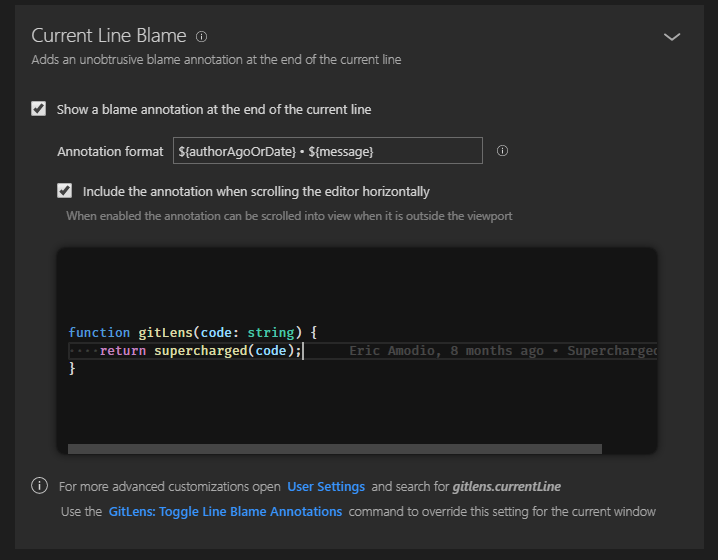
Check out the Code Lens section of the GitLens interactive settings editor (from the command palette run GitLens: Open Settings). From there you can turn on/off those items (vscode calls them Code Lens) as well as most of the other GitLens UI features.
There is also a command GitLens: Toggle Git Code Lens to quickly toggle them back on and off -- though it will only affect the current window and will revert to the configured settings on a reload.
Hope that helps.
 eamodio
on 16 Nov 2018
eamodio
on 16 Nov 2018
i only see toggles for the whole GitLens functionality, not for inline only?
michaelaye
on 16 Nov 2018
Can you send a screenshot of what you are asking about?
Here are the code lens settings -- the image in the settings will dynamically update as you toggle the settings

Here are the current line settings:
eamodio
on 17 Nov 2018
Thanks! Wasn't aware of the gitLens own settings dialog, very convenient! And that the name I was looking for was codeLens!
michaelaye
on 21 Nov 2018
This issue has been automatically locked since there has not been any recent activity after it was closed. Please open a new issue for related bugs.
![github-actions[bot] picture](https://avatars2.githubusercontent.com/in/15368?v=4&s=40) github-actions[bot]
on 4 Dec 2020
github-actions[bot]
on 4 Dec 2020
Related issues
 CoenraadS
·
30Comments
CoenraadS
·
30Comments
 sandy081
·
25Comments
sandy081
·
25Comments
 appinteractive
·
36Comments
appinteractive
·
36Comments
 TomaTomoe
·
35Comments
TomaTomoe
·
35Comments
 minj
·
24Comments
minj
·
24Comments
Most helpful comment
Check out the
Code Lenssection of the GitLens interactive settings editor (from the command palette runGitLens: Open Settings). From there you can turn on/off those items (vscode calls them Code Lens) as well as most of the other GitLens UI features.There is also a command
GitLens: Toggle Git Code Lensto quickly toggle them back on and off -- though it will only affect the current window and will revert to the configured settings on a reload.Hope that helps.