Vscode-gitlens: Is it possible to not have the code jump on opening files due to GitLens
- GitLens Version: 8.3
- VSCode Version: 1.24.0
- OS Version: 10.11.6
Steps to Reproduce:
- Open any new file.
- Wait ~ 1 second. The text will jump down to make space for the GitLens commit overlay.
I find it extremely annoying how when I open any file the text jumps down a bit to make space for this overlay:
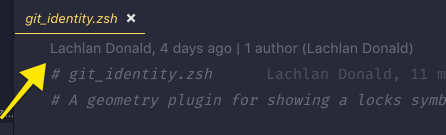
Is it possible to either turn it off completely or make it so that when I open a file, the text is already moved so that the text doesn't shift to make space for that overlay.
Thank you.
 nikitavoloboev
All 14 comments
You can easily turn off (or customize) the code lens features in GitLens from the GitLens Settings editor (run GitLens: Open Settings from the command palette).
Here are the options (make sure you are in Advanced mode at the top):

But other than turning off some of the features (maybe just the File scope) the experience is just how vscode renders code lens -- GitLens can't control how they are displayed (i.e. how they pop in)
Hope that helps.
 eamodio
on 15 Jun 2018
eamodio
on 15 Jun 2018
I'm going to close this as this is as expected.
eamodio
on 19 Jun 2018
@eamodio Is it possible for GitLens to make jumping of the file instant as soon as the file opens? This way there is no visible delay until the GitLens overlays show and the text jumps.
nikitavoloboev
on 23 Jul 2018
Unfortunately not. To keep things performant vscode delays decorations and code lens for a bit after a document is opened
eamodio
on 23 Jul 2018
@eamodio could you move it to the bottom instead to prevent the jumping?
 PascalPixel
on 22 Oct 2018
PascalPixel
on 22 Oct 2018
When you say bottom, you mean of the file?
eamodio
on 22 Oct 2018
This behavior is indeed exceedingly annoying.
 slikts
on 14 Feb 2019
slikts
on 14 Feb 2019
Easiest solution to this was
"gitlens.codeLens.scopes": ["containers", "blocks"]
so that it no longer adds anything to the top anymore.
 pqt
on 1 Mar 2019
pqt
on 1 Mar 2019
@pqt - This does not seem to work anymore :( Any ideas how to do disable it with the latest versions of Code and GitLens? This text jump is sooo annoying.
Also, the screenshot posted by @eamodio - Is that dialog still available today? Or did things change?
 friederbluemle
on 31 Aug 2019
friederbluemle
on 31 Aug 2019
To answer my own question - Yes the dialog is still available: Command menu: GitLens: Open Settings
And sadly, I had to disable "CodeLens" altogether to fully get rid of the "source code jolt" after opening a file.
"gitlens.codeLens.enabled": false
Hopefully this will be fixed in the future.
friederbluemle
on 31 Aug 2019
Yeah @friederbluemle sorry I can't help more, but ultimately I weighed the pros and cons for the plugin and the constant jump had me uninstall it altogether.
Great plugin, but with such a fatal flaw. 🤷🏼♂️
pqt
on 31 Aug 2019
@pqt - Thanks for your reply. Yeah, if you try the line I posted you can still make use of most of the other features of this great plugin. So far it seems to be working for me. I'll try that for now.
friederbluemle
on 31 Aug 2019
Unfortunately there isn't anything GitLens can do to stop the Git code lens from causing the document to reflow -- that is just how the code lens support works in VS Code. Sadly the best options are the ones provided -- either limit where the Git code lens show up via the gitlens.codeLens.scopes or turn them off via gitlens.codeLens.enabled. Although also note that you can toggle them on and off on-demand using the _Toggle Git Code Lens_ command.
eamodio
on 31 Aug 2019
This issue has been automatically locked since there has not been any recent activity after it was closed. Please open a new issue for related bugs.
![github-actions[bot] picture](https://avatars2.githubusercontent.com/in/15368?v=4&s=40) github-actions[bot]
on 27 Nov 2020
github-actions[bot]
on 27 Nov 2020
Related issues
 appinteractive
·
36Comments
appinteractive
·
36Comments
 zmoazeni
·
23Comments
zmoazeni
·
23Comments
 thiagoh
·
35Comments
thiagoh
·
35Comments
 rjbruin
·
22Comments
rjbruin
·
22Comments
 rotwurstesser
·
23Comments
rotwurstesser
·
23Comments
Most helpful comment
This behavior is indeed exceedingly annoying.