Hi,
Thanks for this plugin that looks great! But, I read the documentation and I don't understand how I can commit...
 lcswillems
All 32 comments
GitLens doesn't provide that ability -- that is provided by the built-in Git extension in vscode, which you can get to from the Source Control activity.
 eamodio
on 17 May 2018
eamodio
on 17 May 2018
I wanted to Hide Source Control because this extension is much better than that , but lack of commiting and staging , Disappointed me....
 parsalotfy
on 1 Dec 2018
parsalotfy
on 1 Dec 2018
GitLens is not a replacement for the built-in Git extension, nor is it trying to be. GitLens and the built-in Git are complementary and for some things GitLens even relies on the built-in Git to provide some features.
eamodio
on 1 Dec 2018
@eamodio would be great though if you could blend these two together somehow.
 jayarjo
on 7 Jan 2019
jayarjo
on 7 Jan 2019
@jayarjo what features are you looking for? Personally I feel the built-in git does a good job at the commit ui/ux
eamodio
on 7 Jan 2019
The problem with the plugin is that I am not able anymore to access the built-in Git extension with ctrl+shift+g. And I don't know how to access it without.
lcswillems
on 7 Jan 2019
Ah, yeah, sorry GitLens remaps that to the ctrl+shift+g g chord -- so that GitLens can use ctrl+shift+g for all of its keyboard shortcuts.
eamodio
on 7 Jan 2019
Thank you but this is written nowhere and I think it blocks a lot of people using the extension.
lcswillems
on 7 Jan 2019
@eamodio it's just not intuitive to have related functionality split among two separate tabs, with no direct indication of one's dependency on the other. Ability to commit on the spot would have been awesome I think.
jayarjo
on 8 Jan 2019
FYI, you can move all of GitLens' view to the SCM sidebar -- so then they are all grouped together (which is normally how I use them)
eamodio
on 18 Feb 2019
@eamodio how?
jayarjo
on 18 Feb 2019
Wow, found it in the settings. That was buried deep, believe me. @eamodio you seriously need to put it at the top of the settings page, something like - add all views to Source Control bar. Or even make it default. Awesome!
jayarjo
on 18 Feb 2019
I'm not sure how being the 2nd option on each view's section is buried "deep" -- but agree that it could be more discoverable (as GitLens has a ton of settings). I honestly haven't put any more work into that as vscode keeps saying that they are going to allow users to move views between the sidebars but my guess is it will still be a long time before that actually happens.
Here is the settings in "simple" mode:
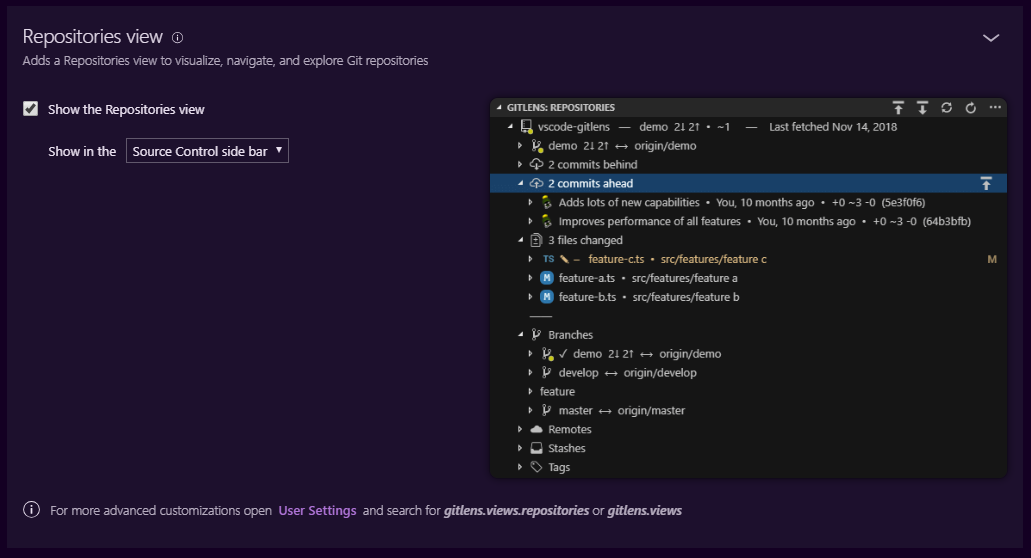
And advanced:

eamodio
on 18 Feb 2019
@eamodio What does push repositories does in gitlens? Its not pushing or commiting code to remote.
 Nisthar
on 5 Mar 2019
Nisthar
on 5 Mar 2019
@Nisthar it should push each repo to the remote. GitLens currently uses the built-in git commands to execute the push itself -- so if pushing works via the built-in git command it should work in GitLens. If you are having issues, can you open a new issue about it and please add logs. Thanks!
eamodio
on 8 Mar 2019
Thank you for the excellent software, but may I ask, what is the purpose for providing "Push repositories" as an option when you refuse to provide "commit" or stage as options?
The problem with the default Git support in VSCode, is that when you would like to stage all changes it also commits untracked files that may be found in your directory. It would be nice to have an automated Gitlens option to choose and commit only the tracked files. This option is not currently exist in the default VSCode git. I have to manually stage each file.
 DoctorDro
on 5 Jun 2019
DoctorDro
on 5 Jun 2019
Hi,
I really think that "source control layout" should be the default. Or it should be mentionned in big somewhere that it is available. It is only 1 year after opening this issue that I am able to use Gitlens.
By default, people don't want to use Gitlens because you remap ctrl+shift+g and prevent them to access the default source control view. It was my case and the case of many other people I think.
Just to convince you this happens:

Only 10% of downloads convert into installs, what is very low compared to this one (20% conversion):

It is not lower because your plugin is worse (the other extension is included in yours) but because people have troubles to use it.
By the way, I saw that you plan to add staging and other things to version 9. I don't think it is useful anymore since I know the "source control layout" is available and I can get everything in one place.
lcswillems
on 17 Jun 2019
I came here after a search looking for commit too. So why bother with adding stage ability? either provide the workflow or don't. Adding one part is an odd and confusing decision...
 chucklepie
on 6 Sep 2019
chucklepie
on 6 Sep 2019
Just got stumbled here.
It would be nice to have an automated Gitlens option to choose and commit only the tracked files. This option is not currently exist in the default VSCode git. I have to manually stage each file.
Or could have, one button to stage all like what in the existing Git extension, which I usually do, then unstaged which are not part for the commit. But I agree with @DoctorDro , why offer stage and push feature available when you can't even commit?
 threeFatCat
on 24 Sep 2019
threeFatCat
on 24 Sep 2019
+1 for adding commit. I like that GitLens has the Fetch option to do a fetch on demand, where as the native Git support does not offer that. But I am also confused why there are so many available Git commands but not commit. Would love to see it in here.
 bmiller-0
on 10 Oct 2019
bmiller-0
on 10 Oct 2019
if you use nested repositories then a commit is really useful. The built in Git functionality of VSCode does not support this hence the reason i use Gitlens such that I can see multiple repositories in the same project and hopefully commit changes across all of them when supported
 rpstreef
on 13 Oct 2019
rpstreef
on 13 Oct 2019
I thought it was my problem. No, there's no commit but there's a push. What is he doing here?If it is combined with the git function of vscode, I don't think push, pull and other functions need to appear

 zzzxb
on 16 Oct 2019
zzzxb
on 16 Oct 2019
It took ages for me to figure this out. This would not be a problem if GitLens was in "Source Control Layout" by default!
 KentoNishi
on 3 Jan 2020
KentoNishi
on 3 Jan 2020
While I appreciate the information in this thread, I did have to search online to find it. Perhaps I missed something in the settings/install screen mentioning this? If not it would seem a completely valid messaging we could add to either screen to help developers along 🚀
 jessycormier
on 24 Mar 2020
jessycormier
on 24 Mar 2020
+1 for adding commit feature
For now I consider that GitLens does half of the job I'm expecting.
Unfortunate, because the done half is great!
 TiffaaMC
on 11 Jun 2020
TiffaaMC
on 11 Jun 2020
+1 for the commit functionality. Its such a hassle to move to terminal, default git view just to commit your changes!
 csarigumba
on 11 Jun 2020
csarigumba
on 11 Jun 2020
I can't agree more with all of you, please add commit feature and shut up all of us once and for all.
 shahidk-ee
on 10 Jul 2020
shahidk-ee
on 10 Jul 2020
You can just drag and drop the gitlens tab on the sidebar into the default source control tab in code now. Still not default as far as I can tell, but very simple.
 hansonryne
on 31 Jul 2020
hansonryne
on 31 Jul 2020
I can't believe this issue bothered me over 2 years.....
 NaNotia
on 22 Sep 2020
NaNotia
on 22 Sep 2020
GitLens is not a replacement for the built-in Git extension, nor is it trying to be.
And yet it overrides default keybinding for built-in git. (btw to cancel override need to add "gitlens.keymap": "none" to vscode settings)
 alchebit
on 9 Oct 2020
alchebit
on 9 Oct 2020
This issue is about commit feature but resolution is:
GitLens doesn't provide that ability -- that is provided by the built-in Git extension in vscode, which you can get to from the Source Control activity
I created new one which is not same as this and does not asks additional feature that already exists in built-in git but instead it asks a commit for another repos that are not available for commit from built-in git (#1135).
 oklas
on 29 Oct 2020
oklas
on 29 Oct 2020
This issue has been automatically locked since there has not been any recent activity after it was closed. Please open a new issue for related bugs.
![github-actions[bot] picture](https://avatars2.githubusercontent.com/in/15368?v=4&s=40) github-actions[bot]
on 29 Nov 2020
github-actions[bot]
on 29 Nov 2020
Related issues
 thiagoh
·
35Comments
thiagoh
·
35Comments
 miluoshi
·
27Comments
miluoshi
·
27Comments
 theseion
·
33Comments
theseion
·
33Comments
 rotwurstesser
·
23Comments
rotwurstesser
·
23Comments
 catexis
·
21Comments
catexis
·
21Comments
Most helpful comment
I wanted to Hide Source Control because this extension is much better than that , but lack of commiting and staging , Disappointed me....