Vscode-gitlens: Force to remove colors from output of git command calls
Hi. First, :clap: for your project!
If the ~/.gitconfig file (or a local git config) sets [color] ui=always, then ugly ANSI colors codes are displayed in gitlens output. For instance:
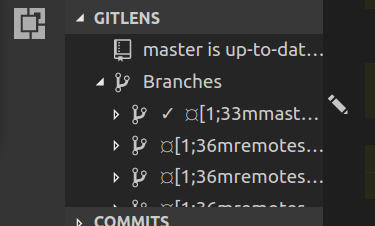
I see many different configuration option for gitlens, and the only one where I could modify the git binary or git command line used for each call from gitlens is gitlens.advanced.git.
I wrote a tiny script that just adds -c color.ui=false to git, but specifying this script does not help to remove the bug.
#!/usr/bin/env /bin/sh
git -c color.ui=false "$@"
So my question is: is there any (or could you add) way of adding a command line flag to git commands used by gitlens (in this case, -c color.ui=false would be enough), or to override global git config for gitlens?
 Naereen
All 5 comments
Thanks -- I will look into adding that in an upcoming release
 eamodio
on 6 Oct 2017
eamodio
on 6 Oct 2017
Great, thanks for your fast reply!
Let me know if you need a beta tester :smile:
Naereen
on 6 Oct 2017
It seems fixed, I will try to update the VSCode extension (when it is updated) and let you know if the bug is fixed. Thanks :clap:!
Naereen
on 9 Oct 2017
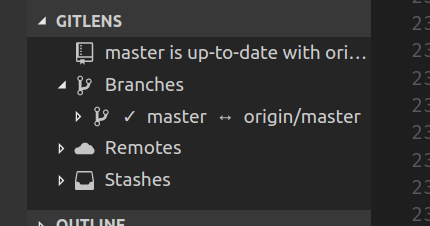
Perfect!
Naereen
on 9 Oct 2017
This issue has been automatically locked since there has not been any recent activity after it was closed. Please open a new issue for related bugs.
![github-actions[bot] picture](https://avatars2.githubusercontent.com/in/15368?v=4&s=40) github-actions[bot]
on 30 Nov 2020
github-actions[bot]
on 30 Nov 2020
Related issues
 obrejla
·
3Comments
obrejla
·
3Comments
 robertzauner
·
3Comments
robertzauner
·
3Comments
 isaacwashere
·
3Comments
isaacwashere
·
3Comments
 ahhmarr
·
3Comments
ahhmarr
·
3Comments
 tiansin
·
4Comments
tiansin
·
4Comments