Vscode-gitlens: VS code built-in icons messed up
- GitLens Version: 4.1.1
- VSCode Version: 1.13.0
- OS Version: macOS 10.12.4
Steps to Reproduce:
- Update GitLens
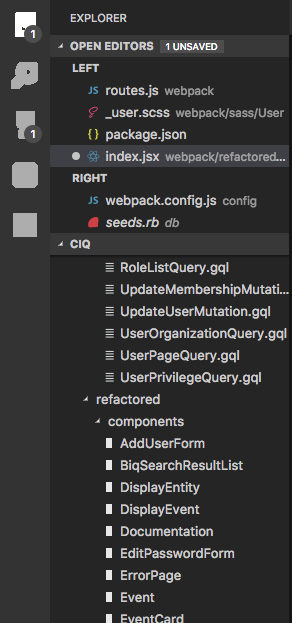
This might be a different issue but it occurred after updating GitLens. Basically all built-in icons are replaced with white squares, or blocky representations of themselves. This includes the close buttons on tabs, dropdown arrows in the explorer, icons in the left menu, split pane buttons, stars for extensions and almost every other icon. It does not affect filetype icons. Could it be something is this update?
 ViggoV
All 6 comments
@ViggoV Hrm, I don't see how that would be possible (for GitLens to cause it). Can you post a screenshot? Does it persist after a restart of vscode? Might also want to try disabling all extensions and see if the issue goes away -- and then re-enabled them 1 by 1.
 eamodio
on 13 Jun 2017
eamodio
on 13 Jun 2017
You're probably right (disabling GitLens did not help). Yes, the issue persists after restart.
ViggoV
on 13 Jun 2017
I think this is related: https://github.com/Microsoft/vscode/issues/28590
eamodio
on 13 Jun 2017
Weirdly enough it doesn't affect the explorer arrows when expanded. Anyways, thanks for your response. The reason is probably something else :)
ViggoV
on 13 Jun 2017
Thanks for the redirect! :D
ViggoV
on 13 Jun 2017
This issue has been automatically locked since there has not been any recent activity after it was closed. Please open a new issue for related bugs.
![github-actions[bot] picture](https://avatars2.githubusercontent.com/in/15368?v=4&s=40) github-actions[bot]
on 8 Dec 2020
github-actions[bot]
on 8 Dec 2020
Related issues
 ridhwaans
·
3Comments
ridhwaans
·
3Comments
 ahhmarr
·
3Comments
ahhmarr
·
3Comments
 vgrafe
·
3Comments
vgrafe
·
3Comments
 batjko
·
4Comments
batjko
·
4Comments
 roblourens
·
4Comments
roblourens
·
4Comments