Vscode-git-graph: Unable to left-click on a file that overflow horizontally in the Commit Details View Files View
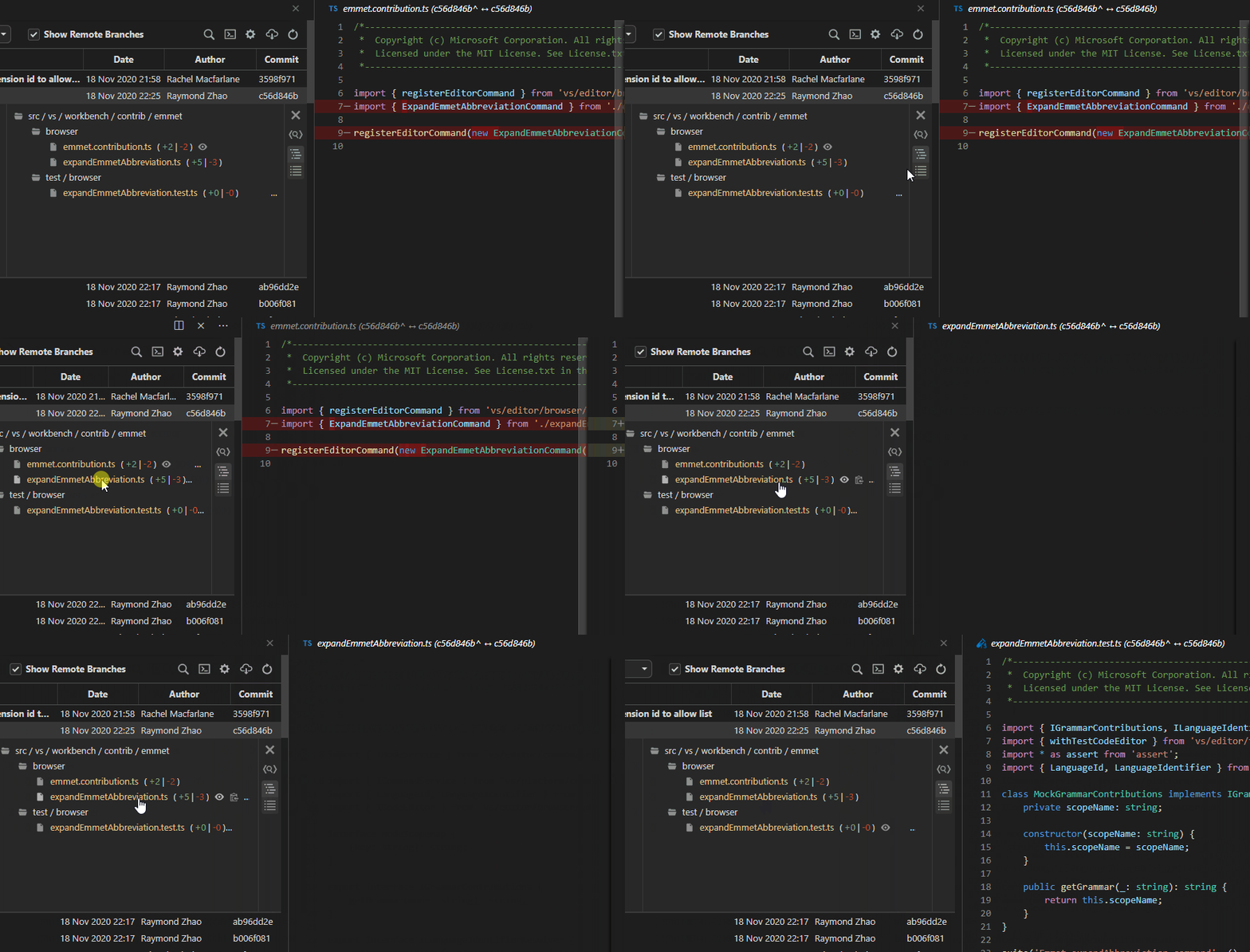
The GIF shows the problem:
- Click on the file name opens the diff when the file name and the action icons are completely visible
- Click on the file name does nothing when it is cut off or the action icons are not visible
Environment
- Git Graph Extension Version: 1.27.0
- Config: "Open New Tab Editor Group" -> Beside
- Visual Studio Code Version: 1.51.1
- Operating System: 10.0.18363.1198
⚠ Please make sure you complete all of the required sections of this template. Without this required information, it will be harder to replicate this bug, and cause additional delays in resolving it.
 Wosi
Wosi
All 5 comments
Hi @Wosi,
Thanks for making me aware of this, upon initial inspection this seem to be more of a Chromium rendering quirk, as the DOM elements and JS doesn't change as a result of a record in the File View being abbreviated (i.e. the event handler is still on the element to capture mouse clicks). I'll look into what's causing this, and work out an alternative method to avoid this issue.
In the meantime, you should still be able to right click on the files in the File Tree to access all of the available actions.
 mhutchie
on 18 Nov 2020
mhutchie
on 18 Nov 2020
Thanks, @mhutchie!
Using the right click context menu is a good workaround.
Wosi
on 18 Nov 2020
Hi @Wosi,
I just did some regression testing on this, and I found that this rendering quirk began occurring in Git Graph 1.27.0, after an additional span element was added around each file record in the File Tree - not sure why this would cause the problem you spotted, but I'll work it out when I fix it.
This also means that in the meantime you also have the option to "Install another Version..." of the extension (Git Graph 1.26.0 will work fine), however you'll lose the new feature of the right-click context menu to run any of the available actions on each file.
mhutchie
on 18 Nov 2020
Thanks again for raising this bug so I could get it fixed! I'm currently looking to bring the release of Git Graph 1.28.0 sooner if possible (from 29/11/2020 to early next week).
This will be available in v1.28.0.
If you'd like to use it before the next release, you can download v1.28.0-beta.2, and install it following the instructions provided here.
mhutchie
on 19 Nov 2020
Wow, that was quick, thank you!
The beta works like a charme!
Wosi
on 19 Nov 2020
Related issues
 arslivinski
·
7Comments
arslivinski
·
7Comments
 morganlombard
·
5Comments
morganlombard
·
5Comments
 borekb
·
4Comments
borekb
·
4Comments
 nickmeinhold
·
5Comments
nickmeinhold
·
5Comments
 fsteinmetz
·
5Comments
fsteinmetz
·
5Comments