Vscode-git-graph: Stashing gives "a newer version of git is required" error, fixed by VSCode restart
Describe the Bug
Stashing gives "a newer version of git is required" error
Steps to Reproduce
Steps to reproduce the behaviour:
- Right click on 'Uncommited Changes'
- Click on 'Stash uncomitted changes...'
- Click 'Yes, stash'
- See error
Expected Behaviour
Stash occurs without error
Environment
- Git Graph Extension Version: 1.24.0
- Visual Studio Code Version: 1.46.1
- Operating System: macOS 10.15.5
Screenshots (optional)
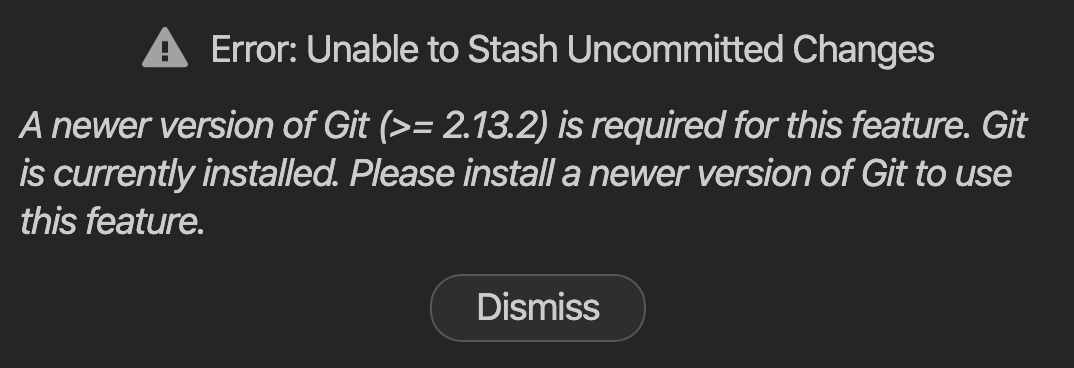
Additional Context (optional)
Happens regularly but not every time. Restarting VSCode always seems to solve it.
My git version:
~ git --version
git version 2.24.3 (Apple Git-128)
 nickmeinhold
All 5 comments
Hi @nickmeinhold,
Unlike most Git integrations that Git Graph has, stashing uncommitted changes has the minimum version required of Git 2.13.2 (when git stash push was added to Git).
On extension startup, Git Graph has to find the Git executable on the users computer, and follows the steps:
- Does the last used Git executable still exist? If yes, continue to use it, else proceed with Step 2.
- Does the Visual Studio Code Setting
git.pathrefer to a valid Git executable (if set)? If yes, use it, else proceed with Step 3. - Find the Git executable according to the platform (e.g.
which git, PATH etc.)
The logic used in Steps 2 & 3 is identical to the Visual Studio Code Git Extension. There has been no code change at all to the implementation of these steps since I first standardised it with the Visual Studio Code Git Extension over 11 months ago. With so many users using Git Graph on a daily basis, it seems extremely unlikely that there is bug as it would have affected so many other users already, and there have been no reports of this by any other user.
I remember only one case that is remotely similar to this, it was caused because the user had multiple versions of Git installed on their computer. When they uninstalled the unintentional version of Git, the issue was resolved (as expected).
This seems highly likely to me to be what your observing, as for the rest of Git Graph to load correctly it must be using a valid Git executable, but not the one you're expecting (v2.24.3).
On startup, the Git executable that Git decides to use is logged to the Git Graph Output Channel as shown below:
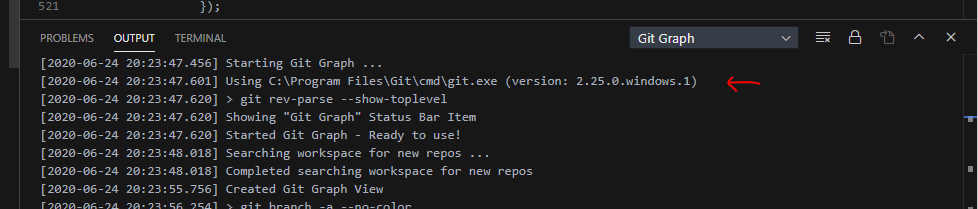
When you next observe the error message you describe, please have a look at the Output Channel to see which Git executable Git Graph is using (and it's version number). This should help you troubleshoot if you do have multiple versions of Git unintentionally installed on your computer. If you observe this error message, and the Git executable used by Git Graph (shown in the Output Channel) does have the required version number, please let me know and provide the Output Channel contents. This would be a bug I want to fix ASAP if this is the case.
 mhutchie
on 25 Jun 2020
mhutchie
on 25 Jun 2020
Thanks very much for the detailed response @mhutchie, I will do as you say and report back when I next see the error message.
nickmeinhold
on 25 Jun 2020
I'll close this issue for now, as every indication I have suggests this is not actually a bug, and is being caused by something specific to your environment (e.g. multiple git installations).
Please report back with the requested information when you next see the error message. In the event that this is a bug, I'll reopen this issue and resolve it as soon as possible.
mhutchie
on 26 Jun 2020
Hi @mhutchie I finally saw the error again - in hindsight I think it might only happen on my laptop and I hadn't used it much in the last week.
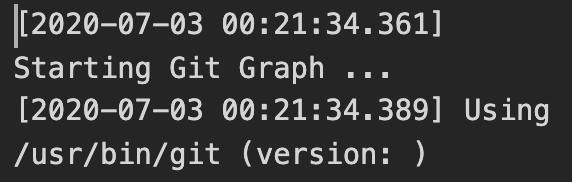
The Output Channel when the error occurs:
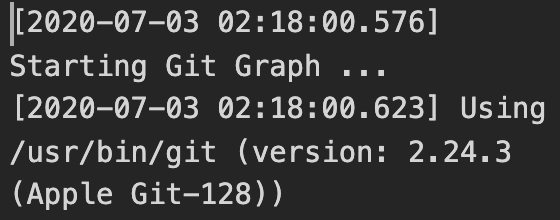
And when I restart VSCode and try again and don't get the error, the Output Channel shows:
Is that useful? I'm very happy to take on figuring out if I have multiple git versions installed - I've done a bit of searching on how to do so but so far haven't found much.
Thank you for this amazing extension by the way, it's incredibly helpful.
nickmeinhold
on 3 Jul 2020
Hi @nickmeinhold,
Thanks for you’re response, from what’s shown in the screenshots Git Graph is only ever using the one Git executable. (you definitely don’t have two versions installed)
However, the a screenshots do explain why you are receiving the error message. On Visual Studio Code startup Git Graph was unable to parse the version number of Git, so when you run “Stash uncomitted changes...“ and Git Graph checks the version number (which couldn’t be parsed), it defaults to return that you don’t have the required Git version.
I’ve already made various robustness improvements to the Git version number retrieval process since you first raised this request, that should prevent you from ever getting this error again. These changes will be released in Git Graph 1.25.0, which I intend to release this weekend.
After you’ve updated to Git Graph 1.25.0 after its release, please let me know if you ever get this again.
mhutchie
on 3 Jul 2020
Related issues
 Kevinwuu
·
3Comments
Kevinwuu
·
3Comments
 morganlombard
·
5Comments
morganlombard
·
5Comments
 arslivinski
·
7Comments
arslivinski
·
7Comments
 Konsonanz
·
4Comments
Konsonanz
·
4Comments
 jboucly
·
3Comments
jboucly
·
3Comments
Most helpful comment
Hi @nickmeinhold,
Thanks for you’re response, from what’s shown in the screenshots Git Graph is only ever using the one Git executable. (you definitely don’t have two versions installed)
However, the a screenshots do explain why you are receiving the error message. On Visual Studio Code startup Git Graph was unable to parse the version number of Git, so when you run “Stash uncomitted changes...“ and Git Graph checks the version number (which couldn’t be parsed), it defaults to return that you don’t have the required Git version.
I’ve already made various robustness improvements to the Git version number retrieval process since you first raised this request, that should prevent you from ever getting this error again. These changes will be released in Git Graph 1.25.0, which I intend to release this weekend.
After you’ve updated to Git Graph 1.25.0 after its release, please let me know if you ever get this again.