Vscode-extension-for-zowe: Provide a warning message after 2 failed login attempts.
Add a warning message after 2 failed login attempts with the same user name. Present a warning message to users who try to login unsuccessfully two times with the same user name. The intent is to help them avoid making the dreaded three tries and you are locked out situation.
 jelaplan
All 16 comments
Hi John,
Would this be only in VS Code Extension or in CLI as well?
In CLI we already get a 401 error message which indicates unauthorized error.
Asking only from the perspective of having this request under the correct repository.
 Alexandru-Dumitru
on 19 Nov 2019
Alexandru-Dumitru
on 19 Nov 2019
Alex
I think we should move this to VS Code. I sort of messed up putting all these in the CLI repo. Rookie mistake from OK Boomer.
jelaplan
on 20 Nov 2019
Alex
I think we should move this to VS Code. I sort of messed up putting all these in the CLI repo. Rookie mistake from OK Boomer.
Made me giggle 😄 .
No worries, I am moving this to vscode repo.
Alexandru-Dumitru
on 21 Nov 2019
It would be ideal to have a means to update your password from the CLI / VS Code Extension in the case it has expired.
 MikeBauerCA
on 21 Nov 2019
MikeBauerCA
on 21 Nov 2019
It would be ideal to have a means to update your password from the CLI / VS Code Extension in the case it has expired.
If you're locked out then you have no means with which to update your credentials.
 jalel01
on 27 Nov 2019
jalel01
on 27 Nov 2019
@jalel01 I agree with the idea to provide a warning message to prevent folks from getting locked out. Typically, this situation occurs when a user's password has expired and needs updated. It would be ideal to be able to update it from the CLI / VS Code Extension. Will raise as a separate issue.
MikeBauerCA
on 27 Nov 2019
Ah i see. Your credentials haven't been revoked. Your password has changed on the mainframe but not in the profile used by ZE. The goal is to update the password directly in the Explorer. Sounds very similar to the 'Edit profiles' enhancement issue.
jalel01
on 27 Nov 2019
It is that my password has expired on the mainframe and I need to update it.
For example, if my password expires and I try to login on 3270, the emulator informs me that my password has expired and prompts me for a new one.
The CLI / VS Code extension does not provide this functionality today. If I keep trying with an expired password, I will get locked out. The key is that in this scenario, my password is not incorrect or mistyped, it has just expired.
MikeBauerCA
on 27 Nov 2019
@MikeBauerCA resetting my pw sounds about as awesome as the feature to unarchive my datasets. Taking the hassle out of mainframe is a big job but you have great ideas.
The story about warning the user is still useful because it says don't try a third time. If the user goes to the ISPF panel they can update their pw but if they try a third time then they'll need to jump through bigger hoops.
jelaplan
on 27 Nov 2019
Research Findings:
- Wrong Hostname : ENOTFOUND
- Wrong Port: ECONNREFUSED
- Wrong UserName: 401 Unauthorized
- Wrong Password: 401 Unauthorized
- RU true: Certificate Error
There is a way for me to know if the username is correct or not. This is to issue _TSO Command LU username._
If the username does not exists, the mainframe response is either "ICH30002I NOT AUTHORIZED TO LIST Z40608" or "ICH30001I UNABLE TO LOCATE USER ENTRY PUNJE02"
If we choose to fire the TSO command, the possible problems that I think we would face is:
- I would need the account number. I can hard-code IZUACCT but there's no guarantee that the company will set IZUACCT as a valid Account Number in their IZUPRM file. We could ask for it but this is a bad UX.
- Security issue. There is a reason why 401 is generic for username and password. If we are able to identify that the username is correct and password is wrong, we might be helping hackers and giving them an easier time to penetrate the system.
- Performance Issue. If we will issue the TSO command then this is another REST API that we will wait for response. Depending on the system, it can be slow.
- Access. I am not sure if every mainframe userID has access to issue the LU command.
Recommended Solution:
- I recommend to stick with the messaging. I would add a validation that If httpStatus is 401, then display "
INVALID -CREDENTIALS! Please make sure that you credentials are correct or there is a possibility that you will be locked out!" - error message pending for review
- I would also recommend a documentation for error messages similar to api-layer. Everything is discussed in this issue: https://github.com/zowe/vscode-extension-for-zowe/issues/388
 jellypuno
on 11 Dec 2019
jellypuno
on 11 Dec 2019
Thank you Jelly, your recommended solution is a good one. I'm happy that we've been able to narrow down the message to a wrong credentials level.
jalel01
on 12 Dec 2019
Hi @jelaplan and @jalel01 ,
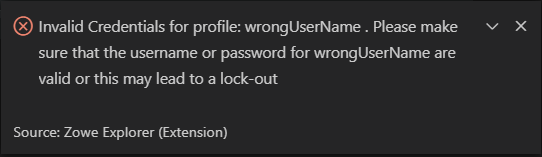
What do you think about this error message?
jellypuno
on 12 Dec 2019
@jellypuno I would recommend changing to
Invalid credentials. Please ensure the username and password for [profileName] are valid or this may lead to a lock-out.
MikeBauerCA
on 12 Dec 2019
I like Mike's suggestion which keeps it simple.
@jalel01, If you can detect problems with host and port, then you might also have error messages that are specific to those.
Wrong Hostname : ENOTFOUND
Wrong Port: ECONNREFUSED
Something like:
Invalid host name. Unable to reach the mainframe.
Invalid port. Unable to reach the mainframe.
jelaplan
on 12 Dec 2019
If you can detect problems with host and port, then you might also have error messages that are specific to those.
In my POV, I am afraid of doing this. Just like what @zFernand0 said in issue #384
Even though I agree about the better user experience that a more readable error message provides, I'll be hesitant to go the route of "mapping" errors to our own messages.
I believe we moved away from this in the Zowe CLI for various reasons - maintainability being one of them.
Cause it might lead to a lot of confusion. ENOTFOUND might be an invalid hostname or a faulty z/OSMF server. ECONNREFUSED might also be an invalid port or you are just not allowed to that connection. If we can think of a vague error message it might work.
jellypuno
on 13 Dec 2019
Thanks for sharing the demo of the warning. It looks good.
WRT to detecting a bad host value, it seems we lack a reliable test. But, note that the Broadcom DevOps team worked on doing a validation test of z/OSMF which might be closer. There is a story 309 for that.
Cause it might lead to a lot of confusion. ENOTFOUND might be an invalid hostname or a faulty z/OSMF server. ECONNREFUSED might also be an invalid port or you are just not allowed to that connection. If we can think of a vague error message it might work.
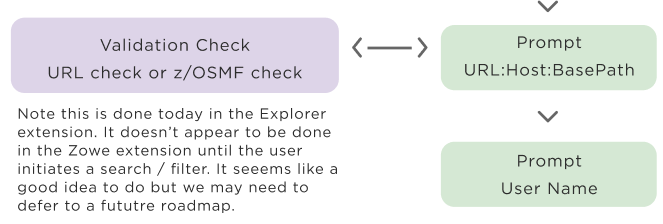
I wonder about the possibility of warnings on what we suspect but may not know with 100% certainty. When Google came on the scene, they brought new kinds of innovations that changed software. One small but significant thing they did was introduce spell check into their search. Initially this was simply a message asking you if you meant to type school when you typed schol. They have applied this same kind of fuzzy estimating in other areas as well, such as the ability to add a calendar item from free text that they attempt to parse and it works well most of the time. Why this was such a big deal was that up until then computers universally would give an error or fail when data was not correct and people tended to view them as unreasonably brittle and inflexible. When I've done debugging and troubleshooting of computers, I often guess what might be wrong, test it out, try again etc. and people like it when computers also try even if they aren't 100% right all the time.
I'll be hesitant to go the route of "mapping" errors to our own messages. I believe we moved away from this in the Zowe CLI for various reasons - maintainability being one of them.
I've never been a fan of this approach but I can understand the decision. The z/OSMF error messages are world class bad and many seem to originate from the bowels of some code written decades ago. I wish that they could be improved by the team who builds z/OSMF but it seems everyone is just passing on what originates at the bottom of the stack and I'm sure they have a very similar argument.
jelaplan
on 18 Dec 2019
Related issues
 ghost
·
4Comments
ghost
·
4Comments
 zFernand0
·
3Comments
jellypuno
·
4Comments
jellypuno
·
5Comments
zFernand0
·
3Comments
jellypuno
·
4Comments
jellypuno
·
5Comments
 t1m0thyj
·
3Comments
t1m0thyj
·
3Comments
Most helpful comment
@jellypuno I would recommend changing to
Invalid credentials. Please ensure the username and password for [profileName] are valid or this may lead to a lock-out.