Vscode-extension-for-zowe: Default search for profile
If #210 is implemented, I think it would be great if I could set a default search for a persisted profiles.
 tucker01
All 9 comments
Perhaps, the default "default search" could be <username>.*
 MikeBauerCA
on 11 Oct 2019
MikeBauerCA
on 11 Oct 2019
Here is how I wrote this up
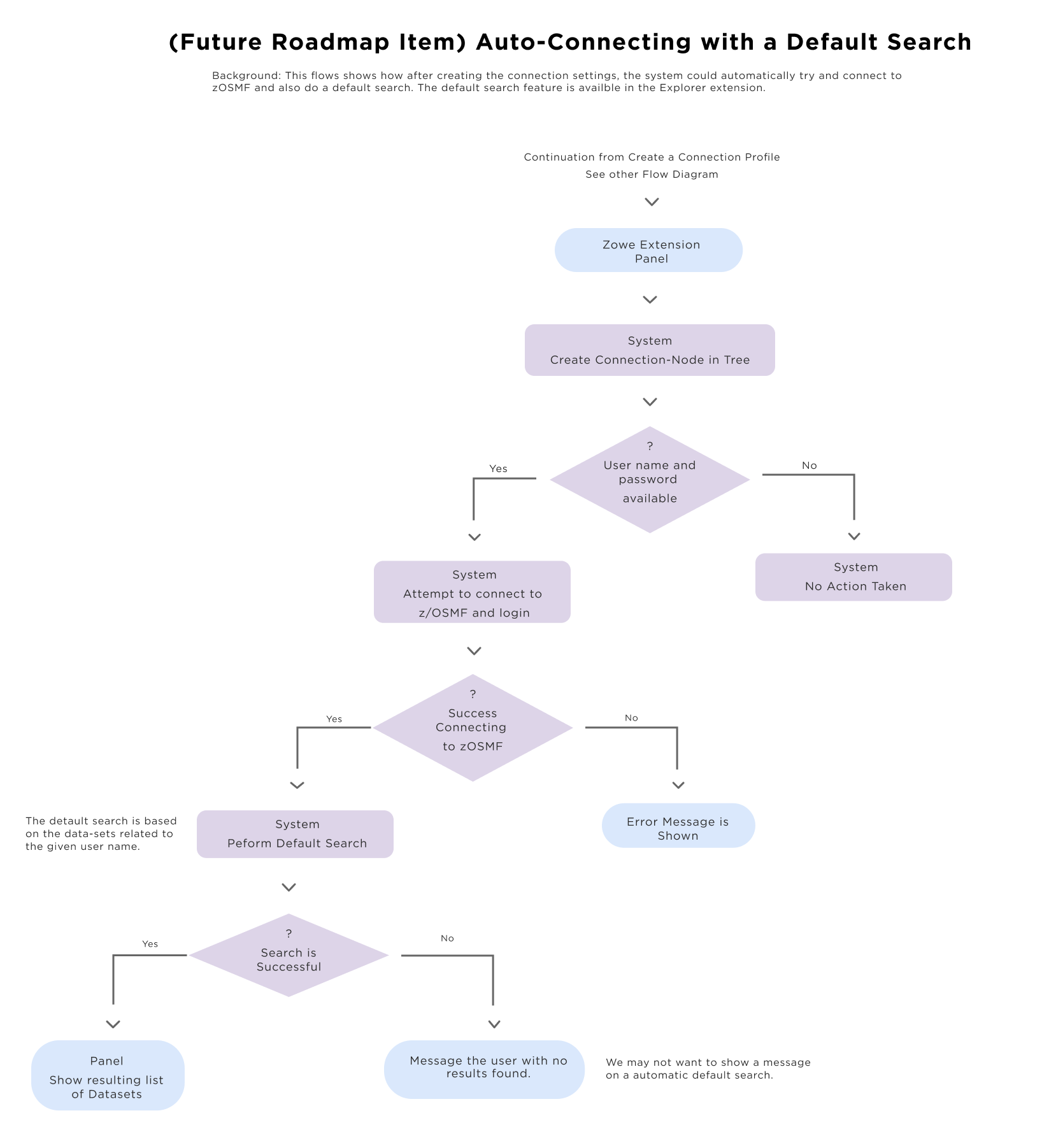
Perform a Search for Datasets when a new connection profile is created. I called this Auto Search. When a user creates a profile, the extension should be able to do a search on the root folder of the entered user name. For a connection, they can optionally enter a user name and password. If they include the user name and password, the extension can search on that user's data-sets. This feature was included in the original z/OS Explorer. It is a nice feature and a time saver for users. This auto search would mean that the system would attempt a connection as soon as the user creates a profile. See the flow diagram named ' 03 Auto-Connecting and Default Search' This feature was referred to as 'My Data Sets’ default filter in the z/OS Explorer extension.
@MikeBauerCA had suggested letting the user pick the root path to search in rather than a one size fits all user directory. I'm not sure how that would be assigned.
 jelaplan
on 19 Nov 2019
jelaplan
on 19 Nov 2019
I believe Default Search has already been implemented :smile:
As for Auto Search, I don't see a big issue as long as it's not enabled by default.
Why? Because I (as a user) may not want the extension to be making requests without me explicitly telling it to, and also the default value used for auto-search could be undesired. That leads to two (or more) configuration items that I need to be aware of (as a user) if it was enabled by default.
However, I do think it can save some time and also provide some validation information right away : )
 zFernand0
on 20 Nov 2019
zFernand0
on 20 Nov 2019
Here is a flow diagram related to auto-search
https://ent.box.com/s/ar7rztx5poo5m5ui8y21bl0ys3eefprn
jelaplan
on 20 Nov 2019
Here is a flow diagram related to auto-search
https://ent.box.com/s/ar7rztx5poo5m5ui8y21bl0ys3eefprn
In case someone can't access it : )
zFernand0
on 21 Nov 2019
My concern about this is how long it will take for Zowe Explorer to load if there is an automatic search.
- It takes approximately 5-10 seconds for Zowe Explorer to initialize the whole session. This is with the assumption that there you have no profiles created.
- Once you create your new profile. It takes 5-7 seconds to process that new profile, write it in the .zowe folder then load it in the dataset tree.
- If you do an auto connect to z/OSMF, it normally takes 7 -10 seconds for z/OSMF to respond. This is depending on the system that you have. It can take longer if you have lower resources allocated for z/OSMF
- After that an automatic search for a dataset will be executed. again it takes at least 7-10 seconds. longer depending on the system.
Given all this facts, I need to wait at least 24 seconds before I could actually do anything in the Zowe Explorer. And this is the happy pass. if there's an error it is a different story. it might take longer.
Currently I am having TIMEOUT issues because I have 300 datasets under USERNAME.* and the extension cannot list it. Having an auto-search that will just end up in timeout error is bad experience for me.
And what happens if I have 100 migrated datasets under USERNAME.*? Will the auto search do an HRECALL request for all those datasets?
I think as a user, giving me the option to do the search on my time is way better.
 jellypuno
on 21 Nov 2019
jellypuno
on 21 Nov 2019
Currently I am having TIMEOUT issues because I have 300 datasets under USERNAME.* and the extension cannot list it.
@jellypuno, this is a separate issue that probably needs more investigation. I am currently able to list 231 data sets on one of the systems I use in about 2 seconds.
I expanded my search to contain 1281 data sets. It took about 25 seconds to complete.
MikeBauerCA
on 21 Nov 2019
Talked with @jellypuno on another thread. The concern is that automatically searching all data sets under a specific HLQ could be considered an unwanted and expensive activity depending on system resources.
Perhaps a default search (after clicking on the search button, already having a filter of HLQ.* to choose from) is sufficient.
MikeBauerCA
on 21 Nov 2019
I would prefer to reinstate the last Zowe explorer instance. I structure the filter/query history for each cointainer in the sequence they were last run so it is simple that when activating the view you execute the last filter/query. I do agree with @zFernando that the user should be able to turn this off
 Colin-Stone
on 22 Nov 2019
Colin-Stone
on 22 Nov 2019
Related issues
jelaplan
·
3Comments
Colin-Stone
·
4Comments
 crawr
·
5Comments
jelaplan
·
4Comments
crawr
·
5Comments
jelaplan
·
4Comments
 travatine
·
4Comments
travatine
·
4Comments