Vscode-extension-for-zowe: Incorrect profile name in favorites crashing Zowe extension
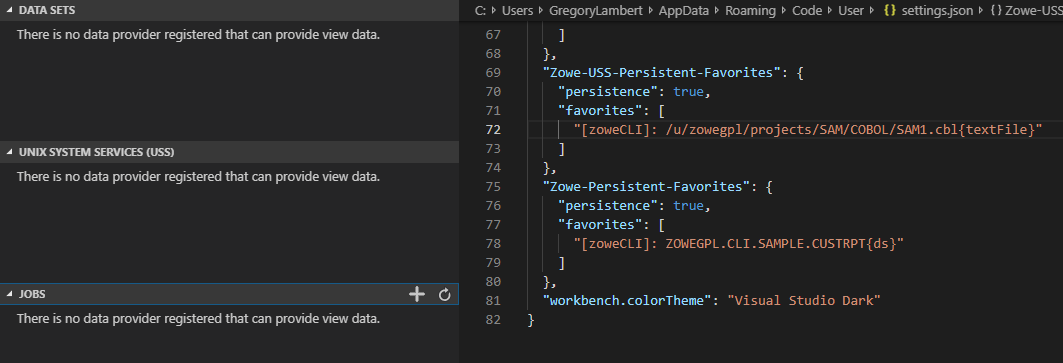
When navigating to the Zowe Extension in VS Code, the Favorites and zosmf-profile do not show up on any of the tabs, data sets, uss, or jobs. Instead, you get the following message: There is no data provider registered that can provide view data.
Steps to Reproduce
Create a zosmf-profile
List datasets and/or USS files
Select a 'favorite', I had one for both Data sets and USS
Delete the zosmf-profile
Create new zosmf-profile with a new name
Open Zowe view
Should see the error message listed above
Looking at the Persistent Favorites in the settings.json, I see the zosmf-profile name is still pointing to the old profile.
Expected behavior
I should still be able to see the new profile and use it regardless of the profile name tagged in the favorites. Maybe some error message indicating the profile name used in the favorites is no longer found so that I know to change it. Regardless, the current message give no help as it is a generic VS Code message.
Screenshots
zoweCLI profile was deleted.
Logs
If applicable, add server logs collected at the time of your problem.
Details
Version and build number: [e.g. 0.4.4-SNAPSHOT build # 155]
Test environment: [e.g. zD&T, zPDT, MONOPLEX, SYSPLEX, z/OS Rev 2.2, TSS, RACF, ACF2, or any other germane detail]
Web Browser Details (if the bug relates to Zowe Desktop usage):
OS: [e.g. macOS, Windows]
Browser [e.g. Chrome, Safari]
Version [e.g. 71.0.3578.98]
REST API client (in case of REST API issue):
Technology: [e.g. Spring Boot, Node.js, Postman]
OS: [e.g. Windows 10]
Shell Environment Details (if the bug relates to CLI):
Technology: [e.g. zsh, cygwin, cmd, powershell, bash]
OS: [e.g. MacOS 10.13, Windows 10, Ubuntu 16.04 LTS]
Additional context
Add any other context about the problem here.
 gplambert
All 3 comments
Planned fix results: When the user has a favorite with an invalid profile name...
- Tree data for Data Sets, USS, and Jobs will still load.
- Favorites with valid profile names will still load in the tree.
- Favorites with invalid profile names will not load in the tree.
- The user will receive an error message for either USS or Data Sets depending on which setting(s) contains the invalid favorites.
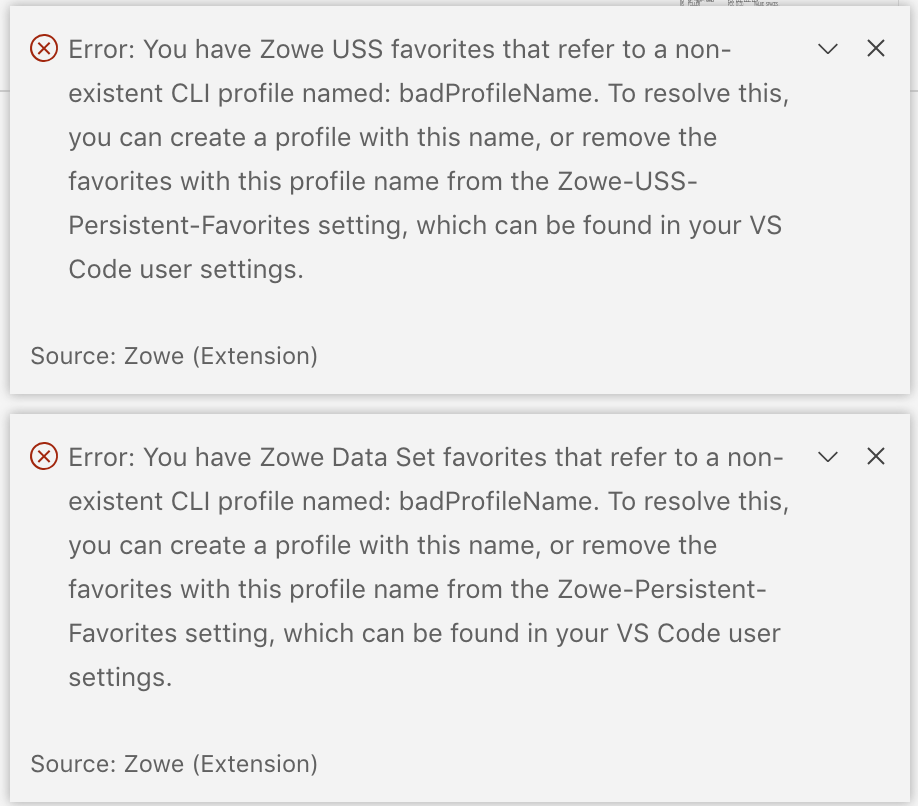
Proposed error messages for USS and Data Sets invalid profile name:
 lauren-li
on 19 Aug 2019
lauren-li
on 19 Aug 2019
@lauren-li can you confirm this issue has been resolved and close if appropriate?
 MikeBauerCA
on 13 Nov 2019
MikeBauerCA
on 13 Nov 2019
@MikeBauerCA This issue is mostly resolved, except the message is specific for VS Code. (It was resolved before we started thinking about bringing the extension into Theia.):
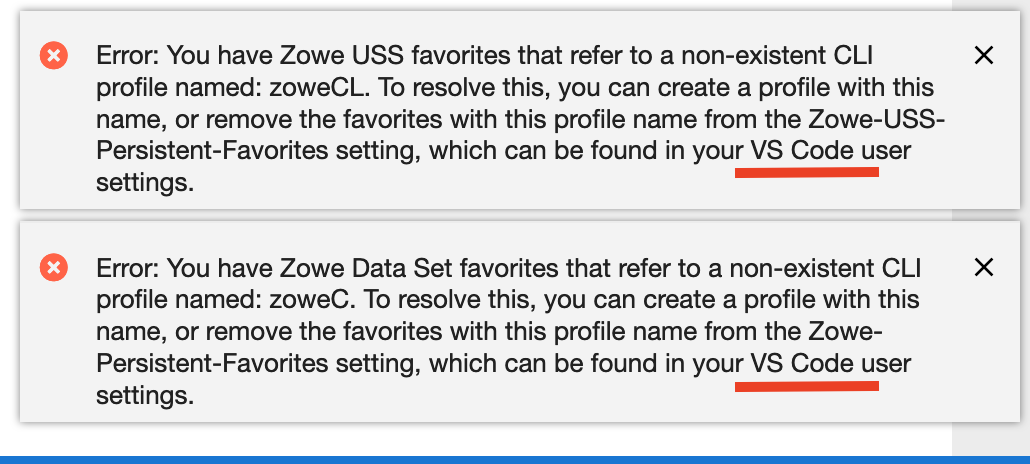
I can add a variable in the message to customize the message to VS Code vs Theia based on the environment being used, but it would probably have to be have to be after I finish work on the webpack issue (#74).
lauren-li
on 13 Nov 2019
Related issues
 jellypuno
·
4Comments
jellypuno
·
4Comments
 fritzc1
·
3Comments
fritzc1
·
3Comments
 Colin-Stone
·
4Comments
Colin-Stone
·
4Comments
 t1m0thyj
·
3Comments
t1m0thyj
·
3Comments
 zFernand0
·
3Comments
zFernand0
·
3Comments
Most helpful comment
Planned fix results: When the user has a favorite with an invalid profile name...
Proposed error messages for USS and Data Sets invalid profile name:
