Vscode-extension-for-zowe: Massive error message when user has no Zowe profile defined
Issue Summary:
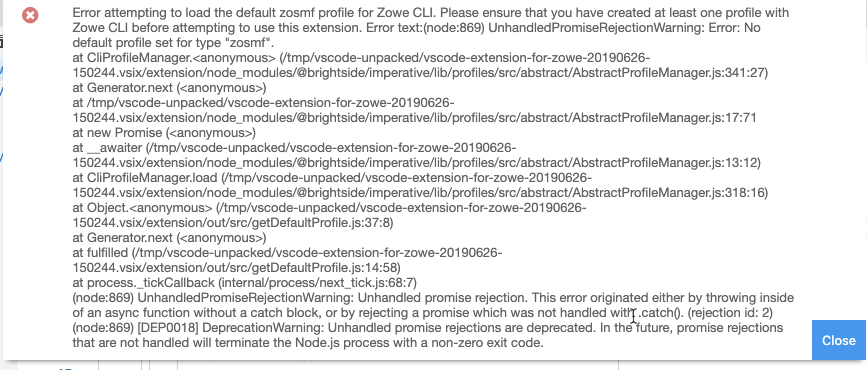
When the user starts the Zowe VS Code extension without first defining a Zowe profile, they are greeted with a massive error message:
Issue Details:
It looks like the error is already handled in ProfileLoader.ts (Line 62). The segment "Error attempting to load the default zosmf profile...to use this extension." is a user-friendly, human-readable error message that is informative and actionable. However, the system error message tacked on at the end adds a lengthy stack trace. Not only could this be a security issue, but it overwhelms and discourages the user without actually giving them any additional useful information.
Proposal:
By removing the system error text, the Zowe VS Code extension would still be providing the user with an informative, actionable error message, while maintaining a smooth and user-friendly experience. The error message would simply say:
Error attempting to load the default zosmf profile for Zowe CLI. Please ensure that you have created at least one profile with Zowe CLI before attempting to use this extension.
 lauren-li
All 12 comments
As long as the stack/error is still logged somewhere to a file or something I don't think there's a problem with removing it from the message. The problem is that there are some other conditions besides not having created a profile (such as other errors accessing the profile directory/ executing the profile loading script) that will cause this same error condition so for debugging purposes the info has to be somewhere
 ChrisBoehmCA
on 2 Jul 2019
ChrisBoehmCA
on 2 Jul 2019
Thank you for pointing this out, @ChrisBoehmCA! I will keep this in mind while I work on the issue. I was thinking about using the same logger as extension.ts is using. Would you recommend I save the error message in imperative.log or zowe.log (or somewhere else)?
lauren-li
on 2 Jul 2019
Maybe in imperative.log? Up to you. Thanks for taking this on : )
ChrisBoehmCA
on 2 Jul 2019
Thanks for the recommendation! I will take your suggestion. The message I am currently using is:
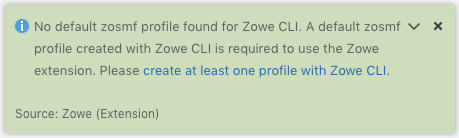
- The blue text is hyperlinked to: https://zowe.github.io/docs-site/latest/user-guide/cli-configuringcli.html#creating-zowe-cli-profiles
- I've changed the "error" to an "information message", as it is quite plausible that this will be the first thing a new user to the Zowe VS Code extension will see upon downloading and starting it, and we do not want to deter them with errors straight off the bat. Nothing is actually broken in the extension, per se - the user is simply missing a Zowe CLI profile, so I think it is sufficient to just inform them that they need to create a Zowe CLI profile rather than saying there is an error and implying something is broken. However, I am still throwing an error in the code (not displayed) after showing the information message to keep the extension from trying to continue and consequently displaying additional errors to the user.
lauren-li
on 2 Jul 2019
Thanks for the recommendation! I will take your suggestion. The message I am currently using is:
My only problem with this message is that if VSCode is simply not able to access the folder in which the profile was created, it might be a bit confusing as a user if I see the same message (telling me to create a profile) even after I had just created one.
 zFernand0
on 2 Jul 2019
zFernand0
on 2 Jul 2019
Thank you for your feedback, @zFernand0! Do you have suggestions for improving the wording for this message? The original error message also didn't seem to cover the scenario you mentioned. Would the likelhood that VS Code is unable to access the profiles folder versus the user not having created a Zowe CLI profile be great enough that we want to add it into the information message?
The reason our team started looking at this message is because we had users who encountered it upon first trying the Zowe VS Code extension without creating a Zowe CLI profile beforehand.
lauren-li
on 2 Jul 2019
It might not happen that the directory is inaccessible that often, but other errors (such as not having node installed or having a bad credential management plugin) could cause the same code to fail. Not sure what the best wording of the message is though
ChrisBoehmCA
on 2 Jul 2019
It might not happen that the directory is inaccessible that often, but other errors (such as not having
nodeinstalled or having a bad credential management plugin) could cause the same code to fail. Not sure what the best wording of the message is though
@ChrisBoehmCA Are the multiple causes for this error documented somewhere? If so, then perhaps we can give the user a simple information message stating the most likely cause of the issue, and then refer them to a link to documentation for other possible causes if they need it.
If not, then I think this information message is still an improvement over the original error message with the stack trace. Perhaps we can go with it for now, and then if we later find a better wording, we can just update the message in a future issue.
lauren-li
on 2 Jul 2019
No documentation I know of. It could be anything that causes the node process to fail, including any type of bad Zowe CLI plugin, node not being on the path, etc. What you said sounds good to me
ChrisBoehmCA
on 2 Jul 2019
Now, the next evolution would be to have a GUI or wizard to step through creating a profile from the VS Code plug-in.
 jelaplan
on 3 Jul 2019
jelaplan
on 3 Jul 2019
I have this message when trying to install the extension. How do I fix it please?
 spufidoo
on 15 Jul 2019
spufidoo
on 15 Jul 2019
@spufidoo With the latest VS Code Marketplace release of this extension (0.23.0), this error message should no longer appear once you create a Zowe profile: https://zowe.github.io/docs-site/latest/user-guide/cli-configuringcli.html#creating-zowe-cli-profiles
If you have done the above step and are still experiencing the issue, would you mind listing your steps to recreate the issue, as well as include the error message you are seeing as a screenshot/paste?
It may also help if you can share what versions of Zowe CLI and VS Code you are using. Thanks!
lauren-li
on 16 Jul 2019
Related issues
 AHumanFromCA
·
3Comments
jelaplan
·
3Comments
AHumanFromCA
·
3Comments
jelaplan
·
3Comments
 jellypuno
·
5Comments
jellypuno
·
5Comments
 phaumer
·
5Comments
phaumer
·
5Comments
 gplambert
·
3Comments
gplambert
·
3Comments