Vscode-extension-for-zowe: Add ability to filter by jobid
When using the JOBS view provided by the Zowe extension for VSC, it would be useful to be able to filter by jobid. For example zowe zos-jobs list jobs returns a list of jobids so it would be useful to copy a jobid from that list and find it quickly using the extension.
 markcocker
All 8 comments
Perhaps the default view should show the job id by default in place of the job name.
When you submit a job, you're presented the jobid although you view it by jobname:

Maybe the presentation of the jobs could be similar to z/OS explorer jobs view?
 dkelosky
on 6 Jun 2019
dkelosky
on 6 Jun 2019
It would be beneficial to be able to see both the job name and the job id, especially in cases where you submit the same job multiple times.
 MikeBauerCA
on 6 Jun 2019
MikeBauerCA
on 6 Jun 2019
@MikeBauerCA You can see the Job Id if you hover on a particular job
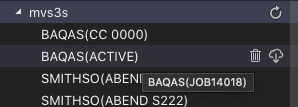
The aim with showing either the RC or the ACTIVE status was that if the same job had been submitted multiple times then the latest one would be easy to find.
 crshnburn
on 7 Jun 2019
crshnburn
on 7 Jun 2019
work in conjunction with #118
 Colin-Stone
on 26 Jul 2019
Colin-Stone
on 27 Sep 2019
Colin-Stone
on 26 Jul 2019
Colin-Stone
on 27 Sep 2019
@markcocker There is now a magnifying glass option to specify a more comprehensive search that includes owner, prefix or jobId. That option also has access to search history. The intention was to get something out there (whilst we are still in development mode) and ask for feedback. VSCode supports the creation of create simple dialogs (an entry field or quick pick) and to get a combination of items the only option is to link them. So it would be good to get your perspective.
Colin-Stone
on 1 Oct 2019
@Colin-Stone Thanks - initial feedback from trying it out:
- For consistency, should label "Search for Jobs using attributes" be "Search Jobs Using Attributes"?
Compare to casing and style of "Search Data Sets by Entering Patterns". - Label "Choose "Create new..." to define a new filter alternatively select a previously defined filter" needs to have a comma, be two sentences or rephrased
eg. "Choose "Create new..." to define a new filter or select a previously defined filter". - When creating a new filter and entering the owner, it allows for multiple words eg. "COCKERM BLA" when only one word is actually used.
- Its not clear to me how you can remove filter definitions?
markcocker
on 1 Oct 2019
Thanks @markcocker. I created https://github.com/zowe/vscode-extension-for-zowe/issues/263 to cover points to 3.
The answer to 4 is that you can't. I've implemented a set with a capacity of 5 unique items each time you create a new item or select an item from the set it gets pushed to the front. If you add a new item to the set and the set exceeds 5 the last one drops off. So for example if you had a specific jobId filter set up and you have deleted that job, it would remain as an option in the filter list until you added enough additional filters for it to drop off the end of the list from lack of use.
Hope that makes sense. It seemed a reasonable solution I could apply consistently to filters on all three views
Colin-Stone
on 9 Oct 2019
Related issues
 zdmullen
·
3Comments
zdmullen
·
3Comments
 AHumanFromCA
·
3Comments
AHumanFromCA
·
3Comments
 phaumer
·
5Comments
Colin-Stone
·
4Comments
phaumer
·
5Comments
Colin-Stone
·
4Comments
 jelaplan
·
4Comments
jelaplan
·
4Comments