Vscode-eslint: Failed to apply ESLint fixes to the document.
To Reproduce
- Install VS Code.
- Install Nodejs.
- Open the project folder and
npm init. npm install eslint --save-dev- Install VSCode-ESLint extension.
npx eslint --initand select Airbnb as the base style guide.- Create a JS file in that folder and put the following code inside:
var i = 0
Ctrl+Shift+PandESLint - Fix all auto-fixable problems.
What's expected?
It should insert a semicolon after the statement.
Or, at least highlight the errors by default. There are four errors in that single line.
What's happening instead?
I get this error:
Failed to apply ESLint fixes to the document. Please consider opening an issue with steps to reproduce.
ESLint CLI
Using ESLint CLI with eslint index.js works:
  1:1   error  Unexpected var, use let or const instead       no-var
  1:5   error  'i' is assigned a value but never used         no-unused-vars
  1:10  error  Newline required at end of file but not found  eol-last
  1:10  error  Missing semicolon                              semi

✖ 4 problems (4 errors, 0 warnings)
  3 errors and 0 warnings potentially fixable with the `--fix` option.
Environment
OS: Ubuntu 18.04.3 LTS
VS Code: 1.41.1
Nodejs: 12.14.1
NPM: 6.13.4
ESLint: 6.8.0
Repo
Please see the repo.
 mrmowji
All 11 comments
@mrmowji thanks for the detailed bug report. Unfortunately I can't reproduce it. Here is what I see:

Does validation work for you (e.g. you see the errors in the problems view) ?
 dbaeumer
on 23 Jan 2020
dbaeumer
on 23 Jan 2020
Which version of the plugin are you using?
dbaeumer
on 23 Jan 2020
@dbaeumer Thanks for the screen. Unfortunately I don't have those red underlines, not even the light bulb. Problems view just says "No problems have been detected in the workspace so far".
I use vscode-eslint 2.0.15.
I tried adding the following properties to Preferences JSON file. No luck.
"editor.codeActionsOnSave": {
  "source.fixAll.eslint": true
}
This is very strange. Is there anything in the ESLint Output channel ? Can you enable tracing to see if that gives us additional information "eslint.trace.server": "verbose"
dbaeumer
on 24 Jan 2020
@dbaeumer Thanks for the hint. I get this error on the ESLint Output window:
Failed to load plugin 'import' declared in
'vscode-eslint-not-working/.eslintrc.json » eslint-config-airbnb-base »
/home/mojtaba/Projects/Development/GitHub/vscode-eslint-not-working/node_modules/eslint-config-airbnb-base/rules/imports.js':
Cannot find module 'eslint-plugin-import' Require stack:
- /home/mojtaba/Projects/Development/GitHub/__placeholder__.js
If I remove "airbnb-base" from extends property, it works. It seems that this issue doesn't belong here. Does it?
I'm wondering why it works with ESLint CLI, but not with VSCode-ESLint.
mrmowji
on 24 Jan 2020
same issue here, if i remove "standard" in extends everything works fine...
 cdfarkas
on 24 Jan 2020
cdfarkas
on 24 Jan 2020
Still strange since the npm install should have installed the eslint-plugin-import module. Here is what I see in my node_modules folder:
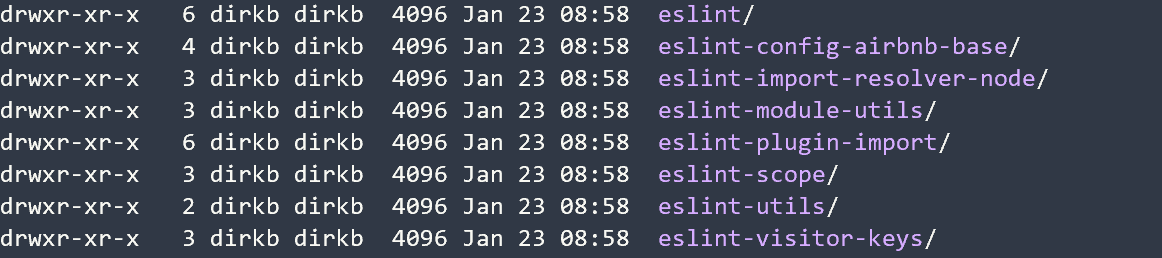
dbaeumer
on 24 Jan 2020
@dbaeumer I have the same directories. Here is a shot:
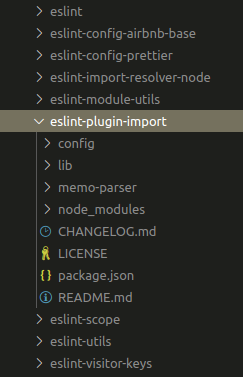
mrmowji
on 24 Jan 2020
This is strange. I have no idea why eslint doesn't find the plugin then. Can you set the setting eslint.debug to true and provide me with the output of the ESLint channel. May be there is something interesting in it.
dbaeumer
on 27 Jan 2020
@dbaeumer I added eslint.debug: true to the Preferences JSON file. VSCode-ESLint is working now. But removing that property from Preferences doesn't seem to have any effect; still working. I'm not sure how.
The only thing I can remember prior to this change, is that I used to have multiple Nodejs apps in my workspace (separated by folders) and I decided to have a single folder opened in VS Code. But now, adding more folders to the workspace doesn't seem to have any effect.
mrmowji
on 27 Jan 2020
If you have multiple folders each having their own eslint installation you might need to configure the working directory setting if you open the parent folder. See eslint.workingDirectories . A config that works in most cases is "eslint.workingDirectories": [{ "mode": "auto" }]
I will close the issue for now. Please ping if it reoccurs and the eslint.workingDirectories setting doesn't help fixing it.
dbaeumer
on 27 Jan 2020
Related issues
 MuhammadJamaluddin
·
4Comments
dbaeumer
·
3Comments
MuhammadJamaluddin
·
4Comments
dbaeumer
·
3Comments
 ablakey
·
5Comments
ablakey
·
5Comments
 lstrzebinczyk
·
6Comments
lstrzebinczyk
·
6Comments
 NickHeiner
·
4Comments
NickHeiner
·
4Comments
Most helpful comment
If you have multiple folders each having their own eslint installation you might need to configure the working directory setting if you open the parent folder. See
eslint.workingDirectories. A config that works in most cases is"eslint.workingDirectories": [{ "mode": "auto" }]I will close the issue for now. Please ping if it reoccurs and the
eslint.workingDirectoriessetting doesn't help fixing it.