Vscode-eslint: Need Insider Testers for new ESLint extension version
Hi all,
I have spent some time to add highly voted features to the ESLint extension. I am asking people in the community to help me test the features since they required quite some rewrite and a bunch of new code. New features are:
- better support for fix on save. The feature is now integrated in VS Code's code action on save feature which allows to define a time which is helpful for large JS file
- The code now executes all fixes. So a single save (if the time budget is large enough) now fixes all of them
- ESlint can be enabled to be used as a formatter. Setting is
eslint.format.enable. - A new probe setting. Its key is
eslint.probeand it is an array of language ids for which ESLint should try to validate the content. If validating fails ESLint will stay silent. Probe languages are:
"javascript", "javascriptreact", "typescript", "typescriptreact", "html", "vue". - The validate setting is still available, but by default now empty. If you add a language id to the validate setting the language will show errors if validation fails.
- the
autofixpart is gone from the validate settings. The extension now always computes fixes. So it is now simply a array of language id. - Better current working directory probing so in most cases there is no need for a
eslint.workingDirectoriessetting. It still exist, however if provided it will automatically change the process cwd. This can be suppressed using the'!cwd'property. - Globbing support for working directories. You can now specify. The usual glob syntax is supported.
I will monitor the inbox the next couple of days to react to bugs people encounter with the new version.
Warning
Using the new extension converts the settings to the new format. This is necessary to support code actions for auto fix. So please backup your settings file before installing and using the extension.
Prerequisite
The insider extension needs that latest VS Code stable or Insider build versioned at 1.41.x. or higher.
The extension can be found here: https://github.com/microsoft/vscode-eslint/releases/tag/2.0.3-next.1
 dbaeumer
All 31 comments
Thank you! Working like a charm, so far.
 gso-visiona
on 28 Nov 2019
gso-visiona
on 28 Nov 2019
Getting this:

 rchl
on 29 Nov 2019
rchl
on 29 Nov 2019
@rchl you should use vscode insiders, which is at v1.41.0, to test the extension.
https://code.visualstudio.com/insiders/
gso-visiona
on 29 Nov 2019
@gso-visiona thanks for providing this. I should definitely mention this.
dbaeumer
on 29 Nov 2019
Is there a reason for that requirement though? Older versions are missing some required API?
rchl
on 29 Nov 2019
It is not an API problem it is an internal VS Code implementation problem. To get things working I needed fixes in VS Code itself for settings and code actions on save. These are only in insider but will be in the next stable release.
dbaeumer
on 29 Nov 2019
I am in the processing of introducing eslint in our typescript codebase and found this issue.
I am not using anything fancy (no format on save, or autofixes) and i can confirm it works in displaying the error.

 zanza00
on 2 Dec 2019
zanza00
on 2 Dec 2019
@zanza00 thanks for reporting this back.
dbaeumer
on 2 Dec 2019
So excited about this! I have a little discrepancy…
I have a project using eslint-plugin-prettier and, while running eslint --fix path/to/file/ignored/by/prettierignore will (correctly) not report any errors, vscode-eslint does and its formatter corrects them.
 matthewwithanm
on 3 Dec 2019
matthewwithanm
on 3 Dec 2019
The solution I imagine for this is that user can provide different config file for format and fix which will allow them to customize this.
dbaeumer
on 3 Dec 2019
The solution I imagine for this is that user can provide different config file for format and fix which will allow them to customize this.
Sorry, I'm not following. Shouldn't the CLI and plugin behave the same by default? Currently, they're doing different things.
matthewwithanm
on 3 Dec 2019
@matthewwithanm I think I misread what you posted. I was talking about different config and ignore files.
Your case should actually work in the new version. Did it fail for you? If so can you please provide me with a GitHub repository I can clone that demos this.
dbaeumer
on 4 Dec 2019
Can I suggest that typescript and typescriptreact be added to the eslint.validate config by default?
Since tslint has been deprecated, this is the main way that TypeScript developers will lint their code, and currently they have to reconfigure the extension to be supported.
 sebinsua
on 6 Dec 2019
sebinsua
on 6 Dec 2019
@sebinsua this is now supported. Did it not work for you? From the above comment:
A new probe setting. Its key is eslint.probe and it is an array of language ids for which ESLint should try to validate the content. If validating fails ESLint will stay silent. Probe languages are:
"javascript", "javascriptreact", "typescript", "typescriptreact", "html", "vue".
The validate setting is still available, but by default now empty. If you add a language id to the validate setting the language will show errors if validation fails.
dbaeumer
on 6 Dec 2019
@sebinsua this is now supported. Did it not work for you? From the above comment:
A new probe setting. Its key is eslint.probe and it is an array of language ids for which ESLint should try to validate the content. If validating fails ESLint will stay silent. Probe languages are:
"javascript", "javascriptreact", "typescript", "typescriptreact", "html", "vue".
The validate setting is still available, but by default now empty. If you add a language id to the validate setting the language will show errors if validation fails.
Apologies, I hastily went into this issue and didn't understand what probe was! I tested the new extension and it works.
sebinsua
on 6 Dec 2019
@sebinsua Great to hear that it works for you!
dbaeumer
on 6 Dec 2019
I installed this to resolve missing error detection in my first, recently created lerna repo and it works out of the box now. Thanks for this improvement!
 s-h-a-d-o-w
on 7 Dec 2019
s-h-a-d-o-w
on 7 Dec 2019
The formatter option is working great (ESLint 2.0.1, VSC Insiders 1.41.0). I really like having that option in addition to fix on save (which is also working for me with the new system).
 sfsccn
on 7 Dec 2019
sfsccn
on 7 Dec 2019
@matthewwithanm I think I misread what you posted. I was talking about different config and ignore files.
Your case should actually work in the new version. Did it fail for you? If so can you please provide me with a GitHub repository I can clone that demos this.
(This was the only extension I had installed when reproing.)
matthewwithanm
on 10 Dec 2019
@matthewwithanm thanks a lot. This is indeed something I broke to easy the setup of eslint 6.x repositories. However ignore files are not consider up the hierarchy (neither for eslint nor for prettier) and in these cases I shouldn't set the cwd to dir.
dbaeumer
on 11 Dec 2019
It would be nice if the extension did not auto-change the settings.json file and instead just marked as a warning the now obsolete arguments such as autoFix. I am working in a team that checks settings.json into git and not everyone is using Insiders, and so I need to now dance around this single file in my folder that should remain unstaged.
 snario
on 12 Dec 2019
snario
on 12 Dec 2019
With the 2.0.2 version of this extension with VSCode 1.41.0, having the parserOptions.project option set to "./tsconfig.json" to be able to use type checking rules as described here, I now get these errors:
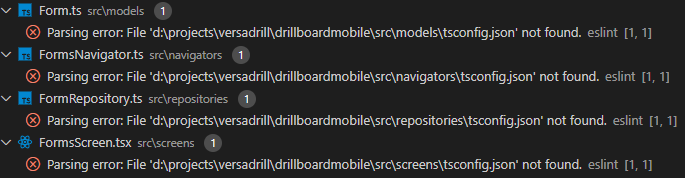
It seems the extension searches my tsconfig file at the same level of each .ts file instead of the root of the workspace. which was not the case with version 1.9.1.
 EtienneBourque
on 13 Dec 2019
EtienneBourque
on 13 Dec 2019
@snario I noticed the same and working on a new version that fixes this. The old settings will be deprecated and you can have both in parallel for a while.
dbaeumer
on 13 Dec 2019
@EtienneBourque I am working on a fix for this. To ensure this will fix your problem can you provide me with a GitHub repository I can clone that demos your problem.
dbaeumer
on 13 Dec 2019
I published a new version of the insider here: https://github.com/microsoft/vscode-eslint/releases/tag/2.0.3-next.1
It addresses @snario concerns about settings migration. It keeps the old settings for now, however to get the code action on save working it add some new once. However this will not affect users using the old version of the extension.
I also addressed problems around choosing the right working directory. However this is very tricky in ESLint because the .eslintignore and the plugin loading has conflicting 'goals'. For the plugin loading it is preferable to choose a working directory close to the file validated. However the .eslintignore file is only honored in the current working directory (eslint is not searching the parent chain for it). So to get a balanced approach users can now use the following entries in the eslint.workingDirectories setting:
- a simple string like
packages/client: this works as before with the difference that it will change the process working directory to it by default. If this is not wanted use{ "directory": "packages/client", "!cwd": true } - a literal `{ "directory": "packages/client" } as shown above.
- a literal
{ "pattern": "packages/*/" }which specifies a glob pattern for the working directory. With this all first level children ofpackageswill become a working directory. So for large mono repositories there is no need to list all directories - a literal
{ "mode": "location" }which uses the workspace folder location or the file location (if no workspace folder is open) as the working directory. This is the default and is the same strategy as in the past. - a literal
{ "mode": "auto" }which tries to guess a working directory based on the location ofpackage.json,.eslintignoreand.eslintrc*files. This might work in many cases but can lead to unexpected results as well.
I would appreciate if people could give the new version another try.
dbaeumer
on 13 Dec 2019
Vscode released version 1.41, which means this can now be installed without the need for Insiders release.
gso-visiona
on 13 Dec 2019
@gso-visiona thanks for pointing this out.
dbaeumer
on 13 Dec 2019
While you published 2.0.3, I was creating a little demo workspace to show the problem I was having with 2.0.2.
I just tested with 2.0.3 and it's fixed. Thanks!
Here's my demo anyway: https://github.com/EtienneBourque/eslint-tsconfig
With 2.0.2, I would get errors with tsconfig.json not being found when opening any file not in the root directory.
EtienneBourque
on 13 Dec 2019
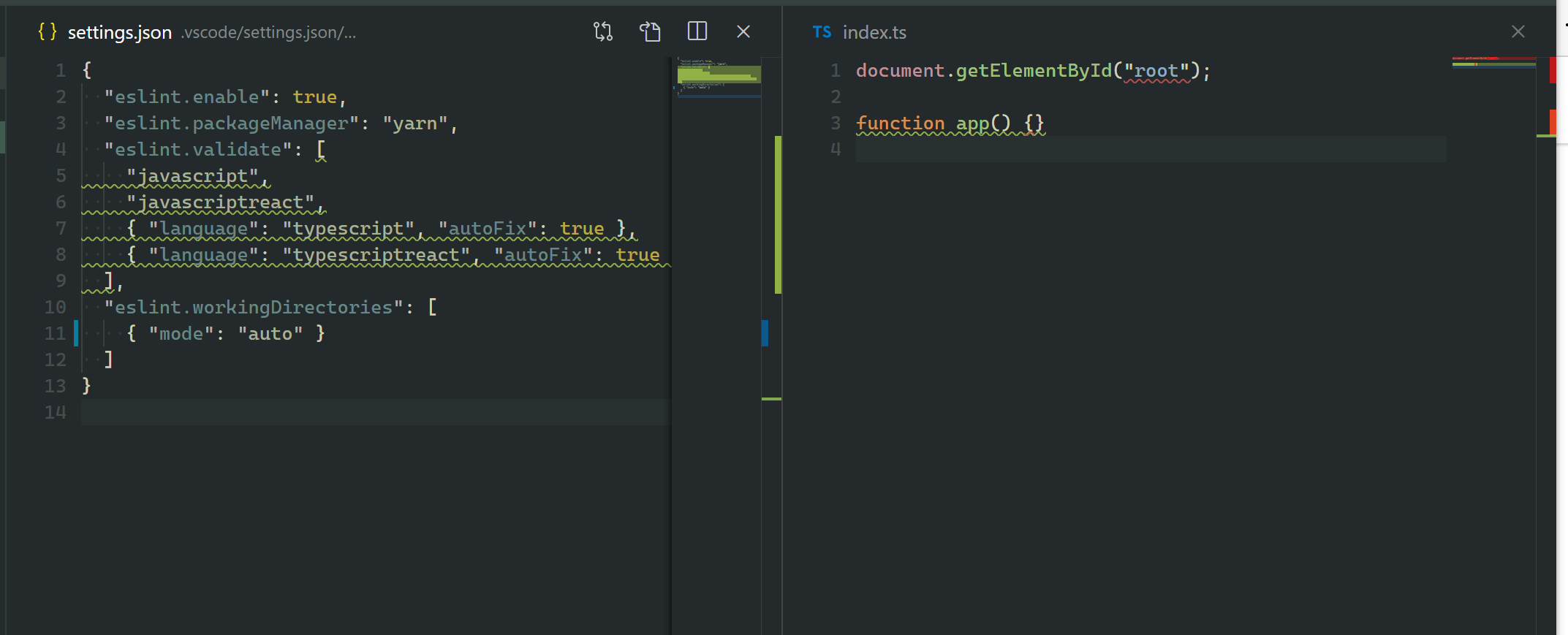
I just wanted to experiment with eslint.workingDirectories but with most of the @dbaeumer mentioned (such as mode or pattern), when I save settings.json, the object literal gets converted to null.
Could that be related to the changes that were made here or is it something different?
So e.g.:
"eslint.workingDirectories": [
    { "mode": "auto" }
  ],
After saving:
"eslint.workingDirectories": [
    null
  ],
@s-h-a-d-o-w which version of the extension are you using. The { "mode": "auto" } is only available in 2.0.3 and it works for me (e.g. doesn't replace it with null). If you see this with 2.0.3 can you please provide me with a repository I can clone that demos this. Thanks !
dbaeumer
on 15 Dec 2019
I officially publish 2.0.4 of the extension. Please provide any kind of feedback using a new issue.
Thanks you all for your testing!
dbaeumer
on 16 Dec 2019
Related issues
 zaggino
·
6Comments
zaggino
·
6Comments
 sebastian-nowak
·
4Comments
sebastian-nowak
·
4Comments
 NickHeiner
·
4Comments
NickHeiner
·
4Comments
 wmertens
·
7Comments
wmertens
·
7Comments
 bacsonvv
·
6Comments
bacsonvv
·
6Comments
Most helpful comment
I officially publish 2.0.4 of the extension. Please provide any kind of feedback using a new issue.
Thanks you all for your testing!