Vscode-eslint: rulename no longer shows
In some recent update, not sure of eslint or this plugin, the eslint rule name stopped showing.
This means I can't easily look it up or disable it.
Can this be reinstated? Preferably, the rulename is the first part of the error message, so it's easy to copy and paste.
 wmertens
All 7 comments
I am also having the same problem. It appears that work is being done to fix this though.
Reference:
https://github.com/Microsoft/vscode-eslint/pull/562
 GStipick
on 2 Nov 2018
GStipick
on 2 Nov 2018
Same problem here, perhaps something changed in the latest VS Code upgrade? Using the latest VS Code (1.28.2).
Like @wmertens I also use this to quickly copy and paste the rule-id to a // eslint-disable-line. Without the rule in the message it's not quick and easy to find the rulenames for the messages.
 Friksel
on 3 Nov 2018
Friksel
on 3 Nov 2018
Two things: the missung rule name is caused by a bug in VS Code which is already fixed in Insider and will be available in the next stable version appearing soon.
Due to a PR I got from @loune the quick fix now contains actions to disable a rule. No need to copy paste anymore.
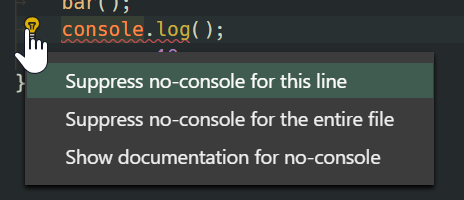
 dbaeumer
on 5 Nov 2018
dbaeumer
on 5 Nov 2018
Thanks for the info @dbaeumer and great to have an action for it! I also just found out that the rule-names are still visible in the 'problems' tab, so there's no need to search for the eslint-names anymore.
Friksel
on 5 Nov 2018
@dbaeumer When using the new 'Suppress ... for this line' action we don't get the suppression on the same line, but as a // eslint-disable-next-line instead of a // eslint-disable-line. I normally put these on the same line as the suppressed line for better readability and less disturbing code flow, but this seems to be impossible with this workflow. Would it be possible to make the 'Suppress .. for this line' insert the suppress-line on the same line as the code (eslint-disable-line) and perhaps move the current behaviour to an additional action to add it to the next line (eslint-disable-next-line)? Thanks!
Friksel
on 6 Nov 2018
@Friksel can you please open a separate issue for this?
dbaeumer
on 6 Nov 2018
@dbaeumer Hereby: https://github.com/Microsoft/vscode-eslint/issues/573
Friksel
on 6 Nov 2018
Related issues
 zliy
·
7Comments
zliy
·
7Comments
 bacsonvv
·
6Comments
bacsonvv
·
6Comments
 lstrzebinczyk
·
6Comments
lstrzebinczyk
·
6Comments
 Jamesernator
·
5Comments
Jamesernator
·
5Comments
 kumarharsh
·
3Comments
kumarharsh
·
3Comments
Most helpful comment
Two things: the missung rule name is caused by a bug in VS Code which is already fixed in Insider and will be available in the next stable version appearing soon.
Due to a PR I got from @loune the quick fix now contains actions to disable a rule. No need to copy paste anymore.