Vscode-eslint: ESLint is not validating any files yet.
Still happening in VSCode version 1.30.2, version of ESLint - 1.8.0
 xerosanyam
All 15 comments
@xerosanyam this works for me. Can you provide me with a GitHub repository I can clone that demos what you are seeing. Do you have eslint installed (npm install eslint)?
 dbaeumer
on 19 Feb 2019
dbaeumer
on 19 Feb 2019
I'm seeing the same issue @dbaeumer @xerosanyam
Steps -
- Open Visual Studio Code
- Shift + Command + P
- ESLint: Show Output Channel
Extension version: 1.8.0
VS Code version: Code - Insiders 1.32.0-insider (11416de365a1e96302e171c9eebc2547872ac230, 2019-02-23T08:16:36.706Z)
OS version: Darwin x64 18.2.0
$ which eslint
/Users/junger/.config/yarn/global/node_modules/.bin/eslint
settings.json
  "eslint.nodePath": "/Users/junger/.config/yarn/global/node_modules/",
  "eslint.options": { "configFile": "/Users/junger/dev/private/.eslintrc" },
  "eslint.packageManager": "yarn",
Also fails on rtm -
VS Code version: Code 1.31.1 (1b8e8302e405050205e69b59abb3559592bb9e60, 2019-02-12T02:16:38.656Z)
OS version: Darwin x64 18.2.0
 joshunger
on 23 Feb 2019
joshunger
on 23 Feb 2019
I had accidentally executed ESLint: Disabled ESLint. Executing ESLint: Enable ESLint fixed the issue.
So the steps to reproduce this issue are -
- Shift + Command + P and select ESLint: Disabled ESLint
- Close vscode
- Shift + Command + P and select ESLint: Show Output Channel

Is there a way to fix this error message?
joshunger
on 23 Feb 2019
@joshunger will look into it. Best would be to print some info about which workspace folders are disabled.
dbaeumer
on 26 Feb 2019
I had accidentally executed ESLint: Disabled ESLint. Executing ESLint: Enable ESLint fixed the issue.
So the steps to reproduce this issue are -
- Shift + Command + P and select ESLint: Disabled ESLint
- Close vscode
- Shift + Command + P and select ESLint: Show Output Channel
Is there a way to fix this error message?
Having the same problem today, I'm fairly sure I didn't disable EsLint at any point,
But disabling and enabling it for the workspace did restore the AutoFixOnSave functionality I had working before. Simply enabling it may have worked, but I first selected disable under the "Did you turn it off and back on?" rule of fixing things.
Thanks for the hint.
Uninstalling and reinstalling eslint did not fix the issue for me.
 shanemgrey
on 27 Feb 2019
shanemgrey
on 27 Feb 2019
Same issue, can someone provide more info about this error? The message "ESLint is not validating any files yet." does not mean nothing for me.
eslint is installed, configuration file is generate by node_modules/.bin/eslint --init, eslint is enabled inside project.. something else is required?
 daaru00
on 5 Mar 2019
daaru00
on 5 Mar 2019
After a lot of try I figure out what the problem is, you need to specify inside the vscode configuration the eslint.validate with file type that you want to lint. For example, in a Vue project you have to specify:
    "eslint.autoFixOnSave": true,
    "eslint.validate": [
        {
            "language": "vue",
            "autoFix": true
        },
        {
            "language": "html",
            "autoFix": true
        },
        {
            "language": "javascript",
            "autoFix": true
        }
    ]
Then, this is the really strange thing, nothing happens, will still not work, you have to disable and re-enable the linter with command ESlint: Disable ESLint and ESlint: Enable ESLint, finally it start works!
So, the real issues are two:
1) the dummy error message that create a lot of confusion and does not provide any kind of information.. please, please, PLEASE, change it to something like "File type not configured, edit eslint.validate configuration" or "Check eslint.validate configuration to lint this file".
2) configuration changes are not applied and need a file open/close and/or enable and disable linter feature.
These two issues combined together make people crazy searching for the cause of this "non functioning behavior".
daaru00
on 5 Mar 2019
I changed the message to:
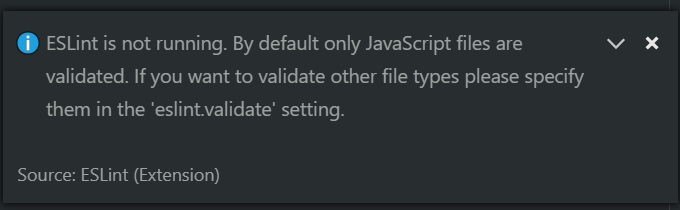
However I can't reproduce the lack of applying configuration changes. This works for me.
dbaeumer
on 7 Mar 2019
However I can't reproduce the lack of applying configuration changes.
@dbaeumer have you tried this?
1) remove the module
2) open a couple of files in a project environment
3) re-install the module
4) try to configure and run linter for that opened files
seems related to current open documents, I think.
daaru00
on 7 Mar 2019
I added "eslint.trace.server": "messages" to my user settings, then checked the Output of ESLint and got the following message:
The language client requires VS Code version ^1.31 but received version 1.30.2
I tried to update, and discovered that VS code was running out of my downloads folder, so it couldn't update 🤦♂️ (see issue). I moved it to Applications, updated, and now ESLint is working again! Hope this helps someone else 😃
 alexlouden
on 8 Mar 2019
alexlouden
on 8 Mar 2019
@daaru00 the extension doesn't support hot install of the eslint npm package right now. I created https://github.com/Microsoft/vscode-eslint/issues/643.
dbaeumer
on 8 Mar 2019
@alexlouden release a new version that addresses the version mismatch.
dbaeumer
on 8 Mar 2019
Releases 1.8.2 which containes the improved error message
dbaeumer
on 8 Mar 2019
A possible way of reproducing the issue is to open a new window and then "open folder" or "add workspace folder" to it.
I remember opening a new window for a separate project, it was working with the previous workspace/window but not with the new window. Since then it isn't working with any folder/workspace.
All the folders I tested with had eslint --init done.
 mkp7
on 19 Mar 2019
mkp7
on 19 Mar 2019
Any update guys? Still getting ESLint is not validating any files yet.
Also, It seems that new release deployed yet.
EDIT: Fixed updating VSCode
 AdriaRios
on 20 Mar 2019
AdriaRios
on 20 Mar 2019
Related issues
joshunger
·
3Comments
 LinusU
·
7Comments
LinusU
·
7Comments
 JonathanWolfe
·
3Comments
JonathanWolfe
·
3Comments
 ravshansbox
·
6Comments
ravshansbox
·
6Comments
 wmertens
·
7Comments
wmertens
·
7Comments
Most helpful comment
Any update guys? Still getting ESLint is not validating any files yet.
Also, It seems that new release deployed yet.
EDIT: Fixed updating VSCode