Vscode-eslint: Latest update appears to have broken nodePath specification
ESLint is no longer loading modules from the configured nodePath, and therefore fails to load the configured plugins.
VS Code 1.6.x (both 1.6.0 and 1.6.1 had this problem)
ESLint 1.3.1
 somewhatabstract
All 14 comments
I'm having the same problem. Breaker. It there way how to install previous version?
 dacz
on 18 Sep 2017
dacz
on 18 Sep 2017
Great question, @dacz. I didn't find a way around this issue yet. I've been trying since it's broken ESLint for me. If I work it out, I'll be sure to post it here. In the meantime, it would be nice to get some acknowledgement that this issue is a legit problem.
somewhatabstract
on 18 Sep 2017
@somewhatabstract @dacz
That still works for me in a test setup that looks like this:
- eslint npm module installed under
C:\tmp\es-298\node_modules\eslint - VS Code workspace under
P:\mseng\vscode\playgrounds\bugs\es-298 - workspace settings file like this:
{
    "eslint.nodePath": "C:\\tmp\\es-298\\node_modules",
    "eslint.trace.server": "messages"
}
- open VS Code on
P:\mseng\vscode\playgrounds\bugs\es-298 - .eslintrc.json file
{
    "env": {
        "browser": true,
        "commonjs": true,
        "es6": true,
        "node": true
    },
    "parserOptions": {
        "ecmaFeatures": {
            "jsx": true
        },
        "sourceType": "module"
    },
    "rules": {
        "no-const-assign": "warn",
        "no-this-before-super": "warn",
        "no-undef": "warn",
        "no-unreachable": "warn",
        "no-unused-vars": "warn",
        "constructor-super": "warn",
        "valid-typeof": "warn"
    }
}
- test.js
function foo() {
    var x;
}
- results in:
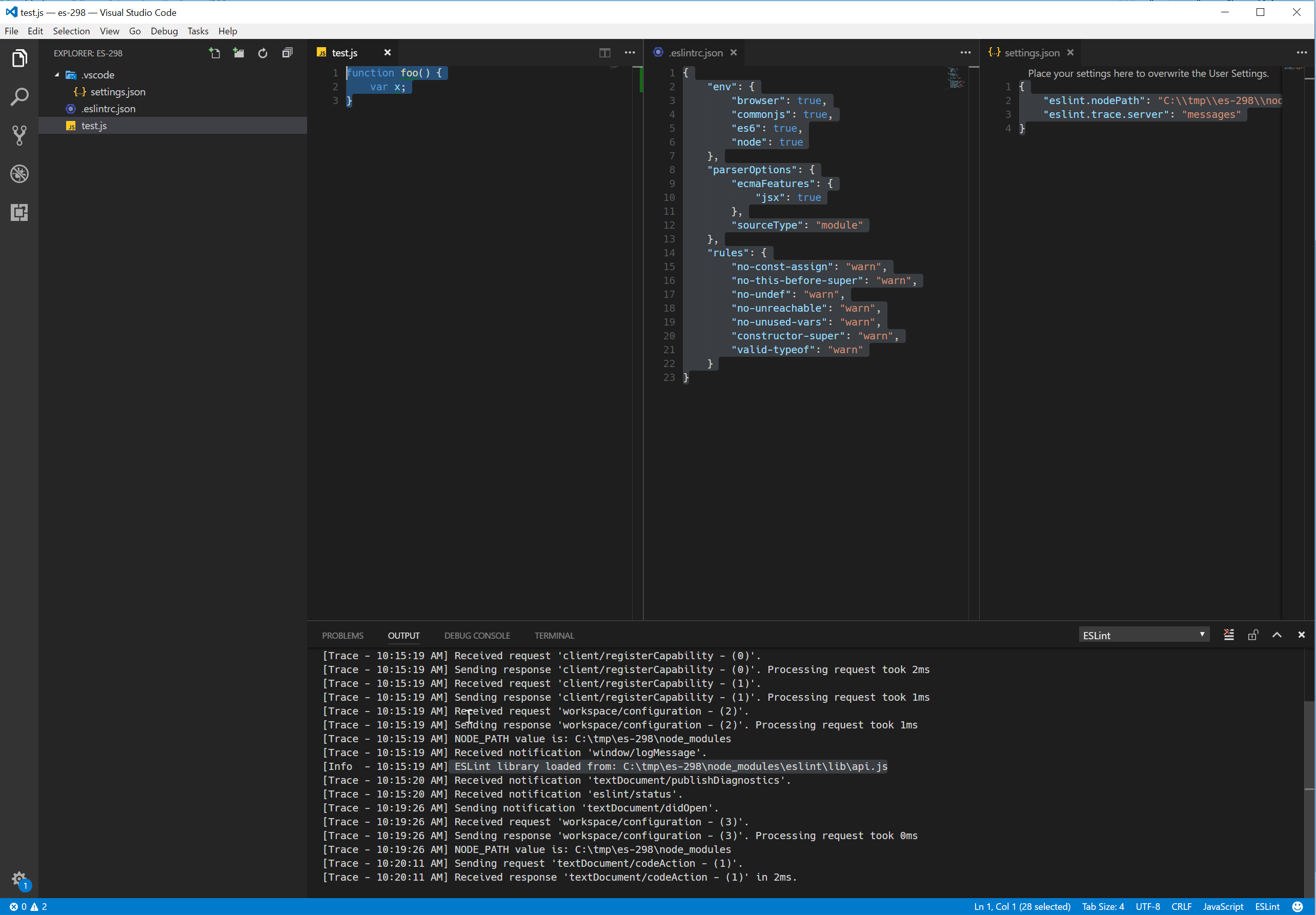
Do you have any steps to reproduce what you are seeing.
 dbaeumer
on 19 Sep 2017
dbaeumer
on 19 Sep 2017
I installed eslint 4.7.1 and tested above under Windows.
dbaeumer
on 19 Sep 2017
And can you enable tracing to verbose ("eslint.trace.server": "verbose") and attach what is printed to the output channel. May be this already gives me a hint what is failing.
dbaeumer
on 19 Sep 2017
I downgraded plugin to 1.2.11 and downgraded eslint (locally installed) to 4.6.1. It worked. Because I need to work I have no courage to try upgrading the plugin.
I suspect that the problem is not the plugin but the eslint 4.7.0.
dacz
on 19 Sep 2017
For me, we have several ESLint plugins in a sub-folder, so we point node_modules to that. But it is picking up eslint and node_modules from the very first node_modules folder it finds, rather than the path provided.
There are also several eslintrc files involved, but it worked before recent changes and doesn't since updating to latest vscode/eslint add-on. The eslint version we use has not changed.
somewhatabstract
on 19 Sep 2017
@somewhatabstract is there anything in the trace when "eslint.trace.server": "verbose" is set that looks suspicious?
dbaeumer
on 19 Sep 2017
@dbaeumer A few things look strange, but this specifically:
[Trace - 19:46:02] NODE_PATH value is: ./<GIT_REPO>/<PATH_I_SPECIFIED_FOR_NODEPATH>
[Trace - 19:46:02] NODE_PATH value is: /usr/local/lib/node_modules
[Trace - 19:46:02] NODE_PATH value is: ./<GIT_REPO>/<PATH_I_SPECIFIED_FOR_NODEPATH>
[Trace - 19:46:02] NODE_PATH value is: /usr/local/lib/node_modules
And:
[Info - 19:46:03] ESLint library loaded from: /Users/jeffyates/<GIT_REPO>/<BUILD_LOCATION_NOT_REFERENCED_IN_ESLINTRC>/node_modules/eslint/lib/api.js
Interestingly, BUILD_LOCATION_NOT_REFERENCED_IN_ESLINTRC is the first folder that contains a node_modules folder. Though, I suspect that's a red herring even though the plugin it fails to find is not in that particular node_modules folder, so the error I'm having makes sense if it is trying to resolve it from there.
somewhatabstract
on 20 Sep 2017
@somewhatabstract I think I know what it is. Can you do the following to verify it:
- make the nodePath variable in the settings file absolute. This should fix the problem.
The underlying cause of the problem is the support for multiple workspace folders which got added to ESLint 1.3.1. To implement this the ESLint language server is not running on working directory of the workspace anymore (since for n folders there is no common working directory). I need to handle the case that the nodePath setting is relative and make it absolute relative to the file being linted.
@egamma you would need to do the same for tslint.
dbaeumer
on 20 Sep 2017
@dbaeumer thanks, issue on this came in today https://github.com/Microsoft/vscode-tslint/issues/264 😄
 egamma
on 20 Sep 2017
egamma
on 20 Sep 2017
Published 1.3.2 which has support for relative nodePath.
dbaeumer
on 20 Sep 2017
Hmm, I tried an absolute path and it didn't seem to work. Let me try again.
somewhatabstract
on 20 Sep 2017
Ha, I see that 1.3.2 fixes it anyway. Great! Thank you!
somewhatabstract
on 20 Sep 2017
Related issues
 mysticatea
·
32Comments
mysticatea
·
32Comments
 dracozombie19
·
72Comments
dracozombie19
·
72Comments
 txchen
·
31Comments
dbaeumer
·
31Comments
egamma
·
36Comments
txchen
·
31Comments
dbaeumer
·
31Comments
egamma
·
36Comments