Vscode-docs: Open Integrated Terminal at the Directory of the Currently Focused File
It would be nice if there was an option to open the integrated terminal in the folder that currently contains the file you are working on. Most of the time, this is where I would prefer to be placed.
I used Atom for many years and there was a package available to do just this. It would be awesome if this was a built-in feature for VS Code, as setting for the integrated terminal.
If this feature actually exists and I somehow missed it, or if someone knows how to do it currently, I would greatly appreciate hearing about it.
 JosephTLyons
All 10 comments
https://code.visualstudio.com/docs/editor/integrated-terminal#_using-variables has an example of setting the current working directory with the current file directory.
"terminal.integrated.cwd": "${fileDirname}"
Will that setting configuration do what you want?
 gregvanl
on 7 Oct 2019
gregvanl
on 7 Oct 2019
@gregvanl, actually, that is absolutely perfect! Thank you very much! I noticed that that setting was there, but I didn't realize you could pass it variables. I made the bad assumption that it would need to be a static location.
I suppose I have one other question... is it possible to apply this setting when launching an external terminal? I'm on macOS... that setting you suggested works flawlessly when launching the integrated terminal (which is all I asked for), but I can't seem to get it to work when launching the external Terminal app from VS Code.
I'm going to close this because you did solve my issue. Thank you.
JosephTLyons
on 7 Oct 2019
@JosephTLyons Glad that works for you.
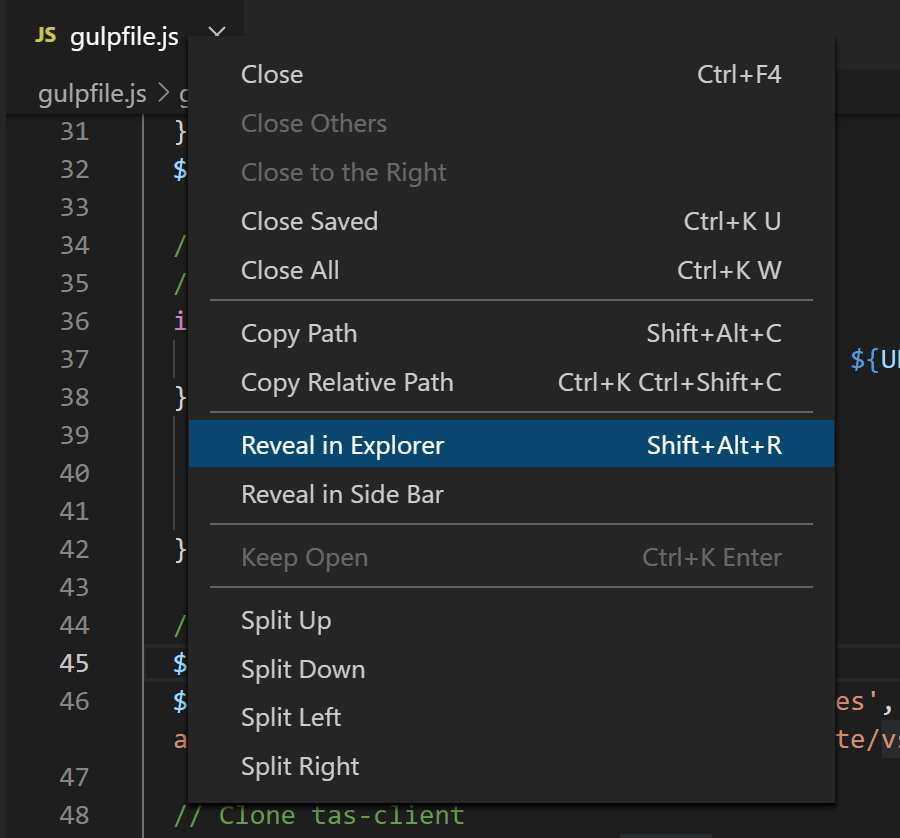
For launching the current file location in an external terminal, try the Reveal in Explorer/Terminal command available in the Command Palette and the file tabbed header context menu.
gregvanl
on 7 Oct 2019
For your initial question, check out https://github.com/microsoft/vscode-docs/blob/vnext/release-notes/v1_39.md#open-new-terminals-with-custom-working-directories coming in the 1.39 release.
gregvanl
on 7 Oct 2019
@JosephTLyons Glad that works for you.
For launching the current file location in an external terminal, try the Reveal in Explorer/Terminal command available in the Command Palette and the file tabbed header context menu.
I'm only seeing a "Reveal in Explorer" command in the command palette, but no option related to a Terminal.
JosephTLyons
on 8 Oct 2019
The command is in the context menu on the file header up on the title bar.
gregvanl
on 8 Oct 2019
Right, that opens up the eternal file manager, such as Finder on Mac or File Explorer on Windows, but I was trying to launch an external terminal at the location of the file (such as launching Mac's Terminal app at the location of the current file).
JosephTLyons
on 9 Oct 2019
Oh, got it.
You can change the Terminal: Explorer Kind setting to 'external' and this will open an external terminal when you right-click on a file in the File Explorer and run "Open in Terminal".
gregvanl
on 9 Oct 2019
Oh ok. This is a bit strange.
- I can launch an integrated terminal at the current files path with the command palette.
- I can launch an external terminal at the current files path by right clicking the file as you mentioned above, but
- I don't think I can launch an external terminal at the current path's file with the command palette.
If I try to launch an external terminal via the command palette, it always resorts to the root of the project. Ideally, both the integrated terminal and the external terminal could launch to the current file's directory directly from the command palette. Is this possible? That should be the last of my questions. If I can launch an external terminal via the command palette and have it show up in the current files directory, that would be perfect, but I haven't been able to find a way to do this yet.
JosephTLyons
on 10 Oct 2019
Hi @JosephTLyons Sorry for the delay in getting back to you. You should be able to bind a keyboard shortcut to the openInTerminal command (by default it is unbound).

If you also have Terminal: Explorer Kind set to "external", then the keyboard shortcut (Ctrl+J, Ctrl+H) in the example above will open an external terminal at the current folder location.
gregvanl
on 21 Oct 2019
Related issues
 tariqawni
·
5Comments
tariqawni
·
5Comments
 karrtikr
·
6Comments
karrtikr
·
6Comments
 bpasero
·
3Comments
bpasero
·
3Comments
 krave1986
·
4Comments
krave1986
·
4Comments
 stone-zeng
·
6Comments
stone-zeng
·
6Comments
Most helpful comment
Hi @JosephTLyons Sorry for the delay in getting back to you. You should be able to bind a keyboard shortcut to the openInTerminal command (by default it is unbound).
If you also have Terminal: Explorer Kind set to "external", then the keyboard shortcut (Ctrl+J, Ctrl+H) in the example above will open an external terminal at the current folder location.