Vscode-docs: What does loose files mean in this article?
Hi, what does "loose files" mean here?
https://code.visualstudio.com/docs/getstarted/userinterface#_can-i-hide-the-open-editors-section-in-the-explorer
 krave1986
All 4 comments
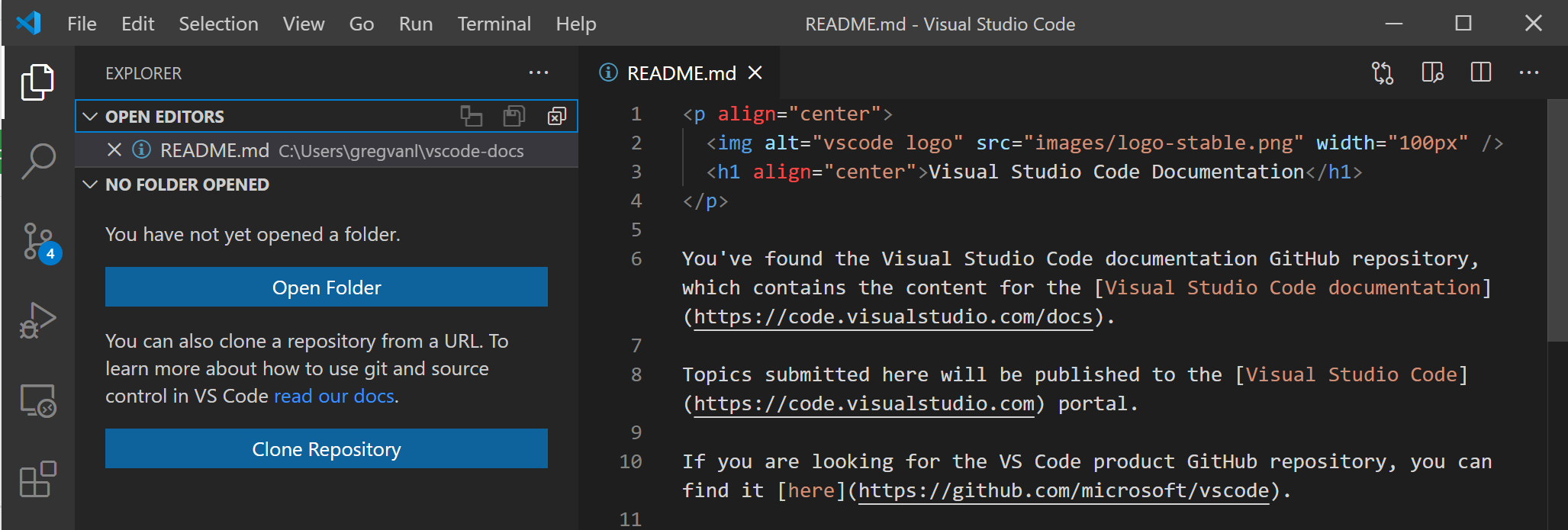
Hi @krave1986 "Loose" files means any files that are opened or created when VS Code does not have an open folder. For example, you can open VS Code from a start menu or close an open folder, but still open individual files directly.
In the image below, I've closed the vscode-docs folder but opened the README directly with File > Open File:
I'll see if I can make the text clearer.
 gregvanl
on 13 Dec 2020
gregvanl
on 13 Dec 2020
@gregvanl Thank you for your clarification. It makes sense for me now. 👍
krave1986
on 14 Dec 2020
@krave1986 I tried to make the justification for displaying loose files clearer.
gregvanl
on 16 Dec 2020
@gregvanl Thank you! In my opnion, loose files refer to the files not belong to the opened folder(s) but being opened in the editor. So we can only show them in 'open editors' pane in order to further navigation.
krave1986
on 16 Dec 2020
Related issues
 busticated
·
4Comments
busticated
·
4Comments
 tbrodbeck
·
4Comments
tbrodbeck
·
4Comments
 tetchel
·
3Comments
tetchel
·
3Comments
 equidevium
·
7Comments
equidevium
·
7Comments
 bersbersbers
·
6Comments
bersbersbers
·
6Comments
Most helpful comment
Hi @krave1986 "Loose" files means any files that are opened or created when VS Code does not have an open folder. For example, you can open VS Code from a start menu or close an open folder, but still open individual files directly.
In the image below, I've closed the vscode-docs folder but opened the README directly with File > Open File:
I'll see if I can make the text clearer.