Vscode-docs: Document PowerShell language development
This proposal is to add a section for PowerShell within this list and not simply a PowerShell page under the Language section. I believe there is enough content needed for PowerShell development that warrants more details than a simply getting started in the language section with Python.

PowerShell being a main language for Microsoft products and with Azure management it warrants building out content so users can see how to get started with PowerShell development. I would propose the initial layout for pages to get started:
├── Extension
├── Editing Code
├── Plaster
├── PSScriptAnalyzer
├── Pester
├── Debugging
├── Settings Reference
 wsmelton
All 26 comments
Hope to have a PR up in the next day or so for this.
 DareDevelOps
on 5 Sep 2018
DareDevelOps
on 5 Sep 2018
Have a look DareDevelops VSCode Docs
DareDevelOps
on 5 Sep 2018
My proposal is to have much more detail than what should go on one language page. We need a section just like Python and Azure.
wsmelton
on 6 Sep 2018
@wsmelton and @DareDevelOps, it's great to see interest for PowerShell in VS Code. From the comments and ratings I've seen, the PowerShell extension is very well liked. As you know, our TOC is limited to two levels and so TOC real estate is at a premium and we're trying to keep the TOC, and doc set in general, pretty tight. At this point, VS Code isn't ready to have PowerShell be a full TOC node but we're very happy to have a topic under Languages as @DareDevelOps has provided. We'd prefer to have extension specific content go in the extension README or GitHub repo (as Markdown docs or wiki). We track file type usage and .ps1 is still pretty far down the list (compared to other languages like python and java).
I'm not a PowerShell expert so I may not understand the need for documentation that should live outside the PowerShell extension repo.
Again, we'd be happy to see a new topic under Languages and this would be a good first step. We can then track page views and user ratings and comments. Also an advantage of having more details and links in the extension README is that it is discoverable and viewable from within VS Code on the Extensions details page, users don't need to search or bookmark a topic in code.visualstudio.com
 gregvanl
on 6 Sep 2018
gregvanl
on 6 Sep 2018
So just from curiosity then what warrants a language or extension getting real estate in the TOC? Why does Azure really need documentation on this site, Azure Login extension just is under 900k and other Azure extensions have not even broken 500k yet. Powershell has had 3.9 million downloads to date!
wsmelton
on 6 Sep 2018
Overall considering PowerShell is the primary language for Windows environment the level if documentation I believe it needs for VS Code would be to much to put under one page. I will just propose it to be added to PowerShell Docs site.
wsmelton
on 6 Sep 2018
Simple solution here - move node, JavaScript, python, and Java under languages
Create new cloud TOC, and put Azure in there. Reserve spaces for AWS, GC, etc.
End this nonsense and focus on meaningful stuff.
 rismoney
on 6 Sep 2018
rismoney
on 6 Sep 2018
This "nonsense" is meaningful to us. Otherwise, solid proposal.
 potatoqualitee
on 6 Sep 2018
potatoqualitee
on 6 Sep 2018
The PowerShell hub on docs.microsoft.com would be a good location for more in-depth topics https://docs.microsoft.com/en-us/powershell/. The VS Code site Languages/PowerShell topic can provide links (Next Steps, etc).
gregvanl
on 6 Sep 2018
Can you address @rismoney's proposal, @gregvanl ? I think Microsoft not showing preferences via TOC would be beneficial to the adoption of non-preferred languages.
potatoqualitee
on 6 Sep 2018
Hi @potatoqualitee, @rismoney, unfortunately the VS Code website is currently limited to a two level TOC. I agree it would be better to have a deeper TOC under Languages and then program language specific content could live there.
gregvanl
on 6 Sep 2018
The "unfortunately" and "I agree" are confusing, my apologies. To be clear, you agree that:
- Java, Python, Node, etc should be moved to Languages
- PowerShell is added to Langauges
- A new section is added named Cloud
- Azure is moved to Cloud
?
potatoqualitee
on 6 Sep 2018
A website TOC which allows arbitrary depth (like docs.microsoft.com) would be nice and could support nesting deep subject content. This would allow a tree under Languages each with it's own detailed content. The VS Code website doesn't currently support more than a two level TOC.
gregvanl
on 6 Sep 2018
I understand then that the answer is no. I also understand Microsoft's emphasis on Azure, and that the Azure TOC cannot change until the website supports nesting.
With regards to languages, is it possible to give Python, Java, Node, etc the same treatment as PowerShell? They all go under languages and just get one link as well?
Visibility is important and the current TOC suggests that some languages are more important than others.
potatoqualitee
on 6 Sep 2018
The PowerShell team and PowerShell community have adopted VSCode as the official editor for PowerShell. Microsoft has even depreciated the ISE in favor of VSCode.
 KevinMarquette
on 6 Sep 2018
KevinMarquette
on 6 Sep 2018
I think there should be a PowerShell page under the Languages node of the TOC, as a start. Let's get that built and start feedback on that. If we need more in-depth content then we should probably discuss that in the PowerShell-RFC repo or the PowerShell-Docs repo.
 sdwheeler
on 6 Sep 2018
sdwheeler
on 6 Sep 2018
@sdwheeler why is documentation specific to VS Code relevant to PowerShell-Docs? This is not about how to use PowerShell but the extension specific to how it works and is utilized within VS Code.
As well, lets take Azure out of it. Python has a whole flipping tutorial...a tutorial. Another extension that is not even close to 500k downloads.
wsmelton
on 6 Sep 2018
I mean seriously here if the overall recommendation by the VS Code Team is that PowerShell does not deserve space in the TOC, then no extension should. So the Azure and Python should be removed and put in their associated documentation sites or within their own repository. Then we can just do the same thing for the PowerShell extension.
wsmelton
on 6 Sep 2018
@wsmelton There are several factors that contribute to the decision of where the content should go. I am saying that the VS Code docs should have a PowerShell page under languages. Let's start there.
Creating detailed content beyond that is not always easy. We need an owner to create and maintain that content, regardless of where it lives. I am offering the PowerShell-Docs and PowerShell-RFC channels as a place for discussing this with the PowerShell team. If there is enough demand from the community then the team is more likely to allocate the resources.
sdwheeler
on 6 Sep 2018
@sdwheeler if you look at the link above https://github.com/DareDevelOps/vscode-docs/blob/lang-PowerShell/docs/languages/powershell.md, we already have community members ready to help contribute documentation. We just need a place to put it where VSCode users can easily find it.
 SteveL-MSFT
on 7 Sep 2018
SteveL-MSFT
on 7 Sep 2018
Why not redirect any/all in depth docs to docs.microsoft.com/topic? if real estate plot size is the issue. I would think all "Docs" would generate from there to begin with. This would reserve local real estate for product specific information.
DareDevelOps
on 7 Sep 2018
My take is that there's no issue in adding PowerShell in under Languages here but some further confusion was caused by the last part of the issue where the suggested content for the PowerShell Page was shown with it's own TOC
Now with @sdwheeler comment about the TOC's is correct in the LEFT hand side - however individual pages also have their TOC in the right like below for the JSON page at https://code.visualstudio.com/docs/languages/json#_hovers
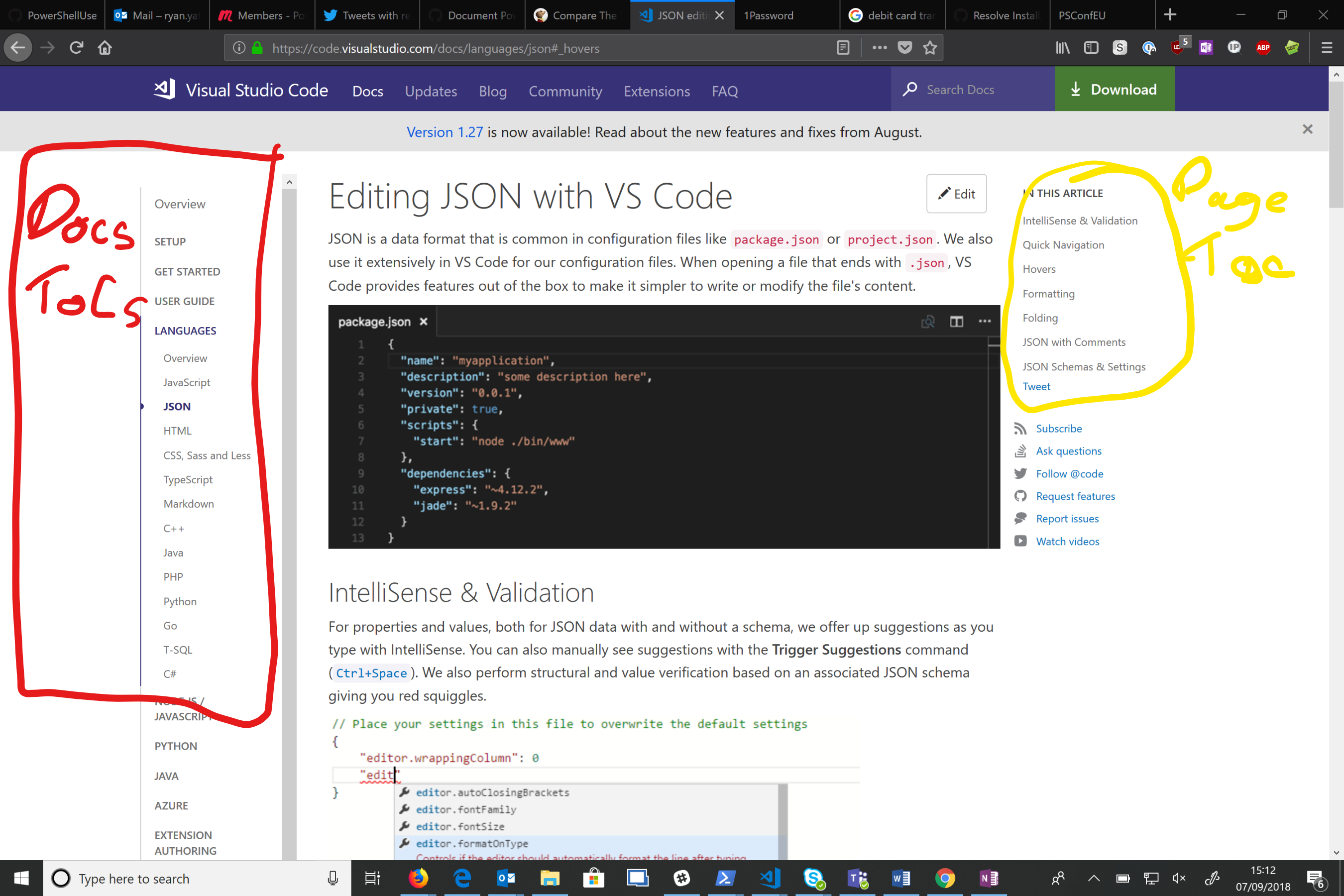
So the PR to fix this should do as suggested by @potatoqualitee said here -https://github.com/Microsoft/vscode-docs/issues/1823#issuecomment-419091890
 kilasuit
on 7 Sep 2018
kilasuit
on 7 Sep 2018
Well...let's just say I'm a third grader and want to know why Jimmy (Python) gets top shelf treatment (in both top-level TOC and in languages), but I don't (PowerShell)
wsmelton
on 7 Sep 2018
I work on the VS Code website and I don't think adding PowerShell to top-level TOC is a good idea:
- There are C++, C#, Go, Vue (Vetur), PHP that have more downloads than Powershell. They aren't in the top level TOC either.
- Extension docs could live very well in GitHub repositories. See https://marketplace.visualstudio.com/items?itemName=octref.vetur and https://vuejs.github.io/vetur.
- Adding it to
/Languagesas a topic makes sense, too.
 octref
on 10 Sep 2018
octref
on 10 Sep 2018
I'm sorry for participating. I think I'm too pragmatic for this type of project and will find something else to dip my feet into. Good luck all.
rismoney
on 11 Sep 2018
New PowerShell topic is live at https://code.visualstudio.com/docs/languages/powershell
gregvanl
on 18 Sep 2018
Related issues
 bersbersbers
·
6Comments
bersbersbers
·
6Comments
 tbrodbeck
·
4Comments
gregvanl
·
4Comments
tbrodbeck
·
4Comments
gregvanl
·
4Comments
 krave1986
·
4Comments
krave1986
·
4Comments
 tetchel
·
6Comments
tetchel
·
6Comments
Most helpful comment
So just from curiosity then what warrants a language or extension getting real estate in the TOC? Why does Azure really need documentation on this site, Azure Login extension just is under 900k and other Azure extensions have not even broken 500k yet. Powershell has had 3.9 million downloads to date!