Vscode-bookmarks: [BUG] - Bookmark icon in editor margin disallow for enable/disable breakpoints
Environment/version
- Extension version: 12.0.0
- VSCode version: 1.53.0-insiders
- OS version: W10 pro 20H2 19042.685
Steps to reproduce
There are two cases of this problem,
- When you create a bookmark and then you want to mark a line as a breakpoint in the editor margin
- Create a bookmark in some line
- Try to mark the line as a breakpoint
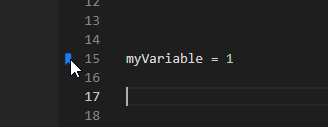
- When you toggles a line as a breakpoint and then you want to disable it after marking as a bookmark
- Create a breakpoint using the editor margin
- Use rigth click to toggle a bookmark
- Try to disable breakpoint from the margin
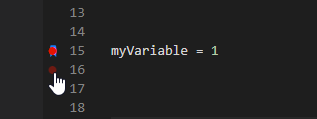
 uselessscat
>All comments
Hi @uselessscat ,
This is caused by VS Code, which still doesn't properly handle both icons. It has been already reported in #56, but the VS Code issue is still open. The original VS Code issue is https://github.com/microsoft/vscode/issues/5923
Hope this helps
 alefragnani
on 21 Dec 2020
alefragnani
on 21 Dec 2020
👍2
Was this page helpful?
0 / 5 - 0 ratings
Related issues
 longv2go
·
6Comments
longv2go
·
6Comments
 LukasPolak
·
4Comments
LukasPolak
·
4Comments
 919Studios
·
4Comments
919Studios
·
4Comments
 it-sha
·
5Comments
it-sha
·
5Comments
 pankajpatel
·
6Comments
pankajpatel
·
6Comments
Most helpful comment
Hi @uselessscat ,
This is caused by VS Code, which still doesn't properly handle both icons. It has been already reported in #56, but the VS Code issue is still open. The original VS Code issue is https://github.com/microsoft/vscode/issues/5923
Hope this helps