Vscode-bookmarks: Bookmark moving off original line
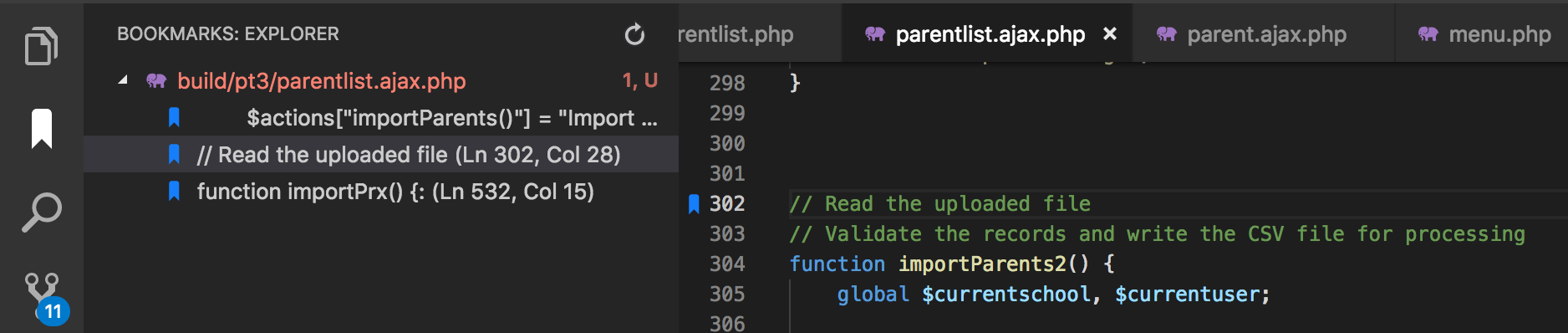
I normally add bookmarks where I have function names. However sometime during editing the bookmark seems to move off the function name. Is there some editing functions I shouldn't be using in order for the bookmarks to stay anchored to the correct line?
I'm on OSX 10.13.6 and VS Code 1.30.1 and Bookmarks 10.0.0
 murraycollingwood
All 17 comments
Hi @murraycollingwood
The bookmarks _should_ stay glued to the source code (sticky behavior), not the line number itself. So, you don’t need to do anything else to it move up or down when you update your code.
I’m wondering, aren’t you facing #116 or #118? If not, then you may have found a new issue with the sticky behavior that needs to be addressed.
Hope this helps
 alefragnani
on 24 Dec 2018
alefragnani
on 24 Dec 2018
I don't use the 'prettier' option, however I do sometimes 'undo' changes.
Let me monitor it and see if I can isolate the problem for you.
murraycollingwood
on 25 Dec 2018
Hi @murraycollingwood ,
If you are using Move Line Up or Move Line Down commands, you could be facing #108. Fortunately, this has been fixed with #136 , which will be released tomorrow (version 10.1.0).
Let me know if it has fixed your scenario, after the update.
alefragnani
on 6 Jan 2019
Same issue for me
 FSLobao
on 8 Feb 2019
FSLobao
on 8 Feb 2019
Hi @murraycollingwood @FSLobao,
Are you still facing this issue? Is it related to Undo or Formatters? If not, please give me the steps that I should follow to reproduce the issue.
I'm revisiting the _sticky_ feature, and would like to see if it is still happening.
Thank you
alefragnani
on 20 Mar 2019
Did a few tests and everything is working perfectly with the sticky feature.
Thanks and regards.
FSLobao
on 20 Mar 2019
same issue...
 code4bones
on 21 Aug 2019
code4bones
on 21 Aug 2019
I had the same issue.
I switched setting Use Workaround For Formatters to false (it was enabled for unknown reason), bookmark stickiness is working again.
 JoshLambda
on 31 Aug 2019
JoshLambda
on 31 Aug 2019
Still have bug
@alefragnani
Reproduce:
- open some document and create a bookmark
- made below changes any where above the bookmark line
2.1 pressenter
2.2 type _a_enter
2.3 type _b_enter
2.4 pressCTRL+zseveral times - bookmark now has been moved
😮😮😮
 maixuanhan
on 24 Oct 2019
maixuanhan
on 24 Oct 2019
I've been having the same issue. The extension idea is wonderful, but I stopped using it because bookmarks move one or two lines sometimes.
It is worth mentioning that:
- I'm working on macOS 10.14
- I normally use this for JS files
- I turned off native auto formatting on save and paste
- Don't use Prettier or any other formatter
- Tested with formatter workaround and without it with no luck
 mig8447
on 27 Apr 2020
mig8447
on 27 Apr 2020
here's a hint: extension must track the onDidChangeTextDocument event, and make incremental updates to its line numbers to stay "in sync" with changes, otherwise it won't ever work right. the "type" of file should not matter to the extension, as long as it's text in a range in a document.
ran into the exact same problems in an extension i am building myself, and in fact, anything using decorations will have the same issues, unless it is doing 100% document re-scans on every TD update (yak). i have looked at many extensions here on github and it is not uncommon to treat TextDocument as if size is no problem and run whatever logic on the whole of the text.
I'm getting ready to turn this extensions off; i'm spending more time resetting bookmarks than work. i use no formatters whatsoever only manual edits and invocation of "format document" every so often.
 pyramid-johng
on 11 Aug 2020
pyramid-johng
on 11 Aug 2020
Hi @pyramid-johng ,
That's exactly how the extension works, as you can see here:
The problem is to correctly handle the different kind of changes that this event fires, and the different settings that interact with it. For regular scenarios the extension works perfectly, but yes, Undo operations sometimes are a mess, and Formatters are not supported. Formatters like prettier or manually called, appears to do the same, and yes, is a complex issue if you don't have a high level API.
Sometime ago I found an issue in VS Code repo asking for a _proper API_ (don't remember if is the same as yours), but no ETA from VS Code team.
It's on my radar, and I would like to return to this issue soon, but no ETA yet.
Hope this helps
alefragnani
on 11 Aug 2020
I am facing the same issue, it seems like the bookmark sticks to the line instead of the source code. It always happens, when I add a new line above with enter, when I delete a line above (command + x, command + shift + k), when I move the source code line...
Edit: I had bookmarks.useWorkaroundForFormatters enabled because I faced this issue one time (maybe #116) and tried enabling it, _which made things worse_.
Context:
- VSCode 1.54.3 x64 (
2b9aebd5354a3629c3aba0a5f5df49f43d6689f8) - Language: Python (3.7.9)
- OS: Darwin 20.2.0 (macOS Big Sur)
- No formatters active
 os-ia
on 16 Mar 2021
os-ia
on 16 Mar 2021
Same here as post above. The bookmark sticks to the line instead of the code.
I tried with and without the Workaround For Formatters, and yet the problem remains. (I'm not using any formatter.)
(Using VSCode 1.55.2 on my Windows 10 19042.928.)
 thelegend09
on 4 May 2021
thelegend09
on 4 May 2021
1 - Toggle a bookmark on.
2 - Add a line above the bookmark. The bookmark is sticky and moves down.
3 - Undo action. The bookmark is sticky and moves up.
1 - Toggle a bookmark on.
2 - Add TWO lines above the bookmark. The bookmark is sticky and moves down.
3 - Now undoing will displace the bookmark incorrectly by ONE line. The bookmark is "correctly" sticky for the second undo action.
4 - Repeat step three with 3, 4, 5, etc. empty lines. The undo stack is always correct for just the LAST new line.
It seems there's an underlying problem with how undo actions are being counted.
I am using prettier, but workaround option is FALSE. If I set the option to TRUE, sticky doesn't work at all.
 justKD
on 6 May 2021
justKD
on 6 May 2021
Same here as post above. The bookmark sticks to the line instead of the code.
I tried with and without the Workaround For Formatters, and yet the problem remains. (I'm not using any formatter.)
(Using VSCode 1.55.2 on my Windows 10 19042.928.)
Finally I got it to work!!!!! My steps:
- I uninstalled the extension.
- I uninstalled VS Code using the free version of Revo Uninstaller and made sure to delete the registry keys linked to it.
- I rebooted the computer. Just in case.
- I reinstalled VS Code. (I redownloaded it, just in case.)
- I reinstalled the extension.
Everything works flawlessly since. Hurray!
thelegend09
on 7 May 2021
1 - Toggle a bookmark on.
2 - Add a line above the bookmark. The bookmark is sticky and moves down.
3 - Undo action. The bookmark is sticky and moves up.1 - Toggle a bookmark on.
2 - Add TWO lines above the bookmark. The bookmark is sticky and moves down.
3 - Now undoing will displace the bookmark incorrectly by ONE line. The bookmark is "correctly" sticky for the second undo action.
4 - Repeat step three with 3, 4, 5, etc. empty lines. The undo stack is always correct for just the LAST new line.It seems there's an underlying problem with how undo actions are being counted.
I am using prettier, but workaround option is FALSE. If I set the option to TRUE, sticky doesn't work at all.
I can replicate this issue on my end, and I do not use prettier
 defenestrateddefense
on 29 Jun 2021
defenestrateddefense
on 29 Jun 2021
Related issues
 LighghtEeloo
·
6Comments
LighghtEeloo
·
6Comments
 GaryFurash
·
5Comments
GaryFurash
·
5Comments
 jing2si
·
4Comments
jing2si
·
4Comments
 it-sha
·
5Comments
it-sha
·
5Comments
 pakLebah
·
3Comments
pakLebah
·
3Comments
Most helpful comment
Still have bug
@alefragnani
Reproduce:
2.1 press
enter2.2 type _a_
enter2.3 type _b_
enter2.4 press
CTRL+zseveral times😮😮😮