Vscode-arduino: The Extension should automagically fill the c_cpp_properties.json, so intellisense works out of the box
EDIT: 07/03/2018: My understanding of the issue has improved since I opened it. I think that the extension should fill the intellisense config file on the fly based on the board being selected by the user.
To my knowledge, the Arduino IDE checks for libraries in 4 places: the main Arduino installation path (in windows c:\program files....), any board-specific version of the libraries for this board ("...appdata\local..."), your sketchbook location and a "libraries" folder for that particular sketch. Ideally, you would install your libraries in your sketchbook location, so they are available for all your projects.
I've just installed VS Code and the Arduino plugin, and it seems to be able to know that my sketchbook location is not the default, as I can see the examples of the libraries that I've installed there, and I can compile my sketch. In any case, I get tens of intellisense errors, as intellisense seems incapable to follow the paths for the includes. I can add the sketchbook location libraries to the c_cpp_properties.json, and either add all the libraries used there (painfull) or add the base "libraries" folder and then tweak the includes to have partial paths (less painfull), but even in these cases, intellisense will complain that it can't find any of the libraries this files might use. And I would have to do it for all my projects, one by one.
What am I doing wrong? why doesn't this plugin pick the usual library locations? Is it normal to have 100s of intellisense errors? is that really the way it's meant to be?
Sorry, I'm new to Visual Studio and Visual Studio Code, and I'm quite sure that the problem it's me not being able to find out the logic behind them, but I can't find any info on the internet either.
I'm using windows 10 64 bits, and my arduino Ide is at the latest version. The relevant part of my c_cpp_settings.json of this project is:
{
            "name": "Win32",
            "includePath": [
                "C:/Program Files (x86)/Microsoft Visual Studio/2017/Community/VC/Tools/MSVC/14.11.25503/include/*",
                "C:/Program Files (x86)/Windows Kits/10/Include/10.0.16299.0/um",
                "C:/Program Files (x86)/Windows Kits/10/Include/10.0.16299.0/ucrt",
                "C:/Program Files (x86)/Windows Kits/10/Include/10.0.16299.0/shared",
                "C:/Program Files (x86)/Windows Kits/10/Include/10.0.16299.0/winrt",
                "${workspaceRoot}",
                "C:\\Users\\Joel\\AppData\\Local\\Arduino15\\packages\\SODAQ\\hardware\\samd\\1.6.14\\cores\\arduino"
            ],
            "defines": [
                "_DEBUG",
                "UNICODE"
            ],
            "intelliSenseMode": "msvc-x64",
            "browse": {
                "path": [
                    "C:/Program Files (x86)/Microsoft Visual Studio/2017/Community/VC/Tools/MSVC/14.11.25503/include/*",
                    "C:/Program Files (x86)/Windows Kits/10/Include/10.0.16299.0/um",
                    "C:/Program Files (x86)/Windows Kits/10/Include/10.0.16299.0/ucrt",
                    "C:/Program Files (x86)/Windows Kits/10/Include/10.0.16299.0/shared",
                    "C:/Program Files (x86)/Windows Kits/10/Include/10.0.16299.0/winrt",
                    "${workspaceRoot}",
                    "C:\\Users\\Joel\\AppData\\Local\\Arduino15\\packages\\SODAQ\\hardware\\samd\\1.6.14\\cores\\arduino"
                ],
                "limitSymbolsToIncludedHeaders": false,
                "databaseFilename": ""
            }
        }
This is a screenshot of my project

 mundodisco8
All 104 comments
Please see here to see whether help resolve this issue?
https://github.com/Microsoft/vscode-arduino/wiki/FAQ
By default, the Arduino extension doesn't pick up all the head files. You can either pop up the command "Arduino: Library Manager" to include the header file to your paths.
 yaohaizh
on 4 Nov 2017
yaohaizh
on 4 Nov 2017
Hi,
I just open an example, the blink example, and used the arduino Uno as board. That way, my c_cpp_properties.json has just these two folders:
"C:\\Program Files (x86)\\Arduino\\hardware\\arduino\\avr\\cores\\arduino",
"${workspaceRoot}"
With that, all the Arduino-defined functions and variables are highlighted as undefined (pinMode, digitalWrite, HIGH,...).
It may be that I don't get how this thing is supposed to work, but I expect from the Arduino plugin to get all these methods by default. I also don't understand why doesn't it search for libraries where the Arduino IDE is expecting to find libraries (that is, the installation folder, the roaming/local/... folder where your boards are installed and the sketchbook location). These folders should be added by default. In any case, even if I add them, I can't get it to work. Yes, it compiles, but it's impossible to use this in a medium sized sketch without getting dozens of errors that make debugging a nightmare.
If my understanding is correct, only the folders in the includePath parameter are used for intellisense, but the search in them is not recursive. I don't know what folders do I have to add to get all the different definitions and methods and whatnot from Arduino working, but I suspect that it could be again dozens of them, not including all the folders I have to include to make a library work if it has dependencies... Is there a way to get Intellisense working on the Arduino plugin or am I doing something that is simply not achievable?
mundodisco8
on 6 Nov 2017
I've been fighting the same thing; since the intellisense parser changed to requiring exact paths from being willing to follow recursive directories, it's basically impossible to set up all the include paths necessary for Arduino usage.
I've been able to add all the libraries to the browse path, which inexplicably _does_ work with recursion. Then, VS Code will suggest folders that are missing from the include path in the light bulb bubble. But I have to play whack-a-mole going deep into the bowels of included microcontroller library structures to get everything added. And the suggestions stop working after you pick only one, so you end up with lots of missing libraries and no way to discover the necessary paths for them...
This really needs to be fixed by the C/C++ extension authors, but judging from their issues database they've seemed stubbornly resistant to feedback requesting the return of recursive search paths. :(
 bandrews
on 7 Nov 2017
bandrews
on 7 Nov 2017
That's a shame, let's see how things develop, but it looks like a dealbreaker, at least for me at the moment. :(
mundodisco8
on 8 Nov 2017
Also been fighting this issue. I have been trying to use the LiquidCrystal library for a project of mine, First it's annoying and unwieldy trying to point to that file - let alone dig around to then find (and point to) the dependencies within that. The c_cpp_properties.json file is becoming a mess trying to keep - I'm rather discouraged to work on a bigger project which might need more libraries.
Any other solutions or alternatives for now? It's a shame because I love Visual Studio Code and it would be perfect to add another type of project to it (I use it for Unity (C#), Java, and Web Development with zero issues)
 aldrDev
on 11 Nov 2017
aldrDev
on 11 Nov 2017
For please this value to your vscode setting file to see whether fix the intellisense issue:
"C_Cpp.intelliSenseEngine": "Tag Parser",
This partially works (In that it stops the problems showing up in my test.ino file; and it seems I can show IntelliSense for methods not affected by problematic includes deeper down the rabbit hole)
As you can see
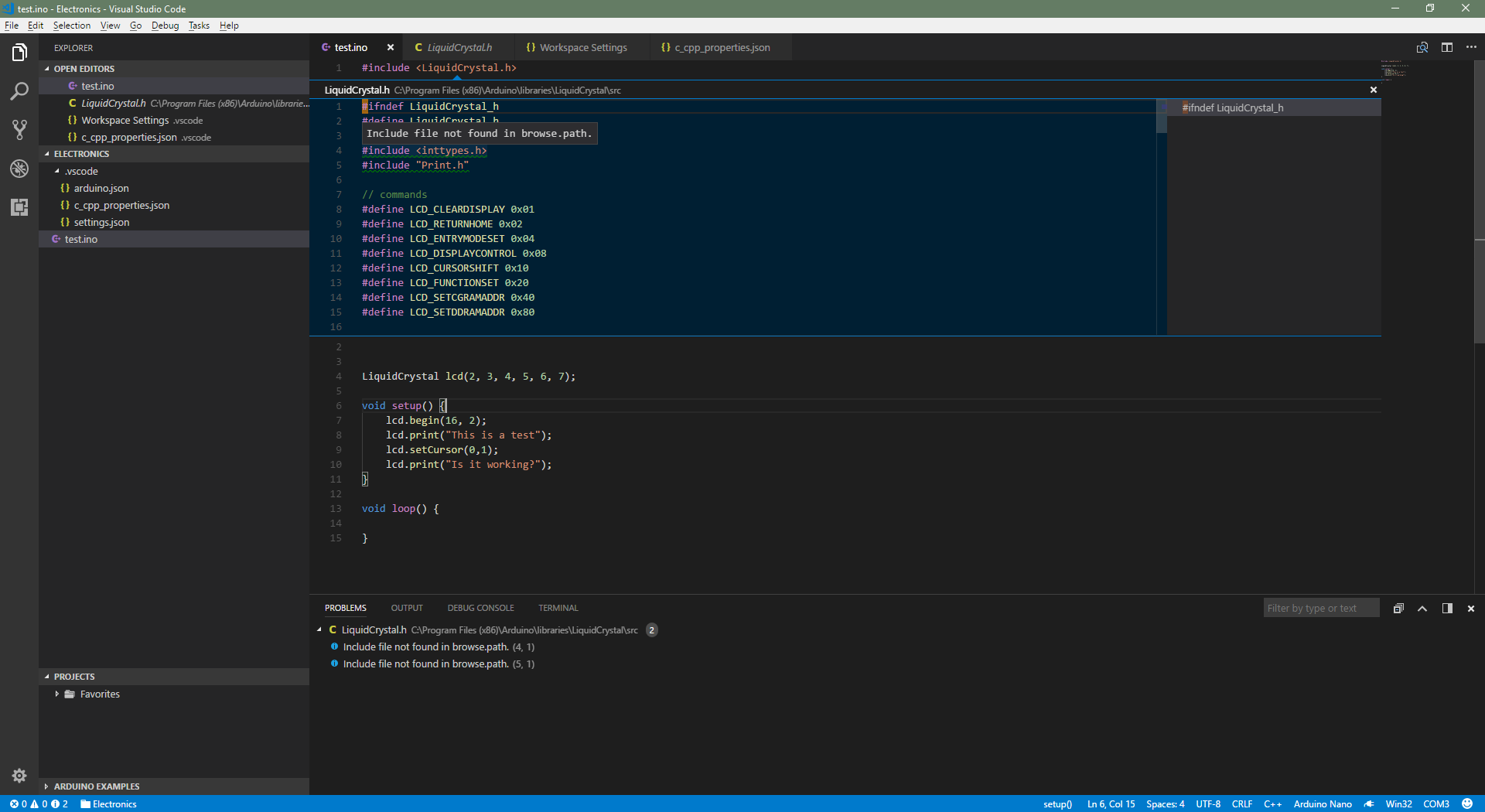
It will suffice for now - At least I can program for (and build) to my Arduino from the comfort of VS Code :) Looking forward to see even tighter / full integration soon.
Thanks @yaohaizh
aldrDev
on 14 Nov 2017
I was in a similar situation trying to set up vscode for programming ESP chips (using Arduino).
I got intellisense to work, but I haven't done too much testing so this solution might not be final one.
But it does give me preview for parameters in the FastLED Library, which is installed under D:\Users\Julian\Documents\Arduino\libraries\FastLED.

Stuff I did:
- _Force Intellisense to use the "Tag Parser" in the User Settings:_
"C_Cpp.intelliSenseEngineFallback": "Disabled",
"C_Cpp.intelliSenseEngine": "Tag Parser",
- Set up the c_cpp_properties.json
{
    "name": "Arduino",
    "includePath": [
        "${workspaceRoot}"
    ],
    "browse": {
        "path": [
            "D:/Program Files (x86)/Arduino/hardware",
            "D:/Program Files (x86)/Arduino/libraries",
            "D:/Users/Julian/Documents/Arduino/libraries/",
            "D:/Users/Julian/Documents/Arduino/hardware/",
            "${workspaceRoot}"
        ],
        "limitSymbolsToIncludedHeaders": true,
        "databaseFilename": ""
    },
    "intelliSenseMode": "msvc-x64"
}
that way, only the Tag Parses will be used as the engine and the config in the c_cpp_properties.json becomes a lot simples, since intellisense reads directories recursively now. That way I also got the engine to read libraries I installed manually, since they are placed in my homedirectory (D:/Users/Julian/Documents/Arduino/libraries/). Same goes for boards I installed, like the ESP8266, which has its package sit in "D:/Users/Julian/Documents/Arduino/hardware/".
Also, I used this as a source.
I'm gonna try to config the Arduino extension from Microsoft as well now, if I run into some issues I can fix I will comment them here.
 JulianGmp
on 17 Nov 2017
JulianGmp
on 17 Nov 2017
I have not tried the tag parser setting suggested here, but had come up with a solution which was to simply add all the include paths by hand.
For a basic hello world program on a UNO like this:
#include <Arduino.h>
#define LED_PIN 10

void setup() {
    pinMode(LED_PIN, OUTPUT);
}

void loop() {
    digitalWrite(LED_PIN, HIGH);
    delay(1000);
    digitalWrite(LED_PIN, LOW);
    delay(1000);
}
I need a C_Cpp_properties.json like this:
{
    "configurations": [
        {
            "name": "Win32",
            "includePath": [
                "${workspaceRoot}",
                "C:\\Program Files (x86)\\Arduino\\hardware\\arduino\\avr\\cores\\arduino",
                "C:\\Program Files (x86)\\Arduino\\hardware\\tools\\avr\\avr\\include",
                "C:\\Program Files (x86)\\Arduino\\hardware\\tools\\avr\\lib\\gcc\\avr\\4.9.2\\include",
                "C:\\Program Files (x86)\\Arduino\\hardware\\arduino\\avr\\variants\\mega"
            ],
            "browse": {
                "limitSymbolsToIncludedHeaders": false,
                "path": [
                    "${workspaceRoot}",
                    "C:\\Program Files (x86)\\Arduino\\hardware\\arduino\\avr\\cores\\arduino",
                    "C:\\Program Files (x86)\\Arduino\\hardware\\tools\\avr\\avr\\include",
                    "C:\\Program Files (x86)\\Arduino\\hardware\\tools\\avr\\lib\\gcc\\avr\\4.9.2\\include",
                    "C:\\Program Files (x86)\\Arduino\\hardware\\arduino\\avr\\variants\\mega"
                ]
            },
            "intelliSenseMode": "msvc-x64"
        }
    ],
    "version": 3
}
Maybe changing it so that Arduino: Board Config actually includes all the needed paths could be a start for trying to fix the issue.
 dafzor
on 21 Nov 2017
dafzor
on 21 Nov 2017
@dafzor Thanks. I adjusted it for linux and it works. At least I got autocompletion and intellisense working. In case someone else needs it, here is my config:
{
    "configurations": [
        {
            "name": "Linux",
            "includePath": [
                "/usr/lib/gcc/avr/7.2.0/include",
                "/home/<user>/.arduino15/packages/arduino/hardware/avr/1.6.20/cores/arduino",
                "/usr/avr/include/",
                "/home/<user>/.arduino15/packages/arduino/tools/avr-gcc/4.9.2-atmel3.5.4-arduino2/avr/include",
                "/usr/share/arduino/hardware/archlinux-arduino/avr/variants/mega"
            ],
            "browse": {
                "limitSymbolsToIncludedHeaders": false,
                "path": [
                    "/usr/lib/gcc/avr/7.2.0/include",
                    "/home/<user>/.arduino15/packages/arduino/hardware/avr/1.6.20/cores/arduino",
                    "/usr/avr/include/",
                    "/home/<user>/.arduino15/packages/arduino/tools/avr-gcc/4.9.2-atmel3.5.4-arduino2/avr/include",
                    "/usr/share/arduino/hardware/archlinux-arduino/avr/variants/mega"
                ]
            },
            "intelliSenseMode": "clang-x64"
        }
    ],
    "version": 3
}
 InRiPa
on 22 Nov 2017
InRiPa
on 22 Nov 2017
Somebody Please tell this for mac too
 heyAyushh
on 28 Nov 2017
heyAyushh
on 28 Nov 2017
I can't find the path for Mac
 carlhung
on 16 Dec 2017
carlhung
on 16 Dec 2017
Same issue.
On Mac:
Added '#include
Not sure about intellisense or anything else. Anyone working on this?
 stormbytes
on 17 Dec 2017
stormbytes
on 17 Dec 2017
@stormbytes I think that is caused because the Arduino.h file isn't included by default in Visual Studio's mind. The Arduino Software obviously includes their core when compiling.
Adding the #include <Arduino.h> or the #include <Esp.h> when using ESP Controllers won't cause issues though. It's a bit annoying but oh well, better than having to use the Arduino "IDE"
JulianGmp
on 17 Dec 2017
@JulianGmp what you're saying makes sense though Platformio team should have considered this when developing the VS extension. Having to add the header to each sketch is completely redundant and means that everyone who uses this extension is bound to run into this exact problem. It will do for now. I hope they fix this is the next update.
stormbytes
on 17 Dec 2017
@stormbytes I'm not using PlatformIO, I'm using the Arduino Extension from Microsoft
But I guess both extensions didn't prevent this from happening, oh well not the End of the world
JulianGmp
on 17 Dec 2017
The official Arduino IDE will include the
yaohaizh
on 18 Dec 2017
Just leaving the info here that even if you setup the include paths the intellisense will still not work 100%. For example, if you include SD.h library and a line like this File myfile = SD.open("myfile"); it will show several type definition errors even though the sketch will compile and run correctly.
So I ended up moving to http://www.visualmicro.com until the vscode extension gets fixed.
dafzor
on 18 Dec 2017
On macOS, I added #include <Arduino.h> to beginning of .ino file and I filled c_cpp_properties.json content with:
{
    "configurations": [
        {
            "name": "Mac",
            "includePath": [
                "${workspaceRoot}",
                "/Applications/Arduino.app/Contents/Java/hardware/arduino/avr/cores/arduino",
                "/Applications/Arduino.app/Contents/Java/hardware/arduino/avr/variants/mega",
                "/Applications/Arduino.app/Contents/Java/hardware/tools/avr/avr/include",
                "/Applications/Arduino.app/Contents/Java/hardware/tools/avr/lib/gcc/avr/4.9.2/include"
            ],
            "defines": ["UBRRH"],
            "browse": {
                "limitSymbolsToIncludedHeaders": false,
                "path": [
                    "${workspaceRoot}",
                    "/Applications/Arduino.app/Contents/Java/hardware/arduino/avr/cores/arduino",
                    "/Applications/Arduino.app/Contents/Java/hardware/arduino/avr/variants/mega",
                    "/Applications/Arduino.app/Contents/Java/hardware/tools/avr/avr/include",
                    "/Applications/Arduino.app/Contents/Java/hardware/tools/avr/lib/gcc/avr/4.9.2/include"
                ]
            },
            "intelliSenseMode": "clang-x64"
        }
    ],
    "version": 3
}
Notice that #include <Arduino.h> line shows error, but you can ignore it and have Intelisense working for rest of file...
 DavidKarlas
on 6 Jan 2018
DavidKarlas
on 6 Jan 2018
I think you can run arduino_debug.exe, compile a sketch. You can look the console window for it how to call avr-g++ to know the predefined macros and include path. Finally my json file look like this:
{
    "configurations": [
        {
            "name": "Win32",
            "defines": [
                "F_CPU=16000000L",
                "ARDUINO=10805",
                "ARDUINO_AVR_UNO",
                "ARDUINO_ARCH_AVR"
            ],
            "includePath": [
                "D:\\tools\\arduino-1.8.5\\hardware\\arduino\\avr\\cores\\arduino",
                "D:\\tools\\arduino-1.8.5\\hardware\\arduino\\avr\\variants\\standard",
                "D:\\tools\\arduino-1.8.5\\hardware\\tools\\avr\\avr\\include",
                "D:\\tools\\arduino-1.8.5\\hardware\\tools\\avr\\lib\\gcc\\avr\\4.9.2\\include"
            ],
            "browse": {
                "limitSymbolsToIncludedHeaders": false,
                "path": [
                    "D:\\tools\\arduino-1.8.5\\hardware\\arduino\\avr\\cores\\arduino",
                    "D:\\tools\\arduino-1.8.5\\hardware\\arduino\\avr\\variants\\standard",
                    "D:\\tools\\arduino-1.8.5\\hardware\\tools\\avr\\avr\\include",
                    "D:\\tools\\arduino-1.8.5\\hardware\\tools\\avr\\lib\\gcc\\avr\\4.9.2\\include"
                ]
            },
            "intelliSenseMode": "msvc-x64"
        }
    ],
    "version": 3
}
 heroboy
on 10 Jan 2018
heroboy
on 10 Jan 2018
I also retried today to configure the support for intellisense and it doesn't work.
After configuring the includePath, now it request WProgram.h even if the Arduino installation is totally updated.
I don't want to waste time and give up.
 raffaeler
on 13 Jan 2018
raffaeler
on 13 Jan 2018
If you meet something like identifier "Serial" not defined, also add "USBCON" into defines in configurations
See cpptools document for more details.
I'm not sure if there're other flags like this, while I hope the extension could do this automatically for us, since we have done setup the "Arduino Board Configuration".
 clouds56
on 20 Jan 2018
clouds56
on 20 Jan 2018
Nope, in my case the problem is the editor. No way to configure properly the intellisense and get rid of the squiggles on the includes
raffaeler
on 20 Jan 2018
Which header is trying to request "WProgram.h"? In my linux package, there's no WProgram.h and no header's including it.
clouds56
on 20 Jan 2018
quick search trough the headers shows this bit of code
`* The WProgram.h file, which provides declarations for the Arduino API,
has been renamed to Arduino.h. To create a library that will work in
both Arduino 0022 and Arduino 1.0, you can use an #ifdef that checks
for the ARDUINO constant, which was 22 and is now 100. For example:
#if defined(ARDUINO) && ARDUINO >= 100
#include "Arduino.h"
#else
#include "WProgram.h"
#endif`
So seems you're using an old library that doesn't properly account for
newer versions of the API.
On 20 January 2018 at 13:01, Clouds notifications@github.com wrote:
Which header is trying to request "WProgram.h"? In my linux package,
there's no WProgram.h and no header's including it.—
You are receiving this because you were mentioned.
Reply to this email directly, view it on GitHub
https://github.com/Microsoft/vscode-arduino/issues/438#issuecomment-359169807,
or mute the thread
https://github.com/notifications/unsubscribe-auth/ABiZrkdbxmzMzogGLcWZFglJqV6CuCn8ks5tMeOSgaJpZM4QSAJ2
.
dafzor
on 20 Jan 2018
The library is DHT.h from Adafruit and is updated.
The DHT.h file specifies the same preprocessor definitgions you wrote, but it complains

If I right click the DHT.h and navigate to definition, the DHT.h file gets opened.
Arduino IDE version 1.8.2
DHT unified 1.0.0
DHT sensor library 1.3.0
raffaeler
on 20 Jan 2018
It's also about defines, the ARDUINO macro is not defined, add
defines: [ "ARDUINO=100" ],
to your c_cpp_properties.json
I'm assuming you're using this DHT.h, and your ARDUINO version is 100, change it if necessary.
clouds56
on 20 Jan 2018
Looks far better now, thanks!
I am adding other include paths and then will try connecting the devices.
I don't understand why the vscode extension does not provide somthing to get this easier. Also the doc does is not clear about the settings needed to make it work.
raffaeler
on 20 Jan 2018
Still, all the solutions force you to use the tag parser, as the default mode doesn't work. I don't think the issue is solved, as the default mode doesn't work. Even including all the individual paths, I still get errors of undefined stuff that is clearly defined in libraries I'm including.
Having to go back a mode that has less features in order for it to work doesn't seem like a solution to me, but more like a patch while we work on the issue (something that I'm super grateful to have the option to use as a fallback, don't get me wrong).
That's why I think the issue should be open. I know that intellisense is not part of this plugin, but you should be either able to talk to the c/c++ plugin team in order to make them aware of this type of issues, or change the c_cpp_properties.json on the fly, based on the selected board, to add the barebones "browse.path".
All the best and good luck.
mundodisco8
on 2 Feb 2018
Another example:
I get errors on all the register names and bit names used to manipulate them. They are defined in "avr/io.h" (location dependant on your architecture), which is basically a bunch of #ifdefs. I understand that is not being picked because the relevant word for my board is not being defined (whereas the Arduino IDE defines all the relevant words), much like in the case of raffaeler with the Wprogram.h library. How can we overcome this? is there a list of stuff that is known to be defined by the IDE that is not being properly passed to intellisense?
mundodisco8
on 2 Feb 2018
+1 this should be the default so the end-user doesn't have to worry about these path
hope to see it in the next release!
another "nice" feature would be to have all the libraries listed when you write #include, example:
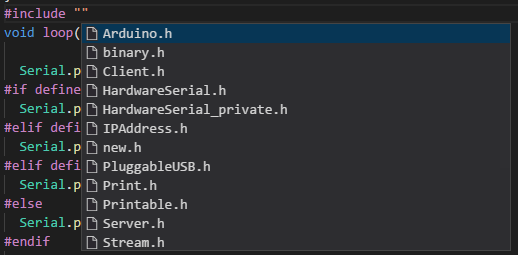
it would be great if you could hide the libraries inside the core and show only the user libraries
P.S: i am using the method of @JulianGmp
 aster94
on 3 Feb 2018
aster94
on 3 Feb 2018
366
 liydu
on 9 Feb 2018
liydu
on 9 Feb 2018
Cross-reference: Microsoft/vscode-cpptools#743
For the Arduino Uno, I have found that the following settings work well:
{
    "configurations": [
        {
            "name": "Win32",
            "includePath": [
                "${workspaceRoot}",
                "C:/Program Files (x86)/Arduino/hardware/arduino/avr/cores/arduino",
                "C:/Program Files (x86)/Arduino/hardware/tools/avr/avr/include",
                "C:/Program Files (x86)/Arduino/hardware/tools/avr/lib/gcc/avr/4.9.2/include",
                "C:/Program Files (x86)/Arduino/hardware/arduino/avr/variants/standard",
            ],
            "defines": [
                "_DEBUG",
                "UNICODE",
                "__AVR_ATmega328P__",
                "__AVR_ENHANCED__"
            ],
            "intelliSenseMode": "clang-x64",
            "browse": {
                "path": [
                    "${workspaceRoot}",
                    "C:/Program Files (x86)/Arduino/hardware/arduino/avr/cores/arduino",
                    "C:/Program Files (x86)/Arduino/hardware/tools/avr/avr/include",
                    "C:/Program Files (x86)/Arduino/hardware/tools/avr/lib/gcc/avr/4.9.2/include",
                    "C:/Program Files (x86)/Arduino/hardware/arduino/avr/variants/standard",
                ],
                "limitSymbolsToIncludedHeaders": false,
                "databaseFilename": ""
            }
        }
    ],
    "version": 3
}
Rough explanation:
"intelliSenseMode": "clang-x64"is needed to play well with GCC__AVR_ATmega328P__and__AVR_ENHANCED__normally only get defined during compilation, so they need to be explicitly called out for the Intellisense engine. Note that these values will vary depending on the board.- The
browseandincludePathsettings are as specific as possible to guide the Intellisense engine to the correct definition for the board. e.g.variants/standardis specified instead ofvariantsto get the correct pins_arduino.h for the Arduino Uno.
Ultimately, this extension should generate a lot of these configuration settings for the user, based on their platform and board selection.
 jlj-ee
on 12 Feb 2018
jlj-ee
on 12 Feb 2018
I'm still not able to get intellisens working on my Mac, anyone already gets it working?
 Eternyt
on 18 Feb 2018
Eternyt
on 18 Feb 2018
I think it is better to just wait, they added a milestone, so i think it would be fixed soon
aster94
on 18 Feb 2018
@Eternyt have you tried @DavidKarlas ' solution? That worked for me
 derwentx
on 19 Feb 2018
derwentx
on 19 Feb 2018
@derwentx Yes, probably I did something wrong...
Eternyt
on 21 Feb 2018
@mundodisco8 have you got this issue solved?
 czgtest
on 7 Mar 2018
czgtest
on 7 Mar 2018
Well, it really depends on what you mean by "solved".
My main problem was the myriad of squiggly lines that appeared. Now I know how to configure the intellisense file to solve it. For reference purposes, this is my c_cpp_properties.json. I will add notes here for the reference of other people that my stumble upon this.
First of all, don't trust those that say "change intellisense to tag parser". That's not a solution, that's the equivalent to replying "don't use all the fancy new features to intellisense" when you ask "Why can't I use all the fancy new features of intellisense".
In the browse section, add the folders where your code is located. ${workspaceroot} will cover your sketch's folder and subfolders. When a library is missing, intellisense will search in these folders recursively, you will see why this is useful later in this post. Add the folder where your libraries might be located. This depends on your configuration and the boar you're using:
"browse": {
                "path": [
                    "${workspaceRoot}",
                    "**path to your sketchbook**/libraries",      <==== Arduino default library location for users
                    "C:/Program Files (x86)/Arduino/libraries",  <====Same thing, but in your installation path
                    "C:/Program Files (x86)/Arduino/hardware",<====This two depend on what board you're using
                    "C:/Program Files (x86)/Arduino/avr"           <====I use a Uno on this example
                ],
                "limitSymbolsToIncludedHeaders": true
            }
On top of that, the IDE defines some words to enable or disable features, depending on your board. I don't know where to look at this, but in this thread people suggest some of these:
"defines": [
                "_DEBUG",
                "UNICODE",
                "ARDUINO=100",
                "__AVR_ATmega328P__",
                "__AVR__",
                "__AVR_ENHANCED__"
            ],
Also, some people mention that the intellisense mode should be changed to clang, don't know what the implications of this has.
"intelliSenseMode": "clang-x64",
After that, every time you include a library, go to the squiggly line, click on the lightbulb, and if the paths are right, it will suggest a location for that particular missing library. If your browse section is not set right, intellisense won't find the libraries. Choose the right path if some are suggested. In the case of that example, I know it's the first one.
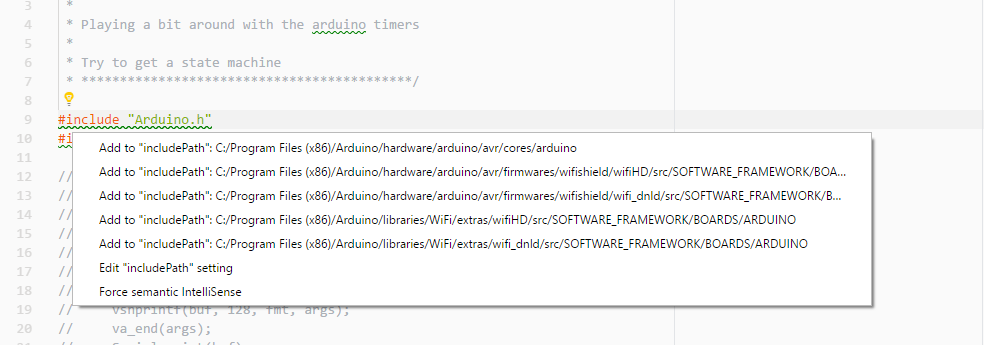
When you do that, one entry is added to the includepath section of the c_cpp_properties.json file. Intellisense will keep searching within that recently added library, so you might need to add entries to other libraries included by your library, and so on. Once all the paths needed are added, your undefines will disappear.
BUT! I really don't see the point of having the extension installed just to have a bunch of buttons to upload the code and open the serial monitor (especially when loading the code implies recompiling from scratch and is so much slower than using the Arduino IDE). I think that the extension should add all the defines and libraries needed automagically based on the current board selected. I will edit the title of my issue to explain my actual issue now, as it has changed since I opened it.
mundodisco8
on 7 Mar 2018
This contents on file "c_cpp_properties.json" works for me on mac, just replace
{
  "configurations": [
    {
      "name": "Mac",
      "includePath": [
        "/Applications/Arduino.app/Contents/Java/libraries",
        "/Users/<user name>/Documents/Arduino/libraries"
      ],
      "browse": {
        "limitSymbolsToIncludedHeaders": false,
        "path": [
          "/Applications/Arduino.app/Contents/Java/libraries",
          "/Users/<user name>/Documents/Arduino/libraries"
        ]
      },
      "intelliSenseMode": "clang-x64",
      "macFrameworkPath": [
        "/System/Library/Frameworks",
        "/Library/Frameworks"
      ]
    }
  ],
  "version": 3
}
 fzoccara
on 18 Mar 2018
fzoccara
on 18 Mar 2018
The suggested way is to use default engine and set intelliSenseMode to clang-x64.
includePath is for the default engine, and browse is for tag parser, so we should use includePath instead of browse.
However, includePath is not recursive currently. C/CPP extension team told us they will support recursive path in includePath 1 or 2 months later.
 Sneezry
on 20 Mar 2018
Sneezry
on 20 Mar 2018
since browse also works, take this as a workaround and fix it temporally in next sprint
 ArthurMa1978
on 9 Apr 2018
ArthurMa1978
on 9 Apr 2018
We did some temporary workaround in v0.2.15, and we will keep seeking final solution
Sneezry
on 14 May 2018
I believe it's worth mentioning that if ${config:arduino.path} was allowed to be used in local user workspace files, that this:
{
    "configurations": [
        {
            "name": "Win32",
            "includePath": [
                "${workspaceRoot}",
                "${config:arduino.path}/hardware/tools/avr/avr/include",
        "${config:arduino.path}/hardware/arduino/avr/cores/arduino",
        "${config:arduino.path}/hardware/arduino/avr/libraries/EEPROM/src",
        "${config:arduino.path}/hardware/tools/avr/lib/gcc/avr/4.9.2/include",
        "${config:arduino.path}/hardware/tools/avr/lib/gcc/avr/4.9.2/include-fixed"
            ],
            "browse": {
                "limitSymbolsToIncludedHeaders": false,
                "path": [
                    "${workspaceRoot}"
                ]
            },
            "intelliSenseMode": "msvc-x64",
            "cppStandard": "c++11"
        }
    ],
    "version": 3
}
Would be a suitable solution for the base case (without factoring the board in).
Likewise the boards could be found in "${config:arduino.path}/hardware/arduino/avr/variants/<board category>" (which is only actually needed for pins_arduino.h).
Perhaps the same effect could be achieved programmatically?
(As for 3rd party libraries added by the Arduino IDE, I think adding those libraries probably counts as a separate issue maybe?)
 Pharap
on 4 Jul 2018
Pharap
on 4 Jul 2018
Hi @Sneezry There is a file named "includes.cache" that the Arduino build process creates in the build directory. That file contains all the include paths for the project. Could you use this file to fill the intellisense include paths automagically?
 sslupsky
on 21 Sep 2018
sslupsky
on 21 Sep 2018
Installation did not work for me out of the box. I tried for several hours all sorts of combinations, and apparently, defines_may_ be the key, but I'm simply not sure what did I miss.
            "defines": [
                "ARDUINO_AVR_NANO",
                "F_CPU=16000000L",
                "ARDUINO_ARCH_AVR",
                "ARDUINO=10805",
                "__AVR_ATmega328P__"
            ],
 ljubomirb
on 15 Oct 2018
ljubomirb
on 15 Oct 2018
@ljubomirb Here is what I use for the MKRWAN1300:
        "defines": [
            "ARDUINO=100",
            "ARDUINO_ARCH_SAMD",
            "ARDUINO_SAMD_MKRWAN1300",
            "__SAMD21G18A__",
            "BOARD_ID_arduino_mkrwan1300",
            "_VARIANT_ARDUINO_MKRWAN1300_"
        ],
It would be really cool if there was a way for the vscode plugin to automatically pick the defines from the make file.
sslupsky
on 24 Oct 2018
@sslupsky
I'm not even sure what is or what was wrong. Most of my problems went away when I set tag parser as IntelliSense engine. So, something is missing either in "how to" instructions, or settings, or is otherwise making us doing the wrong steps. If "tag parser" should be used, then it should be set on automatically. For me, visual studio 201x community still works better with arduino plugin at the moment, but vscode, once fixed, definitely has a great future!
ljubomirb
on 24 Oct 2018
Tag parser should NOT be set. It's a fallback in case the normal mode
doesn't work. The reason why it "works" for you when you set it, it's
because you're telling intellisense to "ignore the errors" that we're
trying to fix here. So it's nothing that tag parser fixes the issue, tag
parser hides the issue.
On Wed, 24 Oct 2018, 16:14 Ljubomir B, notifications@github.com wrote:
@sslupsky https://github.com/sslupsky
I'm not even sure what is or what was wrong. Most of my problems went away
when I set tag parser as IntelliSense engine. So, something is missing
either in "how to" instructions, or settings, or is otherwise making us
doing the wrong steps. If "tag parser" should be used, then it should be
set on automatically. For me, visual studio 201x community still works
better with arduino plugin at the moment, but vscode, once fixed,
definitely has a great future!—
You are receiving this because you were mentioned.
Reply to this email directly, view it on GitHub
https://github.com/Microsoft/vscode-arduino/issues/438#issuecomment-432699662,
or mute the thread
https://github.com/notifications/unsubscribe-auth/AIA3EyfEeS3p1oc7CFOSdojXtZ_ffPhYks5uoIPRgaJpZM4QSAJ2
.
mundodisco8
on 24 Oct 2018
Note to Linux VScode users: Make sure to use "Arduino: upload" as opposed to "upload using programmer." The latter will not upload to the arduino board but instead throw an "Exit with code=1" leaving you no details.
Easy mistake to make since "upload using programmer" can appear as the first and only suggestion in the drop down menu unless you manually type Arduino: upload.
OS: Ubuntu 16.04 xenial
Kernel: x86_64 Linux 4.15.0-38-generic
Uptime: 18m
Packages: 3512
Shell: bash 4.3.48
Resolution: 2560x1080
DE: Unity 7.4.5
WM: Compiz
WM Theme: Radiance
Radiance [GTK2]
, Radiance [GTK3]
Icon Theme: ubuntu-mono-light
Font: Ubuntu 11
CPU: AMD Ryzen 5 1600X Six-Core @ 4GHz
GPU: GeForce GTX 1050
RAM: 2695MiB / 16034MiB
 danindiana
on 8 Nov 2018
danindiana
on 8 Nov 2018
If anyone else has been struggling to get proper Intellisense support in VS Code for Arduino, without randomly hunting pasting in defines and manually resolving pathing issues, I'd strongly recommend the PlatformIO IDE VS Code extension. Don't be scared/confused by the website about paid plans (I was), the only thing you need is a standalone VS Code extension — free and open-source (MIT).
After struggling to get proper code completion working with this plugin for a few hours, I installed that plugin and 5 minutes later everything worked perfectly. No config editing. It already does everything this bug (now a year old!) is seeking — it just sets everything up automagically. Even after hours of tweaking this plugin, I still was only able to get partial code completion by falling back to the tag-based engine, which severely limits the quality of code completion.
I have no affiliation with PlatformIO at all. I wanted to love vscode-arduino, since it seemed lighter weight and I only care about Arduino — it's even officially recommended by Microsoft. But now I can definitely say that PlatformIO seems to be the way to go.
 aroman
on 14 Nov 2018
aroman
on 14 Nov 2018

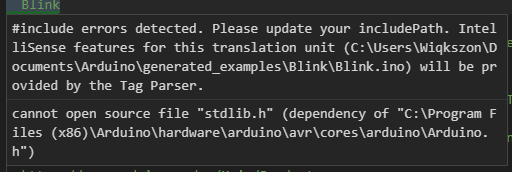
Hi, I'm new on this program the problem I have is when I try to open an example (Blink) I got this 2 errors. I already try adding new paths on c_pp_properties.json, but it doesn't work.
When I upload the code it just work fine but how do I get rid of those errors?
 Wiqkszon
on 26 Nov 2018
Wiqkszon
on 26 Nov 2018
I've had problem with VS Code on OSX marking missing identifiers for NodeMCU.
In my case helped to force path for Arduino libraries:
        "includePath": [
            "/Users/mm/Library/Arduino15/packages/esp8266/tools/**",
            "/Users/mm/Library/Arduino15/packages/esp8266/hardware/esp8266/2.3.0/**"
        ],
        "forcedInclude": [
             "/Applications/Arduino.app/Contents/Java/hardware/arduino/avr/cores/arduino/Arduino.h"
        ],
       "macFrameworkPath": [
            "/System/Library/Frameworks",
            "/Library/Frameworks"
        ],
 MarianMajik
on 1 Jan 2019
MarianMajik
on 1 Jan 2019
Yet another huge disappointment by Microsoft.
Hope this will get some love in the future.
Anyway, for OSX this is what I use at the moment for arduino 1.8.7. Be aware that I have a folder applications2 and that I renamed the arduino app to the version.
{
    "configurations": [
        {
            "name": "Mac",
            "includePath": [
                "${workspaceFolder}/**",
                "/Applications2/Arduino-1.8.7.app/Contents/Java/hardware/arduino/avr/cores/arduino",
                "/Applications2/Arduino-1.8.7.app/Contents/Java/hardware/arduino/avr/variants/standard",
                "/Applications2/Arduino-1.8.7.app/Contents/Java/hardware/tools/avr/include",
                "/Applications2/Arduino-1.8.7.app/Contents/Java/hardware/tools/avr/avr/include",
                "/Applications2/Arduino-1.8.7.app/Contents/Java/hardware/tools/avr/avr/include/avr",
                "/Applications2/Arduino-1.8.7.app/Contents/Java/hardware/tools/avr/lib/gcc/avr/5.4.0/include"
            ],
            "defines": [
                "ARDUINO=100",
                "_DEBUG",
                "UNICODE",
                "__AVR_ATmega328P__",
                "__AVR_ENHANCED__"
            ],
            "macFrameworkPath": [
                "/System/Library/Frameworks",
                "/Library/Frameworks"
            ],
            "compilerPath": "/usr/bin/clang",
            "cStandard": "c11",
            "cppStandard": "c++17",
            "intelliSenseMode": "clang-x64"
        }
    ],
    "version": 4
}
 clankill3r
on 14 Jan 2019
clankill3r
on 14 Jan 2019
In my experience, "compilerPath" might set to Visual Studio one, which cause a lots of false error, including the "missing includepath" warning mentioned above
change it to "compilerPath": "<Your Arduino IDE installation path>\\hardware\\tools\\avr\\bin\\avr-gcc.exe" solve the problem, no need to manually change includepath or add "browse" definition
 sudoerChris
on 22 Jan 2019
sudoerChris
on 22 Jan 2019
this worked for me on Windows 10
"includePath": [
    "${workspaceFolder}/**",
    "C:/Program Files (x86)/Arduino/hardware/**",
    "C:/Program Files (x86)/Arduino/libraries/**",
    "C:/Users/Fabio/Documents/Arduino/libraries/**",
    "C:/Users/Fabio/Documents/Arduino/hardware/**"
],
 TheTrigger
on 21 Feb 2019
TheTrigger
on 21 Feb 2019
i had downloaded the Arduino IDE from arduino.cc using the Windows 10 "Get" feature... never again! i could never find my arduino directory and I almost go nuts. I get so stressed... Anyway I went back to arduino.cc and this time i downloaded a normal windows installer, put /Arduino in program files and then the snippets in this post made it work! hope that helps the next poor bastard!
 elemenofi
on 1 Mar 2019
elemenofi
on 1 Mar 2019
In my experience, "compilerPath" might set to Visual Studio one, which cause a lots of false error, including the "missing includepath" warning mentioned above
change it to"compilerPath": "<Your Arduino IDE installation path>\\hardware\\tools\\avr\\bin\\avr-gcc.exe"solve the problem, no need to manually change includepath or add "browse" definition
This fixed the issue I was having with flash string macro (F("Gimme more memory please")) messing up the error reporting.
I also set "intelliSenseMode": "gcc-x64", mostly just to match the compiler.
 oddstr13
on 7 Mar 2019
oddstr13
on 7 Mar 2019
For please this value to your vscode setting file to see whether fix the intellisense issue:
"C_Cpp.intelliSenseEngine": "Tag Parser",
This is by far the simplest solution, I added this in my
File -> Preferences -> Settings -> Extensions -> Arduino -> settings.json file
And it fixed the problems popping up.
NOTE: I'm using it only for navigating code, I'm still uploading through Arduino IDE.
 smamusa
on 20 Apr 2019
smamusa
on 20 Apr 2019
If you meet something like
identifier "Serial" not defined, also add "USBCON" intodefinesinconfigurations
See cpptools document for more details.I'm not sure if there're other flags like this, while I hope the extension could do this automatically for us, since we have done setup the "Arduino Board Configuration".
Thanks! It helps!
 hywhuangyuwei
on 10 May 2019
hywhuangyuwei
on 10 May 2019
For anyone having problems getting this to work on archlinux, install the AUR package arduino-git and use this file.
{
  "configurations": [
    {
      "name": "Linux",
      "includePath": [
        "/usr/share/arduino/tools/**",
        "/usr/share/arduino/hardware/arduino/avr/**",
        "/usr/share/arduino/hardware/tools/**",
        "/usr/share/arduino/libraries/**"
      ],
      "browse": {
        "path": [
          "/usr/share/arduino/tools",
          "/usr/share/arduino/hardware/arduino/avr",
          "/usr/share/arduino/hardware/tools",
          "/usr/share/arduino/libraries"
        ]
      },
      "forcedInclude": [
        "/usr/share/arduino/hardware/arduino/avr/cores/arduino/Arduino.h"
      ],
      "intelliSenseMode": "gcc-x64",
      "compilerPath": "/usr/bin/gcc",
      "cStandard": "c11",
      "cppStandard": "c++17",
      "defines": [
          "USBCON"
     ]
    }
  ],
  "version": 4
}
You have to install the AUR package because the package arduino and arduino-avr-core are using a different file structure
 ATiltedTree
on 12 May 2019
ATiltedTree
on 12 May 2019
I wrote a complete tutorial on how to setup VSCode for Arduino (especially for a game console named "Gamebuino", but largely applicable to other boards)
The c_cpp_properties.json file is built by taking parts of the sketch compilation command. It gives a perfect result with the default IntelliSense engine and provides a version for different Arduino IDE flavors (Win, Linux, macOS).
Now what annoys me: the vscode extension now adds paths, and there is no way to prevent it.
{
    "env": {
        "WIN32_PACKAGES_PATH": "${env:USERPROFILE}/AppData/Local/Arduino15/packages",
        "WIN32_SKETCHBOOK_PATH": "${env:USERPROFILE}/Documents/Arduino",
        "WIN32_APP_PACKAGES_PATH": "${env:USERPROFILE}/Documents/ArduinoData/packages",
        "MAC_PACKAGES_PATH": "${env:HOME}/Library/Arduino15/packages",
        "MAC_SKETCHBOOK_PATH": "${env:HOME}/Arduino",
        "LINUX_PACKAGES_PATH": "${env:HOME}/.arduino15/packages",
        "LINUX_SKETCHBOOK_PATH": "${env:HOME}/Arduino",
        "PORTABLE_PACKAGES_PATH": "${config:arduino.path}/portable/packages",
        "PORTABLE_SKETCHBOOK_PATH": "${config:arduino.path}/portable/sketchbook"
    },
    "configurations": [
        {
            "name": "Win32",
            "intelliSenseMode": "gcc-x64",
            "cStandard": "c11",
            "cppStandard": "c++11",
            "compilerPath": "\"${env:WIN32_PACKAGES_PATH}/arduino/tools/arm-none-eabi-gcc/7-2017q4/bin/arm-none-eabi-g++.exe\" -mcpu=cortex-m0plus -std=gnu++11 -D__SKETCH_NAME__ -DF_CPU=48000000L -DARDUINO=10809 -DARDUINO_SAMD_ZERO -DARDUINO_ARCH_SAMD -D__SAMD21G18A__ -DUSB_VID=0x2341 -DUSB_PID=0x804d -DUSBCON -DUSB_MANUFACTURER -DUSB_PRODUCT",
            "includePath": [
                "${workspaceFolder}",
                "${env:WIN32_PACKAGES_PATH}/arduino/tools/CMSIS/4.5.0/CMSIS/Include",
                "${env:WIN32_PACKAGES_PATH}/arduino/tools/CMSIS-Atmel/1.2.0/CMSIS/Device/ATMEL",
                "${env:WIN32_PACKAGES_PATH}/gamebuino/hardware/samd/1.2.2/cores/arduino",
                "${env:WIN32_PACKAGES_PATH}/gamebuino/hardware/samd/1.2.2/variants/gamebuino_meta",
                "${env:WIN32_SKETCHBOOK_PATH}/libraries/Gamebuino_META/src",
                "${env:WIN32_PACKAGES_PATH}/gamebuino/hardware/samd/1.2.2/libraries/SPI"
            ],
            "browse": {
                "path": [
                    "${workspaceFolder}",
                    "${env:WIN32_PACKAGES_PATH}/arduino/tools/CMSIS/4.5.0/CMSIS/Include",
                    "${env:WIN32_PACKAGES_PATH}/arduino/tools/CMSIS-Atmel/1.2.0/CMSIS/Device/ATMEL",
                    "${env:WIN32_PACKAGES_PATH}/gamebuino/hardware/samd/1.2.2/cores/arduino",
                    "${env:WIN32_PACKAGES_PATH}/gamebuino/hardware/samd/1.2.2/variants/gamebuino_meta",
                    "${env:WIN32_SKETCHBOOK_PATH}/libraries/Gamebuino_META/src",
                    "${env:WIN32_PACKAGES_PATH}/gamebuino/hardware/samd/1.2.2/libraries/SPI"
                ],
                "limitSymbolsToIncludedHeaders": true
            },
            "forcedInclude": [
                "${env:WIN32_PACKAGES_PATH}/gamebuino/hardware/samd/1.2.2/cores/arduino/Arduino.h",
                "${env:WIN32_SKETCHBOOK_PATH}/libraries/Gamebuino_META/src/Gamebuino-Meta.h"
            ]
        },
        {
            "name": "Win32-Portable",
            "intelliSenseMode": "gcc-x64",
            "cStandard": "c11",
            "cppStandard": "c++11",
            "compilerPath": "\"${env:PORTABLE_PACKAGES_PATH}/arduino/tools/arm-none-eabi-gcc/7-2017q4/bin/arm-none-eabi-g++.exe\" -mcpu=cortex-m0plus -std=gnu++11 -D__SKETCH_NAME__ -DF_CPU=48000000L -DARDUINO=10809 -DARDUINO_SAMD_ZERO -DARDUINO_ARCH_SAMD -D__SAMD21G18A__ -DUSB_VID=0x2341 -DUSB_PID=0x804d -DUSBCON -DUSB_MANUFACTURER -DUSB_PRODUCT",
            "includePath": [
                "${workspaceFolder}",
                "${env:PORTABLE_PACKAGES_PATH}/arduino/tools/CMSIS/4.5.0/CMSIS/Include",
                "${env:PORTABLE_PACKAGES_PATH}/arduino/tools/CMSIS-Atmel/1.2.0/CMSIS/Device/ATMEL",
                "${env:PORTABLE_PACKAGES_PATH}/gamebuino/hardware/samd/1.2.2/cores/arduino",
                "${env:PORTABLE_PACKAGES_PATH}/gamebuino/hardware/samd/1.2.2/variants/gamebuino_meta",
                "${env:PORTABLE_SKETCHBOOK_PATH}/libraries/Gamebuino_META/src",
                "${env:PORTABLE_PACKAGES_PATH}/gamebuino/hardware/samd/1.2.2/libraries/SPI"
            ],
            "browse": {
                "path": [
                    "${workspaceFolder}",
                    "${env:PORTABLE_PACKAGES_PATH}/arduino/tools/CMSIS/4.5.0/CMSIS/Include",
                    "${env:PORTABLE_PACKAGES_PATH}/arduino/tools/CMSIS-Atmel/1.2.0/CMSIS/Device/ATMEL",
                    "${env:PORTABLE_PACKAGES_PATH}/gamebuino/hardware/samd/1.2.2/cores/arduino",
                    "${env:PORTABLE_PACKAGES_PATH}/gamebuino/hardware/samd/1.2.2/variants/gamebuino_meta",
                    "${env:PORTABLE_SKETCHBOOK_PATH}/libraries/Gamebuino_META/src",
                    "${env:PORTABLE_PACKAGES_PATH}/gamebuino/hardware/samd/1.2.2/libraries/SPI"
                ],
                "limitSymbolsToIncludedHeaders": true
            },
            "forcedInclude": [
                "${env:PORTABLE_PACKAGES_PATH}/gamebuino/hardware/samd/1.2.2/cores/arduino/Arduino.h",
                "${env:PORTABLE_SKETCHBOOK_PATH}/libraries/Gamebuino_META/src/Gamebuino-Meta.h"
            ]
        },
        {
            "name": "Win32-App",
            "intelliSenseMode": "gcc-x64",
            "cStandard": "c11",
            "cppStandard": "c++11",
            "compilerPath": "\"${env:WIN32_APP_PACKAGES_PATH}/arduino/tools/arm-none-eabi-gcc/7-2017q4/bin/arm-none-eabi-g++.exe\" -mcpu=cortex-m0plus -std=gnu++11 -D__SKETCH_NAME__ -DF_CPU=48000000L -DARDUINO=10809 -DARDUINO_SAMD_ZERO -DARDUINO_ARCH_SAMD -D__SAMD21G18A__ -DUSB_VID=0x2341 -DUSB_PID=0x804d -DUSBCON -DUSB_MANUFACTURER -DUSB_PRODUCT",
            "includePath": [
                "${workspaceFolder}",
                "${env:WIN32_APP_PACKAGES_PATH}/arduino/tools/CMSIS/4.5.0/CMSIS/Include",
                "${env:WIN32_APP_PACKAGES_PATH}/arduino/tools/CMSIS-Atmel/1.2.0/CMSIS/Device/ATMEL",
                "${env:WIN32_APP_PACKAGES_PATH}/gamebuino/hardware/samd/1.2.2/cores/arduino",
                "${env:WIN32_APP_PACKAGES_PATH}/gamebuino/hardware/samd/1.2.2/variants/gamebuino_meta",
                "${env:WIN32_SKETCHBOOK_PATH}/libraries/Gamebuino_META/src",
                "${env:WIN32_SKETCHBOOK_PATH}/libraries/FixedPoints/src",
                "${env:WIN32_APP_PACKAGES_PATH}/gamebuino/hardware/samd/1.2.2/libraries/SPI"
            ],
            "browse": {
                "path": [
                    "${workspaceFolder}",
                    "${env:WIN32_APP_PACKAGES_PATH}/arduino/tools/CMSIS/4.5.0/CMSIS/Include",
                    "${env:WIN32_APP_PACKAGES_PATH}/arduino/tools/CMSIS-Atmel/1.2.0/CMSIS/Device/ATMEL",
                    "${env:WIN32_APP_PACKAGES_PATH}/gamebuino/hardware/samd/1.2.2/cores/arduino",
                    "${env:WIN32_APP_PACKAGES_PATH}/gamebuino/hardware/samd/1.2.2/variants/gamebuino_meta",
                    "${env:WIN32_SKETCHBOOK_PATH}/libraries/Gamebuino_META/src",
                    "${env:WIN32_APP_PACKAGES_PATH}/gamebuino/hardware/samd/1.2.2/libraries/SPI"
                ],
                "limitSymbolsToIncludedHeaders": true
            },
            "forcedInclude": [
                "${env:WIN32_APP_PACKAGES_PATH}/gamebuino/hardware/samd/1.2.2/cores/arduino/Arduino.h",
                "${env:WIN32_SKETCHBOOK_PATH}/libraries/Gamebuino_META/src/Gamebuino-Meta.h"
            ]
        },
        {
            "name": "Mac",
            "intelliSenseMode": "gcc-x64",
            "cStandard": "c11",
            "cppStandard": "c++11",
            "compilerPath": "\"${env:MAC_PACKAGES_PATH}/arduino/tools/arm-none-eabi-gcc/7-2017q4/bin/arm-none-eabi-g++.exe\" -mcpu=cortex-m0plus -std=gnu++11 -D__SKETCH_NAME__ -DF_CPU=48000000L -DARDUINO=10809 -DARDUINO_SAMD_ZERO -DARDUINO_ARCH_SAMD -D__SAMD21G18A__ -DUSB_VID=0x2341 -DUSB_PID=0x804d -DUSBCON -DUSB_MANUFACTURER -DUSB_PRODUCT",
            "includePath": [
                "${workspaceFolder}",
                "${env:MAC_PACKAGES_PATH}/arduino/tools/CMSIS/4.5.0/CMSIS/Include",
                "${env:MAC_PACKAGES_PATH}/arduino/tools/CMSIS-Atmel/1.2.0/CMSIS/Device/ATMEL",
                "${env:MAC_PACKAGES_PATH}/gamebuino/hardware/samd/1.2.2/cores/arduino",
                "${env:MAC_PACKAGES_PATH}/gamebuino/hardware/samd/1.2.2/variants/gamebuino_meta",
                "${env:MAC_SKETCHBOOK_PATH}/libraries/Gamebuino_META/src",
                "${env:MAC_PACKAGES_PATH}/gamebuino/hardware/samd/1.2.2/libraries/SPI"
            ],
            "browse": {
                "path": [
                    "${workspaceFolder}",
                    "${env:MAC_PACKAGES_PATH}/arduino/tools/CMSIS/4.5.0/CMSIS/Include",
                    "${env:MAC_PACKAGES_PATH}/arduino/tools/CMSIS-Atmel/1.2.0/CMSIS/Device/ATMEL",
                    "${env:MAC_PACKAGES_PATH}/gamebuino/hardware/samd/1.2.2/cores/arduino",
                    "${env:MAC_PACKAGES_PATH}/gamebuino/hardware/samd/1.2.2/variants/gamebuino_meta",
                    "${env:MAC_SKETCHBOOK_PATH}/libraries/Gamebuino_META/src",
                    "${env:MAC_PACKAGES_PATH}/gamebuino/hardware/samd/1.2.2/libraries/SPI"
                ],
                "limitSymbolsToIncludedHeaders": true
            },
            "forcedInclude": [
                "${env:MAC_PACKAGES_PATH}/gamebuino/hardware/samd/1.2.2/cores/arduino/Arduino.h",
                "${env:MAC_SKETCHBOOK_PATH}/libraries/Gamebuino_META/src/Gamebuino-Meta.h"
            ]
        },
        {
            "name": "Mac-Portable",
            "intelliSenseMode": "gcc-x64",
            "cStandard": "c11",
            "cppStandard": "c++11",
            "compilerPath": "\"${env:PORTABLE_PACKAGES_PATH}/arduino/tools/arm-none-eabi-gcc/7-2017q4/bin/arm-none-eabi-g++.exe\" -mcpu=cortex-m0plus -std=gnu++11 -D__SKETCH_NAME__ -DF_CPU=48000000L -DARDUINO=10809 -DARDUINO_SAMD_ZERO -DARDUINO_ARCH_SAMD -D__SAMD21G18A__ -DUSB_VID=0x2341 -DUSB_PID=0x804d -DUSBCON -DUSB_MANUFACTURER -DUSB_PRODUCT",
            "includePath": [
                "${workspaceFolder}",
                "${env:PORTABLE_PACKAGES_PATH}/arduino/tools/CMSIS/4.5.0/CMSIS/Include",
                "${env:PORTABLE_PACKAGES_PATH}/arduino/tools/CMSIS-Atmel/1.2.0/CMSIS/Device/ATMEL",
                "${env:PORTABLE_PACKAGES_PATH}/gamebuino/hardware/samd/1.2.2/cores/arduino",
                "${env:PORTABLE_PACKAGES_PATH}/gamebuino/hardware/samd/1.2.2/variants/gamebuino_meta",
                "${env:PORTABLE_SKETCHBOOK_PATH}/libraries/Gamebuino_META/src",
                "${env:PORTABLE_PACKAGES_PATH}/gamebuino/hardware/samd/1.2.2/libraries/SPI"
            ],
            "browse": {
                "path": [
                    "${workspaceFolder}",
                    "${env:PORTABLE_PACKAGES_PATH}/arduino/tools/CMSIS/4.5.0/CMSIS/Include",
                    "${env:PORTABLE_PACKAGES_PATH}/arduino/tools/CMSIS-Atmel/1.2.0/CMSIS/Device/ATMEL",
                    "${env:PORTABLE_PACKAGES_PATH}/gamebuino/hardware/samd/1.2.2/cores/arduino",
                    "${env:PORTABLE_PACKAGES_PATH}/gamebuino/hardware/samd/1.2.2/variants/gamebuino_meta",
                    "${env:PORTABLE_SKETCHBOOK_PATH}/libraries/Gamebuino_META/src",
                    "${env:PORTABLE_PACKAGES_PATH}/gamebuino/hardware/samd/1.2.2/libraries/SPI"
                ],
                "limitSymbolsToIncludedHeaders": true
            },
            "forcedInclude": [
                "${env:PORTABLE_PACKAGES_PATH}/gamebuino/hardware/samd/1.2.2/cores/arduino/Arduino.h",
                "${env:PORTABLE_SKETCHBOOK_PATH}/libraries/Gamebuino_META/src/Gamebuino-Meta.h"
            ]
        },
        {
            "name": "Linux",
            "intelliSenseMode": "gcc-x64",
            "cStandard": "c11",
            "cppStandard": "c++11",
            "compilerPath": "\"${env:LINUX_PACKAGES_PATH}/arduino/tools/arm-none-eabi-gcc/7-2017q4/bin/arm-none-eabi-g++.exe\" -mcpu=cortex-m0plus -std=gnu++11 -D__SKETCH_NAME__ -DF_CPU=48000000L -DARDUINO=10809 -DARDUINO_SAMD_ZERO -DARDUINO_ARCH_SAMD -D__SAMD21G18A__ -DUSB_VID=0x2341 -DUSB_PID=0x804d -DUSBCON -DUSB_MANUFACTURER -DUSB_PRODUCT",
            "includePath": [
                "${workspaceFolder}",
                "${env:LINUX_PACKAGES_PATH}/arduino/tools/CMSIS/4.5.0/CMSIS/Include",
                "${env:LINUX_PACKAGES_PATH}/arduino/tools/CMSIS-Atmel/1.2.0/CMSIS/Device/ATMEL",
                "${env:LINUX_PACKAGES_PATH}/gamebuino/hardware/samd/1.2.2/cores/arduino",
                "${env:LINUX_PACKAGES_PATH}/gamebuino/hardware/samd/1.2.2/variants/gamebuino_meta",
                "${env:LINUX_SKETCHBOOK_PATH}/libraries/Gamebuino_META/src",
                "${env:LINUX_PACKAGES_PATH}/gamebuino/hardware/samd/1.2.2/libraries/SPI"
            ],
            "browse": {
                "path": [
                    "${workspaceFolder}",
                    "${env:LINUX_PACKAGES_PATH}/arduino/tools/CMSIS/4.5.0/CMSIS/Include",
                    "${env:LINUX_PACKAGES_PATH}/arduino/tools/CMSIS-Atmel/1.2.0/CMSIS/Device/ATMEL",
                    "${env:LINUX_PACKAGES_PATH}/gamebuino/hardware/samd/1.2.2/cores/arduino",
                    "${env:LINUX_PACKAGES_PATH}/gamebuino/hardware/samd/1.2.2/variants/gamebuino_meta",
                    "${env:LINUX_SKETCHBOOK_PATH}/libraries/Gamebuino_META/src",
                    "${env:LINUX_PACKAGES_PATH}/gamebuino/hardware/samd/1.2.2/libraries/SPI"
                ],
                "limitSymbolsToIncludedHeaders": true
            },
            "forcedInclude": [
                "${env:LINUX_PACKAGES_PATH}/gamebuino/hardware/samd/1.2.2/cores/arduino/Arduino.h",
                "${env:LINUX_SKETCHBOOK_PATH}/libraries/Gamebuino_META/src/Gamebuino-Meta.h"
            ]
        },
        {
            "name": "Linux-Portable",
            "intelliSenseMode": "gcc-x64",
            "cStandard": "c11",
            "cppStandard": "c++11",
            "compilerPath": "\"${env:PORTABLE_PACKAGES_PATH}/arduino/tools/arm-none-eabi-gcc/7-2017q4/bin/arm-none-eabi-g++.exe\" -mcpu=cortex-m0plus -std=gnu++11 -D__SKETCH_NAME__ -DF_CPU=48000000L -DARDUINO=10809 -DARDUINO_SAMD_ZERO -DARDUINO_ARCH_SAMD -D__SAMD21G18A__ -DUSB_VID=0x2341 -DUSB_PID=0x804d -DUSBCON -DUSB_MANUFACTURER -DUSB_PRODUCT",
            "includePath": [
                "${workspaceFolder}",
                "${env:PORTABLE_PACKAGES_PATH}/arduino/tools/CMSIS/4.5.0/CMSIS/Include",
                "${env:PORTABLE_PACKAGES_PATH}/arduino/tools/CMSIS-Atmel/1.2.0/CMSIS/Device/ATMEL",
                "${env:PORTABLE_PACKAGES_PATH}/gamebuino/hardware/samd/1.2.2/cores/arduino",
                "${env:PORTABLE_PACKAGES_PATH}/gamebuino/hardware/samd/1.2.2/variants/gamebuino_meta",
                "${env:PORTABLE_SKETCHBOOK_PATH}/libraries/Gamebuino_META/src",
                "${env:PORTABLE_PACKAGES_PATH}/gamebuino/hardware/samd/1.2.2/libraries/SPI"
            ],
            "browse": {
                "path": [
                    "${workspaceFolder}",
                    "${env:PORTABLE_PACKAGES_PATH}/arduino/tools/CMSIS/4.5.0/CMSIS/Include",
                    "${env:PORTABLE_PACKAGES_PATH}/arduino/tools/CMSIS-Atmel/1.2.0/CMSIS/Device/ATMEL",
                    "${env:PORTABLE_PACKAGES_PATH}/gamebuino/hardware/samd/1.2.2/cores/arduino",
                    "${env:PORTABLE_PACKAGES_PATH}/gamebuino/hardware/samd/1.2.2/variants/gamebuino_meta",
                    "${env:PORTABLE_SKETCHBOOK_PATH}/libraries/Gamebuino_META/src",
                    "${env:PORTABLE_PACKAGES_PATH}/gamebuino/hardware/samd/1.2.2/libraries/SPI"
                ],
                "limitSymbolsToIncludedHeaders": true
            },
            "forcedInclude": [
                "${env:PORTABLE_PACKAGES_PATH}/gamebuino/hardware/samd/1.2.2/cores/arduino/Arduino.h",
                "${env:PORTABLE_SKETCHBOOK_PATH}/libraries/Gamebuino_META/src/Gamebuino-Meta.h"
            ]
        }
    ],
    "version": 4
}
 bfxdev
on 2 Jul 2019
bfxdev
on 2 Jul 2019
@bfxdev
"${env:USERPROFILE}/Documents/Arduino"
Not everybody has their Arduino folder located there for the record.
Pharap
on 2 Jul 2019
@Pharap you're totally right, and it is unfortunate there is no way to determine the sketchbook path from the extension (which seems to be determined internally). I'll write a feature request.
bfxdev
on 3 Jul 2019
It's also about defines, the ARDUINO macro is not defined, add
defines: [ "ARDUINO=100" ],to your c_cpp_properties.json
I'm assuming you're using this DHT.h, and your ARDUINO version is 100, change it if necessary.
This is a good workaround.
For a complete fix, this can not be part of the c_cpp_properties.json, as it may change when the user installs a new version of the IDE, and some libraries may rely on that value for compatibility reasons.
 iFreilicht
on 8 Jul 2019
iFreilicht
on 8 Jul 2019
Not sure if this was mentioned here (EDIT: I see bfxdev posted a similar workaround, wasn't here yesterday when I was struggling :D so here's a solution that someone can find maybe a bit simpler).
You can work around the issue and gain full intellisense in VS code for your Arduino sketch by fully copying compiler args from Arduino IDE logs, as is, without much thinking.
Full steps:
- Open your existing sketch or any other sample in Arduino IDE. Make sure it works, compiles and uploads from there.
- Go to
File -> Preferences. On theSettingstab in the opened window, tick theShow verbose output during Compilationcheckbox. - Next, do
Sketch -> Verify/Compile. This should successfully compile your sketch, as expected. You should see a message in the output log along the lines of "Sketch uses X bytes (Y%) of program storage space.". - Copy everything from that same log window below the Arduino text editor and paste it into a real text editor of your choosing.
- Find a line there mentioning "ino.cpp" (if several, pick the last of the first bunch). Copy almost the entire line, starting with the path to the
g++compiler and ending with the last include (before the full path to your "ino.cpp" file). - Open the sketch folder in VSCode. Make sure you already have the
Arduinoextension fully installed there. - Run the
>Arduino: InitializeVSCode command (by pressingCtrl+Pand entering the command). - This will generate a
.vscodefolder with two files. - Replace the entire contents of the
.vscode/c_cpp_properties.jsonfile with:
{
    "configurations": [
        {
            "name": "Arduino",
            "windowsSdkVersion": "10.0.17763.0",
            "compilerPath": "{EVERYTHING THAT YOU COPIED FROM THAT LOG}",
            "cStandard": "c11",
            "cppStandard": "c++11",
            "intelliSenseMode": "clang-x64"
        }
    ],
    "version": 4
}
- Make sure you escape all the quotes in the pasted string as needed for them to be included in JSON. My working example for a
TinyScreen+board:
{
    "configurations": [
        {
            "name": "Arduino",
            "windowsSdkVersion": "10.0.17763.0",
            "compilerPath": "\"C:\\Users\\evilk\\AppData\\Local\\Arduino15\\packages\\arduino\\tools\\arm-none-eabi-gcc\\4.8.3-2014q1/bin/arm-none-eabi-g++\" -mcpu=cortex-m0plus -mthumb -c -g -Os -w -std=gnu++11 -ffunction-sections -fdata-sections -fno-threadsafe-statics -nostdlib --param max-inline-insns-single=500 -fno-rtti -fno-exceptions -MMD -DF_CPU=48000000L -DARDUINO=10809 -DARDUINO_SAMD_ZERO -DARDUINO_ARCH_SAMD -D__SAMD21G18A__ -DUSB_VID=0x03EB -DUSB_PID=0x8009 -DUSBCON \"-DUSB_MANUFACTURER=\"TinyCircuits\"\" \"-DUSB_PRODUCT=\"TinyScreen+\"\" -DUSBCON \"-IC:\\Users\\evilk\\AppData\\Local\\Arduino15\\packages\\arduino\\tools\\CMSIS\\4.5.0/CMSIS/Include/\" \"-IC:\\Users\\evilk\\AppData\\Local\\Arduino15\\packages\\arduino\\tools\\CMSIS-Atmel\\1.1.0/CMSIS/Device/ATMEL/\" \"-IC:\\Users\\evilk\\AppData\\Local\\Arduino15\\packages\\TinyCircuits\\hardware\\samd\\1.0.8\\cores\\arduino\" \"-IC:\\Users\\evilk\\AppData\\Local\\Arduino15\\packages\\TinyCircuits\\hardware\\samd\\1.0.8\\variants\\tinyscreen_p\" \"-IC:\\Users\\evilk\\Documents\\Arduino\\libraries\\TinyScreen\" \"-IC:\\Users\\evilk\\AppData\\Local\\Arduino15\\packages\\TinyCircuits\\hardware\\samd\\1.0.8\\libraries\\SPI\" \"-IC:\\Users\\evilk\\AppData\\Local\\Arduino15\\packages\\TinyCircuits\\hardware\\samd\\1.0.8\\libraries\\Wire\"",
            "cStandard": "c11",
            "cppStandard": "c++11",
            "intelliSenseMode": "clang-x64"
        }
    ],
    "version": 4
}
This is a manual approach to each individual board / sketch AND depends on hardcoding your PC's paths, but should be OK for one-man projects and only takes a few minutes to set up and allows you to not even get into the weeds of the c_cpp_properties.json format and still gives you full intellisense without hunting down rogue DEFINEs and INCLUDEs. You can be sure that the intellisense run is exactly the same as the real compilation step performed by the Arduino IDE (which I think what vscode-arduino is calling when you run >Arduino: Upload or >Arduino: Verify. Definitely not a replacement for a real solution, but hopefully will save someone some time.
 rsheptolut
on 8 Jul 2019
rsheptolut
on 8 Jul 2019
hi there,
I'm a newbie playing with MXchip and going through DPS tutorial https://docs.microsoft.com/en-us/azure/iot-dps/how-to-connect-mxchip-iot-devkit. I get the error "include file not found in browse.path." for 4 include files..
Seems like this thread talks about Tag Parser however I couldn't find c_cpp_properties.json.
I'm using VS code 1.37.0 and MXchip with 1.6.2 firmware.
Can someone be kind to provide step by step instructions to fix this problem to get to fun stuff?
Thanks!
 Hi007
on 14 Aug 2019
Hi007
on 14 Aug 2019
It will be great to have "ARDUINO=\WProgram.h includes.
P.S. If you start getting errors about Serial being undefined, try defining USBCON as well (source)
 haizaar
on 27 Sep 2019
haizaar
on 27 Sep 2019
Disable extensions “C/C++ Clang Command Adapter“
 timaker
on 3 Oct 2019
timaker
on 3 Oct 2019
Sort of new to VSC-arduino and could use some help. Got most of my path problems solved but intelisense is throwing errors for any AVR on chip registers like OCR2A. "identifier "OCR2A" is undefined. I tried every sort thing I could think of in the c_cpp_properties.json file.
The sketch only has two lines #include
OCR2A = 0x44; This is not the only on chip register that has problems. The code compiles fine on VSC and Arduino IDE.
 cschaffter
on 15 Jan 2020
cschaffter
on 15 Jan 2020
I'm pretty annoyed. Why don't they just parse the compiler output and populate the intellisense with it correctly? Fiddling with that configuration is useless, since I switch architectures mostly every second build (developing libraries). This extension is pretty f%&d up.
 elektronikworkshop
on 4 Feb 2020
elektronikworkshop
on 4 Feb 2020
Hi to everyone who is suffering from this!
I was so annoyed, that I began to work on an auto-configuration mechanism, which parses the build output from Arduino and creates a c_cpp_properties.json from it. The goal is that no one wants likely ever edit this file manually again - except for very weird setups for which I will add a configuration flag/option that will keep the extension from touching the file.
I coded some proof of concept already but I haven't committed anything yet. But I began documenting the project here.
Anyone who wants to keep me motivated can chip in some :beer:-money - the donation button can be found in the link above.
Other support is appreciated and comprises
- people with Windows and OSX setups to test the cross platform compatibility
- the original maintainers could help me with CI and how to build test-releases
The progress can be followed within the same file. The repo is set to this feature branch by default.
elektronikworkshop
on 5 Feb 2020
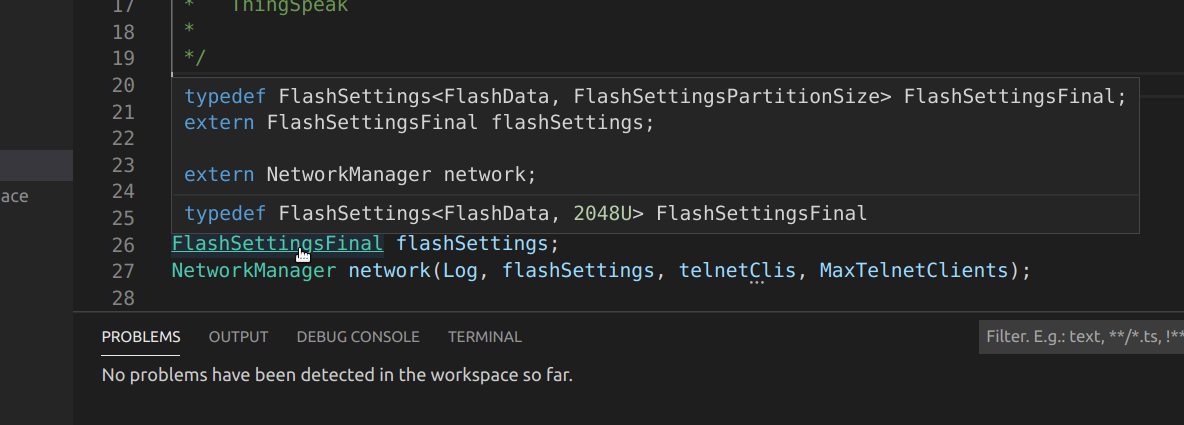
There's very good progress regarding this project. Interested can read the details in the branch documentation. Summarized: The new magic generates perfect c_cpp_properties.jsons for all my huge projects which include lots of libraries with complex board setups (ESP32, ESP8266). I can browse easily through my project files and even libraries up to the headers of the standard libraries of the current compiler.
No problems have been detected in the workspace so far
That's my favorite sentence ... how exiting! Soon complex coding for Arduino will be a breeze within vscode-arduino!
Just take a look at this auto-magically generated c_cpp_properties.json
{
    "configurations": [
        {
            "name": "Arduino",
            "compilerPath": "/home/uli/.arduino15/packages/esp8266/tools/xtensa-lx106-elf-gcc/2.5.0-4-b40a506/bin/xtensa-lx106-elf-g++",
            "compilerArgs": [
                "-U__STRICT_ANSI__",
                "-Wall",
                "-Wextra",
                "-mlongcalls",
                "-mtext-section-literals",
                "-fno-rtti",
                "-falign-functions=4",
                "-std=gnu++11",
                "-MMD",
                "-ffunction-sections",
                "-fdata-sections",
                "-fno-exceptions"
            ],
            "intelliSenseMode": "gcc-x64",
            "includePath": [
                "/home/uli/.arduino15/packages/esp8266/hardware/esp8266/2.6.3/tools/sdk/include",
                "/home/uli/.arduino15/packages/esp8266/hardware/esp8266/2.6.3/tools/sdk/lwip2/include",
                "/home/uli/.arduino15/packages/esp8266/hardware/esp8266/2.6.3/tools/sdk/libc/xtensa-lx106-elf/include",
                "/home/uli/Projects/chanet/software/mqtt-temp-sensor-build/core",
                "/home/uli/.arduino15/packages/esp8266/hardware/esp8266/2.6.3/cores/esp8266",
                "/home/uli/.arduino15/packages/esp8266/hardware/esp8266/2.6.3/variants/nodemcu",
                "/home/uli/Projects/arduino/libraries/DHT_sensor_library",
                "/home/uli/Projects/arduino/libraries/EwUtil/src",
                "/home/uli/Projects/arduino/libraries/LogProxy/src",
                "/home/uli/Projects/arduino/libraries/MqttClient/src",
                "/home/uli/Projects/arduino/libraries/StreamCmd/src",
                "/home/uli/Projects/arduino/libraries/TelnetServer/src",
                "/home/uli/.arduino15/packages/esp8266/hardware/esp8266/2.6.3/libraries/ESP8266WiFi/src",
                "/home/uli/Projects/arduino/libraries/FlashSettings/src",
                "/home/uli/.arduino15/packages/esp8266/hardware/esp8266/2.6.3/libraries/EEPROM",
                "/home/uli/.arduino15/packages/esp8266/hardware/esp8266/2.6.3/libraries/ESP8266mDNS/src",
                "/home/uli/Projects/arduino/libraries/PubSubClient/src",
                "/home/uli/Projects/arduino/libraries/OneWire",
                "/home/uli/Projects/arduino/libraries/DallasTemperature",
                "/home/uli/.arduino15/packages/esp8266/hardware/esp8266/2.6.3/libraries/Wire",
                "/home/uli/Projects/arduino/libraries/Adafruit_Unified_Sensor",
                "/home/uli/Projects/arduino/libraries/Adafruit_BME680_Library",
                "/home/uli/.arduino15/packages/esp8266/hardware/esp8266/2.6.3/libraries/SPI",
                "/home/uli/.arduino15/packages/esp8266/tools/xtensa-lx106-elf-gcc/2.5.0-4-b40a506/bin/../lib/gcc/xtensa-lx106-elf/4.8.2/../../../../xtensa-lx106-elf/include/c++/4.8.2",
                "/home/uli/.arduino15/packages/esp8266/tools/xtensa-lx106-elf-gcc/2.5.0-4-b40a506/bin/../lib/gcc/xtensa-lx106-elf/4.8.2/../../../../xtensa-lx106-elf/include/c++/4.8.2/xtensa-lx106-elf",
                "/home/uli/.arduino15/packages/esp8266/tools/xtensa-lx106-elf-gcc/2.5.0-4-b40a506/bin/../lib/gcc/xtensa-lx106-elf/4.8.2/../../../../xtensa-lx106-elf/include/c++/4.8.2/backward",
                "/home/uli/.arduino15/packages/esp8266/tools/xtensa-lx106-elf-gcc/2.5.0-4-b40a506/bin/../lib/gcc/xtensa-lx106-elf/4.8.2/include",
                "/home/uli/.arduino15/packages/esp8266/tools/xtensa-lx106-elf-gcc/2.5.0-4-b40a506/bin/../lib/gcc/xtensa-lx106-elf/4.8.2/include-fixed",
                "/home/uli/.arduino15/packages/esp8266/tools/xtensa-lx106-elf-gcc/2.5.0-4-b40a506/bin/../lib/gcc/xtensa-lx106-elf/4.8.2/../../../../xtensa-lx106-elf/include",
                "/home/uli/.arduino15/packages/esp8266/hardware/esp8266/2.6.3/**",
                "/home/uli/.arduino15/packages/esp8266/tools/**"
            ],
            "forcedInclude": [],
            "cStandard": "c11",
            "cppStandard": "c++11",
            "defines": [
                "__ets__",
                "ICACHE_FLASH",
                "NONOSDK22x_190703=1",
                "F_CPU=80000000L",
                "LWIP_OPEN_SRC",
                "TCP_MSS=536",
                "LWIP_FEATURES=1",
                "LWIP_IPV6=0",
                "ARDUINO=10811",
                "ARDUINO_ESP8266_NODEMCU",
                "ARDUINO_ARCH_ESP8266",
                "ARDUINO_BOARD=\\\"ESP8266_NODEMCU\\\"",
                "LED_BUILTIN=2",
                "FLASHMODE_DIO",
                "ESP8266"
            ]
        }
    ],
    "version": 4
}
Nice extra:
:beers: still greatly appreciated!
elektronikworkshop
on 7 Feb 2020
Hey @elektronikworkshop, I'd love to try this out and give feedback. It would be a huge quality of life improvement if this was to work. Could you point me to a resource that helps me install your version of the extension?
iFreilicht
on 12 Feb 2020
Hi iFreilicht,
that's the reason I embarked on this project. Great if you'd like to help out - this comes in really handy. Getting the stuff rock solid is one of my central objectives and testing is one cornerstones here.
Currently my work is at the following state:
- Parsing works
- Enable/disable via global or project flags
- You can have personal configurations which aren't overwritten
But I'm not fully there yet. Things which are yet to be done are:
- Move the parser/configuration-generator out of the "verify" code, since it requires the build to be run with
--verboseflag enabled which most probably few like (except for me :) I always switch on all warnings and set it to verbose).
This is something I can implement pretty fast - I have not removed the original "IntelliSense configurator" which ruins the
c_cpp_properties.jsonevery now and then but that's one of my next tasks as well. And you can simply delete the file as you can re-generate the perfect version with my analyzer/generator by simply verifying your sketch - My development system runs on Ubuntu-GNU/linux and I haven't done any work for Windows yet but that's one of the next steps. The chances that it works on OSX "out of the box" are pretty good
To run the development version clone my repository and checkout the intellisense-autoconfig branch
The following steps requires you to have git, vscode, npm and nodejs at recent versions. On my Ubuntu system I don't use the versions supplied by my package manager (apt) as they are usually pretty outdated - I usually install nodejs and npm from their respective/official websites. If you're on Windows you'll have to be a bit more patient since I haven't set up a virtual machine yet for testing and Windows is definitely not my domain. But I'll document the setup process as soon as I'll get to it.
git clone https://github.com/elektronikworkshop/vscode-arduino
cd vscode-arduino
# switch to the feature branch (not necessary probably because this branch is set to default)
git checkout intellisense-autoconfig
# check if you're on the right branch
git status
# install module dependencies
npm install
# install gulp builder globally to make it available to the path (requires relaunching your shell)
npm install -g gulp
# to make sure that gulp is actually working type
gulp --tasks
# if not -> configure your $PATH and open a new terminal to make sure it's added, then
# open vscode
code .
Making sure that gulp is on your $PATH is essential. As long this isn't the case the following steps must not be carried out.
Then hit F5 to debug or select it from the Debug menu. vscode will then complain that there's No task defined and you let it generate the configuration for you by clicking the button Configure Task. After configuring the tasks debug (F5) or build (Ctrl + Shift + B) should work.
As soon as you've got it up and running (F5 spawns a new window), just navigate to your Arduino project. Configure in the vscode-arduino global settings the build output to verbose and run verify (Ctrl + Alt + R) as you know it. This will then generate a fresh c_cpp_properties.json. As long as I haven't removed the generator from the current maintainers you'll have to regenerate it as soon as you see those double asterisk-paths like whatever/path/** - if I get to it today, I'll give it a try and will remove/disable it for testing. You can then pull my changes in by running
git pull
from within your terminal inside vscode (and your vscode-arduino folder).
Different IntelliSense configurations can be selected in vscode in the lower right. The configuration my branch generates is called Arduino as depicted here:
Sometimes IntelliSense has problems within the extension host (which you're running when launching it with F5) and fails to resolve some header paths. This is a problem of vscode and not the extension. Then just restart. The extension host is a bit buggy if you ask me, so I hope I can provide some development snapshots in the future which will render all the steps above superfluous and let you run the latest development version with your regular vscode.
I'll try to contact you via email to help you out during setup and testing.
Regards/EW
P.S.: I'll copy these instructions to my branch notes. If you have some additional findings please let me know to keep this documentation up to date. So future readers please check out the corresponding section within the branch notes
elektronikworkshop
on 12 Feb 2020
I just learned how I can send you a development snapshot - this way you don't have to bother with the above steps.
I wrote you an email - I hope it's a valid address - ends with k.com
elektronikworkshop
on 12 Feb 2020
And during the next days I'll prepare a command line tool which allows for the generation of c_cpp_properties.json. This way anybody can get better IntelliSense even if it's not integrated into vscode-arduino yet.
elektronikworkshop
on 13 Feb 2020
This is awesome work, @elektronikworkshop. Very much looking forward to testing the tool - can explore on both Linux and OS X.
 jjsanderson
on 13 Feb 2020
jjsanderson
on 13 Feb 2020
Hi jj,
thanks a lot - I'm back hacking. I was enjoying some snow during the last two days. I'll prepare something testable and let you know as soon as it's ready. I've not decided yet if I should prepare a complementary command line tool or continue on direct integration.
It looks good for OSX - I ran a test with another user's output and it was parsed perfectly (as I expected, since command invocation and paths are the same on both systems).
Regards!
elektronikworkshop
on 15 Feb 2020
@iFreilicht @jjsanderson et al
I made some significant progress. Most of the functionality is now in place:
- The analysis now runs as a separate build process
- vscode-arduino detects when the user changes sketch, board or board configuration and runs the analysis to generate the
c_cpp_properties.json - You can invoke an analysis manually by
- either running the command Arduino: Rebuild IntelliSense Configuration
- or via short cut Alt + Ctrl/Cmd + I
- You can en-/disable it in the global settings and override the global setting in your project's
arduino.json
Limitations:
- No Windows support currently
After successful analysis you have to select the correct IntelliSense-configuration in the lower right of the status bar in case it isn't selected automatically. The generated configuration's name is Arduino.
More details on the project's status etc. can be found in my branch notes
■
I prepared an alpha package for manual installation. Alpha builds are from now on available from this Dropbox folder. Unfortunately Microsoft's vsce tool has a known bug: it doesn't support alpha version numbers. Therefore I will increment the last digit for every new test release I'll upload. As soon as this should go public (after hopefully being merged) the version numbers will probably jump back, if the maintainers don't decide to bump the version to 0.3.0+.
The extension packages can be installed as follows:
code ~/Downloads/vscode-arduino-0.2.xy.vsix
You probably have to disable the official version of the extension from your extension manager (I don't have the problem as I run the debug version within my development host).
Please report any problems either by email (preferred) or by writing to the chat mentioned in my branch notes. I can send a private message on the chat with my email for anyone who wasn't able to reverse engineer it from my commits :wink:
While this is out for testing, I will polish and commit the amassed changes from the last days (this will take probably one or two days) and work on the Windows-support afterwards.
:beers:
elektronikworkshop
on 19 Feb 2020
Any upcoming alpha/test release will land in the above mentioned location. I added a readme which contains relevant information on the release's individual changes.
Enjoy! :tada:
EW
elektronikworkshop
on 19 Feb 2020
Preliminary Windows support has landed.
...and I have fixed some pretty nasty issues which affect the parsing engine on OSX and Linux as well. Better everyone gets the latest alpha release here (0.2.33). This folder contains a readme with the latest info.
I'll have to clean up and document my stuff during the next few days - please report your experiences in the meanwhile as outlined in the Dropbox readme.
Thanks && Regards!
EW
@jjsanderson @iFreilicht @mikecentola
elektronikworkshop
on 21 Feb 2020
@jjsanderson @iFreilicht @mikecentola
My feature branch approaches merging. It seems to work perfectly: Some brave alpha testers and I resolved some minor issues en route. Please test the latest alpha release (see above) and let me know (even if it just works). In the meanwhile I'll discuss the upcoming pull request with the maintainers directly.
Regards
EW
elektronikworkshop
on 26 Feb 2020
I installed the fix and it is working for me on Windows10 1903 and Arduino 1.8.12. using an Atmega1284 processor.
Thanks so much this has bee a real annoyance for some time now.
Thanks,
Craig
cschaffter
on 27 Feb 2020
Thanks Craig for the feedback!
This exact annoyance was my trigger... Great to hear that it works and helps - this is the best wage I can get!
Wish us luck for getting that merged. Up to now I have no response from the person I contacted at Microsoft. I'd prefer to merge it non-impersonally due to the amount of changes this pull request comprises. Let's see if they're still committed to this project...
Kind regards,
EW
elektronikworkshop
on 27 Feb 2020
During pull request preparation I added some enhancements:
- The IntelliSense configuration is now updated even during builds (if anything changes) - this help with keeping the configuration up to date during the regular workflow and will probably eliminate some manual invocations of the analysis
- Reworked logging under Windows (dropping irrelevant messages from the Arduino build process)
- Alpha releases are finally named properly
Available from the known location
Regards,
EW
elektronikworkshop
on 27 Feb 2020
Correction: During upload the latest alpha dumps too much information - I have to rework that. Additionally I found a bug which prevents board configurations to be set. Sorry for that. New alpha will follow.
elektronikworkshop
on 27 Feb 2020
New alpha available which fixes all those issues and tries to beautify build log outputs (by removing spurious Arduino-backend messages) especially on Windows.
Regards,
EW
elektronikworkshop
on 27 Feb 2020
Yet another alpha available:
- Fixes some bugs (problems when no sketch was set)
- Fixes severe security issue reported by Mathieu
- Adds new features:
- New post-build command which allows you to run commands/scripts after successful builds
- Proper
cmdandbashsupport for pre-/post-build commands - Arduino preferences from within
arduino.json(allows you to pass additional compiler arguments like defines, flags, etc)
Details are outlined in the Dropbox-readme. Documentation for the features have been added to the README.
It's getting more and more stable - thanks to your feedback!
Regards,
EW
elektronikworkshop
on 29 Feb 2020
EW,
Something has changed in the past week or so -- was not able to get intellisense to work for the LOLIN(WEMOS) D1 R@ &mini ESP8266 board. A .ino file with a single line #include
gets squiggles but worse it never builds the c_cppProperties.json file in .vscode folder but it does build the .arduino.json. However it was working on a UNO board and building the json file ok.
I thought I would just uninstall the arduino plugin and do a reinstall and then apply the fix. But now it just gives me the error when I double click on the downloaded fix: Element 'Identy' has invalid value for attribute 'Version' and doesn't get installed. And now intellisense does not work at all.
Any idea of what I should try.
Thanks for the help.
Running on Windows 10 VSC is ver 1.43.0 the fix from dropbox is 0.w.30 ahpha18
cschaffter
on 18 Mar 2020
Hey @elektronikworkshop , I had a quick look at your repo ... it appears to be a fork of the vscode-arduino extension, is that correct? So, the idea is to use this extension instead of the vscode-arduino extension?
I think you are on the right track regarding parsing the build commands. I have familiarized myself with a couple things about VSCode while using it for Arduino and other work. I think these two things would be of interest to your project if you are not already familiar with them:
- CMake-Tools extension
- configurationProvider API
The CMake-Tools extension was first published by "vector-of-bool". However, Microsoft took over this extension a few months ago. This extension has the ability to parse compiler_commands.json files that are generated by CMake. You can either,
- Tell IntelliSense to use the compile_commands.json file directly by adding a line to the the c_cpp_properties.json file similar to the following line with the correct path:
"compileCommands": "~/Documents/source/blinky/build/compile_commands.json"
or,
- CMake-Tools will read the compile_commands.json file and provide the configuration directly to intelliSense. VSCode now has a "configurationProvider" API. This allows, quite literally, an extension to provide a configuration to VSCode so you do not have to mess around with the c_cpp_properties.json file. This simplifies the c_cpp_properties.json to two lines:
{
    "name": "Arduino",
    "configurationProvider": "elektronikworkshop"
}
Incidentally, the CMake-Tools extension uses this API as well. So, there maybe some code in the CMake-Tools extension that is helpful to your effort.
I was going to go check out an idea I had to use the CMake-Tools extension to read the Arduino compile command directly but I haven't had a chance to try that out yet.
Finally, have you considered migrating the extension to the arduino-cli? I do not use the Arduino IDE to do my builds when using vscode-arduino anymore. Rather, I created some vscode tasks to invoke the arduino-cli. I find this works better for me. I think the vscode-arduino extension should drop using the IDE and switch to the cli. The cli is quite stable now.
sslupsky
on 18 Mar 2020
Problem update: I think I may have done an update of VSC or the arduino plugin without thinking about it and wiped out the fixed version replacing it with the broken original one. Took me a while to remember how to install the one from drop box: To help out others this is what I did to get it back working again:
Downloaded the vscode-arduino-beta from drop box at:
https://www.dropbox.com/sh/whmcdt26chyjgby/AAB1Ld2fzZ9Z_NfM3CRay17wa
Then:
- Uninstalled the current arduino plugin
- Opened the Extension Panel in VSC and clicked on the three dots in the upper right corner
of the extension panel next to the document icon and selected "More Actions" From the list of more actions selected "Install from VSIX" and pointed to the downloaded file. - I did remove the c_cpp_properties.json file in the sketch's .vscode folder and let the plugin rebuild it.
Craig
cschaffter
on 18 Mar 2020
On macOS, I added
#include <Arduino.h>to beginning of.inofile and I filledc_cpp_properties.jsoncontent with:{ "configurations": [ { "name": "Mac", "includePath": [ "${workspaceRoot}", "/Applications/Arduino.app/Contents/Java/hardware/arduino/avr/cores/arduino", "/Applications/Arduino.app/Contents/Java/hardware/arduino/avr/variants/mega", "/Applications/Arduino.app/Contents/Java/hardware/tools/avr/avr/include", "/Applications/Arduino.app/Contents/Java/hardware/tools/avr/lib/gcc/avr/4.9.2/include" ], "defines": ["UBRRH"], "browse": { "limitSymbolsToIncludedHeaders": false, "path": [ "${workspaceRoot}", "/Applications/Arduino.app/Contents/Java/hardware/arduino/avr/cores/arduino", "/Applications/Arduino.app/Contents/Java/hardware/arduino/avr/variants/mega", "/Applications/Arduino.app/Contents/Java/hardware/tools/avr/avr/include", "/Applications/Arduino.app/Contents/Java/hardware/tools/avr/lib/gcc/avr/4.9.2/include" ] }, "intelliSenseMode": "clang-x64" } ], "version": 3 }Notice that
#include <Arduino.h>line shows error, but you can ignore it and have Intelisense working for rest of file...
Thank you for your answer and you answer gives me inspiration.But your c_cpp_properties.json content doesn't work on me.Considering the situation of windows and Linux,I changed some and it worked for me.this is my c_cpp_properties.jsoncontent:
{
    "configurations": [
        {
            "name": "Mac",
            "includePath": [
                "${workspaceRoot}",
                "/Users/<your-mac>/Documents/Arduino/libraries",
                "/Users/<your-mac>/Documents/Arduino/hardware",
                "/Applications/Arduino.app/Contents/Java"
            ],
            "defines": [
                "UBRRH"
            ],
            "browse": {
                "limitSymbolsToIncludedHeaders": false,
                "path": [
                    "${workspaceRoot}",
                    "/Users/<your-mac>/Documents/Arduino/libraries",
                    "/Users/<your-mac>/Documents/Arduino/hardware",
                    "/Applications/Arduino.app/Contents/Java"
                ]
            },
            "intelliSenseMode": "clang-x64",
            "compilerPath": "/usr/bin/clang",
            "cStandard": "c11",
            "cppStandard": "c++17"
        }
    ],
    "version": 4
}
 ZZJ34
on 25 Apr 2020
ZZJ34
on 25 Apr 2020
Hi there.
I'm trying the VScode on win10 and also have problem with definition highlight.
I found, that the IntelliSense doesn't see ARDUINO_ARCH_ESP8266 defined, so it think it ends with #error "Board not supported" in the library...
Does anyone know how to fix that?
Otherwise it looks OK, I just had to add Library folder into the includePath...
EDIT: I just got it working by defining ARDUINO_ARCH_ESP8266 in IntelliSense configuration under Directives definitions...
So for perfect work it looks like there is missing just linking Libraries folder in Path and adding board to definition :)
 Benik3
on 8 May 2020
Benik3
on 8 May 2020
@elektronikworkshop I've tested successfully with an Arduino Uno, Mini and Nano, all on Ubuntu 18.04, 20.04 and Windows 10. It works flawlessly every time, third party libraries are properly discovered and as such, it is a huge quality of live improvement.
The serial monitor doesn't work, but AFAIK that's a bug in the extension version you forked. I think it's time for a pull-request, there's no way people can productively use this extension without it.
iFreilicht
on 14 Aug 2020
On Windows I get lines like this,
"C:\\Users\\hl\\AppData\\Local\\Arduino15\\packages\\arduino\\hardware\\avr\\1.6.21\\cores\\arduino\\Arduino.h"
But would rather have this,
"${env:LOCALAPPDATA}\\Arduino15\\packages\\arduino\\hardware\\avr\\1.8.2\\cores\\arduino\\Arduino.h",
 iqapps
on 15 Sep 2020
iqapps
on 15 Sep 2020
@iqapps Could you explain why?
The proposed addition to this extension will re-generate these paths anyway, so there's no clear advantage in using environment variables. Additionally, I'm not sure if the Arduino toolchain supports paths like these, so it seems less error-prone to just use with absolute paths instead.
iFreilicht
on 21 Sep 2020
@iFreilicht I guess you are right there. Can the autogeneration be switched off. If so, my proposal would make sense. And could there be multiple installations?. In our case we check in the c_cpp_properties.json file to share it over git, since at the beginning there was no autogeneration.
iqapps
on 21 Sep 2020
Can the autogeneration be switched off. If so, my proposal would make sense.
Right now it automatically runs every time you load the project or change the board. I'm not aware of a setting to turn it off. Even then, I'm not sure it would make sense. This seems like a niche use-case, and it would be easy to find and replace all instances after the file was generated for the first time. After that, you're not using the autogeneration anymore anyway.
And could there be multiple installations?
It's aware of multiple installations of the Arduino IDE (I assume that's what you meant) and handles them gracefully, so it will detect if there are multiple installations and find all necessary headers even if they are only present in one installation. If there are multiple versions it will just choose one, so there are no conflicts when compiling. Not sure what the logic is they're using there, my guess would be most recent file. @elektronikworkshop, could you comment on this?
In our case we check in the c_cpp_properties.json file to share it over git, since at the beginning there was no autogeneration.
Yes, I did the same thing for my projects as well, but if this addition gets into the extension, you should probably delete that file from git as it will may be changed every time you build.
iFreilicht
on 21 Sep 2020
@iFreilicht alright then 👍
iqapps
on 21 Sep 2020
Good, useless. How do you disable those warnings, indeed, for people cross-compiling; hence, thus; having conditional include procedures according to platform? pretty common, very intrusive and obnoxious "feature". Tag parser is good, telling us, it doesn't find header files not referenced in current project, we don't care much, not your business. Secondable, is it possible to implement "live settings refresh" without the need of killing the current window and re-open it each time?
 moe123
on 31 Dec 2020
moe123
on 31 Dec 2020
@moe123 What are you talking about? What warnings? What does this have to do with the tag parser? How is this supposed “live refresh” feature related? I’m super-confused by your comment.
iFreilicht
on 3 Jan 2021
@iFreilicht

moe123
on 3 Jan 2021
@moe123 are these errors in the v0.3.4 or did you build #1141 locally?
 adiazulay
on 4 Jan 2021
adiazulay
on 4 Jan 2021
Related issues
 Alisparrow2000
·
15Comments
Alisparrow2000
·
15Comments
 rei-vilo
·
15Comments
rei-vilo
·
15Comments
 Proladon
·
16Comments
Proladon
·
16Comments
 lamqhoang
·
19Comments
lamqhoang
·
19Comments
 hellyzh
·
18Comments
hellyzh
·
18Comments
Most helpful comment
For please this value to your vscode setting file to see whether fix the intellisense issue: