Vrtk: Cannot access protected member `UnityEngine.Texture.Texture()`
Environment
- VRTK imported from the Unity Asset Store.
- VRTK Version: 3.2.1
- Version of Unity3D: 2018.1.0f2
- Hardware used: HTC Vive
- SDK used: SteamVR
Steps to reproduce
- Import VRTK to the assets
Expected behavior
- No error should come up.
Current behavior
- I am getting two errors:
Assets/VRTK/Scripts/Interactions/Highlighters/VRTK_MaterialColorSwapHighlighter.cs(146,66): error CS1540: Cannot access protected member `UnityEngine.Texture.Texture()' via a qualifier of type `UnityEngine.Texture'. The qualifier must be of type `VRTK.Highlighters.VRTK_MaterialColorSwapHighlighter' or derived from it
Assets/VRTK/Scripts/Interactions/Highlighters/VRTK_MaterialColorSwapHighlighter.cs(146,66): error CS0122: `UnityEngine.Texture.Texture()' is inaccessible due to its protection level
 Aniket-Pradhan
All 22 comments
Try searching on github issues before posting.
Vrtk 3.2.1 is not supported on unity 2018.1
 thestonefox
on 16 May 2018
thestonefox
on 16 May 2018
replace the line giving you the error with this :
renderer.material.SetTexture("_MainTex", new Texture2D(0,0));
good luck!
 MTulaimat
on 24 Jul 2018
MTulaimat
on 24 Jul 2018
That would mean you continue to use the VRTK version that is over a year old. Instead follow best practices to get the latest VRTK by getting it from the GitHub branch.
 bddckr
on 24 Jul 2018
bddckr
on 24 Jul 2018
Oh no idea it got updated
Can you provide the link of the latest version please
Thanks!
MTulaimat
on 24 Jul 2018
You're on the repo already! https://github.com/thestonefox/VRTK
Join  because you can instantly get answers instead of waiting on here. It's also way easier for troubleshooting in general. GitHub issues are only useful for proper bug reports with steps to reproduce in an example scene like the Issue Template requires.
bddckr
on 25 Jul 2018
I had the same issue... using this latest version with 2018.2.2f
adjusting the line in question to this: "renderer.material.SetTexture("_MainTex", new Texture2D(0,0));"
fixed the issue for me : )
I will keep an eye open for an update to VRTK that works with 2018.2 +
 treendy
on 5 Aug 2018
treendy
on 5 Aug 2018
@treendy As already explained above you need to use VRTK from GitHub. If you're unable to familiarize yourself on how to do so don't use this comment section, instead go and use the already linked Slack.
bddckr
on 6 Aug 2018
Thanks, however, i did already question on Slack, but having found this post it solved my issue (as mentioned above).
Only posting here for others to know what the fix was for my issue.
Also, FYI, i am using the latest gitHub version (as mentioned above), just with a different unity version.
treendy
on 6 Aug 2018
You're definitely not using the GitHub master branch if you get this compile error.
I assume you're using the releases page of GitHub, not the master branch.
bddckr
on 6 Aug 2018
For anyone reading this: This issue is marked as closed for a reason. The reason is that it was fixed back in the day in VRTK so no adjustment is necessary if you get the latest VRTK (from the GitHub master).
bddckr
on 6 Aug 2018
I downloaded from the master branch... however, I had an issue with a class returning null instead of an empty string which caused my Unity to crash... i cant remember what that related to now and what order my attempts was made.
I will retry with the master and confirm
Thank you for your help
treendy
on 6 Aug 2018
That's unrelated and is already discussed in https://github.com/thestonefox/VRTK/issues/1852 instead.
bddckr
on 6 Aug 2018
Thats the one... it was this post that helped me: #1848 ... but as you say, it is unrelated, but will retry the master branch and confirm later (it may have been #1848 issue that caused me to not use the master branch in error)
treendy
on 6 Aug 2018
Unfortunately my experience with the master build didnt go very well, and my personal suggestion would be to apply the temp fix above (which works), then if your unity crashes when trying to run, take a look at #1848, then just wait for a release (which will be more stable than the master)
After downloading the latest master, i now get further errors
"NullReferenceException: Object reference not set to an instance of an object
VRTK.VRTK_TouchpadControl.ControlFixedUpdate () (at Assets/VRTK/Source/Scripts/Locomotion/VRTK_TouchpadControl.cs:58)
VRTK.VRTK_ObjectControl.FixedUpdate () (at Assets/VRTK/Source/Scripts/Locomotion/VRTK_ObjectControl.cs:173)"
also, i have less examples, and when trying to run an example, my Unity crashes (and that is with the #1848 fix included
treendy
on 7 Aug 2018
 redflasher
on 23 Nov 2018
redflasher
on 23 Nov 2018
No. v4 is WIP and not ready to use. Use the GitHub master branch.
bddckr
on 23 Nov 2018
I have the exact same error with VRTK 3.3.0 and Unity2018.3.10f1
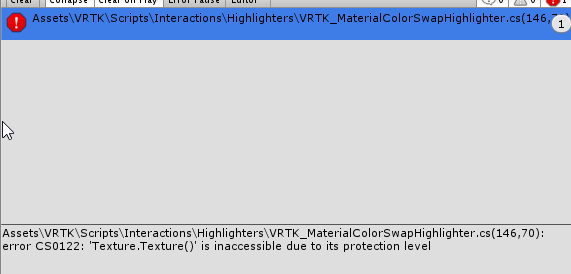
 Fangh
on 18 Apr 2019
Fangh
on 18 Apr 2019
Then you didn't update correctly as 3.3.0 can't have that issue. I suggest you ask for troubleshooting advice on our Slack, I'm sure someone can help you ensure you're importing 3.3.0 into your project correctly!
bddckr
on 18 Apr 2019
sorry it seems my Asset Store downloaded an old version instead of the new one... I think because when you already have downloaded the asset long ago, the button is "Import" on the asset store and it import the vesion you bought long time ago...
Fangh
on 18 Apr 2019
I swear Unity fixed that back in Unity 5.6 days 😞
bddckr
on 18 Apr 2019
replace the line giving you the error with this :
renderer.material.SetTexture("_MainTex", new Texture2D(0,0));good luck!
It's working now!
Thank you so much
 reginalluna
on 18 Dec 2019
reginalluna
on 18 Dec 2019
renderer.material.SetTexture("_MainTex", new Texture2D(0,0));
yes work
 oklangame
on 4 Apr 2021
oklangame
on 4 Apr 2021
Related issues
 broehl
·
8Comments
broehl
·
8Comments
 dantman
·
4Comments
dantman
·
4Comments
 JWNJWN
·
4Comments
JWNJWN
·
4Comments
 bgr
·
8Comments
bgr
·
8Comments
 monodavids
·
3Comments
monodavids
·
3Comments
Most helpful comment
That would mean you continue to use the VRTK version that is over a year old. Instead follow best practices to get the latest VRTK by getting it from the GitHub branch.