Vrtk: Adaptive quality generates warnings that avoids to use it
Hi,
I just updated my whole VR project to :
Unity 5.6.0f3
VRTK today build
SteamVR 1.2.1
When I use the adaptive quality I got thousands of warnings :
RenderTexture: Resolving surfaces of different sizes.
That makes the project very slow so unusable.
If I disable the adaptive quality it works fine.
 FairT
FairT
All 21 comments
What do you mean by VRTK today build? The latest version of github master? If so what commit hash?
 thestonefox
on 26 Apr 2017
thestonefox
on 26 Apr 2017
Hi,
Sorry if I was not clear.
I meant that I just downloaded the Github master when I writed this report.
I don't know where to find the commit hash, if you still need it tell me
how and I ll give you this information.
But to be clear I downloaded the github master yesterday.
Have a good day,
Cédric
On 26 April 2017 at 09:49, StoneFox notifications@github.com wrote:
What do you mean by VRTK today build? The latest version of github master?
If so what commit hash?—
You are receiving this because you authored the thread.
Reply to this email directly, view it on GitHub
https://github.com/thestonefox/VRTK/issues/1138#issuecomment-297274948,
or mute the thread
https://github.com/notifications/unsubscribe-auth/AXvbT5Luev8tWnKUrv6ZCVrjhnAmRrCkks5rzvcegaJpZM4NHy9V
.
FairT
on 26 Apr 2017
Are you using single pass rendering?
https://docs.unity3d.com/Manual/SinglePassStereoRendering.html
thestonefox
on 26 Apr 2017
If it is the right thing we talk about :
[image: Inline images 1]
On 26 April 2017 at 10:01, StoneFox notifications@github.com wrote:
Are you using single pass rendering?
—
You are receiving this because you authored the thread.
Reply to this email directly, view it on GitHub
https://github.com/thestonefox/VRTK/issues/1138#issuecomment-297279434,
or mute the thread
https://github.com/notifications/unsubscribe-auth/AXvbT-X3V2_bsdSdiXCEj1x1V7op9Pvxks5rzvnIgaJpZM4NHy9V
.
FairT
on 26 Apr 2017
Doesn't look like your image uploaded
thestonefox
on 26 Apr 2017
Oh sorry,
It was written :
Stereo Rendering Method : Multi Pass
On 26 April 2017 at 10:54, StoneFox notifications@github.com wrote:
Doesn't look like your image uploaded
—
You are receiving this because you authored the thread.
Reply to this email directly, view it on GitHub
https://github.com/thestonefox/VRTK/issues/1138#issuecomment-297302086,
or mute the thread
https://github.com/notifications/unsubscribe-auth/AXvbT1nMFPHOQfatOhie9cSfxVsnCVBaks5rzwYxgaJpZM4NHy9V
.
FairT
on 26 Apr 2017
If you're using multi pass rendering then that's probably the issue.
I think the adaptive rendering and unity 5.6 don't work with multi pass, apparently it's a bug in unity 5.6 (i hear).
try single pass rendering
thestonefox
on 26 Apr 2017
Unfortunatelly the single pass does not solve the problem.
On 26 April 2017 at 10:56, StoneFox notifications@github.com wrote:
If you're using multi pass rendering then that's probably the issue.
I think the adaptive rendering and unity 5.6 don't work with multi pass,
apparently it's a bug in unity 5.6 (i hear).try single pass rendereing
—
You are receiving this because you authored the thread.
Reply to this email directly, view it on GitHub
https://github.com/thestonefox/VRTK/issues/1138#issuecomment-297303364,
or mute the thread
https://github.com/notifications/unsubscribe-auth/AXvbT9VnbjGGzckRsAwYRdfbdhL5cnzIks5rzwbYgaJpZM4NHy9V
.
FairT
on 26 Apr 2017
I just tested the github project with only the last SteamVR version added and the example 39 AdaptiveQuality has the problem.
FairT
on 26 Apr 2017
maybe when @bddckr is back from vacation he can chip in with some thoughts?
thestonefox
on 26 Apr 2017
Of course, no hurry at all.
You 're doing a great job guys, focus on something more important and come
back to it when you got time.
On 26 April 2017 at 11:51, StoneFox notifications@github.com wrote:
maybe when @bddckr https://github.com/bddckr is back from vacation he
can chip in with some thoughts?—
You are receiving this because you authored the thread.
Reply to this email directly, view it on GitHub
https://github.com/thestonefox/VRTK/issues/1138#issuecomment-297325584,
or mute the thread
https://github.com/notifications/unsubscribe-auth/AXvbT8Q3p8MggzfdDcmPzjGZXNnZRkjNks5rzxOJgaJpZM4NHy9V
.
FairT
on 26 Apr 2017
Unity logging
RenderTexture: Resolving surfaces of different sizes.
all the time on 5.6.0f3 is a Unity bug we can't work around. 😩
Until Unity fixes it in a new (patch) release I suggest disabling/not using Adaptive Quality since the logging is bogging down the framerate.
 bddckr
on 1 May 2017
bddckr
on 1 May 2017
I haven't used VRTK, but I fixed this issue in the lab render. It seems that renderViewportScale doesn't work the same way anymore and pops out a message. You have to switch the functions to renderScale. There might be another way to fix it.
 KevinComerford
on 30 Jun 2017
KevinComerford
on 30 Jun 2017
@KevinComerford That won't work as we need renderViewportScale _in addition to_ renderScale. renderViewportScale is broken in the latest 5.6 patch releases, but works fine in 5.6.0f3, only a subset of users are getting the error spam above.
Let's hope these things are fixed in 2017.1.
bddckr
on 30 Jun 2017
Oh really? So has it been fixed in the last unity update? That's good news. Someone was pointing out to me that this was an issue. I'll get back to them if it's no longer the case.
KevinComerford
on 30 Jun 2017
It's working fine for me and several others in 5.6.0f3, is broken in 5.6.1p4. Dunno why the error spam is hitting the issue author here.
I have no idea if it works in 5.6.2p1 or 2017.1.
bddckr
on 30 Jun 2017
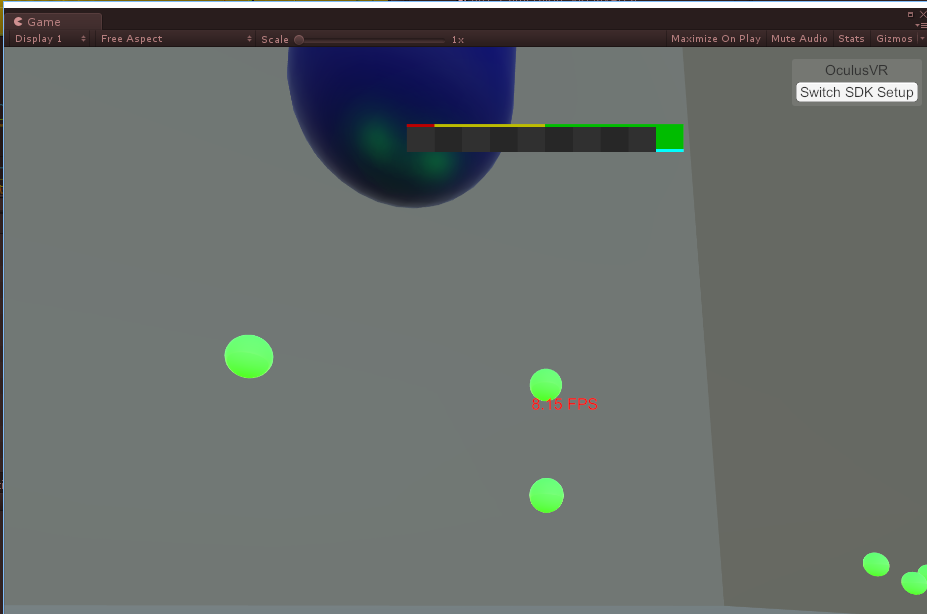
Anyone have Adaptive Quality working on Oculus? It seems to be doing nothing, although I am not getting those console errors. When I play on Vive/SteamVR it is fine. Unity 2017.1.1f1. VRTK 3.2.0 git version from Sept 14.
 SmartCarrion
on 21 Sep 2017
SmartCarrion
on 21 Sep 2017
Adaptive Quality uses renderViewportScale which is broken on every new Unity version these days except for 2017.2.b10, but even in that version there's some perf problems going on that prevent AQ from being useful.
(Last known Unity version to support it was 5.6.0f3 which you shouldn't use because it has that editor security issue and all their patch releases actually have broken renderViewportScale.)
bddckr
on 21 Sep 2017
Given as it's 3 months later and I'm seeing exactly the same issue - has there been any resolution to this issue? The solution presented is 'disable dynamic resolution' in every thread I've seen, which really misses the point.
 djarcas
on 15 Dec 2017
djarcas
on 15 Dec 2017
@djarcas as you're still seeing the same issue then it's probably fair to assume there hasn't been any resolution
thestonefox
on 15 Dec 2017
@djarcas The issue posted here is a Unity bug that was resolved after 5.6.0f3. If the same issue is back again it's again on Unity to fix it.
The issue of renderViewportScale not working was also a Unity bug which seems to be fixed with one of the patch releases of 2017.1.
You can probably see we're not affiliated with Unity in any way.
@thestonefox I vote to close this issue.
bddckr
on 15 Dec 2017
Related issues
 dantman
·
6Comments
thestonefox
·
7Comments
dantman
·
6Comments
thestonefox
·
7Comments
 ajaxlex
·
8Comments
ajaxlex
·
8Comments
 IARI
·
3Comments
thestonefox
·
5Comments
IARI
·
3Comments
thestonefox
·
5Comments