Voyager: admin menu not displaying on new installation
Version information
- Laravel: v6.17.1
- Voyager: v1.3.1
- PHP: 7.2.24
- Database: MySQL 8.0
Description
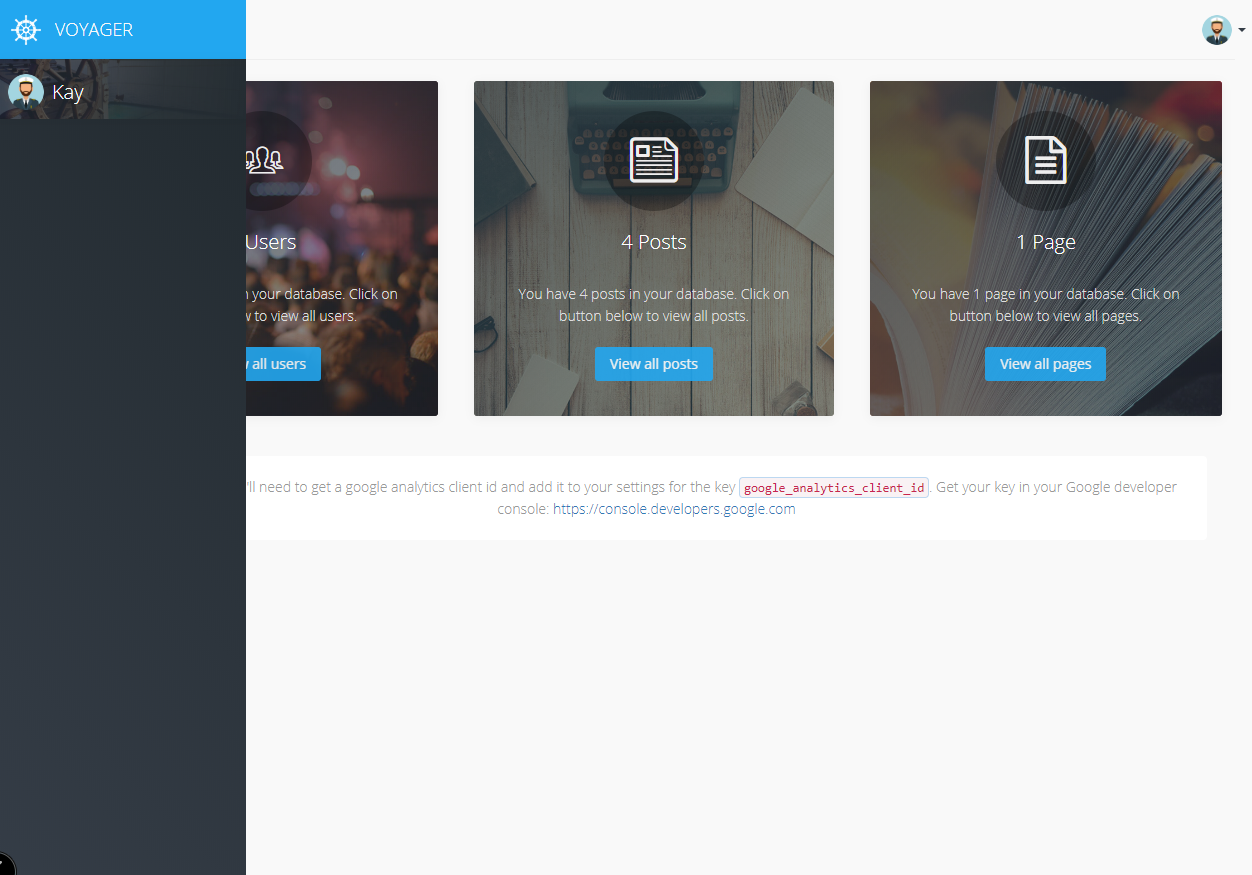
On a fresh install, logging in as either a newly created admin user or the dummy [email protected] user, the sidebar admin menu does not render.
The grey bar appears with the username and avatar in under the voyager logo, but there are no options.
Steps To Reproduce
Steps to reproduce the behavior:
- Install Laravel
- Composer require tcg/voyager & install as per instructions
- php artisan voyager:admin ... --create
- Log in
- See error
Expected behavior
Side menu displays admin menu icons as per the pre-built admin menu.
Screenshots
If applicable, add screenshots to help explain your problem.
Additional context
dd'ing menu('admin') gives a list of the correct options unformatted, but when used with <admin-menu> doesn't render
 Kayrah87
All 7 comments
Do you have any error in browser console?
 MrCrayon
on 27 Feb 2020
MrCrayon
on 27 Feb 2020
Chrome console shows no errors at all. /storage/logs/laravel.log reveals no errors either.
Kayrah87
on 27 Feb 2020
By way of an update, a deep dive into the code reveals that vue was failing to compile the template because the server I was using had headers preventing unsafe-eval.
The error message is as below:
[Vue warn]: It seems you are using the standalone build of Vue.js in an environment with Content Security Policy that prohibits unsafe-eval. The template compiler cannot work in this environment. Consider relaxing the policy to allow unsafe-eval or pre-compiling your templates into render functions.
to resolve I changed the header to add_header Content-Security-Policy "default-src 'self' 'unsafe-inline' 'unsafe-eval' blob:";
The security.conf file where this was contained was generated by nginxconfig.io so anyone using this source please check /etc/nginx/nginxconfig.io/security.conf for this header.
The only other way around this would be for the templates to be precompiled in a future version of voyager to avoid requiring unsafe-eval.
Kayrah87
on 28 Feb 2020
Thank you for the update!
Shouldn't that error show up in Chrome console?
So that we know where to ask people to look at in the same situation.
MrCrayon
on 29 Feb 2020
The error I experienced was a Vue error, and required the installation of the Vue.js DevTools extension in Chrome. The plain console does not show the Vue related error at all.
Kayrah87
on 1 Mar 2020
to resolve I changed the header to
add_header Content-Security-Policy "default-src 'self' 'unsafe-inline' 'unsafe-eval' blob:";The security.conf file where this was contained was generated by nginxconfig.io so anyone using this source please check
/etc/nginx/nginxconfig.io/security.conffor this header.
Thanks @Benaal for finding this, was looking for a solution to my problem as well -> did the trick, would therefore +1 the precompile idea
Using Laravel 7 on php7.2 with Nginx
 oneWaveAdrian
on 20 Apr 2020
oneWaveAdrian
on 20 Apr 2020
This issue has been automatically locked since there has not been any recent activity after it was closed. If you have further questions please ask in our Slack group.
![github-actions[bot] picture](https://avatars.githubusercontent.com/in/15368?v=4&s=40) github-actions[bot]
on 18 Oct 2020
github-actions[bot]
on 18 Oct 2020
Related issues
 craigb88
·
3Comments
craigb88
·
3Comments
 vaggelis2018
·
3Comments
vaggelis2018
·
3Comments
 ferrywae
·
4Comments
ferrywae
·
4Comments
 jeulun
·
3Comments
jeulun
·
3Comments
 abacram
·
3Comments
abacram
·
3Comments