Voyager: The avatar doesn't show image
- Laravel Version: 5.5.*
- Voyager Version: ^1.0
- PHP Version: 7.1.3
- Database Driver & Version: MySQL
Description:
I have followed all the instruction on the internet already but none of them can solve.
- php artisan storage:link
- change the APP_URL: http://localhost:8000 to http://127.0.0.1:8000
Could you please propose any alternative solution to this issue?
Steps To Reproduce:
 hourdev
All 26 comments
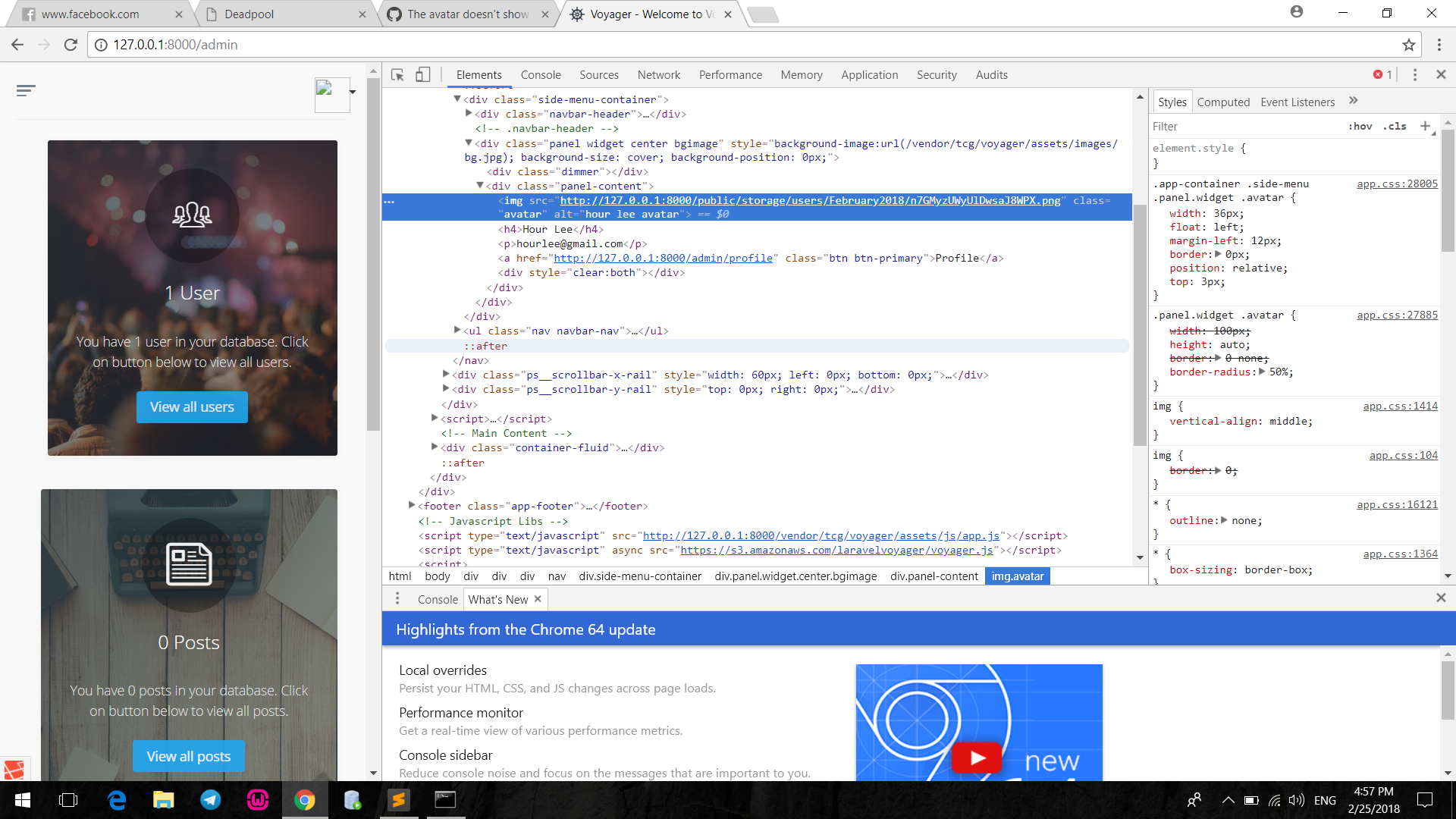
Hi! Can you tell href of image?
 artemmolotov
on 24 Feb 2018
artemmolotov
on 24 Feb 2018
As @ArtemMolotov has requested, please share the URL for your site (I'm guessing http://localhost:8000/admin/) and the URL/href for the image that's broken.
 fletch3555
on 24 Feb 2018
fletch3555
on 24 Feb 2018
Here's my URL for my site: http://127.0.0.1:8000/admin
hourdev
on 25 Feb 2018
hourdev
on 25 Feb 2018
@hourdev Can you open image if you delete /public from image href?
artemmolotov
on 25 Feb 2018
go to config/filesystem.php and check if the public url is same as this one.
'public' => [
            'driver' => 'local',
            'root' => storage_path('app/public'),
            'url' => env('APP_URL').'/storage',
            'visibility' => 'public',
        ],
 simoebenhida
on 25 Feb 2018
simoebenhida
on 25 Feb 2018
@ArtemMolotov that works if i delete /public. So, what should I do next?
hourdev
on 25 Feb 2018
@simoebenhida already tried but nth has changed
hourdev
on 25 Feb 2018
can i see your public url on config/filesystem.php and your variable APP_ENV on .env
simoebenhida
on 25 Feb 2018
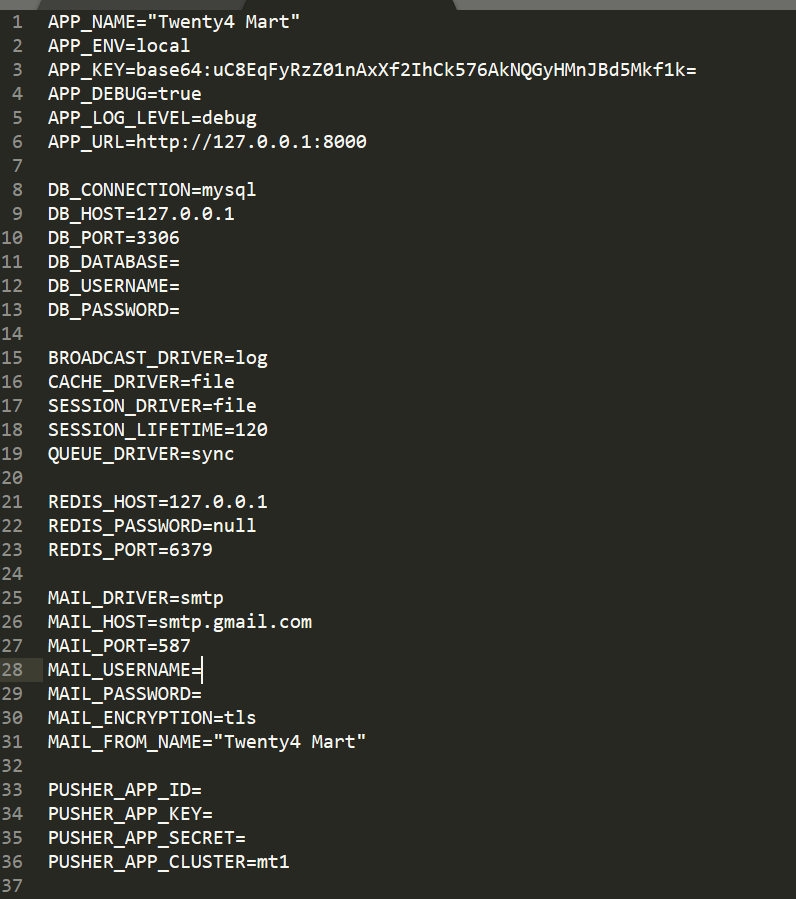
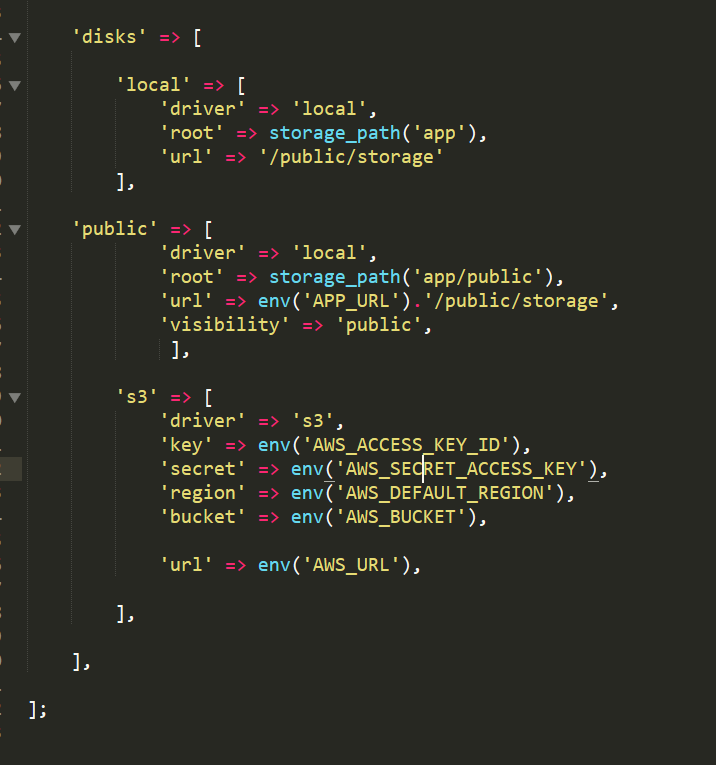
@simoebenhida
hourdev
on 25 Feb 2018
yes on your filesystem.php public array replace 'public' => 'url' with this
'url' => env('APP_URL').'/storage', and it will work
simoebenhida
on 25 Feb 2018
still doesn't work
hourdev
on 25 Feb 2018
can i see the new filesystem.php changements
simoebenhida
on 25 Feb 2018
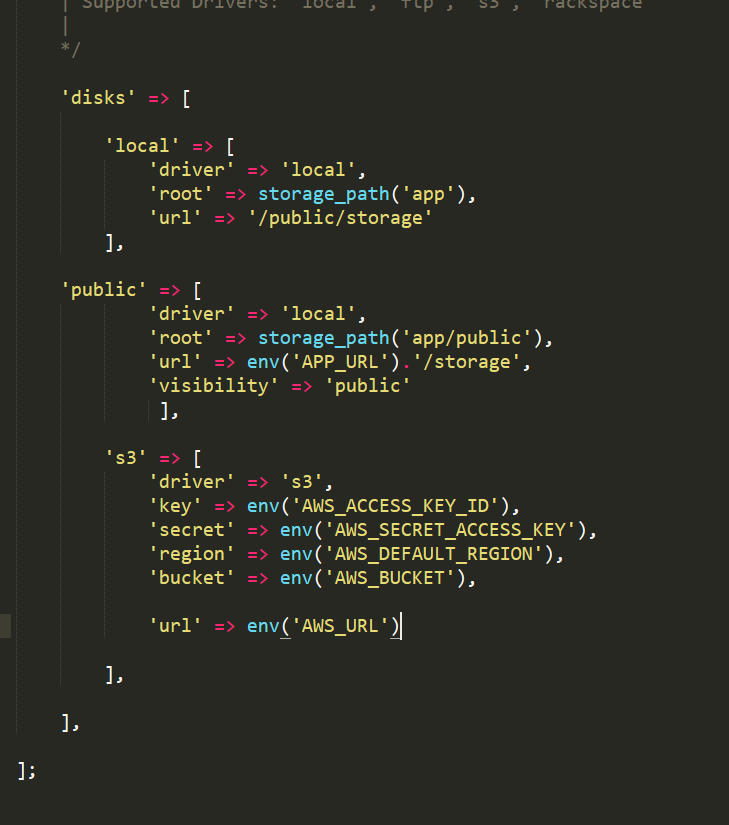
hourdev
on 25 Feb 2018
yes remove public from 'local' => 'url' too
simoebenhida
on 25 Feb 2018
or is better to remove it you dont need url on your local driver its already called on public driver.
simoebenhida
on 25 Feb 2018
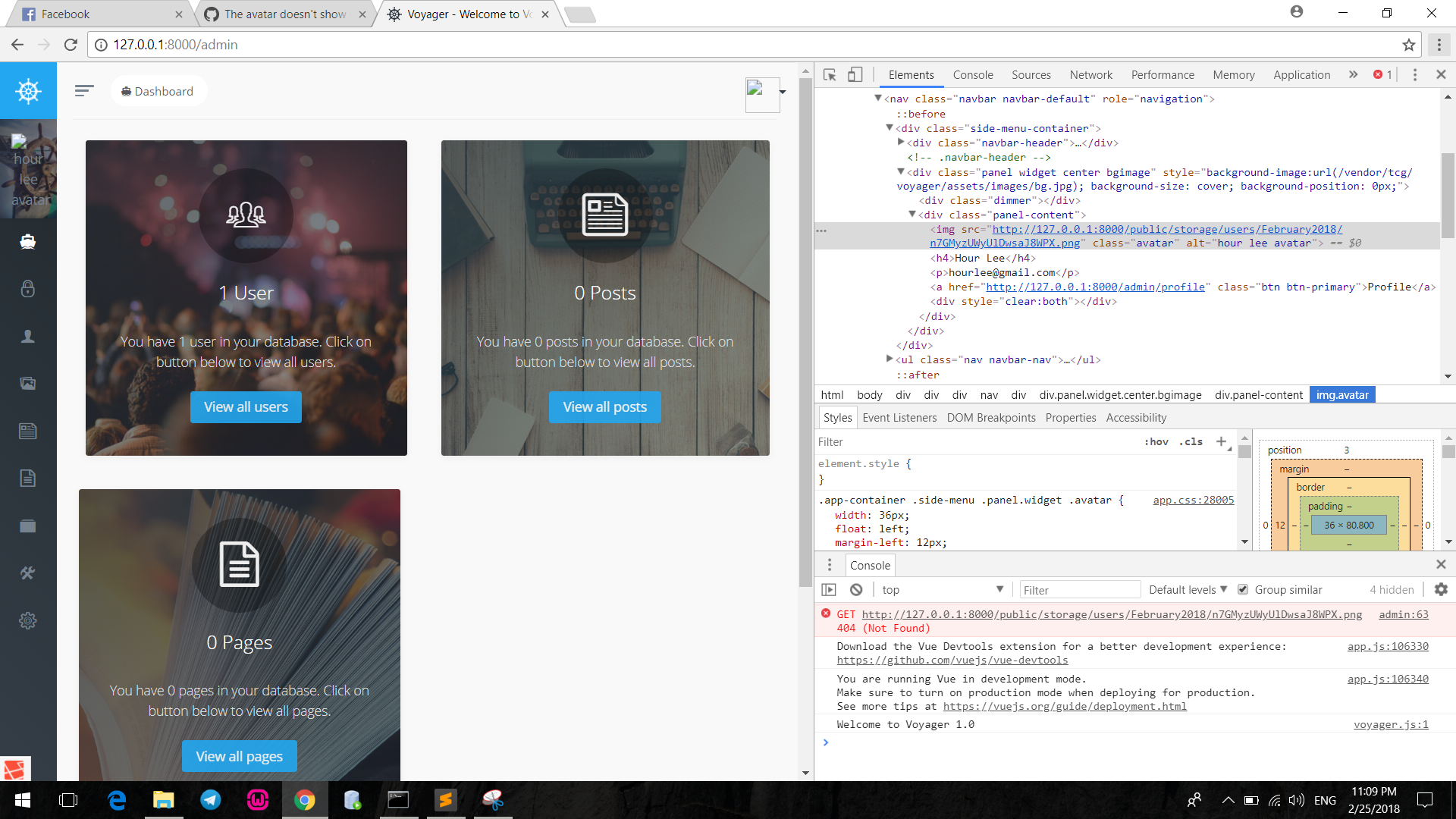
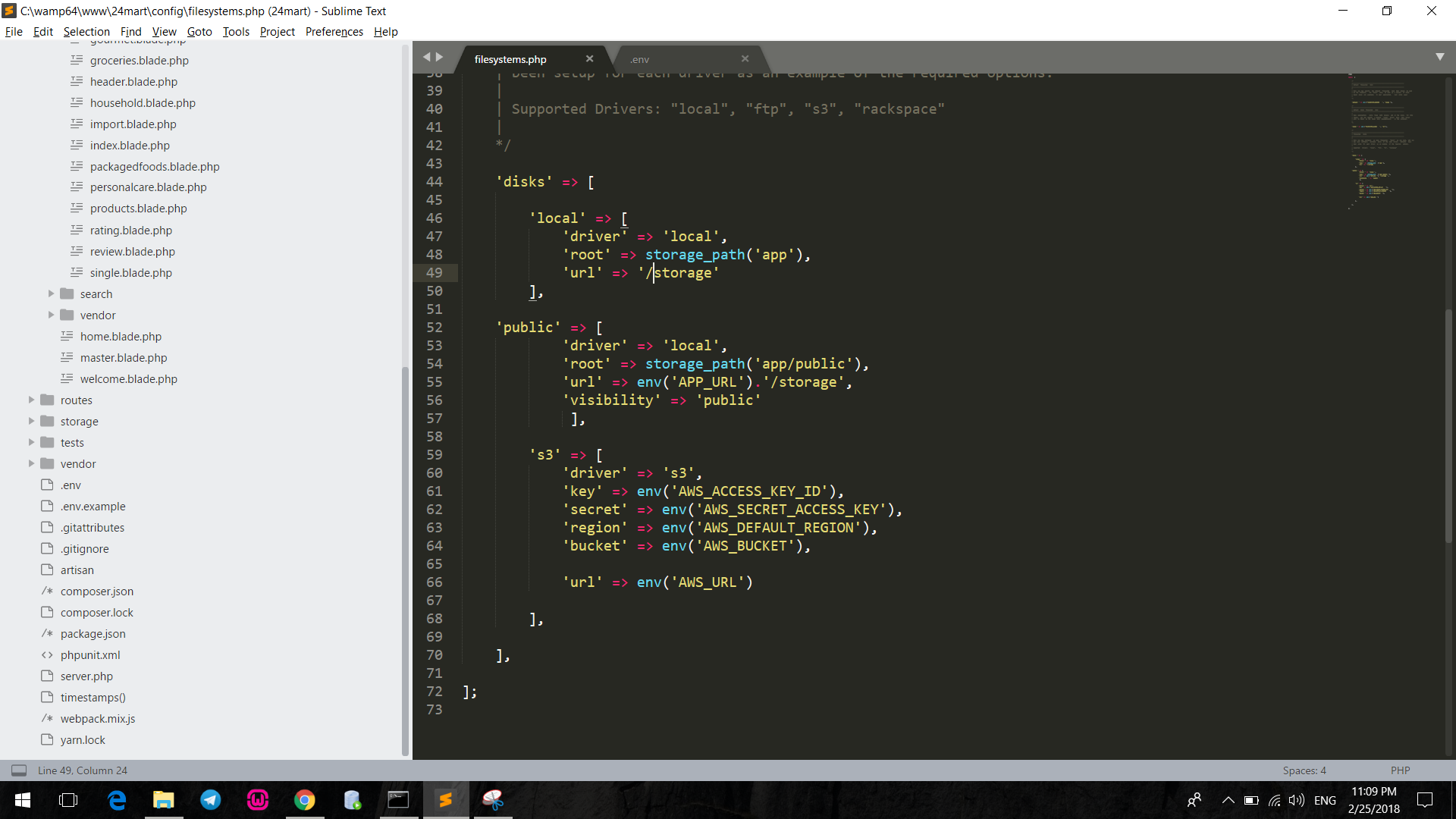
still doesn't work
hourdev
on 25 Feb 2018
yes. already removed, but doesn't work
hourdev
on 25 Feb 2018
did you already run php artisan config:cache by any chance ?
simoebenhida
on 25 Feb 2018
didn't.. haha
now, it is working. thanks a lot for your help!
hourdev
on 25 Feb 2018
i meet the same question and i did all you said,however it still doesn't work
 psger
on 28 Feb 2018
psger
on 28 Feb 2018
albeit this is closed, people are still having an issue. the solution for me was to remove the symlink in the public folder, then ensure the URL was correct in the .env file
APP_URL=http://your-app.test
As this constant is used in the config/filesystems.php file
'url' => env('APP_URL').'/storage',
the storage folder is appended the URL, so a forward slash is required before storage
so the url will be http://your-app.test/storage
Then navigate to the voyager dashboard and an alert will be there to fix the symlink, once clicked it worked for me.
 KobiMontague
on 10 Mar 2018
KobiMontague
on 10 Mar 2018
'disks' => [
    'local' => [
        'driver' => 'local',
        'root' => storage_path('app'),
        'url' => '/storage',
    ],

    'public' => [
        'driver' => 'local',
        'root' => storage_path('app/public'),
        'url' => env('APP_URL').'/storage',
        'visibility' => 'public',
    ],

    's3' => [
        'driver' => 's3',
        'key' => env('AWS_ACCESS_KEY_ID'),
        'secret' => env('AWS_SECRET_ACCESS_KEY'),
        'region' => env('AWS_DEFAULT_REGION'),
        'bucket' => env('AWS_BUCKET'),
        'url' => env('AWS_URL'),
    ],

],
 prasathkarnan
on 23 Oct 2018
prasathkarnan
on 23 Oct 2018
Dose not working please help
prasathkarnan
on 23 Oct 2018
After deleting the public/storage ( if any ) folder run the command
php artisan storage:link
php artisan config:cache
And finally re-run the server .
It works for me .
 arshomashohag
on 25 May 2019
arshomashohag
on 25 May 2019
- php artisan storage:link
- php artisan config:cache
- re-run the server
It worked for me. Thank you @arshomashohag
 Jihun0109
on 9 Mar 2020
Jihun0109
on 9 Mar 2020
Related issues
 MikadoInfo
·
3Comments
MikadoInfo
·
3Comments
 rayqiri
·
3Comments
rayqiri
·
3Comments
 winex01
·
3Comments
winex01
·
3Comments
 TPRAsh
·
3Comments
TPRAsh
·
3Comments
 iwasherefirst2
·
3Comments
iwasherefirst2
·
3Comments
Most helpful comment
didn't.. haha
now, it is working. thanks a lot for your help!