Voyager: This action is unauthorized
- Laravel Version: latest
- Voyager Version: 1.0.5
- PHP Version: 7.0.9
- Database Driver & Version: 5.7.14
Description:
Can't browse a BREAD that I have created. I always have this error "This action is unauthorized". However i've already added permisions for that BREAD to admin user.
Any Helps or suggest?
Thanks...
 Djomab
All 20 comments
Same here. Fresh installation
 linjection
on 13 Oct 2017
linjection
on 13 Oct 2017
can nobody help us?
linjection
on 14 Oct 2017
not so active community hm? :-(
linjection
on 15 Oct 2017
Hello, After you created BREAD go to Roles->admin and add permissions.
 edvinas1995
on 16 Oct 2017
edvinas1995
on 16 Oct 2017
@edvinas1995 i've already added permisions for that BREAD to admin user but I have always this error this action is unauthorized.
Djomab
on 16 Oct 2017
@edvinas1995 works great at my projekt, thanks
linjection
on 16 Oct 2017
I have the same issue, fresh install and Role for admin is set...
Symfony \ Component \ HttpKernel \ Exception \ AccessDeniedHttpException
This action is unauthorized.
Any idea to fix that?
 cruex-de
on 19 Oct 2017
cruex-de
on 19 Oct 2017
faces this if i change model path on bread too.. tried to solve it.. but no solution yet
 SamSolomonOfficial
on 21 Oct 2017
SamSolomonOfficial
on 21 Oct 2017
Thanks @SamSolomon0611 i solved my problem just by changing my model path "App models" to "App"(i have created a folder Models for all my models but now i have deleted it and moved all my models in App)
Djomab
on 21 Oct 2017
Just check name of your model. I had this error i just forger to Write the model name first letter Uppercase.
 khalidahmada
on 29 Oct 2017
khalidahmada
on 29 Oct 2017
I'm having this issue and tried all the above but still no luck.
- update
the table was created with the wrong name so i changed the table name in phpMyAdmin to match the table voyager was looking for.
i named the table 'reportData' in the create new table page
voyager was looking for 'report_data'
 craftycal
on 9 Nov 2017
craftycal
on 9 Nov 2017
i had the same issue, after creating new BREAD it continues to shot "This action is unauthorized".
in BREAD my model path was App[model_name], so i chang it to App[model_name] and it start working.
Hope this can be helpful to you too.
 arxymond
on 10 Jan 2018
arxymond
on 10 Jan 2018
I had the same issue, but returned true in the authorize method inside my {RequestName}Request.
/**
* Determine if the user is authorized to make this request.
*
* @return bool
*/
public function authorize()
{
return true;
}
Then it started working.
 vusi-charlie
on 16 Jan 2018
vusi-charlie
on 16 Jan 2018
I've had the same issue as this. The issue was for me that I had the model starting with a lowercase character. When this was corrected to uppercase it resolved the issue.
 kevin-coyle
on 10 Feb 2018
kevin-coyle
on 10 Feb 2018
having the exact same error , permissions given to admin via the Roles page but still getting Unauthorized access message
 sam-zed
on 16 Feb 2018
sam-zed
on 16 Feb 2018
Please open a new issue
 fletch3555
on 16 Feb 2018
fletch3555
on 16 Feb 2018
Check if the "permissions" table contains the correct table names. I changed my table name and Voyager wont automatically change it in the permissions table..
 imuller
on 11 Mar 2018
imuller
on 11 Mar 2018
I had similar problem with AccessDeniedHttpException.
If you use custom policies(in other part of the application for example) you may need to add BREAD methods(browse, read, edit, add, delete) there.
I've created trait that do the work for me:
`trait VoyagerPolicyTrait
{
public function browse(User $user)
{
return $user->isAdmin();
}
public function edit(User $user)
{
    return $user->isAdmin();
}

public function add(User $user)
{
    return $user->isAdmin();
}

public function delete(User $user)
{
    return $user->isAdmin();
}

public function read(User $user)
{
    return $user->isAdmin();
}
}`
Policy class
class ReviewPolicy
{
    use HandlesAuthorization;
    use VoyagerPolicyTrait;
}
Hope it will be helpful.
 girni
on 18 Mar 2018
girni
on 18 Mar 2018
@girni I faced this problem too, and I had tried almost all of the solutions above. However, only your solution successfully solve my specific situation. Thx for solving it soooo much !!!
 plxus
on 23 Mar 2018
plxus
on 23 Mar 2018
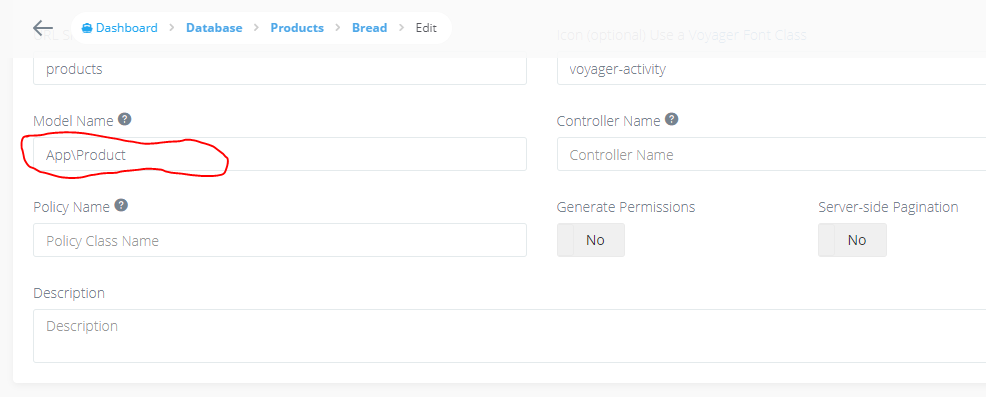
remove /App/Product to
App/Product
remve / sign
Dashboard - Database -Products -Bread -Edit
 rathod4rathod
on 24 Mar 2018
rathod4rathod
on 24 Mar 2018
Related issues
 duongsieu
·
3Comments
duongsieu
·
3Comments
 abacram
·
3Comments
abacram
·
3Comments
 popica80
·
3Comments
popica80
·
3Comments
 wp-src
·
3Comments
wp-src
·
3Comments
 iwasherefirst2
·
3Comments
iwasherefirst2
·
3Comments