Voyager: Can't access to the admin page in voyager 1.0
- Laravel Version: 5.5.13
- Voyager Version: 1.0
- PHP Version:7.0.10
- Database Driver & Version:MySql 5.7.14
Description:
Hello!
After composer require tcg/voyager i run php artisan voyager:install --with-dummy .
All things are correct but at the end of my installation i got this issue:
`Attempting to set Voyager User model as parent to App\User
Dumping the autoloaded files and reloading all new files
[Symfony\Component\Process\Exception\ProcessTimedOutException]
The process "composer dump-autoload" exceeded the timeout of 60 seconds.`
And then can't to my admin page.
Need your help! Thanks
 BarthFox
All 20 comments
This likely has nothing to do with Voyager.
Can you try running composer dump-autoload manually? If that doesn't work, try deleting your vendor directory and running composer install followed by the artisan voyager:install command again
 fletch3555
on 27 Sep 2017
fletch3555
on 27 Sep 2017
@fletch3555 I delete wich one the public vendor directory or the '/vendor/tcg ? I've ran composer dump-autoload then php artisan voyager:install but return [Symfony\Component\Process\Exception\ProcessTimedOutException]
The process "composer dump-autoload" exceeded the timeout of 60 again
BarthFox
on 27 Sep 2017
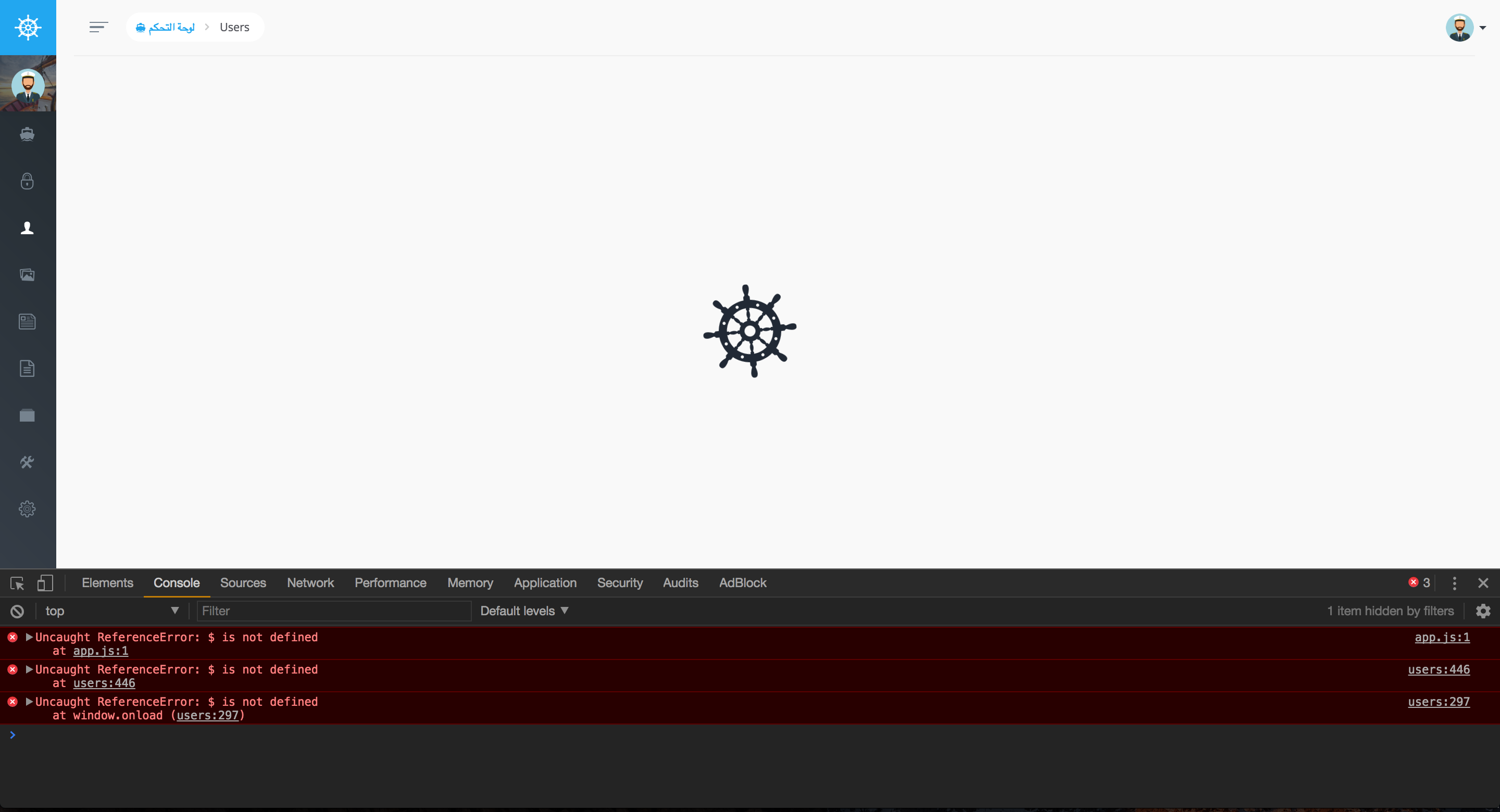
@fletch3555 this's because can't load jquery

 Maghraby
on 27 Sep 2017
Maghraby
on 27 Sep 2017
What can we do in this case? @Maghraby
BarthFox
on 28 Sep 2017
@Maghraby, the presence or absence of jquery has absolutely nothing to do with this issue.
@BarthFox, I meant delete /vendor/tcg/voyager, not /public/vendor.
fletch3555
on 28 Sep 2017
@fletch3555 jquery can't load any data
Maghraby
on 30 Sep 2017
Hi @fletch3555 Even i delete the vendor folder it returns the same error. i installed the new version of laravel with the new version of voyager but nothing changes
BarthFox
on 1 Oct 2017
I have the same problem and still couldn't find the solution.
 yakuter
on 10 Oct 2017
yakuter
on 10 Oct 2017
Even now i can't resolve it
BarthFox
on 10 Oct 2017
I solved the problem. Its all about the "browser cache". Just clear history, that's all.
yakuter
on 10 Oct 2017
Tried on two separate vagrant homestead environments:
- Ubuntu 16.04 / PHP 7.1.0 / L 5.5
- Ubuntu 14.04 / PHP 7.0.5 / L 5.4
On both environments, the "artisan voyager:install" command hangs during the "Dumping the autoloaded files and reloading all new files" phase.
Result: no /admin route is available. These are the routes that show when issuing an "artisan route:list" command:
GET|HEAD | / | Closure | web
GET|HEAD | api/user | Closure | api,auth:api
GET|HEAD | arrilot/load-widget | Arrilot\Widgets\Controllers\WidgetController@showWidget |
@yakuter I can't possibly imagine why this would have anything to do with the browser's history cache.
 mpenna
on 10 Oct 2017
mpenna
on 10 Oct 2017
@mpenna, please make sure VoyagerServiceProvider is loaded (either statically (5.4) or dynamically (5.5)). Sounds like artisan voyager:install isn't writing the routes to the routes file. Do you have permissions set up correctly?
fletch3555
on 11 Oct 2017
Hi @fletch3555 Voyager's service provider is seems to be loading OK. Debugging the install command, I was able to detect that the installation hangs during the dump-autoload phase.
$process = new Process($composer.' dump-autoload');
Just as a test, I commented out that line and once that was out of the equation the installation ran all the way through without issues doing what it is supposed to do, which includes writing Voyager's routes to app's web routes file.
Some other wierdness is going on here, that's for sure.
mpenna
on 11 Oct 2017
The actual line that was commented out is this one:
$process->setWorkingDirectory(base_path())->run();
mpenna
on 11 Oct 2017
I guess I've found out what the problem is.
I have brought that line back into the picture but first I cancelled the timeout setting for the corresponding process:
$process = new Process($composer.' dump-autoload');
$process->setTimeout(null);
$process->setWorkingDirectory(base_path())->run();
With this in place, the voyager:install command ran without issues. Apparently, here in my environment the "composer dump-autoload" needs a bit more of time to fully run.
mpenna
on 11 Oct 2017
@mpenna thanks for this! removing the timeout worked for me. guess my "composer dump-autoload" needs a bit more time to run as well.
 nmduarte
on 30 Oct 2017
nmduarte
on 30 Oct 2017
$process = new Process($composer.' dump-autoload');
$process->setTimeout(null);
$process->setWorkingDirectory(base_path())->run();
@mpenna Which file will I make these changes?
 ekfinbarr
on 17 Jan 2018
ekfinbarr
on 17 Jan 2018
$process = new Process($composer.' dump-autoload');
$process->setTimeout(null);
$process->setWorkingDirectory(base_path())->run();
these lines are found in vendor/symphony/process/Process.php at line 165
it is written as $this->setTimeout(null);, note that i have already changed my value to null, you should yours should be 60 if it is unchanged.
 Aliji-Emmanuel
on 29 Jan 2018
Aliji-Emmanuel
on 29 Jan 2018
This was fixed in #2552
 emptynick
on 10 Mar 2018
emptynick
on 10 Mar 2018
This issue has been automatically locked since there has not been any recent activity after it was closed. If you have further questions please ask in our Slack group.
![github-actions[bot] picture](https://avatars.githubusercontent.com/in/15368?v=4&s=40) github-actions[bot]
on 18 May 2020
github-actions[bot]
on 18 May 2020
Related issues
 wislem
·
3Comments
wislem
·
3Comments
 Nagendra1421
·
3Comments
Nagendra1421
·
3Comments
 rayqiri
·
3Comments
rayqiri
·
3Comments
 winex01
·
3Comments
winex01
·
3Comments
 TPRAsh
·
3Comments
TPRAsh
·
3Comments
Most helpful comment
I guess I've found out what the problem is.
I have brought that line back into the picture but first I cancelled the timeout setting for the corresponding process:
With this in place, the voyager:install command ran without issues. Apparently, here in my environment the "composer dump-autoload" needs a bit more of time to fully run.