Voyager: Images not shown on hosting
- Laravel Version: 5.3
- Voyager Version: 0.11.14
- PHP Version: 5.6
- Database Driver & Version:
Description:
i set up a voyager project on production as a subdomain example : http://subdomain.web.com/public/
on .env APP_URL is http://subdomain.web.com/public/
http://subdomain.web.com/storage/.../.../img.jpg ---- image not appear
can anyone help me please
Steps To Reproduce:
install laravel voyager on godaddy as a subdomain
 saldanac
All 9 comments
Are you run php artisan storage:link?
 davodavodavo3
on 17 Sep 2017
davodavodavo3
on 17 Sep 2017
yes I did.... My laravel app is running like http://subdomain.web.com/public/ but images not loading :(
saldanac
on 17 Sep 2017
everythings is working fine...only images not loading properly
saldanac
on 17 Sep 2017
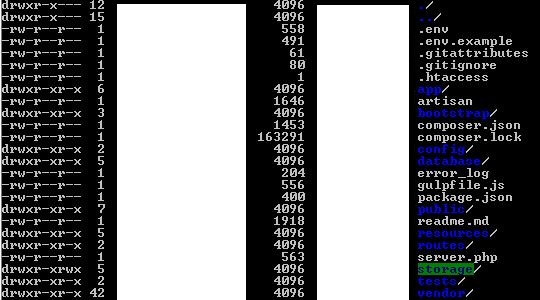
what green background on storage folder means?
saldanac
on 17 Sep 2017
@saldanac, the issue is with your configuration. It's not recommended to have laravel installed so the public directory is under the web root (to find out why, try visiting http://subdomain.web.com/.env). If you insist on doing it that way, you need to update the storage path in config/filesystem.php. the path /storage/{...}/img.jpg is referring to /public/storage/..., not /storage/...
Also, the green background is dependent on the terminal/shell you're using, but likely means that it's "world"-writable (https://unix.stackexchange.com/a/94505)
 fletch3555
on 18 Sep 2017
fletch3555
on 18 Sep 2017
Thank you I have done a wrong configuration...now I have laravel installed on root directory and public folder on public_html/subdomain ... now working fine. of course Its my first time uploading a laravel project on a shared hosting 💃 Thank you for your help.
saldanac
on 22 Sep 2017
pls help me
 ghost
on 23 Apr 2018
ghost
on 23 Apr 2018
i tried file system and app url
ghost
on 23 Apr 2018
This issue has been automatically locked since there has not been any recent activity after it was closed. If you have further questions please ask in our Slack group.
![github-actions[bot] picture](https://avatars.githubusercontent.com/in/15368?v=4&s=40) github-actions[bot]
on 18 May 2020
github-actions[bot]
on 18 May 2020
Related issues
 TXRRNT
·
3Comments
TXRRNT
·
3Comments
 craigb88
·
3Comments
craigb88
·
3Comments
 zzpwestlife
·
3Comments
zzpwestlife
·
3Comments
 popica80
·
3Comments
popica80
·
3Comments
 jeulun
·
3Comments
jeulun
·
3Comments
Most helpful comment
@saldanac, the issue is with your configuration. It's not recommended to have laravel installed so the public directory is under the web root (to find out why, try visiting http://subdomain.web.com/.env). If you insist on doing it that way, you need to update the storage path in
config/filesystem.php. the path/storage/{...}/img.jpgis referring to/public/storage/..., not/storage/...Also, the green background is dependent on the terminal/shell you're using, but likely means that it's "world"-writable (https://unix.stackexchange.com/a/94505)