Voodooi2c: Problem pointer - ice lake notebook - i2c hid satellite
Describe the bug
A clear and concise description of what the bug is.
-Hello everyone and sorry for the inconvenience, but I have a problem with the touch pad of my laptop, it is of the ice lake generation, the gestures work, system preferences sees it well, but with the use of 1 finger, the pointer responds badly, in the video attachment you can see, moving vertically the pointer responds badly, and moving the pointer horizontally with the slightest movement goes very fast horizontally on the screen
Did you read the common errors documentation?
Please answer yes or no after reading https://voodooi2c.github.io/#Common%20Errors/Common%20Errors
- YES
Did you read the troubleshooting documentation?
Please answer yes or no after reading https://voodooi2c.github.io/#Troubleshooting/Troubleshooting.
-YES
Have you searched the issue on Github, Gitter, or Google?
Please answer yes or no, this is to avoid creating duplicate Github issues.
-YES
System Environment
Please answer:
- What is your operating system? - MACOS BIG SUR 11.2
- What version of the drivers (including drivers) are you using? - VOODOOI2C AND VOODOOI2C HID 2.6.3
- What is your hardware configuration? - DELL VOSTRO 5401 (ICE LAKE)
-CPU : I7 1065G7
-IGPU: INTEL IRIS PLUS G7
-1° NVME FOR MACOS: SAMSUNG 970 EVO PLUS 500GB
-2° NVME FOR WINDOWS 10: HYNIX BC511 512GB
-RAM: KINGSTON HYPERX IMPACT DDR4 3200 32GB (2X16GB)
-WIFI+BT: BROADCOM DW1830
MY EFI ON GITHUB --> https://github.com/Lorys89/DELL_VOSTRO_5401-ICE-LAKE
Troubleshooting Archive
Please attach the troubleshooting archive (as per https://voodooi2c.github.io/#Troubleshooting/Troubleshooting) and any additional logs or videos demonstrating the problem. Please attach any extra files to Github and not anywhere else like Google Drive.
LOG -->
Log.log
IOREG -->
MacBook Pro 16,2 ice lake DELL.zip
IOREG WITH SSDT-I2CD -->
MacBook Pro 16,2 with I2CD.zip
VIDEO OF THE PROBLEM -->
problem i2c.mp4.zip
DSDT ORIGIN -->
DSDT.aml.zip
Additional context
Add any other context about the problem here.
 Lorys89
All 11 comments
@ben9923 @zhen-zen is this material okay? or do you want me to add more?
last log --->
Log.log
with ssdt i2c1 + log --->
SSDT-I2C1.zip
Log2.log
RunMeApp-OcDebug -->
debug_3834.zip
Lorys89
on 10 Jan 2021
for me it's not a problem at acpi level but it will be kext/driver
info for my touch pad resolution --->
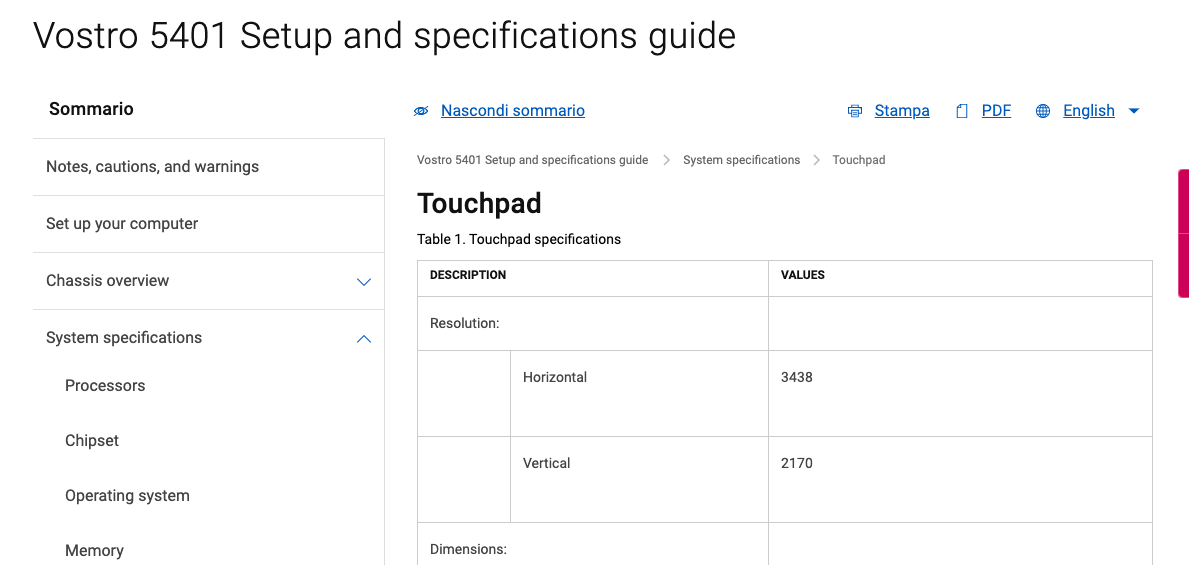
and the value of DELL XPS 9300 (ICE LAKE) touch pad (in this XPS icl work good i2c)--->
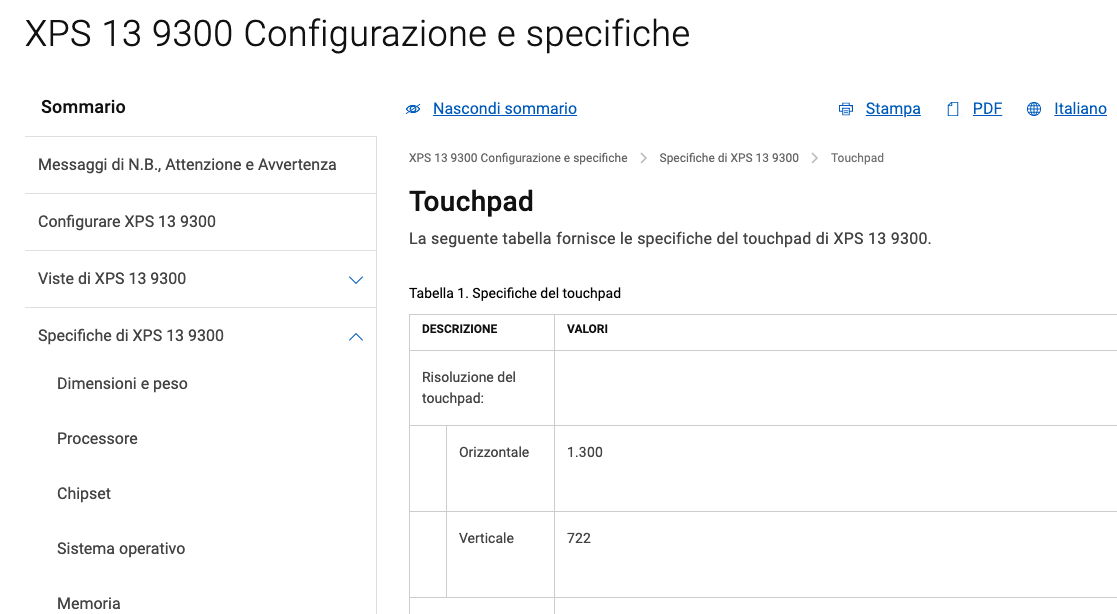
and the value of DELL INSPIRON 5593 (ICE LAKE) touch pad (in this INSPIRON icl work good i2c)--->
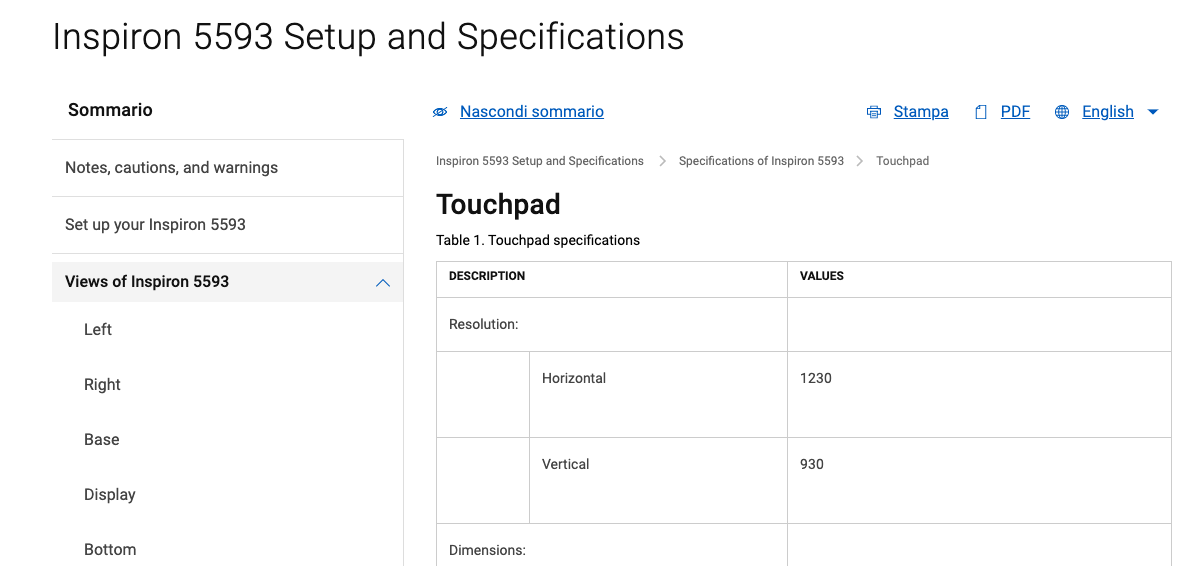
Lorys89
on 14 Jan 2021
Hello everyone! Here with the same identical problem on my HP Pavilion x360 Icelake! everything works, also the Touchscreen panel! Just the vertical issue on the trackpad! here my ioreg and rep: IOREG
 Vorshim92
on 14 Jan 2021
Vorshim92
on 14 Jan 2021
Hello everyone! Here with the same identical problem on my HP Pavilion x360 Icelake! everything works, also the Touchscreen panel! Just the vertical issue on the trackpad! here my ioreg and rep: IOREG
we probably have the same i2c elan
Lorys89
on 14 Jan 2021
@kprinssu seeing the info and files provided, what do you think?
Lorys89
on 14 Jan 2021
@ben9923 WP i2c hid , see video. https://github.com/Lorys89/DELL_VOSTRO_5401-ICE-LAKE/raw/main/Screenshot/video_2021-01-18_23-48-22.mp4.zip
my friend @mbarbierato worked on kext i2c hid and the results are excellent, the speed must only be optimized, now I can already use it discreetly in my touch pad.
Lorys89
on 18 Jan 2021
@ben9923 this pr https://github.com/VoodooI2C/VoodooI2CHID/pull/47 fix my problem :)
(my touch pad with dpi x and dpi y elevated, and logic and phisical differ a lot, it needs a new calculation, I have all the study material.)
i2cLog.log
ioreg MacBook Pro 16,2.zip
see video https://github.com/Lorys89/DELL_VOSTRO_5401-ICE-LAKE/raw/main/Screenshot/i2c%20hid%20work%20good.mp4.zip
Lorys89
on 20 Jan 2021
Problem lays in VoodooI2CHID's unit exponent factoring, not being able to handle anything lower than -2.
We probably also want to eliminate the scaling by x10 in the native engine and just let the satellites report the proper, already-scaled dimensions.
Reported physical X/Y in @Lorys89's device are 0x1bee0/0x10f18 (114.4cm/69.4cm), 10 times bigger than actual value...
As the Magic Trackpad 2 only reports 16 bit dimensions, actual reported values were 0xbee0/0x0f18 (48.9cm/3.9cm).
Such values obviously messed up with the input processing.
Fixed in https://github.com/VoodooI2C/VoodooI2CHID/commit/1674b569a863ba789982cc1d86f2c80c05d55c74 along with a change in VoodooI2C to not scale the value by x10.
Note: VoodooInput expects physical dimensions in 0.01 mm units.
Thanks @mbarbierato for the lead to mess with physical dimensions.
CC @kprinssu
 ben9923
on 23 Jan 2021
ben9923
on 23 Jan 2021
@ben9923 the changes looks good. Feel free to do a new release!
 kprinssu
on 23 Jan 2021
kprinssu
on 23 Jan 2021
thanks
Lorys89
on 6 Feb 2021
Thanks
 mbarbierato
on 6 Feb 2021
mbarbierato
on 6 Feb 2021
Related issues
 gujiangjiang
·
11Comments
gujiangjiang
·
11Comments
 alfinauzikri
·
7Comments
alfinauzikri
·
7Comments
 grantbi
·
6Comments
grantbi
·
6Comments
 dreamwhite
·
11Comments
dreamwhite
·
11Comments
 im-bravo
·
5Comments
im-bravo
·
5Comments
Most helpful comment
thanks