Voodooi2c: touchpad slower As the usage time increases
As the usage time increases, the touchpad will have a significant lag. The touchpad is very sensitive within a few minutes after booting, and you can’t feel any lag, but after using it for a period of time, you will feel a significant lag. The kernel task occupancy rate reaches 30-40%. After waiting for tens of seconds, the touchpad can return to the sensitive state.
Info:
Device: Lenovo XiaoxinPro 13 Intel i7 10710u on macOS 10.15.4
using latest 2.4.2 kext.(only copy VoodooI2C.kext and VoodooI2CHID.kext to efi, it's that wrong? Because I saw my original efi have these two files )
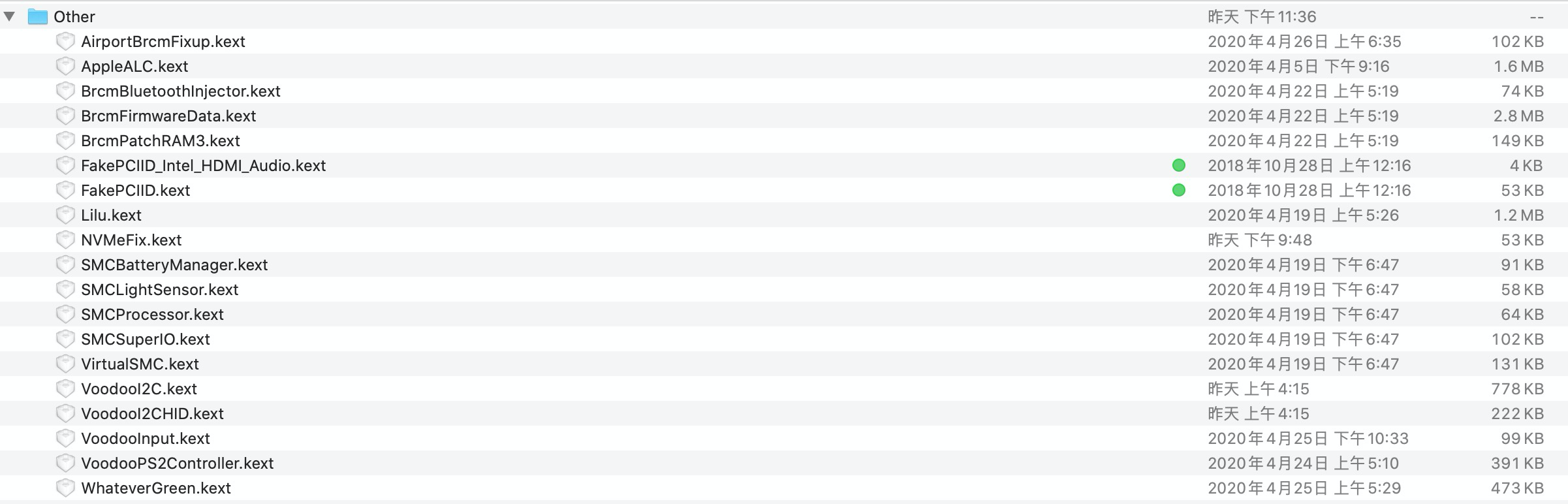
system log :( have countless GPIO28 error
2020-04-30 08:14:02.437805+0800 0xe4 Default 0x0 0 0 kernel: (kernel) VoodooGPIOCannonLakeLP::Failed getting hardware pin for GPIO pin 28
2020-04-30 08:14:02.438103+0800 0xe4 Default 0x0 0 0 kernel: (kernel) VoodooGPIOCannonLakeLP::Failed getting hardware pin for GPIO pin 28
2020-04-30 08:14:02.444784+0800 0xe4 Default 0x0 0 0 kernel: (kernel) VoodooGPIOCannonLakeLP::Failed getting hardware pin for GPIO pin 28
2020-04-30 08:14:02.445022+0800 0xe4 Default 0x0 0 0 kernel: (kernel) VoodooGPIOCannonLakeLP::Failed getting hardware pin for GPIO pin 28
2020-04-30 08:14:02.445253+0800 0xe4 Default 0x0 0 0 kernel: (kernel) VoodooGPIOCannonLakeLP::Failed getting hardware pin for GPIO pin 28
2020-04-30 08:14:02.451752+0800 0xe4 Default 0x0 0 0 kernel: (kernel) VoodooGPIOCannonLakeLP::Failed getting hardware pin for GPIO pin 28
2020-04-30 08:14:02.452004+0800 0xe4 Default 0x0 0 0 kernel: (kernel) VoodooGPIOCannonLakeLP::Failed getting hardware pin for GPIO pin 28
2020-04-30 08:14:02.452228+0800 0xe4 Default 0x0 0 0 kernel: (kernel) VoodooGPIOCannonLakeLP::Failed getting hardware pin for GPIO pin 28
2020-04-30 08:14:02.458586+0800 0xe4 Default 0x0 0 0 kernel: (kernel) VoodooGPIOCannonLakeLP::Failed getting hardware pin for GPIO pin 28
2020-04-30 08:14:02.458822+0800 0xe4 Default 0x0 0 0 kernel: (kernel) VoodooGPIOCannonLakeLP::Failed getting hardware pin for GPIO pin 28
2020-04-30 08:14:02.459131+0800 0xe4 Default 0x0 0 0 kernel: (kernel) VoodooGPIOCannonLakeLP::Failed getting hardware pin for GPIO pin 28
2020-04-30 08:14:02.624369+0800 0x205d6 Default 0x0 0 0 kernel: (IOAudioFamily) + IOAudioEngine[
2020-04-30 08:14:02.624626+0800 0x205d6 Default 0x0 0 0 kernel: (IOAudioFamily) +-IOAudioEngine[
2020-04-30 08:14:02.624656+0800 0x205d6 Default 0x0 0 0 kernel: (IOAudioFamily) + IOAudioDevice[
2020-04-30 08:14:02.624661+0800 0x205d6 Default 0x0 0 0 kernel: (IOAudioFamily) + IOAudioDevice[
2020-04-30 08:14:02.624665+0800 0x205d6 Default 0x0 0 0 kernel: (IOAudioFamily) - IOAudioDevice[
2020-04-30 08:14:02.624668+0800 0x205d6 Default 0x0 0 0 kernel: (IOAudioFamily) - IOAudioDevice[
2020-04-30 08:14:02.624670+0800 0x205d6 Default 0x0 0 0 kernel: (IOAudioFamily) - IOAudioEngine[
2020-04-30 08:14:02.624673+0800 0x205d6 Default 0x0 0 0 kernel: (IOAudioFamily) +-IOAudioEngine[
2020-04-30 08:14:03.097081+0800 0xdd01 Default 0x0 0 0 kernel: tcp_timers: tcp_output() returned 0 with retransmission timer disabled for 53448 > 443 in state 4, reset timer to 646
 packyan
All 6 comments
You'll need to provide more details.
Which hardware, kext version (make sure it's latest), when did it start, which satellites are you using for each device.
Attach a troubleshooting archive (ACPI, IOReg, kernel log).
 ben9923
on 29 Apr 2020
ben9923
on 29 Apr 2020
You'll need to provide more details.
Which hardware, kext version (make sure it's latest), when did it start, which satellites are you using for each device.Attach a troubleshooting archive (ACPI, IOReg, kernel log).
Already update details, plz check.
packyan
on 30 Apr 2020
using latest 2.4.2 kext.(only copy VoodooI2C.kext and VoodooI2CHID.kext to efi, it's that wrong? Because I saw my original efi have these two files )
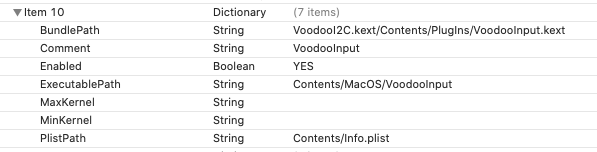
VoodooInput.kext is now bundled with VoodooI2C. If you are on Clover you can just delete VoodooInput.kext. If you are on OpenCore well, you can replace VoodooInput with the one inside of VoodooI2C/Plugins or just delete it and redefine the path in your config (in Kernel section) like so
 marianopela
on 30 Apr 2020
marianopela
on 30 Apr 2020
使用最新的2.4.2 kext。(仅将VoodooI2C.kext和VoodooI2CHID.kext复制到efi,这是错误的吗?因为我看到我的原始efi有这两个文件)
VoodooInput.kext现在与VoodooI2C捆绑在一起。如果您在Clover上,则可以删除VoodooInput.kext。如果您使用的是OpenCore,则可以用VoodooI2C / Plugins内部的一个替换VoodooInput,也可以删除它,然后在配置(在内核部分)中重新定义路径,如下所示
I'm using Clover, and I have done what your said, then it's working fine, no more lagging, but system log are still tons of GPIO 28 Error. This Error can be fixed? Thanks for your reply.
Default 0x0 0 0 kernel: (kernel) VoodooGPIOCannonLakeLP::Failed getting hardware pin for GPIO pin 28
packyan
on 30 Apr 2020
system log are still tons of GPIO 28 Error. This Error can be fixed? Thanks for your reply.
Default 0x0 0 0 kernel: (kernel) VoodooGPIOCannonLakeLP::Failed getting hardware pin for GPIO pin 28
Seems like 28 is not the right pin for you
Please read here carefully
marianopela
on 30 Apr 2020
系统日志仍然是GPIO 28错误吨。这个错误可以解决吗?感谢您的回复。
默认值0x0 0 0内核:(内核)VoodooGPIOCannonLakeLP :::无法获取GPIO引脚28的硬件引脚
似乎28不是适合您的引脚
请仔细阅读此处
I am a newbie in hackintosh, so when I saw that page, I gave up.
packyan
on 30 Apr 2020
Related issues
 alfinauzikri
·
7Comments
alfinauzikri
·
7Comments
 onejay09
·
6Comments
onejay09
·
6Comments
 williambj1
·
10Comments
williambj1
·
10Comments
 liyi-debug
·
9Comments
liyi-debug
·
9Comments
 Hunter9888x
·
7Comments
Hunter9888x
·
7Comments
Most helpful comment
system log are still tons of GPIO 28 Error. This Error can be fixed? Thanks for your reply.
Seems like 28 is not the right pin for you
Please read here carefully