Voodooi2c: New version causes problems
when i updated to 2.4.2 then cursor shows ridiculous behaviour cusor flickering, not working properly, cursor jumping from a point to point without touching the trackpad.
trackpad: FTE1001
Asus X556UQK
kext used: vodooi2c.kext, vodooi2cFTE.kext
 nikhil19rathore99
All 28 comments
You'll need to attach a troubleshooting archive.
How does 2.4.1 behave on your machine?
 ben9923
on 29 Apr 2020
ben9923
on 29 Apr 2020
how do i get turbo-shooting files. yeah it was works fine but launchpad gestures works only sometimes not everytime and my cursor speed is too fast even at 1 step increased in initial value.
can i send ioreg screenshot to you
nikhil19rathore99
on 29 Apr 2020
current using vodooi2c 2.4.1 not using 2.4.2 becuase it will do some strange behaviour and the problem with gesture is in this version also
nikhil19rathore99
on 29 Apr 2020
Please attach all logs, read https://voodooi2c.github.io/#Troubleshooting/Troubleshooting. It is very hard to understand what's going on from just the IORegistry file.
 kprinssu
on 29 Apr 2020
nikhil19rathore99
on 30 Apr 2020
kprinssu
on 29 Apr 2020
nikhil19rathore99
on 30 Apr 2020
I hope this is all from my side please help if possible ,Thanks for the concern
nikhil19rathore99
on 30 Apr 2020
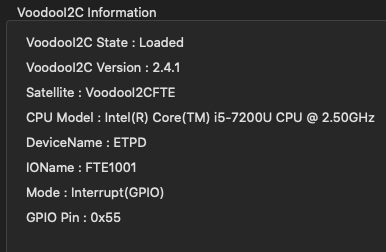
this is left
nikhil19rathore99
on 30 Apr 2020
nikhil19rathore99
on 30 Apr 2020
You are getting multiple VoodooI2CFTETouchpadDriver::FTE1001 Invalid report log events. Are you certain that your device is a FTE based device?
kprinssu
on 30 Apr 2020
You are getting multiple
VoodooI2CFTETouchpadDriver::FTE1001 Invalid reportlog events. Are you certain that your device is a FTE based device?
In windows i checked the device properties it shows deviceDescription: \dev\FTE1001, Although it was from i2CHID class, and all the gestures works fine but launchpad gesture not works and latest versions laggs and bit strange behaviuor, I hope u understand what i am saying!!
nikhil19rathore99
on 30 Apr 2020
That is not a good of way checking if you have a FTE device or not. Check which drivers are loading on Windows and Linux. Preferrably Linux as it is verbose and can easily tell you which kernel module has loaded for your trackpad.
kprinssu
on 30 Apr 2020
That is not a good of way checking if you have a FTE device or not. Check which drivers are loading on Windows and Linux. Preferrably Linux as it is verbose and can easily tell you which kernel module has loaded for your trackpad.
can i send the window trackpad device properties screenshot to show ??
nikhil19rathore99
on 30 Apr 2020
Yes, I don't see why you shouldn't?
kprinssu
on 30 Apr 2020
Yes, I don't see why you shouldn't?
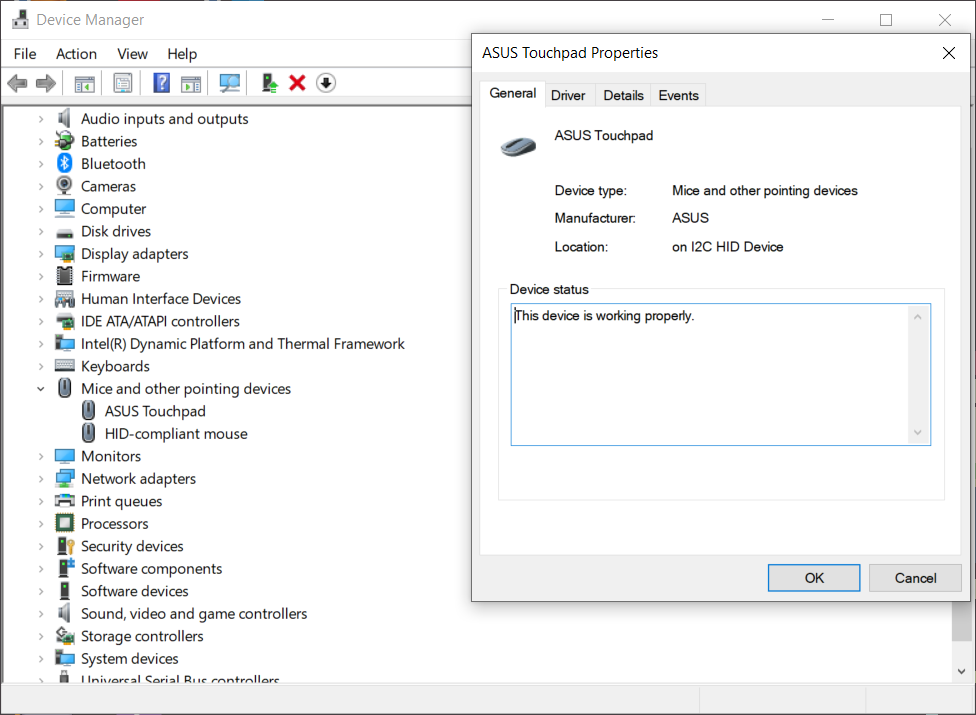
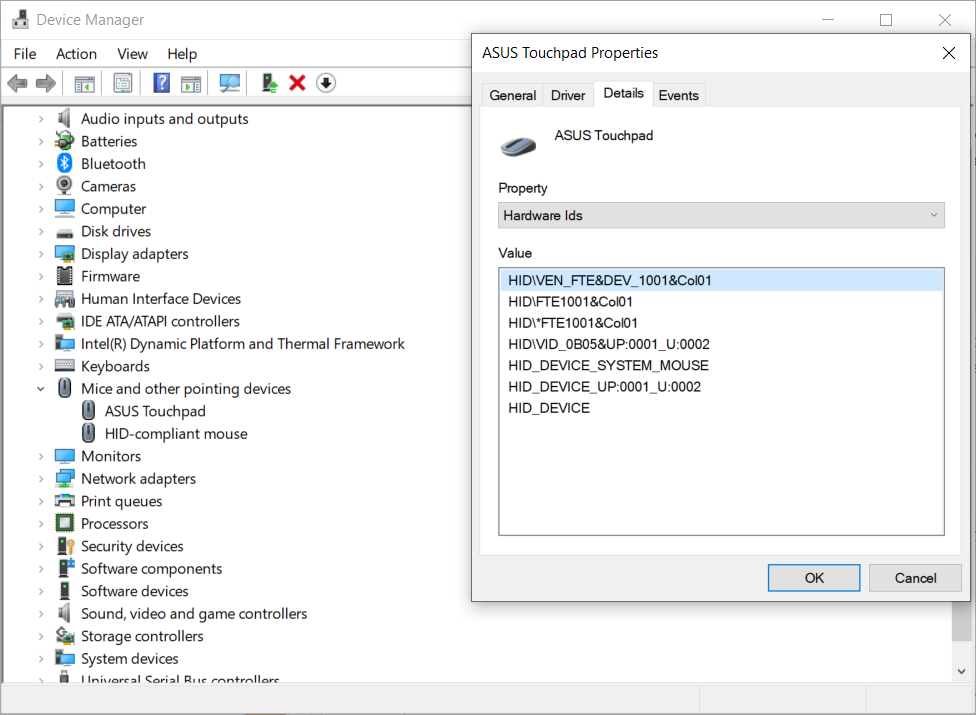
nikhil19rathore99
on 30 Apr 2020
What is your laptop model?
kprinssu
on 30 Apr 2020
What is your laptop model?
Asus X556UQK, I've mentioned a txt file about laptop above
nikhil19rathore99
on 1 May 2020
this log file contains system file,
Asus X556UQK,
Processor: i5-7200U, KabyLake 7th Gen,
GPU: intel hd620
problems:
- Cursor moves too fast even at slow speed,
- 3 fingures with thumg laucnhpad gesture not working properly,
3.Cursor movement is not so smooth like windows
Please consider this problems, Thanks for your concern in this matter!!
nikhil19rathore99
on 1 May 2020
I want you to double check if you are using the correct satellite kext. As I suspect that you do not have a FTE based device rather a Elan based one. An easy way to check is to boot up your device using a live Linux USB and checking which kernel modules load.
Additionally, here's an archived repository for your device, https://github.com/systemfaliure/ASUS-X556UQK-hackintosh/tree/master/CLOVER/kexts/10.13. Notice that this user is using VoodooI2CElan. I also have yet to come across an Asus laptop that does not use a Elan device.
I suggest you read https://voodooi2c.github.io/#Satellite%20Kexts/Satellite%20Kexts.
kprinssu
on 1 May 2020
I want you to double check if you are using the correct satellite kext. As I suspect that you do not have a FTE based device rather a Elan based one. An easy way to check is to boot up your device using a live Linux USB and checking which kernel modules load.
Additionally, here's an archived repository for your device, https://github.com/systemfaliure/ASUS-X556UQK-hackintosh/tree/master/CLOVER/kexts/10.13. Notice that this user is using VoodooI2CElan. I also have yet to come across an Asus laptop that does not use a Elan device.
I suggest you read https://voodooi2c.github.io/#Satellite%20Kexts/Satellite%20Kexts.
which command i use to check the trackpad in linux
nikhil19rathore99
on 1 May 2020
I: Bus=0018 Vendor=0b05 Product=0101 Version=0100
N: Name="Asus TouchPad"
P: Phys=i2c-FTE1001:00
S: Sysfs=/devices/pci0000:00/0000:00:15.1/i2c_designware.1/i2c-5/i2c-FTE1001:00/0018:0B05:0101.0001/input/input7
U: Uniq=
H: Handlers=mouse0 event7
B: PROP=5
B: EV=b
B: KEY=e520 10000 0 0 0 0
B: ABS=661800011000003
nikhil19rathore99
on 1 May 2020
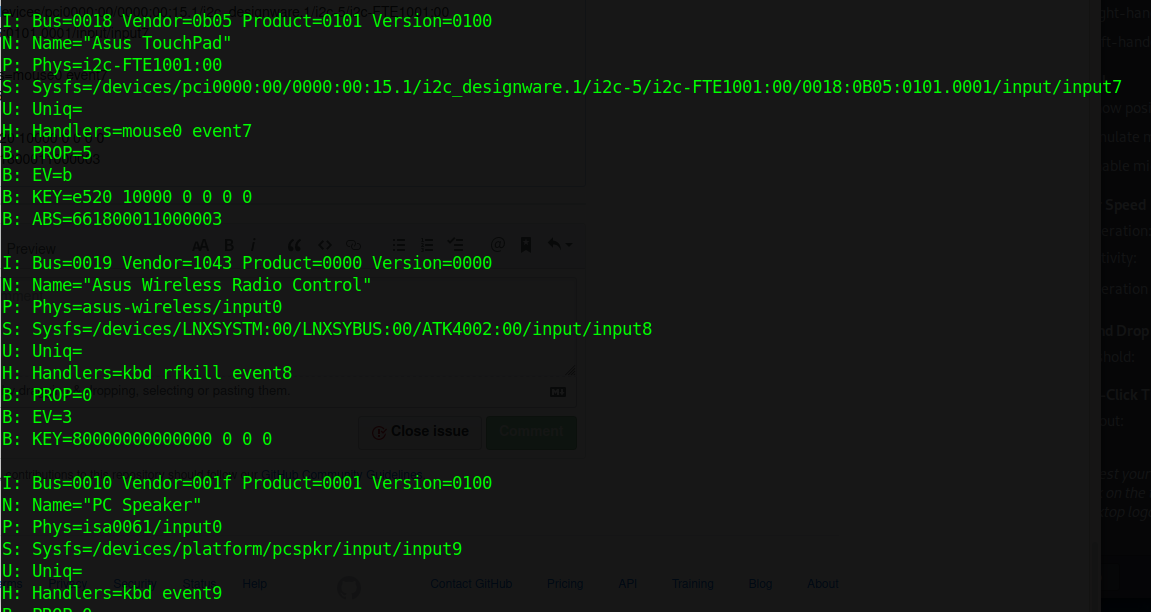
nikhil19rathore99
on 1 May 2020
lsmod
There are also i2c tools, check this out: https://it-explain.com/how-to-scan-i2c-bus-in-linux/
 edd1024
on 1 May 2020
edd1024
on 1 May 2020
lsmod
There are also i2c tools, check this out: https://it-explain.com/how-to-scan-i2c-bus-in-linux/
i install that i2c tools but how to scan this i mean i provide the xinput output above which confirms that my trackpad is i2c-FTE:1001
nikhil19rathore99
on 2 May 2020
I want you to double check if you are using the correct satellite kext. As I suspect that you do not have a FTE based device rather a Elan based one. An easy way to check is to boot up your device using a live Linux USB and checking which kernel modules load.
Additionally, here's an archived repository for your device, https://github.com/systemfaliure/ASUS-X556UQK-hackintosh/tree/master/CLOVER/kexts/10.13. Notice that this user is using VoodooI2CElan. I also have yet to come across an Asus laptop that does not use a Elan device.
I suggest you read https://voodooi2c.github.io/#Satellite%20Kexts/Satellite%20Kexts.
and talkin about his specs it was old mine was new 2017 model, so there is hardware difference
nikhil19rathore99
on 2 May 2020
I want you to double check if you are using the correct satellite kext. As I suspect that you do not have a FTE based device rather a Elan based one. An easy way to check is to boot up your device using a live Linux USB and checking which kernel modules load.
Additionally, here's an archived repository for your device, https://github.com/systemfaliure/ASUS-X556UQK-hackintosh/tree/master/CLOVER/kexts/10.13. Notice that this user is using VoodooI2CElan. I also have yet to come across an Asus laptop that does not use a Elan device.
I suggest you read https://voodooi2c.github.io/#Satellite%20Kexts/Satellite%20Kexts.
It's been 3 days since i posted the issue yet it's not been resolved althoughi provided all the information needeed to fix but the problem is not solved yet, Please help!!
nikhil19rathore99
on 2 May 2020
Seems the changes of VoodooI2CHID in the new version have not yet been ported to the satellite you are using. You may want to raise an issue in the VoodooI2CFTE project.
 Goshin
on 2 May 2020
Goshin
on 2 May 2020
I want you to double check if you are using the correct satellite kext. As I suspect that you do not have a FTE based device rather a Elan based one. An easy way to check is to boot up your device using a live Linux USB and checking which kernel modules load.
Additionally, here's an archived repository for your device, https://github.com/systemfaliure/ASUS-X556UQK-hackintosh/tree/master/CLOVER/kexts/10.13. Notice that this user is using VoodooI2CElan. I also have yet to come across an Asus laptop that does not use a Elan device.
I suggest you read https://voodooi2c.github.io/#Satellite%20Kexts/Satellite%20Kexts.It's been 3 days since i posted the issue yet it's not been resolved althoughi provided all the information needeed to fix but the problem is not solved yet, Please help!!
@nikhil19rathore99 you do realize that myself and the other contributors and maintainers are doing this for free right? We have no incentive to help you out, please do not act entitled.
As Goshin mentioned mentioned the changes have to be ported, as seen here https://github.com/kprinssu/VoodooI2CELAN/commit/6897677af23c1e647760ebfb4e23af22883fc995. Will be fixed, until then please wait or you can try attempting the port yourself.
kprinssu
on 2 May 2020
I want you to double check if you are using the correct satellite kext. As I suspect that you do not have a FTE based device rather a Elan based one. An easy way to check is to boot up your device using a live Linux USB and checking which kernel modules load.
Additionally, here's an archived repository for your device, https://github.com/systemfaliure/ASUS-X556UQK-hackintosh/tree/master/CLOVER/kexts/10.13. Notice that this user is using VoodooI2CElan. I also have yet to come across an Asus laptop that does not use a Elan device.
I suggest you read https://voodooi2c.github.io/#Satellite%20Kexts/Satellite%20Kexts.It's been 3 days since i posted the issue yet it's not been resolved althoughi provided all the information needeed to fix but the problem is not solved yet, Please help!!
@nikhil19rathore99 you do realize that myself and the other contributors and maintainers are doing this for free right?
As Goshin mentioned mentioned the changes have to be ported, as seen here kprinssu/VoodooI2CELAN@6897677. Will be fixed, until then please wait or you can try attempting the port yourself.
So Sorry, Thanks for your support, I think I am new in GitHub issue post, please accept my apology, Sorry and again Thanks for the reply and support!!
And the trackpad is FTE1001, I've checked many times in linux with different software as u mentioned and the follow the instructions given in your manuals
nikhil19rathore99
on 2 May 2020
Related issues
 alfinauzikri
·
7Comments
alfinauzikri
·
7Comments
 hrytskivr
·
8Comments
hrytskivr
·
8Comments
 axel9546
·
11Comments
axel9546
·
11Comments
 williambj1
·
10Comments
williambj1
·
10Comments
 jaromeyer
·
10Comments
jaromeyer
·
10Comments
Most helpful comment
@nikhil19rathore99 you do realize that myself and the other contributors and maintainers are doing this for free right? We have no incentive to help you out, please do not act entitled.
As Goshin mentioned mentioned the changes have to be ported, as seen here https://github.com/kprinssu/VoodooI2CELAN/commit/6897677af23c1e647760ebfb4e23af22883fc995. Will be fixed, until then please wait or you can try attempting the port yourself.