Voila: Custom Widget results are not shown on voila dashboard.
I really liked the voila library and I have used it along with ipyleaflet and it works fine and I could see the results on the dashboard link. I have created a custom widget similar to ipyleaflet and it works fine in Jupyter notebook and Jupyter lab but when I run it using voila I do not see results on the dashboard link only black page appears.
Can someone please guide me on how I can debug this issue?
Please let me know if any additional details are required.

 sackh
sackh
All 32 comments
I have the same issue: an ipywidget runing well in a given Jupyter Lab server and the voila lab extension not working.
It seems voilà is not reusing the jupyter Lab "context" and tries to rebuild it's own...
Of course, voila tries to upload the custom ipywidget and as this one is not in npm nor pypi: it fails loading it.
Is there a way to parameter jupyter config file to have voila share the same python environment and the same javascript files and other resources as the jupyter lab server?
Thx
 gbrault
on 10 Jun 2020
gbrault
on 10 Jun 2020
If your JavaScript package is not uploaded to npmjs, you need to pass the option --enable_nbextensions=True to Voila to make it work.
By default Voila downloads the extension on npmjs, and apparently you did not upload it to it, so you need to tell Voila to use the local nbextensions.
 martinRenou
on 10 Jun 2020
martinRenou
on 10 Jun 2020
If your JavaScript package is not uploaded to npmjs, you need to pass the option --enable_nbextensions=True to Voila to make it work.
There is also some documentation about this option here: https://voila.readthedocs.io/en/latest/using.html#using-third-party-widgets-with-voila
Closing as answered, but feel free to comment here (or open a new issue) if you have any question.
 jtpio
on 10 Jun 2020
jtpio
on 10 Jun 2020
Thank you this is resolved 👍
sackh
on 10 Jun 2020
It doesn't work for me, but my extension is not a "classic notebook" but a jupyter lab extension...
Any idea?
gbrault
on 10 Jun 2020
Is it a local extension you built?
You might be able to install an nbextension by doing:
jupyter nbextension install --py --symlink --sys-prefix package_name
jupyter nbextension enable --py --sys-prefix package_name
And then start Voila with the --enable_nbextensions=True option.
martinRenou
on 10 Jun 2020
Many thanks @martinRenou , I am moving forward.
But still some small issues pending
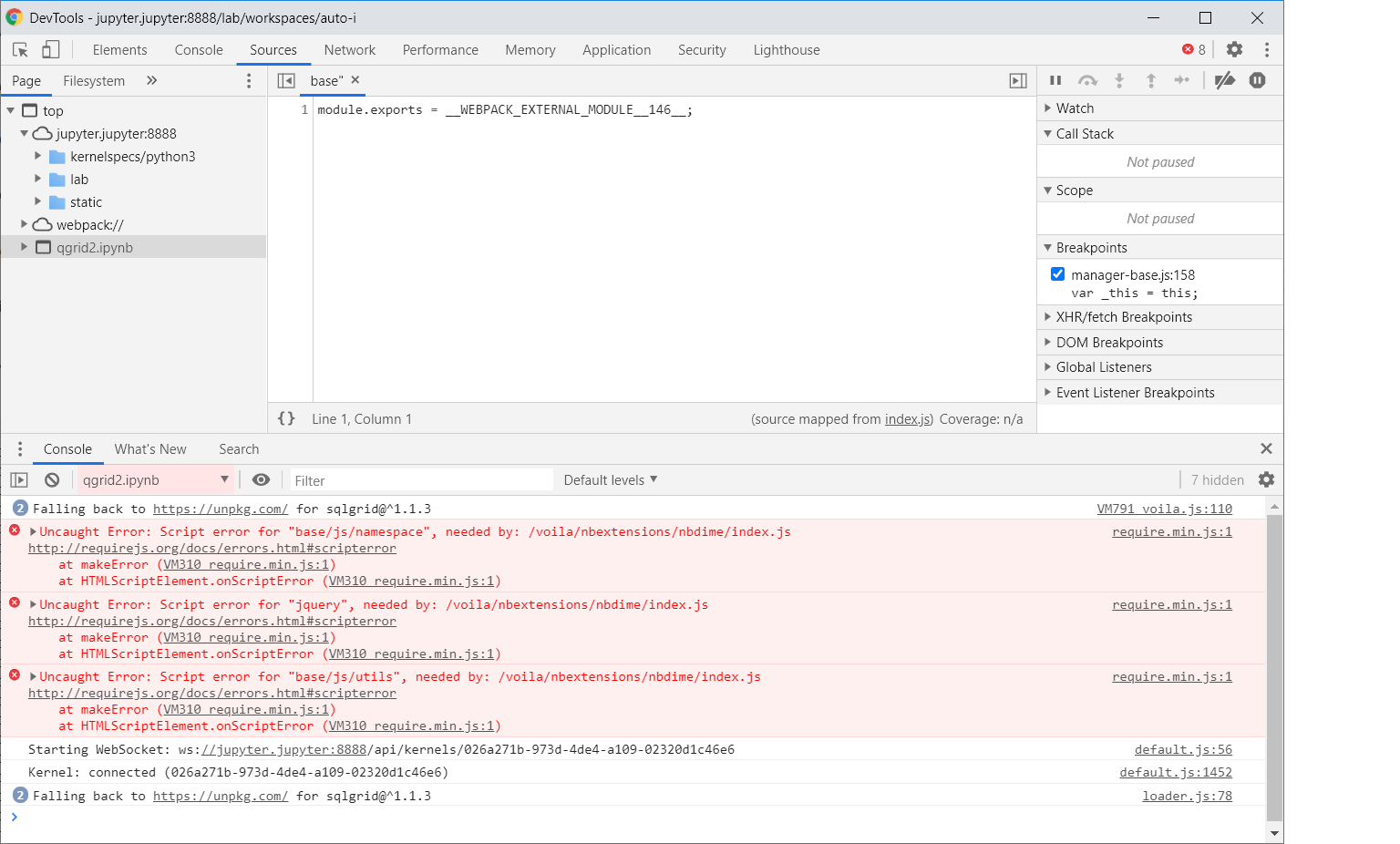
The widget works in the "classic Notebook" now.

gbrault
on 10 Jun 2020
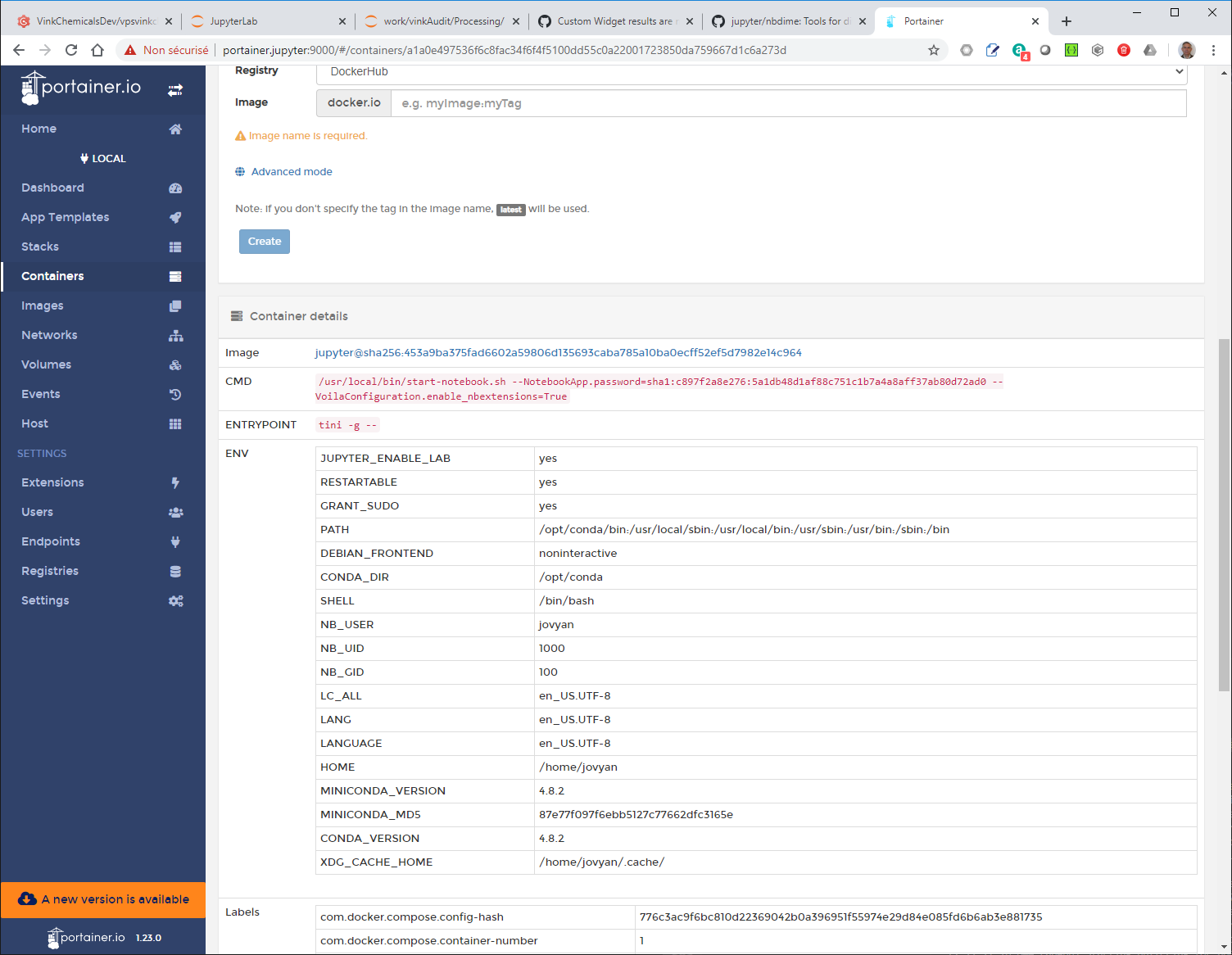
As you can see, I have started the jupyter lab with the voila parameter...
How can I check programatically that this is taken into effect in a notebook, importing voila?
gbrault
on 10 Jun 2020
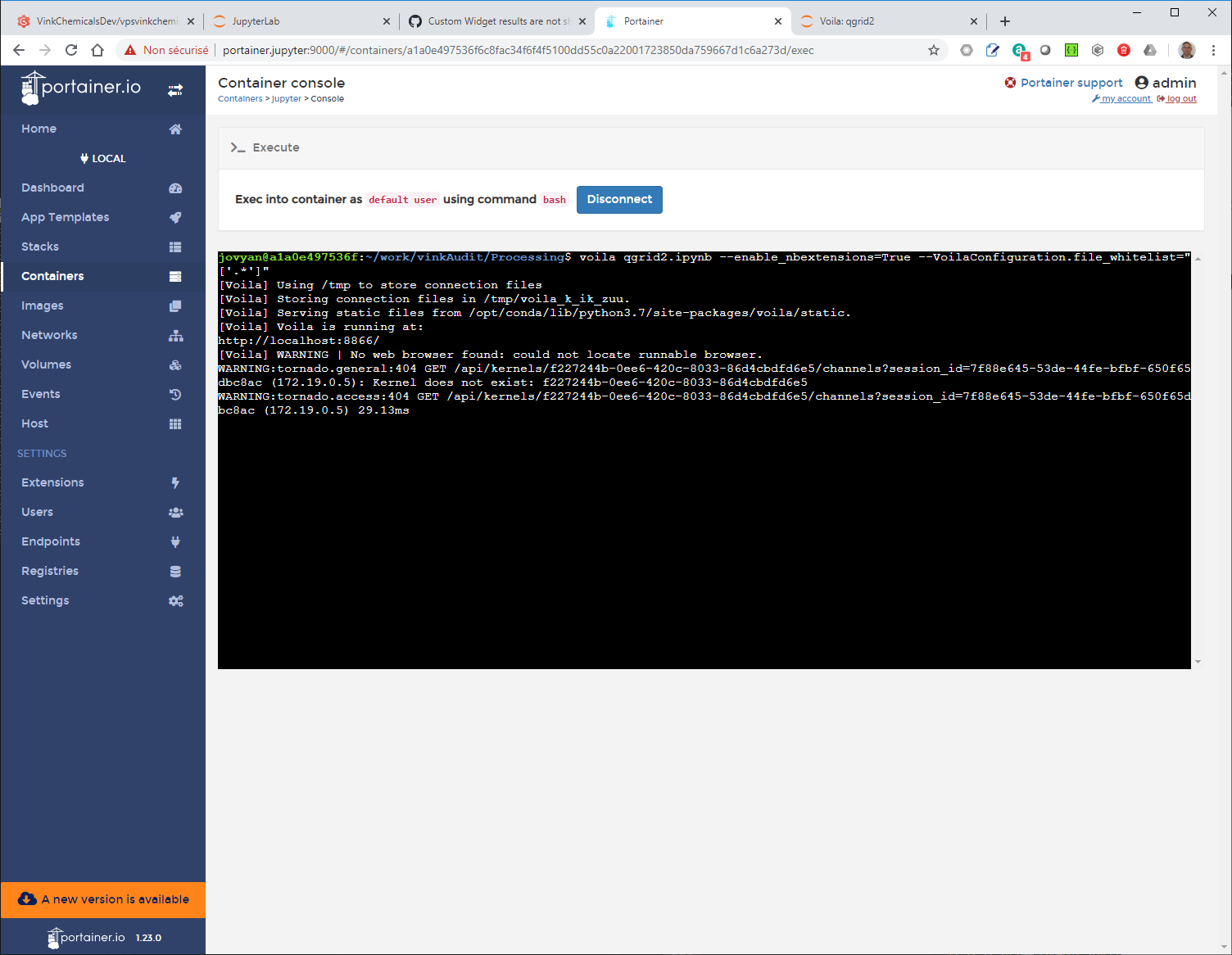
I have try just with voilà
gbrault
on 10 Jun 2020
And have the same issue with nbdime?
gbrault
on 10 Jun 2020
@gbrault nbdime is mostly meant to be used as an extension in JupyterLab and the classic notebook (not sure it's relevant for a voila dashboard?)
jtpio
on 10 Jun 2020
@gbrault
The widget works in the "classic Notebook" now.
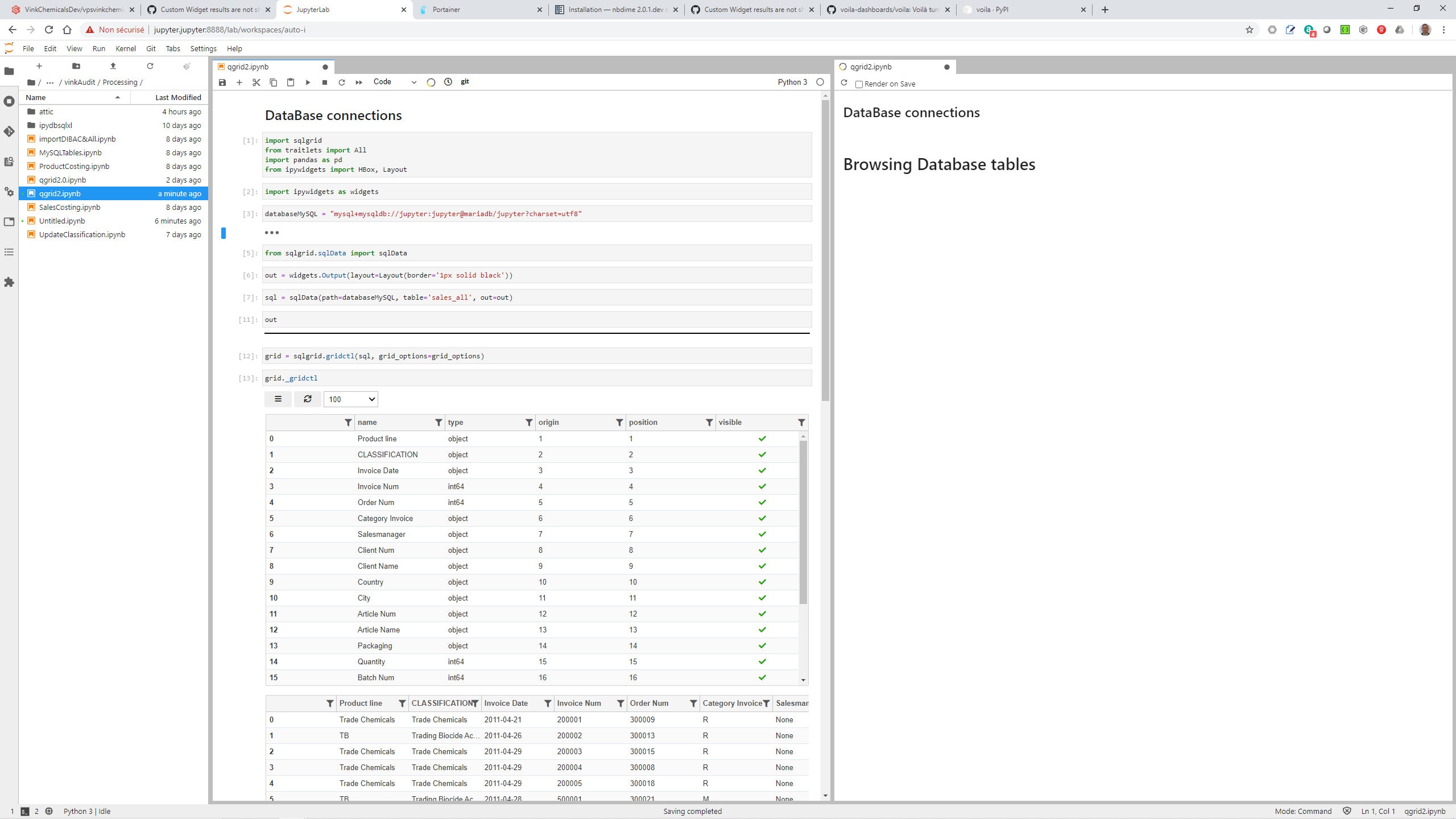
Does it work with Voila too? If not, would it be possible to post a screenshot of what it looks like when rendered with Voila?
jtpio
on 10 Jun 2020
gbrault
on 10 Jun 2020
Just the markdown is showing up
gbrault
on 10 Jun 2020
I have jupyter lab git extension installed, I assume it's why we have this nbdime extension installed. But my Jupyter lab ipywidgets doesn't use it... Very surprised...
gbrault
on 10 Jun 2020
I'll try to disable the git extension!
gbrault
on 10 Jun 2020
Could it be an issue with qgrid?
There was a comment about this recently: https://github.com/voila-dashboards/voila/issues/72#issuecomment-638949420
jtpio
on 10 Jun 2020
I forked qgrid and renamed it sqlgrid, adding the support of SQL Table browsing.
It might be a problem there of course...
I make some investigations and keep you posted.
If you like to get access to sqlgrid, I can provide you access it's a github private repo for the time being: just let me know.
gbrault
on 10 Jun 2020

gbrault
on 11 Jun 2020
It seems I get it fixed...
My assumption is that voila stops everything if any required javascript is missing. In that case it was base/js/dialog (which is in the classic notebook but not in the lab nor in voila) and as it was not defined but required, everything failed with voila. I suppressed this from the js code of the sqlgrid component and now "c'est tombé en marche"...
gbrault
on 11 Jun 2020
@jtpio , @martinRenou (@SylvainCorlay) and All: Do you know where I can find a spec which describes how an ipywidget derived component must declare its resources from a js and py perspective?
Many thanks! Would help me a lot!
gbrault
on 11 Jun 2020
Works with the Jupyter Lab voila extension as well!
Thanks guys you do a really great job!

gbrault
on 11 Jun 2020
Looking good, thanks @gbrault for the updates!
Do you know where I can find a spec which describes how an ipywidget derived component must declare its resources from a js and py perspective?
We usually recommend starting from the TypeScript cookiecutter, which takes care of all the TS and Python boilerplate that make widgets work in JupyterLab, the classic notebook and Voila: https://github.com/jupyter-widgets/widget-ts-cookiecutter
It looks like the issues you have been facing were however more related to qgrid (also reported several times in https://github.com/voila-dashboards/voila/issues/72).
jtpio
on 11 Jun 2020
You are right @jtpio it's linked to sqlgrid (which is my fork of qgrid) and I have found the same corrective action as mentioned in #72 !
Thanks for your support.
gbrault
on 11 Jun 2020
@jtpio I am trying to display voila with itables, but when voila gets rendered only the table header shows up no content of the table. Do you have any idea why it might happen?
 anxhelahyseni
on 16 Jun 2020
anxhelahyseni
on 16 Jun 2020
I am trying to display voila with itables
Does this refer to this project? https://github.com/mwouts/itables
It would be better to open an issue there if it's really specific to this widget.
jtpio
on 17 Jun 2020
@anxhelahyseni it looks like itables is specific to the classic notebook (and could explain why it doesn't work with voila): https://github.com/mwouts/itables/issues/3
jtpio
on 17 Jun 2020
@jtpio Thank you for you reply. It was weird because on a normal jupyter notebook it was working but in jupyterlab it is not working either.
Is there any table package that is currently working with voila? I tried a couple and none worked either.
anxhelahyseni
on 17 Jun 2020
Is there any table package that is currently working with voila? I tried a couple and none worked either.
ipysheet should work with Voila: https://github.com/QuantStack/ipysheet
Although it's more of a spreadsheet widget, it may work for your use case?
jtpio
on 17 Jun 2020
@jtpio I have large data and i want something more interactive with pagination and a good looking as it is for researchers to show their work,
anxhelahyseni
on 17 Jun 2020
@anxhelahyseni you could try my implementation of the ipyvuetify table https://github.com/mariobuikhuizen/ipyvuetify/issues/71#issue-630953624
 DougRzz
on 18 Jun 2020
DougRzz
on 18 Jun 2020
Hi @anxhelahyseni @DougRzz , we are also trying to interact with a large dataset (1-3GBs) in Voila. However as in Voila version 0.2.7, we observed that Voila is not responsive if it needs to interact with more than 1.5GB of data. Any recommendation?
 heng2j
on 30 Jun 2021
heng2j
on 30 Jun 2021
Related issues
 maartenbreddels
·
7Comments
maartenbreddels
·
7Comments
 choldgraf
·
5Comments
choldgraf
·
5Comments
 pingme998
·
5Comments
pingme998
·
5Comments
 astrojuanlu
·
5Comments
astrojuanlu
·
5Comments
 cornhundred
·
4Comments
cornhundred
·
4Comments
Most helpful comment
If your JavaScript package is not uploaded to npmjs, you need to pass the option
--enable_nbextensions=Trueto Voila to make it work.By default Voila downloads the extension on npmjs, and apparently you did not upload it to it, so you need to tell Voila to use the local nbextensions.