Voila: How to set a specific width and height for the output section ?
Is there any way to modify the output section to specify height and width and make the page shorter.
In my web application with voila, more than 100 lines of logs are shown as output, printing that output might make the vertical display longer because it depends on the number of output lines. Is any way to give a layout ,a certain height and width of the output section and make it auto scroll.
Please reply as soon as possible, I've been searching for this all over the web and haven't found any solution to my problem.
 pingme998
All 5 comments
If you use ipywidgets at all, you could use the Tab widget and set the height to some short measurement. Then show output within that widget - that will give you a scroll bar.
Note - this is a messy example but should give you a path forward.
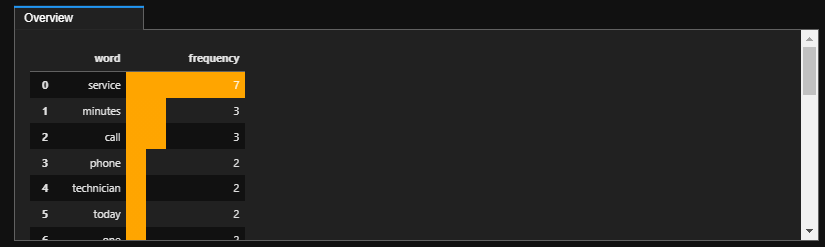
I have a long dataframe that I am showing in the Tab widget - note the scrollbar on the right:
import ipywidgets as widgets
from ipywidgets import interact
from IPython.display import display

tab = widgets.Tab()
some_output = widgets.Output()
some_output.layout.height = '200px'
tab_contents = ['Overview']
children = [some_output]
tab.children = children
children = [some_output]

for idx, each in enumerate(tab_contents):
    tab.set_title(idx, each)

with some_output:
    display(agg)

tab
Here is what it looks like in voila:
 afonit
on 21 Jun 2021
afonit
on 21 Jun 2021
If you use ipywidgets at all, you could use the Tab widget and set the height to some short measurement. Then show output within that widget - that will give you a scroll bar.
Note - this is a messy example but should give you a path forward.
I have a long dataframe that I am showing in the Tab widget - note the scrollbar on the right:
import ipywidgets as widgets
from ipywidgets import interact
from IPython.display import display

tab = widgets.Tab()
some_output = widgets.Output()
some_output.layout.height = '200px'
tab_contents = ['Overview']
children = [some_output]
tab.children = children
children = [some_output]

for idx, each in enumerate(tab_contents):
    tab.set_title(idx, each)

with some_output:
    display(agg)

tab
Here is what it looks like in voila:
Thank you for replying
I tested it and lowered the output layout height. 😊
pingme998
on 23 Jun 2021
Is there any way to autoscroll output?
pingme998
on 23 Jun 2021
About the autoscroll output - I just looked and I don't see an obvious way to do it, but if you could capture/set the scroll position then you could set it with the Play widget to iterate through the scroll steps.
Again - not sure if the scroll position is exposed anywhere, so far I have not seen it in any of the methods I have looked through.
afonit
on 23 Jun 2021
so sad 😿
pingme998
on 23 Jun 2021
Related issues
 mcornudella
·
6Comments
mcornudella
·
6Comments
 roman-kouzmenko
·
5Comments
roman-kouzmenko
·
5Comments
 astrojuanlu
·
5Comments
astrojuanlu
·
5Comments
 johnjarmitage
·
6Comments
johnjarmitage
·
6Comments
 choldgraf
·
5Comments
choldgraf
·
5Comments