Vm: First bug report regarding SMB script
Message Body:
Hi Daniel, I have successfully installed Nextcloud on my esxi server and can connect remotely using my domain https://nextcloud/mydomain.com.
I am trying to set up an smb share using your smbmount script but I am getting the error advising unable to set up a mount.
I think my error is the UNC //Server/Share. The hostname of my server is nextcloud so I am inputting //nextcloud/Files but no luck.
Is it something obvious I am missing as I can set up an smb share in Ubuntu server the old fashioned way but your script needs a specific input I think.
Chris
@szaimen
 enoch85
All 57 comments
@enoch85 does Chris has an github account or an email address so that we can communicate? This seems to be reported over email, so please send me his email address if he allows that.
 szaimen
on 28 Jan 2020
szaimen
on 28 Jan 2020
I asked him to sign up here. If he doesn't I'll send you his email in a PM.
enoch85
on 28 Jan 2020
Thanks!
szaimen
on 28 Jan 2020
I have already an assumption: he should try the ip-address from his smb-server once instead of the smb-server name "nextcloud"
So e.g. //ip-address/share
Also he could try to ping that ip-address first from his instance.
If that is the case here, I think I will have to add a check for this.
szaimen
on 28 Jan 2020
If that is the case here, I think I will have to add a check for this.
Add a check for it since it might be an issue anyway. Be progressive. :)
enoch85
on 28 Jan 2020
Hi all I have signed up for GitHub so can contribute
Chris
 CW450
on 30 Jan 2020
CW450
on 30 Jan 2020
Daniel,
I tried again after the update and using the IP address it worked (but didn’t work using the UNC name of my pc) and set up two SMB shares which I can see in my Win 10 pc and Nextcloud on both pc and mobile.
Is it by design that I can’t add files via the Windows share and they appear in the Nextcloud SMB? As I can add to my Nextcloud and they appear in my windows share immediately. They are called SMB1 and SMB2 and not the windows share names, is that by design also?
Chris
CW450
on 30 Jan 2020
I tried again after the update and using the IP address it worked (but didn’t work using the UNC name of my pc)
Have you tried using the UNC after the update? If yes, it is most likely a network problem.
Is it by design that I can’t add files via the Windows share and they appear in the Nextcloud SMB?
No, this should work. At least for me it does; the new files should get loaded as soon as you access the directory. (So if the folder is already open, you should at least reload the side to check the folder again for new files or you change the directory once and go back.)
Can you check if the follwing option is activated?
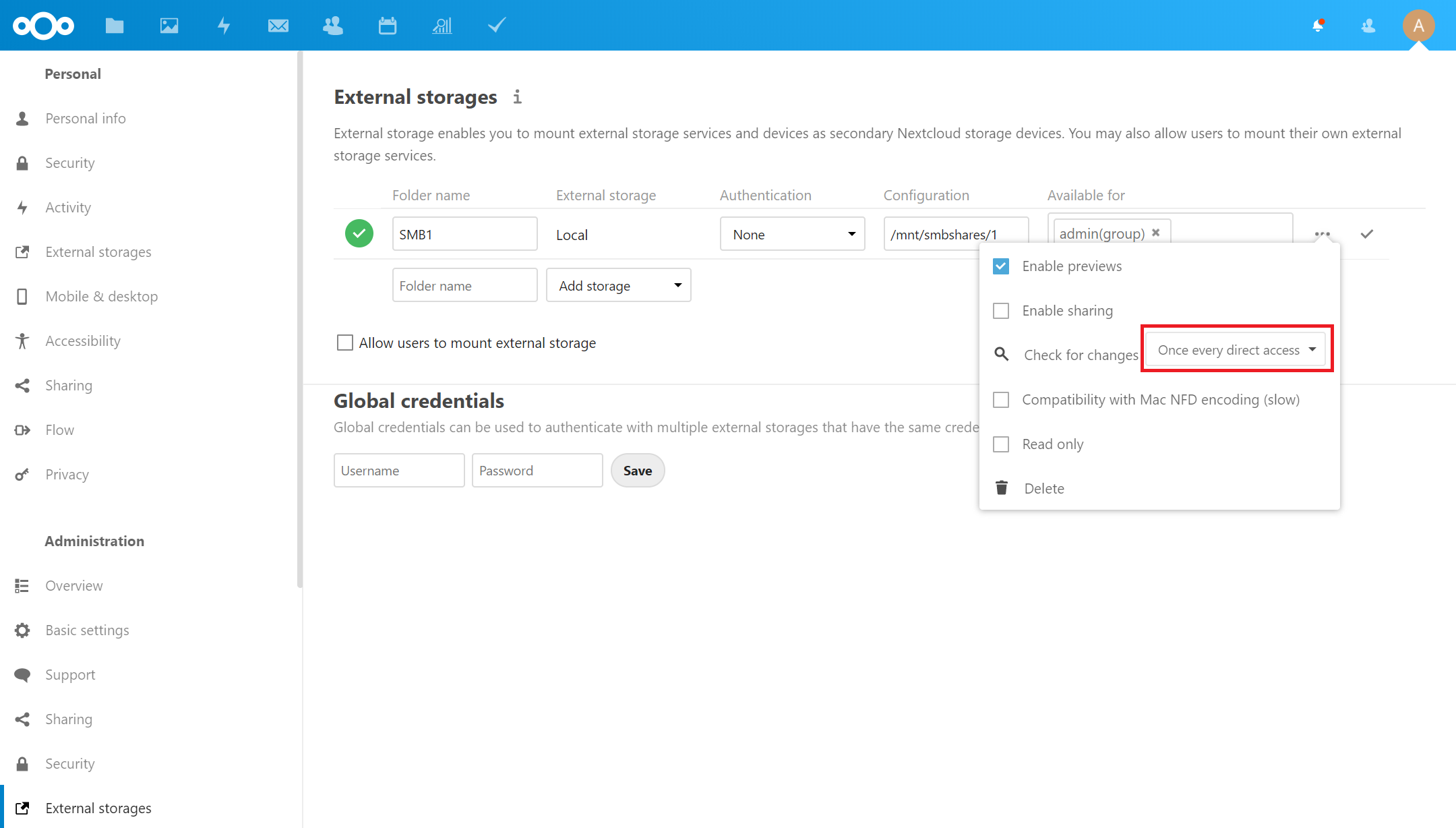
They are called SMB1 and SMB2 and not the windows share names, is that by design also?
Yes, that is by design. You can rename the name in the external stoages in the settings (aka "Folder name")
szaimen
on 30 Jan 2020
Excellent, I can now add files via the Windows share and they appear in the Nextcloud SMB1 which I have renamed. Strange as i didn't change anything just logged out and back in.
Is it best to add further mount/shared via the smbmount.sh or can I do this via the settings/external storage?
CW450
on 30 Jan 2020
Do you want me to try and add another mount/share using the UNC rather than the IP Address?
CW450
on 30 Jan 2020
Do you want me to try and add another mount/share using the UNC rather than the IP Address?
Yes that would be nice.
szaimen
on 30 Jan 2020
Excellent, I can now add files via the Windows share and they appear in the Nextcloud SMB1 which I have renamed. Strange as i didn't change anything just logged out and back in.
Good to here that it works now.
Is it best to add further mount/shared via the smbmount.sh or can I do this via the settings/external storage?
If you want to add more shares, you should do it via the script. But currently there is a max limit of 3 shares.
Another option is to mount the parent folder of all folders that you want to add and manually add them with the external storage app.
szaimen
on 30 Jan 2020
Great you were able to solve it @CW450
Great to know it works @szaimen :) :tada:
enoch85
on 30 Jan 2020
I still can't add mount/shares via the UNC but the IP address method works.
I will try your other option to mount the parent folder etc..with the external storage app.
Do I have to use the full syntax:
curl -sLO https://raw.githubusercontent.com/nextcloud/vm/master/apps/smbmount.sh && sudo bash smbmount.sh
to run this smbmount in ssh?
Or is the smbmount.sh stored in the nextcloud server?
CW450
on 30 Jan 2020
You can just use
sudo additional_apps
And choose smbmount in the main menu ;)
This is an alias for sudo bash /var/scripts/apps.sh
szaimen
on 30 Jan 2020
I still can't add mount/shares via the UNC but the IP address method works.
Hm okay, do you have used the updated script?
szaimen
on 30 Jan 2020
sudo additional_apps and just additional_apps gave :command not found and bash /var/scripts/apps.sh gave no such file or directory
Yes I curled the latest script
CW450
on 30 Jan 2020
sudo additional_apps and just additional_apps gave :command not found and bash /var/scripts/apps.sh gave no such file or directory
Yes I curled the latest script
Are you on the latest 18.0 Nextcloud VM release?
szaimen
on 30 Jan 2020
Otherwise you have to use the full command
curl -sLO https://raw.githubusercontent.com/nextcloud/vm/master/apps/smbmount.sh && sudo bash smbmount.sh
szaimen
on 30 Jan 2020
And maybe execute rm smbmount.sh before you give the command a next try.
szaimen
on 30 Jan 2020
Yes I am on the latest release as I assume the cron updates it automatically it
CW450
on 30 Jan 2020
And maybe execute
rm smbmount.shbefore you give the command a next try.
Please try that once.
szaimen
on 30 Jan 2020
sudo additional_apps and just additional_apps gave :command not found and bash /var/scripts/apps.sh gave no such file or directory
@enoch85 any idea why that doesn't work?
szaimen
on 30 Jan 2020
I executed rm smbmount.sh, ran the latest curl and it still did not work via UNC.
I pinged my pc 192.168.1.3 fine and then pinged win10pro and it showed it pinged win10pro.mydomain.com successfully?
CW450
on 30 Jan 2020
I executed rm smbmount.sh, ran the latest curl and it still did not work via
Hm, strange
win10pro.mydomain.com
Is this the server name of your smb-server?
Or this this your client or nextcloud domain?
szaimen
on 30 Jan 2020
No its fully qualified name is just win10pro
CW450
on 30 Jan 2020
I access the nextcloud vm via nextcloud.mydomain.com
CW450
on 30 Jan 2020
So your SMB-Server is a Win10Pro-machine?
Can you confirm? Then maybe I have some steps how to solve that problem.
szaimen
on 30 Jan 2020
Yes my daily work pc is a win 10 pro and my windows 2019 server and nextcloud server are vm's in my esxi machine
CW450
on 30 Jan 2020
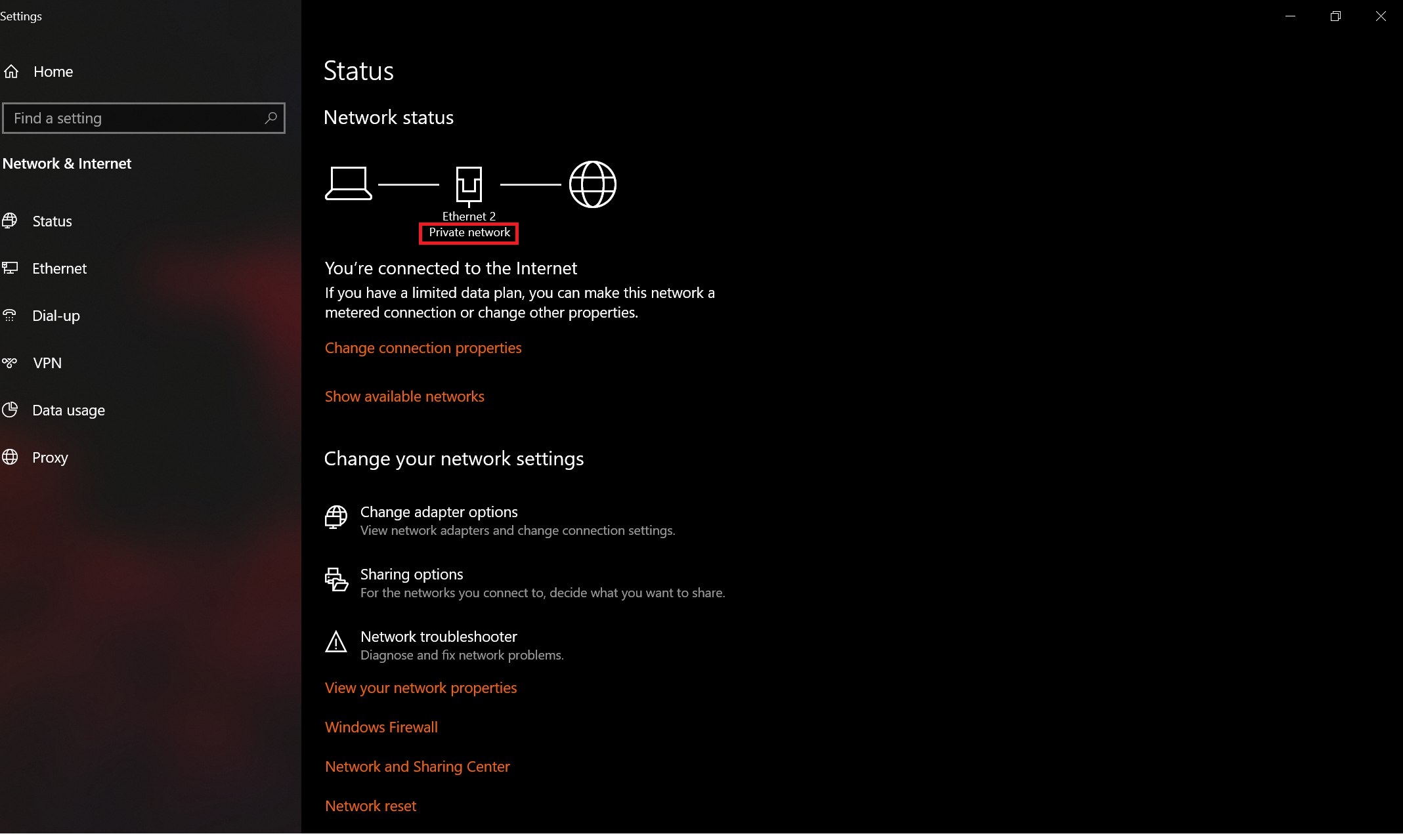
Have you set your smb-server to private network or public network/business network? That could be theoratically the problem.
Your default connection should be set to private network: (then the mounting with the unc should work)
szaimen
on 31 Jan 2020
It is private
CW450
on 31 Jan 2020
Hm okay, then maybe a problem with the resolving of local addresses. But actually I have no other idea for now.
But nice that it works with the ip-address!
szaimen
on 31 Jan 2020
sudo additional_apps and just additional_apps gave :command not found and bash /var/scripts/apps.sh gave no such file or directory
@enoch85 any idea why that doesn't work?
szaimen
on 31 Jan 2020
I have compared this Nextcloud vm to the Owncloud one and Daniels is a beautifully crafted linux ova and the best bit is the updating via cron as it is not straightforward with Nextcloud's own offering.
Let me know if there is anything else you would like me to test!
CW450
on 31 Jan 2020
sudo additional_apps and just additional_apps gave :command not found and bash /var/scripts/apps.sh gave no such file or directory
@enoch85 any idea why that doesn't work?
I have found the reason myself.
You have to become the root user first with
sudo -i
Aftterwards you can just type in additional_apps, press [ENTER] and it should work.
szaimen
on 31 Jan 2020
@enoch85 any idea why that doesn't work?
apps.sh are only downloaded and available if you deployed with 18.0.0, earlier versions needs to do it manually. (Backwards compatibility and all that stuff, remember?) :)
enoch85
on 31 Jan 2020
Yes, I remember.
But @CW450 has said, that he is on the Nextcloud VM 18.0 release
So that was why my question came up.
But as I wrote before:
I have found the reason myself.
You have to become the root user first with
sudo -i
Aftterwards you can just type inadditional_apps, press [ENTER] and it should work.
szaimen
on 31 Jan 2020
Hi I have loads of errors on my Nextcloud VM and now can't ssh into it from windows or open it via a browser BUT I can access it remotely via the nextcloud.domain.com.
On a reboot it throws up:
14.624139] CIFS VFS: error connecting to socket Aborting operation
14.624636] CIFS VFS: cifs_mount failed w/return code = -113
failed to mount /mnt/smbshares/1.
See 'systemctl status mnt-smbshares-1.mount' for details
[DEPEND] Dependency failed for Remote File Systems
and then WAN IPv4 would normally show my IP address but is blank
Any ideas please??
CW450
on 31 Jan 2020
I have deleted the SMB share in the nextcloud application via settings and rebooted but same error as above
CW450
on 31 Jan 2020
On a reboot it throws up:
14.624139] CIFS VFS: error connecting to socket Aborting operation
14.624636] CIFS VFS: cifs_mount failed w/return code = -113
failed to mount /mnt/smbshares/1.
See 'systemctl status mnt-smbshares-1.mount' for details
AFAIK this is a bug with the linux kernel. Haven't found any working solution for that to get rid of the error message, and this is quite normal for the bootup process, but it should work nonetheles. Have you tried the proposed systemctl status mnt-smbshares-1.mount What is the output? Is the mount active? It should be.
and then WAN IPv4 would normally show my IP address but is blank
This is something I have never experienced but it is definitely not due to the cifs-mount. Have you tried curl ifconfig.me? Does it show your wan ipv4 address?
and now can't ssh into it from windows
This is also something I have never experienced, but it is as well definitely not due to the cifs-mount. have you tried to restart your server once?
I have deleted the SMB share in the nextcloud application via settings and rebooted but same error as above
You should delete the smbmount with the smb-mount script. Then the error messages shouldn't appear again.
szaimen
on 1 Feb 2020
I turned the Nextcloud VM off for 30 mins and just restarted and the error had disappeared. To be sure I ran the smbmount script and the mount/share was still there so i deleted it and rebooted and no errors.
CW450
on 1 Feb 2020
I turned the Nextcloud VM off for 30 mins and just restarted and the error had disappeared
Which error had disappeared? The ssh and wan-ip error?
szaimen
on 1 Feb 2020
Both
CW450
on 1 Feb 2020
So to recap:
The errors on boot that you have reported are expected, but as I said before the mounts should work nonetheless.
The ssh problem and wan ip problem on the other hand, aren't related as far as I see/understand it and therefore eveything works as expected.
szaimen
on 1 Feb 2020
To be sure I ran the smbmount script and the mount/share was still there so i deleted it and rebooted and no errors.
@CW450 So you think the smbmount script was the cause of everything?
@szaimen In that case we should add some more checks, and only allow IP if FQDN doesn't work.
enoch85
on 1 Feb 2020
I can only assume that installing the SMB mount was the cause of the error as I checked the logging file and the errors started after the smb install and since removing there are no more errors in the log.
Daniel will the Ubuntu server 18.04 automatically update itself as well as when I booted I noticed that there were updates available?
CW450
on 1 Feb 2020
sudo additional_apps and just additional_apps gave :command not found and bash /var/scripts/apps.sh gave no such file or directory
@enoch85 any idea why that doesn't work?
I have found the reason myself.
You have to become the root user first with
sudo -i
Aftterwards you can just type inadditional_apps, press [ENTER] and it should work.
Also I tried this and it returned additional_apps:command not found
CW450
on 1 Feb 2020
The smbmount script is not tinkering with any ssh or wan ip related stuff. So it cannot cause these ssh and wan-ip errors.
But as I said:
14.624139] CIFS VFS: error connecting to socket Aborting operation
14.624636] CIFS VFS: cifs_mount failed w/return code = -113
failed to mount /mnt/smbshares/1.
See 'systemctl status mnt-smbshares-1.mount' for details
These are normal for mounting a cifs share (kernel bug)
And I haven't found a way to get rid of them. But smbmounts should work nonetheless.
szaimen
on 1 Feb 2020
Also I tried this and it returned additional_apps:command not found
So then you are probably not on the latest Nextcloud VM 18.0 release. What is important to know that Nextcloud 18 is not the same like the Nextcloud VM 18.0 release: it depends on when you first have downloaded the VM or first installed the VM.
szaimen
on 1 Feb 2020
So will it update to the latest automatically via cron?
CW450
on 1 Feb 2020
Daniel will the Ubuntu server 18.04 automatically update itself as well as when I booted I noticed that there were updates available?
No, you will stay on the same OS version. That's not done automatically since it involves upgrading PHP, DB, and all kinds of stuff that are nested in the VM.
What will be upgraded via the cron though are the current versions dependencies, Nextcloud and everything else.
Just to make something clear here; as @szaimen said, to get the latest features (like the additional_apps command in CLI) you need the latest version of the VM when it was released. The update script won't get you all the latest stuff added in the VM since that would make the update script unstable because we have people running it that are on older versions of Nextcloud and doesn't update that frequently. So to get ALL the latest features, you need the latest release, as some of the latest stuff happens during the installation, and the first setup.
enoch85
on 1 Feb 2020
This isn't closed as it doesn't seem to work with UNC paths.
@szaimen Please make a PR where we only allow IP addresses.
enoch85
on 2 Feb 2020
This isn't closed as it doesn't seem to work with UNC paths.
@szaimen Please make a PR where we only allow IP addresses.
@enoch85 Have you tested it yourself?
Because in my network are the UNC paths working correctly. That was the reason why I have assumed a network configuration problem in Chris' network.
But I will test that again to make sure.
szaimen
on 2 Feb 2020
@enoch85 Have you tested it yourself?
I don't use Windows. If I do shares it's strictly NFS. :)
enoch85
on 2 Feb 2020
I have tested the script with the UNC path again and it works reliably in my network. So this can be closed IMO.
szaimen
on 2 Feb 2020
Great!
enoch85
on 3 Feb 2020
A friend of mine has tested it in his network as well and the UNC-path did work for him, too. So I would say Chris' findings are definitely a network configuration problem.
szaimen
on 3 Feb 2020
Related issues
szaimen
·
6Comments
 RKlarmann
·
4Comments
enoch85
·
4Comments
RKlarmann
·
4Comments
enoch85
·
4Comments
 dseeker
·
4Comments
dseeker
·
4Comments
 mr-manuel
·
6Comments
mr-manuel
·
6Comments
Most helpful comment
I have compared this Nextcloud vm to the Owncloud one and Daniels is a beautifully crafted linux ova and the best bit is the updating via cron as it is not straightforward with Nextcloud's own offering.
Let me know if there is anything else you would like me to test!