Vm: Installation script exits with error: bash /change_db_pass.sh: No such file or directory
Steps to reproduce
- download Ubuntu 18.04 OVA 2018-06-27. Version: 13.0.4
- extract image, convert to qcow2 and create VM using KVM/qemu
- boot image
Expected behaviour
I expected the installation script to run properly
Actual behaviour
installation script exit with error trying to execute change_db_pass.sh:
bash /change_db_pass.sh: No such file or directory
Server configuration
Server version: (see your admin page)
Ubuntu 18.04 OVA
VM version (Scripted install from master OR Released version)
2018-06-27. Version: 13.0.4
Updated from an older installed version or fresh install:
fresh install
Network
Do you use DHCP?
yes
Is port 80 and/or 443 open?
didn't check
Logs / Screenshots
Log file (/var/ncdata/nextcloud.log)
There is no log file in /var
There is an empty nextcloud.log in /mnt/ncdata
Installation log (command output)
see screenshot
Screenshoots
 forerunnert
All 16 comments
Hmm, that's strange. It works for me.
This is the line that fails, but if the script didn't exist it should fail earlier as it gets downloaded here.
Can you please try again?
 enoch85
on 21 Jul 2018
enoch85
on 21 Jul 2018
@forerunnert I think you had a temporary glitch. Can you find the file in question in /var/scripts?
enoch85
on 21 Jul 2018
It does work now so there must have been a temporary glitch somehow.
Thanks for the help!
forerunnert
on 23 Jul 2018
Hello,
I'm aware this is an old thread but I am getting this same result with using the OVA in ESXi. No ncdata folder in /var/. I've tried restarting the vm and starting from re-import with same issue. I also received a warning saying that it failed to restart the OpenSSL service but I think this is unrelated?
here are screenshots:
I will submit new post if no response occurrs from this due to its age...
thanks
 p27182
on 24 Jun 2019
p27182
on 24 Jun 2019
@p27182 Hi, please download the latest OVA and try again. This is fixed long time ago.
Thanks!
enoch85
on 25 Jun 2019
Thanks for a quick response! The OVA I'm attempting to use was downloaded yesterday 6/24/2019 🤔 from https://cloud.hanssonit.se/s/zjsqkrSpzqJGE9N - is this an old download location?
Also possibly worth mentioning that as soon as the startup script runs I see this output:
https://i.imgur.com/p4ARinA.png
Looking at the script though I don't see how this would cause issues down the line but I only have so much experience... The VM definitley has internet access.
thanks!
edit: forgot to tag @enoch85
p27182
on 25 Jun 2019
@p27182 It seems like you have connectivity issues since the $SCRIPTS variable is missing. from the output in your screenshots.
Can you do a nslookup github.com and post the result?
enoch85
on 25 Jun 2019
I tried to look to see where that was defined but I guess it's over my head...
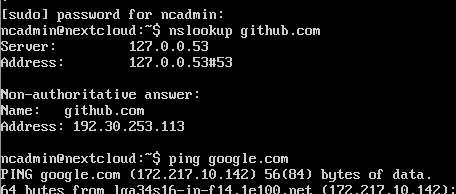
@enoch85 thanks again for responding!
I think you found the problem though... I will report back if this works - I think the issue was with raw.github.com
p27182
on 25 Jun 2019
That's strange, seems like you got internet, question is how?
Just made a fresh install with the OVA and there were no issues. Sorry, this must be an issue in your setup somehow. The thing is (as I mentioned above) that the $SCRIPTS variable is missing and it's fetched via lib.sh, which needs a proper internet connection to function since the import happens via curl from Github.
enoch85
on 25 Jun 2019
Pic or it didn't happen: https://cloud.hanssonit.se/s/e53LboLHq8bGwox
enoch85
on 25 Jun 2019
@enoch85 hahah yea it worked, there was an entry in my pihole specific to raw.github.com that was blocking the requests.
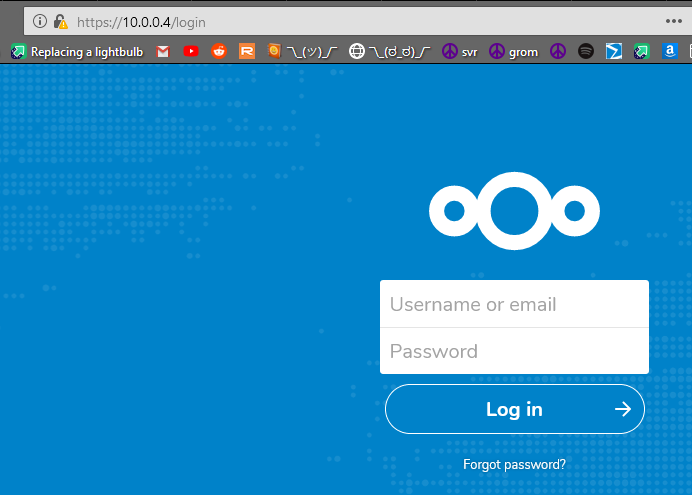
I am still having some trouble with other pieces of this (domain name related potentially), if I don't figure this out int he next few days I will be contacting you for your paid support. Thanks again for your quick responses!
all I have at the moment, local functionality:
p27182
on 25 Jun 2019
Great stuff! :D
enoch85
on 25 Jun 2019
Hello,
I have got the same error of @forerunnert when trying to load OVA "1TB_Nextcloud_VM_www.hanssonit.se.ova" from 08.02.2019 on VirtualBox 6.1
@enoch85 is it due to my .ova that is old or is it due to something else?
Thanks
 Swiss-M
on 21 Nov 2020
Swiss-M
on 21 Nov 2020
Hi, it's due to that the OVA is old, yes.
We made major changes some time ago, and to stay up to date the best option would be to get a new one.
enoch85
on 21 Nov 2020
@enoch85 Ok, I see thank you for the quick answer.
Is it possible to get a new one ?
I have bought it on your website order #2565 but never managed to use it.
Thank you for the help
Swiss-M
on 21 Nov 2020
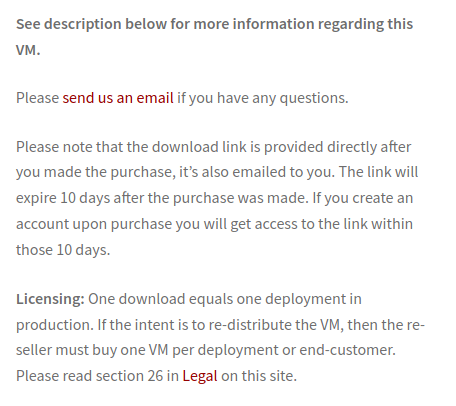
In other words, downloads older than 10 days has to be re-bought.
Here's some more information: https://www.techandme.se/ubuntu-20-04-and-our-vms/
Hope it helps!
enoch85
on 21 Nov 2020
Related issues
 mr-manuel
·
6Comments
mr-manuel
·
6Comments
 szaimen
·
6Comments
szaimen
·
6Comments
 peacock40
·
6Comments
peacock40
·
6Comments
 dseeker
·
4Comments
enoch85
·
4Comments
dseeker
·
4Comments
enoch85
·
4Comments