Visualstudio: Can't login to GitHub
NOTE: Updating to Visual Studio 2017 15.5.7 or later should fix this. See https://github.com/github/VisualStudio/issues/949#issuecomment-367821388
I'm having some trouble logging on to GutHib to push new changes to my repository. I've just recently upgraded to Visual Studio 17. Everything used to work on VS 2015, but doesn't any longer.
- GitHub Extension for Visual Studio version: 2.2.0.8
- Visual Studio 2017 Professional: Ver 15.0.0+26228.9
- Windows 7 Pro SP1
Detailed steps:
- I have a local clone of a public (personal) repository. I've made changes to the local files
- Staged the changes.
- Attempted to push the changes.
- The GitHub login dialog appears. I've entered my username and password. I've confirmed that these are correct by logging in to the website.
- I get the following in my ouput pane on Visual Studio
Opening repositories:
### Local path, removed the actual path to anonymise ###
Error encountered while pushing to the remote repository: Git failed with a fatal error.
fatal: AggregateException encountered.
   One or more errors occurred.
error: cannot spawn askpass: No such file or directory
fatal: could not read Username for 'https://github.com': terminal prompts disabled
Pushing to https://github.com/### repo path ###.git
I have 2 factor enabled on my account.
 HisRoyalRedness
All 154 comments
I have a similar problem, but the login fails verifying the 2FA code and never completes the login.
 richardmatsu
on 7 Apr 2017
richardmatsu
on 7 Apr 2017
@HisRoyalRedness is this still happening to you? If it is - the credentials are stored in the Windows Credential Manager, so perhaps something happened that cleared them. Could you open Credential Manager, go to Windows Credentials, and check the Generic Credentials list to see if you have two entries that look like the following:
git:https://github.com
https://github.com/
Apologies also for the delay in replying, this got missed somehow 😕
 shana
on 24 Apr 2017
shana
on 24 Apr 2017
@richardmatsu Could you check the log in %localappdata%\GitHubVisualStudio\extension.log and see if you have messages in it that are similar to issue #958?
shana
on 24 Apr 2017
Nope, nothing like that. For kicks, I deleted my saved credentials in Credential Manager but no difference.
2017-04-24 15:09:36.1679|INFO|thread: 1|RepositoryHost|Log in from cache for login '(null)' to host 'https://api.github.com/' FAILED
2017-04-24 15:09:36.1679|INFO|thread: 1|RepositoryHosts|Log in to GitHub.com host 'https://api.github.com/' with username '**' FAILED
richardmatsu
on 24 Apr 2017
I've got nothing stored in my Credential Manager. Nothing in the log looks similar to #958
HisRoyalRedness
on 26 Apr 2017
@HisRoyalRedness we're a bit stumped here to be honest. Would it be possible to run Fiddler and take a look at the requests that are being sent?
 grokys
on 26 Apr 2017
grokys
on 26 Apr 2017
Also, are you still getting these errors?
error: cannot spawn askpass: No such file or directory
fatal: could not read Username for 'https://github.com': terminal prompts disabled
These look like low-level errors unrelated to GHfVS. Does your git commandline work?
grokys
on 26 Apr 2017
Hi there,
Yes, I still get those errors. I can fetch and pull from the commandline
without any trouble.
I'm working on getting some Fiddler dumps for you
On 27 April 2017 at 09:50, Steven Kirk notifications@github.com wrote:
Also, are you still getting these errors?
error: cannot spawn askpass: No such file or directory
fatal: could not read Username for 'https://github.com': terminal prompts
disabledThese look like low-level errors unrelated to GHfVS. Does your git
commandline work?—
You are receiving this because you were mentioned.
Reply to this email directly, view it on GitHub
https://github.com/github/VisualStudio/issues/949#issuecomment-297551777,
or mute the thread
https://github.com/notifications/unsubscribe-auth/ADH1yBVes-Tqiwb9EQUq6Avd5qmXINClks5rz7wvgaJpZM4MyRzj
.
HisRoyalRedness
on 27 Apr 2017
OK, perhaps I should have checked this in the first instance ... :-)
It seems that the extension is having some trouble getting through our corporate proxy. I've got the requisite global git entries.
git config --global --list
http.proxy=127.0.0.1:8088
https.proxy=127.0.0.1:8088
I have CNTLM installed locally to do the NTLM auth through the corporate proxy. Complicated, I know...
git & other apps --> CNTLM Proxy (127.0.0.1) --> corporate proxy --> web
I can operate through the command line, so the config must be OK. These same settings appear in the VS git extension (under Repository Settings), and are shown as global settings.
When I attempt to sync my repository through the VS extension, I get the 'cannot spawn askpass' errors, and Fiddler shows auth errors from the corporate proxy. Could it be possible that the extension is ignoring the git proxy settings and picking up the proxy from Internet Options (which would be the corporate proxy)?
HisRoyalRedness
on 27 Apr 2017
@HisRoyalRedness did you get any further with this issue? Apologies for not replying earlier, but we were unable to repro here.
grokys
on 11 Dec 2017
Yup, still the same behaviour. Generally I stage and commit from Visual Studio, and push and pull to/from remotes from the command line using the standard Git tools. Yes, it's a pain, but I manage to get by with this workflow.
I've since upgraded to a new PC, running Windows 10 (old one was Windows 7), upgraded to Visual Studio 2017, and I still get the exact same error from Git (i.e. error: cannot spawn askpass).
Git command line works fine.
HisRoyalRedness
on 11 Dec 2017
Hey guys - just landed on this page trying to search for this same issue (VS2017, behind corp firewall but with correct HTTP and HTTPS proxies set in my environment variables). I am able to use Git add-in for VS2017 to connect to my GitHub account and clone my repositories but when I try to push a change via VS Git add-in, I get the same error as HisRoyalRedness (cool username btw ;)).
Any luck establishing a root cause and/or a fix/workaround?
 MuqadderIqbal
on 12 Dec 2017
MuqadderIqbal
on 12 Dec 2017
@HisRoyalRedness @MuqadderIqbal so the problem occurs when pushing/pulling from team explorer? Are you able to log into GitHub using the Team Explorer "Connect" section, as described here?
https://github.com/github/VisualStudio/blob/master/docs/getting-started/authenticating-to-github.md
When you've logged in there, a dialog shouldn't appear when pushing and pulling.
grokys
on 12 Dec 2017
@grokys I am able to successfully connect to my GitHub repo and authenticate. I am also able to successfully clone my library. However, after committing a change, an attempt to push it to GitHub repo results in an error. Here is the error stack trace:-
Opening repositories:
C:\MyGithub\Learn-Pandas
Commit dea72b81 created locally in repository C:\MyGithub\Learn-Pandas
Error encountered while pushing to the remote repository: Git failed with a fatal error.
HttpRequestException encountered.
An error occurred while sending the request.
cannot spawn askpass: No such file or directory
could not read Username for 'https://github.com': terminal prompts disabled
Pushing to https://github.com/MuqadderIqbal/Learn-Pandas.git
MuqadderIqbal
on 12 Dec 2017
@grokys Ditto for me. I can connect and authenticate to GitHub. I can see the list of my repositories from within Visual Studio. Just can't push or pull. My error message is a little different. This was after attempting a pull
Git failed with a fatal error.
fatal: TaskCanceledException encountered.
   A task was canceled.
error: cannot spawn askpass: No such file or directory
fatal: could not read Username for 'https://github.com': terminal prompts disabled
And this after a push:
Opening repositories:
C:\Users\KeithF\Source\Repos\HBusLogger
Commit b85c226f created locally in repository C:\Users\KeithF\Source\Repos\HBusLogger
Error encountered while pushing to the remote repository: Git failed with a fatal error.
fatal: TaskCanceledException encountered.
   A task was canceled.
error: cannot spawn askpass: No such file or directory
fatal: could not read Username for 'https://github.com': terminal prompts disabled
Pushing to https://github.com/HisRoyalRedness/HBusLogger
If I push from a command prompt (just the standard Windows cmd, not git bash), I'm asked to enter my user name and password, and the push succeeds
C:\Users\KeithF\Source\Repos\HBusLogger>git push
fatal: TaskCanceledException encountered.
   A task was canceled.
Username for 'https://github.com': HisRoyalRedness
Password for 'https://[email protected]':
Counting objects: 22, done.
Delta compression using up to 8 threads.
Compressing objects: 100% (22/22), done.
Writing objects: 100% (22/22), 2.93 KiB | 1.46 MiB/s, done.
Total 22 (delta 18), reused 0 (delta 0)
remote: Resolving deltas: 100% (18/18), completed with 6 local objects.
To https://github.com/HisRoyalRedness/HBusLogger
   92d8346..b85c226  master -> master
OK, I've got it working now. I thought I'd try get some Fiddler traces for you, couldn't get it to work through Fiddler (with the complex arrrangement of corporate proxies and my local CNTLM proxy, its no wonder), and then put it all back together again. Then hey presto, it all just worked!
So, I'm guessing that I got one of these steps wrong at some point. Anyway, this is what I did
- Verified that CNTLM was configured correctly. Other apps use this, so I was certain it was set up correctly. I've got CNTLM accepting connections at 127.0.0.1:8088, and passing them on to the corporate proxy with the appropriate Window logon details.
- Set global proxy settings. I had repository and global settings applied. I've removed the repository settings and it seems to work with just the global ones (as it should)
git config --global http.proxyhttp://127.0.0.1:8088</li> <li><code>md5-b6ffcfb4d9445867d5b22079433a6913</code><a href="https://127.0.0.1">https://127.0.0.1</a>:8088
- Confirmed that the config file at
%USERPROFILE%\.gitconfighad the correct settings. I can't remember if it did or not. I did edit the file while trying to get Fiddler working - Created the HTTP_PROXY and HTTPS_PROXY environment variables. Something required them. Not sure if it was the Visual Studio Github extension or something else
I can now push and pull from my repository
I've got a sneaky suspicion that I configured my https proxy setting with an http url. I did notice this when messing with the settings and corrected it. I've since set it back to http to see if I could get it to fail again, but was unsuccessful. Something to check anyway if you still have problems
Hopefully it all continues to work. I'll post an update in a day or two.
HisRoyalRedness
on 13 Dec 2017
Glad you got it working @HisRoyalRedness. As I suspected, it was a proxy issue. Does the information above help you @MuqadderIqbal?
One thing to note is that GitHub for Visual Studio doesn't actually supply the git push and pull functionality - this is part of Team Explorer, so if the login works then the problem was actually on Microsoft's side.
I'm going to close this issue now as it looks like there's a fix and it's also not actually our functionality that's exhibiting the problem.
grokys
on 13 Dec 2017
I faced the same issue guys, it appears when I have only TLS1.2 enabled on my PC. After enabling TLS 1.1, SSL.x the issue was resolved. For enabling and disabling I used IISCrypto software. Hope that helps the team and other users.
 vCillusion
on 30 Jan 2018
vCillusion
on 30 Jan 2018
Thanks for letting us know @vCillusion - that will be helpful information for anyone experiencing this problem in future. Looks like we might need to look into why this is the case, maybe we can fix it on our end. I've opened an issue to track this over in #1443.
grokys
on 30 Jan 2018
Thanks @HisRoyalRedness
My email was wrong in here %USERPROFILE%.gitconfig
Corrected and now is working like a charm.
 pbenitez
on 7 Feb 2018
pbenitez
on 7 Feb 2018
I've tried most of the suggestion list above. I am still not able to Push. Here is the output from the extension.log:
2016-09-28 19:38:48.3619|INFO|thread: 1|RepositoryHost|Log in from cache for login 'davidehnis' to host 'https://api.github.com/' SUCCEEDED
2016-09-28 19:38:48.3799|INFO|thread: 1|RepositoryHosts|Log in to GitHub.com host 'https://api.github.com/' with username 'davidehnis' SUCCEEDED
2016-09-28 19:39:39.7486|ERROR|thread:75|PullRequestCreationViewModel|Octokit.ApiValidationException: Validation Failed
at Octokit.Connection.HandleErrors(IResponse response) in Y:\jenkins\workspace\GitHub for Visual Studio speakeasy jenkinskeep\submodules\octokit.net\Octokit\Http\Connection.cs:line 562
at Octokit.Connection.
--- End of stack trace from previous location where exception was thrown ---
at System.Runtime.CompilerServices.TaskAwaiter.ThrowForNonSuccess(Task task)
at System.Runtime.CompilerServices.TaskAwaiter.HandleNonSuccessAndDebuggerNotification(Task task)
at Octokit.Connection.1.MoveNext() in Y:\jenkins\workspace\GitHub for Visual Studio speakeasy jenkinskeep\submodules\octokit.net\Octokit\Http\Connection.cs:line 528
--- End of stack trace from previous location where exception was thrown ---
at System.Runtime.CompilerServices.TaskAwaiter.ThrowForNonSuccess(Task task)
at System.Runtime.CompilerServices.TaskAwaiter.HandleNonSuccessAndDebuggerNotification(Task task)
at Octokit.ApiConnection.<Post>d__211.MoveNext() in Y:\jenkins\workspace\GitHub for Visual Studio speakeasy jenkinskeep\submodules\octokit.net\Octokit\Http\ApiConnection.cs:line 0
--- End of stack trace from previous location where exception was thrown ---
at System.Reactive.PlatformServices.ExceptionServicesImpl.Rethrow(Exception exception)
at System.Reactive.ExceptionHelpers.ThrowIfNotNull(Exception exception)
at System.Reactive.Subjects.AsyncSubject1.GetResult()
at GitHub.Services.PullRequestService.<PushAndCreatePR>d__8.MoveNext() in Y:\jenkins\workspace\GitHub for Visual Studio speakeasy jenkinskeep\src\GitHub.App\Services\PullRequestService.cs:line 93
{"message":"Validation Failed","errors":[{"resource":"PullRequest","code":"custom","message":"A pull request already exists for davidehnis:Create-initial-constructs."}],"documentation_url":"https://developer.github.com/v3/pulls/#create-a-pull-request"}
2016-09-28 19:42:47.6679|ERROR|thread:53|PullRequestCreationViewModel|Octokit.ApiValidationException: Validation Failed
at Octokit.Connection.HandleErrors(IResponse response) in Y:\jenkins\workspace\GitHub for Visual Studio speakeasy jenkinskeep\submodules\octokit.net\Octokit\Http\Connection.cs:line 562
at Octokit.Connection.<RunRequest>d__52.MoveNext() in Y:\jenkins\workspace\GitHub for Visual Studio speakeasy jenkinskeep\submodules\octokit.net\Octokit\Http\Connection.cs:line 543
--- End of stack trace from previous location where exception was thrown ---
at System.Runtime.CompilerServices.TaskAwaiter.ThrowForNonSuccess(Task task)
at System.Runtime.CompilerServices.TaskAwaiter.HandleNonSuccessAndDebuggerNotification(Task task)
at Octokit.Connection.<Run>d__511.MoveNext() in Y:\jenkins\workspace\GitHub for Visual Studio speakeasy jenkinskeep\submodules\octokit.net\Octokit\Http\Connection.cs:line 528
--- End of stack trace from previous location where exception was thrown ---
at System.Runtime.CompilerServices.TaskAwaiter.ThrowForNonSuccess(Task task)
at System.Runtime.CompilerServices.TaskAwaiter.HandleNonSuccessAndDebuggerNotification(Task task)
at Octokit.ApiConnection.1.MoveNext() in Y:\jenkins\workspace\GitHub for Visual Studio speakeasy jenkinskeep\submodules\octokit.net\Octokit\Http\ApiConnection.cs:line 0
--- End of stack trace from previous location where exception was thrown ---
at System.Reactive.PlatformServices.ExceptionServicesImpl.Rethrow(Exception exception)
at System.Reactive.ExceptionHelpers.ThrowIfNotNull(Exception exception)
at System.Reactive.Subjects.AsyncSubject1.GetResult()
at GitHub.Services.PullRequestService.
{"message":"Validation Failed","errors":[{"resource":"PullRequest","code":"custom","message":"No commits between master and Create-initial-constructs"}],"documentation_url":"https://developer.github.com/v3/pulls/#create-a-pull-request"}
 davidehnis
on 8 Feb 2018
davidehnis
on 8 Feb 2018
Hi, I was getting the same error as the original poster (when fetching)
error: cannot spawn askpass: No such file or directory
fatal: could not read Username for 'https://github.com': terminal prompts disabled
I just reverted my GitHub extension (from 2.4.2.1331 to 2.2.0.10) and I am no longer getting those errors.
 vmp-mark
on 8 Feb 2018
vmp-mark
on 8 Feb 2018
I Just start getting this erros too. Only resolve to after force a logoff/login in GitHub Desktop.
 rafaelsc
on 8 Feb 2018
rafaelsc
on 8 Feb 2018
@davidehnis thanks for the logs. I can't see anything in there except creating pull requests failing because of a PR already existing for the branch and then a branch not having any commits.
How were you trying to push? Was it from Team Explorer -> Sync? If so, that's part of Team Explorer and so not our extension which would explain the lack of logs. Do you think you could:
- Post a screenshot of the error, given that there's nothing in the logs
- Try pushing from the command line
This may help us diagnose the problem.
grokys
on 9 Feb 2018
Hi, I was getting the same error as the original poster (when fetching)
error: cannot spawn askpass: No such file or directory
fatal: could not read Username for 'https://github.com': terminal prompts disabled
I just reverted my GitHub extension (from 2.4.2.1331 to 2.2.0.10) and I am no longer getting those errors.
Thanks for the information @vdms-mark. It's strange that reverting the GitHub extension fixed this, because as far as I can tell, this isn't happening in our code. Would you be able to upgrade back to the latest version of GitHub for Visual Studio again and see what happens? I suspect that reverting the extension might just have caused Visual Studio to fix itself...
grokys
on 9 Feb 2018
I Just start getting this erros too. Only resolve to after force a logoff/login in GitHub Desktop.
Again, strange @rafaelsc - we shouldn't be sharing credentials with GitHub Desktop... I'm trying to work out how these separate issues and solutions fit together.
grokys
on 9 Feb 2018
I've just come across this problem myself, and thought I'd document the cause here in case anyone else is experiencing this problem. Trying to push to a repository was showing the following error in the output pane:
error: cannot spawn askpass: No such file or directory
fatal: could not read Username for 'https://github.com': terminal prompts disabled
There were two causes for this:
- I was not already logged in via GitHub for Visual Studio
- I entered my password incorrectly
Lets look at these in detail:
I was not logged in via GitHub for Visual Studio
The following dialog was being shown:
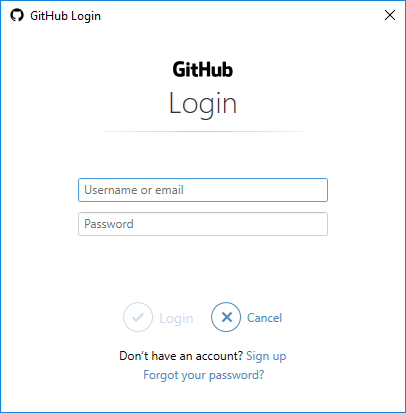
Important: This dialog is not part of GitHub for Visual Studio, this is part of the Git Credential Manager for Windows. _If you are seeing this dialog you are not signing in using GitHub for Visual Studio._ Close the dialog and log in using GitHub for Visual Studio.
I entered my password incorrectly
In the above dialog, I entered my password incorrectly. When this happens, the Git Credential Manager for Windows tries to ask you for your password on the command-line. Because we're not running on the command line this fails with error: cannot spawn askpass: No such file or directory, which is a very unhelpful error message.
This error might not be caused by entering you password incorrectly - it could be caused by proxy settings etc. The fact remains, I was not signing in using GitHub for Visual Studio: instead you should log in using GitHub for Visual Studio
grokys
on 20 Feb 2018
This is still happening to me even though iam logged in. Gonna remove 2FA I guess......
EDIT: It seems I cant because iam in a organisation that requires 2FA...Why is this being made so hard? Nice all this security locking me out of my repo...
 Barsonax
on 22 Feb 2018
Barsonax
on 22 Feb 2018
I have the same issue without 2FA.... grrrrr
Update:
I could push with github desktop when I signed out and in again, but still in visual studio it's not working.
 twixwix
on 22 Feb 2018
twixwix
on 22 Feb 2018
I ran into this today. Updated to build 15.5.7 and the problem went away
 nimad
on 22 Feb 2018
nimad
on 22 Feb 2018
Hey @Barsonax and @twixwix, updating VS to 15.5.7 should fix your login problems. Let us know.
 meaghanlewis
on 22 Feb 2018
meaghanlewis
on 22 Feb 2018
Yes it does!
Barsonax
on 22 Feb 2018
As @nimad says, if you update Visual Studio, it works
 sergiobarriel
on 22 Feb 2018
sergiobarriel
on 22 Feb 2018
Visual Studio Enterprise build 15.5.7 also fixed the issue for me.
Also updated to the latest version of the GitHub extension.
 dankoster
on 22 Feb 2018
dankoster
on 22 Feb 2018
I ran to this problem just now. what just happened? 😄 🤔
 MkazemAkhgary
on 22 Feb 2018
MkazemAkhgary
on 22 Feb 2018
Same as above, updating to 15.5.7 fixes this.
 gabrielhall2112
on 22 Feb 2018
gabrielhall2112
on 22 Feb 2018
This sucks. It was working yesterday and suddenly not today. I don't have a spare hour right now to do a VS install. I'm really getting sick of all this MS BS.
 nkev
on 23 Feb 2018
nkev
on 23 Feb 2018
Please ensure you're running VS 15.5.7 as there are some updates related to disabling weak cryptography that were rolled out today.
 shiftkey
on 23 Feb 2018
shiftkey
on 23 Feb 2018
Updating to 15.5.7 fixed this.
Thanks.
 chris-githu
on 23 Feb 2018
chris-githu
on 23 Feb 2018
Updating to VS 15.5.7 helped me and a colleague this morning!
We both had the "HttpRequestException"-version of the issue. Updating solved it immediately.
Thanks to everybody who spend their time helping to find a solution.
 AOS-Miracle
on 23 Feb 2018
AOS-Miracle
on 23 Feb 2018
Yes, the update fixed this.
 pablodelolmo
on 23 Feb 2018
pablodelolmo
on 23 Feb 2018
Updating fixed it here too.
 mvinicius85
on 23 Feb 2018
mvinicius85
on 23 Feb 2018
Updating also fixed it here, thanks.
 ytian2
on 23 Feb 2018
ytian2
on 23 Feb 2018
15.7 is a winner!
 rfustino
on 23 Feb 2018
rfustino
on 23 Feb 2018
thank you @meaghanlewis and @nimad !! GitHub was working just recently with 15.5.6 - the update today to 15.5.7 helped tremendously for the error: cannot spawn askpass: No such file or directorymessage today!
 gojimmypi
on 23 Feb 2018
gojimmypi
on 23 Feb 2018
In the future regarding breaking changes a better error message along the lines of security settings invalid would be better instead of cannot spawn askpass: No such file or directory which caused me to spend wasted time trying to debug what I assumed to be a corrupted install (because since when do executable suddenly vanish normally?).
 lloydjatkinson
on 24 Feb 2018
lloydjatkinson
on 24 Feb 2018
@avelis26 update to 15.5.7 to fix
gojimmypi
on 26 Feb 2018
I saw that and thanks... that worked.
 avelis26
on 26 Feb 2018
avelis26
on 26 Feb 2018
-1: No admin rights - cannot install any updates... should work - no sysadmin wide and far - f**d ...
git remote set-url origin username:[email protected]/username/repo.git
is therefore what works for me.
Note: this will store your github-pw as plaintext in ./.git/config
Thanks github, now I'm that much safer... - love you
_PS: that's sarcasm_
@microsoft: Why does TLS 1.2 need a Visual Studio Update ? :bomb: :bomb: :bomb:
 ststeiger
on 26 Feb 2018
ststeiger
on 26 Feb 2018
Thanks @nimad, updating my VS worked.
 theaustinhargis
on 26 Feb 2018
theaustinhargis
on 26 Feb 2018
Thanks everybody! Now it works!
 bollafa
on 26 Feb 2018
bollafa
on 26 Feb 2018
I Work To 2:00 AM,Tell me ,because version Question ? what?????
 NobleKiss
on 27 Feb 2018
NobleKiss
on 27 Feb 2018
The issue here is that Visual Studio bundles their own git.exe and (based on the above comments) the version prior to 15.5.7 was a piece of junk. I have git 2.16-x64 installed so I don't need their version. The fix for me (without updating to 15.5.7) was to delete this folder --
C:\Program Files (x86)\Microsoft Visual Studio\2017\Professional\Common7\IDE\CommonExtensions\Microsoft\TeamFoundation\Team Explorer\Git
 rdefulio
on 27 Feb 2018
rdefulio
on 27 Feb 2018
Followup on my previous post ... If you can't install the update right now..
GoodGit = C:\Program Files\Git
BadGit = C:\Program Files (x86)\Microsoft Visual Studio\2017\Professional\Common7\IDE\CommonExtensions\Microsoft\TeamFoundation\Team Explorer\Git
BadGit is found first by visual studio, unless you edit your visual studio options and remove the CommonExtension folder from the search path.
[C:\]dir git.exe /s/b/a
C:\Program Files\Git\bin\git.exe
C:\Program Files\Git\cmd\git.exe
C:\Program Files\Git\mingw64\bin\git.exe
C:\Program Files\Git\mingw64\libexec\git-core\git.exe
C:\Program Files (x86)\Microsoft Visual Studio\2017\Professional\Common7\IDE\CommonExtensions\Microsoft\TeamFoundation\Team Explorer\Git\cmd\git.exe
C:\Program Files (x86)\Microsoft Visual Studio\2017\Professional\Common7\IDE\CommonExtensions\Microsoft\TeamFoundation\Team Explorer\Git\mingw32\bin\git.exe
After deleting the bad git folder, make sure running git.exe from the command prompt finds the correct version via the system path.
[C:\]git --version
git version 2.16.2.windows.1
But probably the right way to do it would be to remove git from this section of Tools-->Options, seen here.

rdefulio
on 27 Feb 2018
This issue was fixed for me by updating to the latest 15.5.7 and installing the Git For Visual Studio extension again. Sorry I don't have more specifics! It was as easy as it sounded.
 AlexanderJ-ULabs
on 28 Feb 2018
AlexanderJ-ULabs
on 28 Feb 2018
GitHub Extension 2.4.2.1331
VS 2017 15.5.7
And getting this when trying to do commits now. I've been able to push without issues until today. Not sure what's changed. Still investigating.
A task was canceled.
cannot spawn askpass: No such file or directory
could not read Username for 'https://github.com': terminal prompts disabled
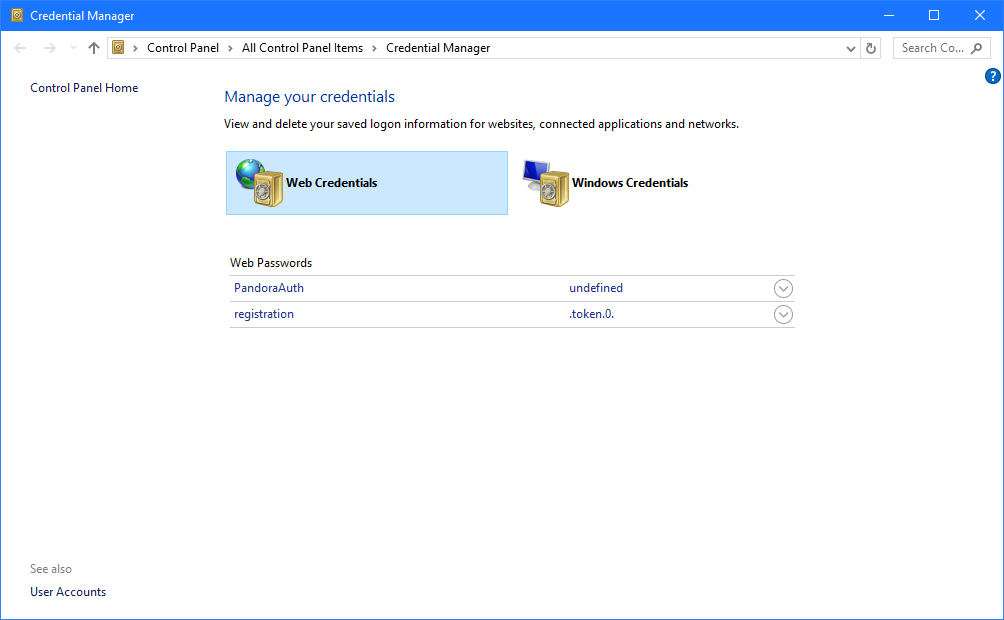
UPDATE: I installed the Git Cred Manager, didn't fix it. I deleted my GitHub login in the Cred Manger in Control Panel under Web and so far I've been able to make commits.
 Zero2Cool
on 28 Feb 2018
Zero2Cool
on 28 Feb 2018
Because we're not running on the command line this fails with error: cannot spawn askpass: No such file or directory, which is a very unhelpful error message.
Also in this department of unhelpful error messages, I love that this reports the exception type name instead of the exception message, stack trace, or something actually meaningful.... "AggregateException encountered" =<
 StingyJack
on 1 Mar 2018
StingyJack
on 1 Mar 2018
@StingyJack: That's all the info you get on the command line. No stack trace. And yes, the error message is very unhelpful. That has something to do with the programmer, though, not the reporter.
In fact, sometimes it just outputs nothing at all (while it says "look in the output tab") - but still fails - seems to be a visual studio issue, too. Sometimes message, sometimes blank. Same error. That's like when you switch to the "error tab" and look for compiler error 1 of 0.
ststeiger
on 1 Mar 2018
Also in this department of unhelpful error messages, I love that this reports the exception type name instead of the exception message, stack trace, or something actually meaningful.... "AggregateException encountered"
Yes I agree, the error message is not helpful. I'm tagging some of the Team Explorer people here so they're aware of this thread: @kaylangan @clboles @jeremyepling
Thanks for everyone's input on this!
grokys
on 1 Mar 2018
Could commit but couldn't push. Upgraded Git for Visual Studio and didn't help. Then upgraded to VS 15.5.7 and it worked again.
 benmccallum
on 3 Mar 2018
benmccallum
on 3 Mar 2018
I was having the same problem. Upgraded to VS 15.5.7 and it worked again.
 JonathanERoss
on 4 Mar 2018
JonathanERoss
on 4 Mar 2018
Upgrading to VS 15.5.7 also solved the problem for me.
 vivienchevallier
on 4 Mar 2018
vivienchevallier
on 4 Mar 2018
I was facing the same issue on both VS2017 and GIT Bash. Upgrading to VS 15.5.7 has fixed both. Thanks all.
 AnuragLalithambikai
on 5 Mar 2018
AnuragLalithambikai
on 5 Mar 2018
Upgrading to VS 15.5.7 fixed it last week. Now the same error is back. Now what? Geez I hate how much time Visual Studio wastes. It's the opposite of what it's supposed to do!
Error encountered while fetching: Git failed with a fatal error.
TaskCanceledException encountered.
A task was canceled.
cannot spawn askpass: No such file or directory
could not read Password for 'https://[email protected]': terminal prompts disabled
UPDATE:
Updating the Git Credential Manager then rebooting fixed it. I'm still pissed that I spent 20 minutes finding this solution and VS 15.5.7 didn't tell me this in the first place. Typical.
https://github.com/Microsoft/Git-Credential-Manager-for-Windows/releases/tag/v1.14.0
nkev
on 19 Mar 2018
@nkev, there was a Git extension for VS update I saw last night, wonder what that was for. Anddoes it update Git credential manager under the covers...? Will see if mine is broken today after updating the ext last night :p
benmccallum
on 19 Mar 2018
Fixed for me as well by upgrading VS2017
Old Version: 15.5.2
New Version: 15.6.2
Also note in the 15.6 release they've added more Git support:
"We added support for Git authentication over SSH. You can configure continuous delivery for solutions under source control in a VSTS or GitHub Git repo with SSH AUTH enabled."
https://docs.microsoft.com/en-us/visualstudio/releasenotes/vs2017-relnotes#15.6.2
 lmoxiel
on 19 Mar 2018
lmoxiel
on 19 Mar 2018
It's silly that we have to update the whole VS for incremental updates. It takes half an hour on my machine and I'm reluctant to do it for every release.
nkev
on 19 Mar 2018
I have the same issue, now can i fix it without reinstall anything?
 shtse8
on 20 Mar 2018
shtse8
on 20 Mar 2018
@shtse8 you don't have to reinstall, you just need to update Visual Studio.
grokys
on 20 Mar 2018
Upgrade VS from 15.3.3 to 15.6.4 -> now able to push to github !
 Wallonman
on 26 Mar 2018
Wallonman
on 26 Mar 2018
Updating Visual Studio did the trick for me too!
 chrisgel15
on 27 Mar 2018
chrisgel15
on 27 Mar 2018
I have VS 2017 version 15.6.4, GitHub.VisualStudio version 2.4.3.17 and GitBash version 2.16.1.windows.4 I am facing the same issue while trying to pull using VSTS Git Hub extension.
I am behind corporate proxy, configured through CNTLM, I verified git config --global, the correct username, email and proxy address is configured for http and https.
While logging in VSTS does ask username, password and 2 factor authentication code then connects, then when trying to pull it shows the following exception in VS output window, can anyone please help
Git failed with a fatal error.
HttpRequestException encountered.
An error occurred while sending the request.
cannot spawn /C/Program Files (x86)/Microsoft Visual Studio/2017/Enterprise/Common7/IDE/CommonExtensions/Microsoft/TeamFoundation/Team Explorer/Git/mingw32/libexec/git-core/git-askpass.exe: No such file or directory
could not read Username for 'https://github.com': terminal prompts disabled
 SanjibKHarchowdhury
on 2 Apr 2018
SanjibKHarchowdhury
on 2 Apr 2018
I had the same problem. After updating to the latest VS, problem is fixed. Still, error message is really confusing.
 aperwe
on 3 Apr 2018
aperwe
on 3 Apr 2018
Try to set username and password to your Remote url in repository settings.
Remotes: https://username:pass@github.com/Username/Repo
 Maximres
on 6 May 2018
Maximres
on 6 May 2018
I had same issue. In my case for some reason on my laptop, when I have my VPN on, no Windows universal type apps can connect to the internet. Edge for example cannot, while chrome and Firefox run fine. Same deal with Windows weather and news apps. Curiously, the live tiles can still update, but opening the app it says no connection.
It seems this part of Visual Studio must use similar code, because when I turned my VPN off, it works fine.
I use the same VPN account and credentials on my desktop machine, and it works fine - same version of Windows 10, too. This issue is something to do with windows. At some point a Windows 10 major update fixed it, but then it got broken again.
 cactusoft
on 24 May 2018
cactusoft
on 24 May 2018
Had the same issue, Seems windows store the credentials in a strange way.
All i did to fix was the following...
cd C:\location\of\project
git config credential.helper store
git push http://example.com/repo.git
At this point it will fail and ask fro crentials:
Username: <type your username>
Password: <type your password>
Then i could push from visual studio. Hope this helps :)
 TheJaysH
on 3 Jul 2018
TheJaysH
on 3 Jul 2018
Had the same issue and noticed i didn't update in a while.
Update Visual Studio and now it works. Thanks.
 Fieel
on 7 Jul 2018
Fieel
on 7 Jul 2018
Broken for me still in 15.4.7
EDIT: The "real" solution ended up being importing my ssh keys from my other dev environment, caching them in Pageant PuTTY authentication agent and closing the repo via SSH rather than HTTPS. Was not able to solve the HTTPS / two-factor auth issues with VS, Atlassian and Windows Credentials.
Error: cannot spawn /C/Program Files (x86)/Microsoft Visual Studio/2017/Community/Common7/IDE/CommonExtensions/Microsoft/TeamFoundation/Team Explorer/Git/mingw32/libexec/git-core/git-askpass.exe: No such file or directory
Error encountered while pushing to the remote repository: Git failed with a fatal error.
could not read Password for 'https://[email protected]': terminal prompts disabled
Pushing to https://[email protected]/blahblahblah/blahblahblah.git
I have tried clearing all credentials from Windows credentials manager, but they do not appear to be getting recreated into the credentials manager when I sign back into Atlassian.
I cannot find any GitCredentialsManager directory on my system, even though I have enabled the display and search of hidden files and system directories, so no tenant.cache file that I can delete to try and resolve, either.
Have executed git config and am not seeing any proxies, although I am running Windows from a Parallels VM. Any other internet connectivity is working fine though, including auth... credentials just aren't getting stored. No enterprise network settings on my machine, etc. again, two-factor auth was working not too long ago.
When I try to execute the following from the command-line:
git config credentials.helper store
git push origin ...
It took over a minute to respond and ask for my password. The VS process definitely doesn't last very long. Although, the error I'm getting when it finally completes is very different. The response I get is that SSH is recommended and if I use HTTPS then I need to login with the app password.
 ghost
on 7 Jul 2018
ghost
on 7 Jul 2018
I've got Visual Studio 2017 v15.7.4 installed in a school for my students to use git to manage their programming projects. I've got the GitHub for VS plugin version 2.5.3.2888. Cloning, committing and pushing all works fine for 'normal' GitHub repos but fails when using the private organisation account that we need for school assessments (so they don't cheat!)
Here's the error:
Error encountered while cloning the remote repository: Git failed with a fatal error.
ArgumentNullException encountered.
   Value cannot be null.
Parameter name: path
cannot spawn /C/Program Files/Microsoft Visual Studio/2017/Community/Common7/IDE/CommonExtensions/Microsoft/TeamFoundation/Team Explorer/Git/mingw32/libexec/git-core/git-askpass.exe: No such file or directory
could not read Username for 'https://github.com': terminal prompts disabled
My students don't have admin privileges or access to a command line / git terminal. Can anyone help me get this working? They're 32bit Win7 computers so I can't install GitHub Desktop on them.
Many thanks!
 pddring
on 13 Jul 2018
pddring
on 13 Jul 2018
@Pritchard @pddring can you update to Visual Studio 2017 v15.7.5 and let us know if you continue to have problems?
meaghanlewis
on 13 Jul 2018
@meaghanlewis I am having same issue and error as @pddring with Visual Studio 2017 v15.7.5
I can fetch a brand new branch and connect to a repository, however unable to fetch/push commits
 bwlegalana
on 16 Jul 2018
bwlegalana
on 16 Jul 2018
We began having the same issue with Atlassian's own software, SourceTree using BitBucket HTTPS connections. We've quickly moved our teams to use SSL only from hereon. This is resolving the issue across all teams - some using Visual Studio, some not.
I will debug next time we run into a an issue isolated to Visual Studio environments, but I consider this resolved as not being a bug with VS itself.
ghost
on 25 Jul 2018
@Maximres Your solution (https://github.com/github/VisualStudio/issues/949#issuecomment-386886010) worked for me. Nothing else before worked. :)
 spookiecookie
on 25 Jul 2018
spookiecookie
on 25 Jul 2018
This started here after I have updated Visual Studio to version 15.7.6. I cleared my bitbucket credentials and re-entered them but the results is still the same. :(
 JedatKinports
on 7 Aug 2018
JedatKinports
on 7 Aug 2018
Git integration with VS not working anymore.
Only command line tools.
Any action to git from VS - problems with credentials.
Any action from command line working as should.
Fun is that yesterday everything was working good and from yesterday no changes on system (no updates, no reset or restart VS)
What else can Microshit destroy ?
 TymekMM
on 7 Aug 2018
TymekMM
on 7 Aug 2018
Same as the above 2 - another VS update (15.7.6) and git integration broken yet again. Can push via command line but not in VS. I can do fetches ok, but not push. Very frustrating!
Error encountered while pushing to the remote repository: Git failed with a fatal error.
HttpRequestException encountered.
An error occurred while sending the request.
cannot spawn /C/Program Files (x86)/Microsoft Visual Studio/2017/Enterprise/Common7/IDE/CommonExtensions/Microsoft/TeamFoundation/Team Explorer/Git/mingw32/libexec/git-core/git-askpass.exe: No such file or directory
could not read Password for https://xyz : terminal prompts disabled
pushing to https://xyz
 SimonSDA
on 7 Aug 2018
SimonSDA
on 7 Aug 2018
And again fun is that this askpass.exe is there in the correct place :)
I know where is problem we all are using Microsoft system and software :)
TymekMM
on 7 Aug 2018
If you're unable to push, this is a problem with Team Explorer's git integration rather than GitHub for Visual Studio. @clboles @kaylangan @jeremyepling any idea?
grokys
on 7 Aug 2018
Use command line, everything working fine.
TymekMM
on 7 Aug 2018
It has started to happen to us as well out of nowhere with no changes in the environment at all. Git with VS doesn't work, but git in command line works fine. The solution of hard-coding the password in the remote settings (https://github.com/github/VisualStudio/issues/949#issuecomment-386886010) fix this issue, but it's very insecure to store a password in plain text like this.
 AmosHason
on 7 Aug 2018
AmosHason
on 7 Aug 2018
@SimonSDA @AmosHason @TymekMM @richardmatsu JedatKinports could check your local disk and determine if "C:\Program Files (x86)\Microsoft Visual Studio\2017\Enterprise\Common7\IDE\CommonExtensions\Microsoft\TeamFoundation\Team Explorer\Git\mingw32libexec\git-coregit-askpass.exe" actually exists or not?
I'm trying to determine if this is a Visual Studio installer issue or something else. Thanks! 🙇
 whoisj
on 7 Aug 2018
whoisj
on 7 Aug 2018
@whoisj It does exist.
I actually gave up and configured SSH key authentication, and now Git works with VS without any issues, but this issue still needs to be fixed.
AmosHason
on 7 Aug 2018
I just upgraded to 15.7.6 and I'm having the same issue. Configured SSH key authentication, but Visual Studio integration still not working. The "git-askpass.exe" does indeed exist at the path mentioned in the error message as not existing.
@whoisj Any other ideas?
I'm using Bitbucket, BTW.
 GarrettDavis
on 7 Aug 2018
GarrettDavis
on 7 Aug 2018
To those who are having this issue, capturing additional trace logs would be very useful towards discovering the root cause and resolving the issue. To enable tracing...
- Open Command Prompt
- Run
setx GIT_TRACE %UserProfile%\git.log. - Run
setx GCM_TRACE %UserProfile%\git.log. - Restart all Git clients including consoles, Visual Studio, etc.
- Reproduce the issue.
- Collect the logs from
%UserProfile%\git.log.
Once you have the logs captured, please share them here. Of course, as always, please redact any personal, secret, or personally identifiable information before sharing on the Internet.
Of time the logs will get large. To avoid this, you can disable trace logging by...
- Open Command Prompt
- Run
setx GIT_TRACE "". - Run
setx GCM_TRACE "". - Restart all Git clients including consoles, Visual Studio, etc.
whoisj
on 7 Aug 2018
@whoisj Here's the log with my username redacted.
12:14:58.242625 git.c:340               trace: built-in: git 'remote' '--verbose'
12:15:38.289999 git.c:340               trace: built-in: git 'for-each-ref' '--format='\''[%(refname)][%(objecttype)][%(objectname)][%(upstream)][%(push)][%(HEAD)]'\''' 'refs/heads/' 'refs/remotes/'
12:15:38.305624 git.c:340               trace: built-in: git 'rev-parse' '--git-dir' '--git-common-dir' '--is-bare-repository' '--git-path' 'index' '--git-path' 'objects/' '--git-path' 'hooks/' '--git-path' 'info/' '--git-path' 'logs/' '--git-path' 'HEAD' '--git-path' 'description' '--git-path' 'refs/' '--show-toplevel' '--shared-index-path'
12:15:38.377518 git.c:340               trace: built-in: git 'status' '--porcelain=v2' '--branch' '--no-lock-index' '--untracked-files=all' '--show-ignored-directory' '--ignore-submodules=none' '--ignored'
12:15:38.377518 git.c:340               trace: built-in: git 'cat-file' '--batch=[%(objectname)][%(objecttype)][%(objectsize)]'
12:15:38.621994 git.c:340               trace: built-in: git 'config' '--show-origin' '--list' '-z'
12:15:39.044405 git.c:340               trace: built-in: git 'for-each-ref' '--format='\''[%(refname)][%(objecttype)][%(objectname)][%(upstream)][%(push)][%(HEAD)]'\''' 'refs/heads/' 'refs/remotes/'
12:15:39.129093 git.c:340               trace: built-in: git 'rev-list' '--stdin' '--use-bitmap-index' '--header' 'refs/heads/master' '--'
12:15:41.651766 git.c:340               trace: built-in: git 'remote' '--verbose'
12:15:41.765676 git.c:340               trace: built-in: git 'config' '--show-origin' '--list' '-z'
12:15:54.414072 git.c:340               trace: built-in: git 'diff-tree' '--no-ext-diff' '--full-index' '--abbrev=40' '-m' '-r' '--name-status' '--no-renames' '--diff-filter=ACDTMBRXU' 'HEAD' 'refs/heads/develop'
12:15:54.521367 git.c:340               trace: built-in: git 'for-each-ref' '--format='\''[%(refname)][%(objecttype)][%(objectname)][%(upstream)][%(push)][%(HEAD)]'\''' 'refs/heads/' 'refs/remotes/'
12:15:54.594397 git.c:340               trace: built-in: git 'checkout' '--progress' 'develop'
12:15:54.690668 git.c:340               trace: built-in: git 'for-each-ref' '--format='\''[%(refname)][%(objecttype)][%(objectname)][%(upstream)][%(push)][%(HEAD)]'\''' 'refs/heads/' 'refs/remotes/'
12:15:54.775164 git.c:340               trace: built-in: git 'cat-file' '--batch=[%(objectname)][%(objecttype)][%(objectsize)]'
12:15:54.806416 git.c:340               trace: built-in: git 'status' '--porcelain=v2' '--branch' '--no-lock-index' '--untracked-files=all' '--show-ignored-directory' '--ignore-submodules=none' '--ignored'
12:15:54.859820 git.c:340               trace: built-in: git 'rev-list' '--use-bitmap-index' '--header' 'refs/heads/develop..refs/remotes/origin/develop' '--'
12:15:54.928251 git.c:340               trace: built-in: git 'rev-list' '--use-bitmap-index' '--header' 'refs/remotes/origin/develop..refs/heads/develop' '--'
12:15:54.944258 git.c:340               trace: built-in: git 'remote' '--verbose'
12:15:55.017266 git.c:340               trace: built-in: git 'config' '--show-origin' '--list' '-z'
12:15:55.938843 git.c:340               trace: built-in: git 'for-each-ref' '--format='\''[%(refname)][%(objecttype)][%(objectname)][%(upstream)][%(push)][%(HEAD)]'\''' 'refs/heads/' 'refs/remotes/'
12:15:56.006966 git.c:340               trace: built-in: git 'cat-file' '--batch=[%(objectname)][%(objecttype)][%(objectsize)]'
12:15:58.209999 git.c:340               trace: built-in: git 'for-each-ref' '--format='\''[%(refname)][%(objecttype)][%(objectname)][%(upstream)][%(push)][%(HEAD)]'\''' 'refs/heads/' 'refs/remotes/'
12:15:58.290077 git.c:340               trace: built-in: git 'remote' '--verbose'
12:15:58.347556 git.c:340               trace: built-in: git 'pull' '--verbose' '--progress' '--no-edit' '--no-stat' '--recurse-submodules=no' 'origin'
12:15:58.347556 run-command.c:626       trace: run_command: 'fetch' '--update-head-ok' '-v' '--progress' '--recurse-submodules=no' 'origin'
12:15:58.378813 git.c:340               trace: built-in: git 'fetch' '--update-head-ok' '-v' '--progress' '--recurse-submodules=no' 'origin'
12:15:58.394442 run-command.c:626       trace: run_command: 'remote-https' 'origin' 'https://[email protected]/prysm/synthesis.http.git'
12:15:58.425693 git.c:572               trace: exec: 'git-remote-https' 'origin' 'https://[email protected]/prysm/synthesis.http.git'
12:15:58.425693 run-command.c:626       trace: run_command: 'git-remote-https' 'origin' 'https://[email protected]/prysm/synthesis.http.git'
12:15:58.925993 run-command.c:626       trace: run_command: 'git credential-manager get'
12:15:59.079572 git.c:572               trace: exec: 'git-credential-manager' 'get'
12:15:59.079572 run-command.c:626       trace: run_command: 'git-credential-manager' 'get'
12:15:59.196910 ...\Common.cs:665       trace: [Main] git-credential-manager (v1.16.2) 'get'
12:15:59.275959 ...\Git\Where.cs:343    trace: [FindGitInstallations] found 1 Git installation(s).
12:15:59.282960 ...Configuration.cs:222 trace: [LoadGitConfiguration] git All config read, 45 entries.
12:15:59.283960 ...\Common.cs:393       trace: [LoadOperationArguments] GCM_HTTP_USER_AGENT = 'git-credential-manager (Microsoft Windows NT 10.0.16299.0; Win32NT x64) CLR/4.0.30319 VS15/15.0.0'.
12:15:59.286960 ...\Common.cs:445       trace: [LoadOperationArguments] interactive = 'Auto'.
12:15:59.286960 ...\Common.cs:463       trace: [LoadOperationArguments] validate = 'True'.
12:15:59.287960 ...\Common.cs:479       trace: [LoadOperationArguments] modalPrompt = 'True'.
12:15:59.318330 ...\Common.cs:84        trace: [CreateAuthentication] detecting authority type for 'https://[email protected]/'.
12:15:59.329454 ...uthentication.cs:319 trace: [GetAuthentication] authentication for Bitbucket created
12:15:59.329454 ...\Common.cs:173       trace: [CreateAuthentication] authority for 'https://[email protected]/'  is Bitbucket
12:15:59.329454 ...seSecureStore.cs:195 trace: [ReadCredentials] credentials for 'git:https://[email protected]' read from store.
12:15:59.329454 ...uthentication.cs:180 trace: [GetCredentials] successfully retrieved stored credentials, updating credential cache
12:15:59.348655 ...\Authority.cs:214    trace: [ValidateCredentials] authentication type = 'Credential'.
12:16:00.294748 ...\Git\Trace.cs:139    trace: [WriteException] ! error: 'An error occurred while sending the request.'.
12:16:00.294748 ...\Git\Trace.cs:143    trace: [WriteException]        > 'The underlying connection was closed: The connection was closed unexpectedly.'.
12:16:00.328546 ...\Common.cs:630       trace: [LogEvent] System.Net.Http.HttpRequestException: An error occurred while sending the request. ---> System.Net.WebException: The underlying connection was closed: The connection was closed unexpectedly.
   at System.Net.HttpWebRequest.EndGetResponse(IAsyncResult asyncResult)
   at System.Net.Http.HttpClientHandler.GetResponseCallback(IAsyncResult ar)
   --- End of inner exception stack trace ---
   at System.Runtime.ExceptionServices.ExceptionDispatchInfo.Throw()
   at System.Runtime.CompilerServices.TaskAwaiter.HandleNonSuccessAndDebuggerNotification(Task task)
   at Microsoft.Alm.Authentication.Network.<HttpGetAsync>d__2.MoveNext()
--- End of stack trace from previous location where exception was thrown ---
   at System.Runtime.ExceptionServices.ExceptionDispatchInfo.Throw()
   at System.Runtime.CompilerServices.TaskAwaiter.HandleNonSuccessAndDebuggerNotification(Task task)
   at Atlassian.Bitbucket.Authentication.Rest.RestClient.<TryGetUser>d__4.MoveNext()
--- End of stack trace from previous location where exception was thrown ---
   at System.Runtime.ExceptionServices.ExceptionDispatchInfo.Throw()
   at System.Runtime.CompilerServices.TaskAwaiter.HandleNonSuccessAndDebuggerNotification(Task task)
   at Atlassian.Bitbucket.Authentication.Authority.<ValidateCredentials>d__9.MoveNext()
--- End of stack trace from previous location where exception was thrown ---
   at System.Runtime.ExceptionServices.ExceptionDispatchInfo.Throw()
   at System.Runtime.CompilerServices.TaskAwaiter.HandleNonSuccessAndDebuggerNotification(Task task)
   at Atlassian.Bitbucket.Authentication.Authority.<ValidateCredentials>d__6.MoveNext()
--- End of stack trace from previous location where exception was thrown ---
   at System.Runtime.ExceptionServices.ExceptionDispatchInfo.Throw()
   at System.Runtime.CompilerServices.TaskAwaiter.HandleNonSuccessAndDebuggerNotification(Task task)
   at Atlassian.Bitbucket.Authentication.Authentication.<ValidateCredentials>d__33.MoveNext()
--- End of stack trace from previous location where exception was thrown ---
   at System.Runtime.ExceptionServices.ExceptionDispatchInfo.Throw()
   at System.Runtime.CompilerServices.TaskAwaiter.HandleNonSuccessAndDebuggerNotification(Task task)
   at Microsoft.Alm.Cli.CommonFunctions.<QueryCredentials>d__10.MoveNext()
--- End of stack trace from previous location where exception was thrown ---
   at System.Runtime.ExceptionServices.ExceptionDispatchInfo.Throw()
   at System.Runtime.CompilerServices.TaskAwaiter.HandleNonSuccessAndDebuggerNotification(Task task)
   at Microsoft.Alm.Cli.Program.<>c__DisplayClass23_1.<<Get>b__0>d.MoveNext()
12:16:00.328546 ...\Program.cs:578      trace: [Run] fatal: HttpRequestException encountered.
   An error occurred while sending the request.
12:16:00.349690 run-command.c:626       trace: run_command: '/C/Program Files (x86)/Microsoft Visual Studio/2017/Professional/Common7/IDE/CommonExtensions/Microsoft/TeamFoundation/Team Explorer/Git/mingw32/libexec/git-core/git-askpass.exe' 'Password for '\''https://[email protected]'\'': '
Running into this issue as well with the new update to VS :(
 StevenRasmussen
on 7 Aug 2018
StevenRasmussen
on 7 Aug 2018
Same problem here... Trying to pull/push bitbucket updates on Visual Studio Version 15.7.6.
 ligiasilvamendes
on 7 Aug 2018
ligiasilvamendes
on 7 Aug 2018
I'm having the same problem using bitbucket and Visual Studio Version 15.7.6.
 PradoRodrigo
on 7 Aug 2018
PradoRodrigo
on 7 Aug 2018
Same problem here. I had to pull/push commis out VS. My VS version 15.7.6 too. T.T
 lucas-moura
on 7 Aug 2018
lucas-moura
on 7 Aug 2018
Can't pull and push either. Before today it were working fine, now when I try to pull or push I get this error message:
No such file or directory could not read Username for 'https://bitbucket.org': terminal prompts disabled
 qicaro
on 7 Aug 2018
qicaro
on 7 Aug 2018
This is definitely related to the VS 15.7.6 update. I was able to push and pull yesterday, then updated VS, now no go. Identical behavior at work. The file itself (git-askpass.exe) does exist.
 Monte-Christo
on 7 Aug 2018
Monte-Christo
on 7 Aug 2018
Thanks for that trace log @GarrettDavis. The root error message there is The underlying connection was closed: The connection was closed unexpectedly. This message is being reported by Git Credential Manager for Windows.
All, we saw error message like this when GitHub deprecated support for TLS1.0 and TLS1.1. I have no idea, though I will try to find out, if Atlassian has done something similar. In the meantime you can reference this Developer Community topic to potentially find workarounds for your current situation.
Update:
It looks like Atlassian made some changes to BitBucket's networking on 06-Aug-18 (yesterday). I'm not blaming these changes, but it is something to consider when trying to debug what is happening here.
Update 2:
I've found the cause of the cannot spawn /C/Program Files (x86)/.../git-askpass.exe: No such file or directory error message, and while I've prepared a fix for it (future version of VS), __the message is a red herring__ as the only way to reach this error state is to run into the The underlying connection was closed: The connection was closed unexpectedly first _and_ git-askpass.exe would fail to do anything to resolve the issue (it just reports already cached credentials).
__TL;DR__
The cannot spawn /C/Program Files (x86)/.../git-askpass.exe: No such file or directory message is a symptom of credential acquisition failing unexpectedly. Understanding the credential acquisition failure, not the failure to find git-askpass, will resolve the issue.
whoisj
on 7 Aug 2018
but for now, going ssh is the only option besides using command line git commands? Reinstalling Visual studio is pretty cumbersome...
 ivleth
on 8 Aug 2018
ivleth
on 8 Aug 2018
From @davidscherf in #1841
- GitHub Extension for Visual Studio version: 2.5.4.3349
- Visual Studio version: 15.7.6
Pull or push no longer works
Git failed with a fatal error.
HttpRequestException encountered.
An error occurred while sending the request.
cannot spawn /C/Program Files (x86)/Microsoft Visual > Studio/2017/Community/Common7/IDE/CommonExtensions/Microsoft/TeamFoundation/Team Explorer/Git/mingw32/libexec/git-core/git-askpass.exe: No such file or directory
@davidscherf could you let us know where your repository is located?
grokys
on 8 Aug 2018
The cannot spawn /C/Program Files (x86)/.../git-askpass.exe: No such file or directory message is a symptom of credential acquisition failing unexpectedly.
@whoisj I know this is probably easier said than done, but would it be possible to display a more helpful error message when such things fail? cannot spawn /C/Program Files (x86)/.../git-askpass.exe isn't just unhelpful, it's misleading...
grokys
on 8 Aug 2018
@whoisj yes. The file git-askpass.exe does exist in "\Common7\IDE\CommonExtensions\Microsoft\TeamFoundation\Team Explorer\Git\mingw32libexec\git-core".
and here is the log:
09:34:02.374429 git.c:340               trace: built-in: git 'remote' '--verbose'
09:34:02.405671 git.c:340               trace: built-in: git 'remote' '--verbose'
09:34:02.436914 git.c:340               trace: built-in: git 'remote' '--verbose'
09:34:02.468157 git.c:340               trace: built-in: git 'remote' '--verbose'
09:34:02.499399 git.c:340               trace: built-in: git 'remote' '--verbose'
09:34:02.530642 git.c:340               trace: built-in: git 'remote' '--verbose'
09:34:02.546263 git.c:340               trace: built-in: git 'remote' '--verbose'
09:34:02.577506 git.c:340               trace: built-in: git 'remote' '--verbose'
09:34:07.002017 git.c:340               trace: built-in: git 'for-each-ref' '--format='\''[%(refname)][%(objecttype)][%(objectname)][%(upstream)][%(push)][%(HEAD)]'\''' 'refs/heads/' 'refs/remotes/'
09:34:07.033932 git.c:340               trace: built-in: git 'cat-file' '--batch=[%(objectname)][%(objecttype)][%(objectsize)]'
09:34:07.126684 git.c:340               trace: built-in: git 'config' '--show-origin' '--list' '-z'
09:34:07.765977 git.c:340               trace: built-in: git 'rev-parse' '--git-dir' '--git-common-dir' '--is-bare-repository' '--git-path' 'index' '--git-path' 'objects/' '--git-path' 'hooks/' '--git-path' 'info/' '--git-path' 'logs/' '--git-path' 'HEAD' '--git-path' 'description' '--git-path' 'refs/' '--show-toplevel' '--shared-index-path'
09:34:07.800883 git.c:340               trace: built-in: git 'status' '--porcelain=v2' '--branch' '--no-lock-index' '--untracked-files=all' '--show-ignored-directory' '--ignore-submodules=none' '--ignored'
09:34:07.844765 git.c:340               trace: built-in: git 'rev-list' '--use-bitmap-index' '--header' 'refs/heads/master..refs/remotes/origin/master' '--'
09:34:07.870696 git.c:340               trace: built-in: git 'rev-list' '--use-bitmap-index' '--header' 'refs/remotes/origin/master..refs/heads/master' '--'
09:34:10.077660 git.c:340               trace: built-in: git 'config' '--show-origin' '--list' '-z'
09:34:13.339267 git.c:340               trace: built-in: git 'remote' '--verbose'
09:34:13.358216 git.c:340               trace: built-in: git 'for-each-ref' '--format='\''[%(refname)][%(objecttype)][%(objectname)][%(upstream)][%(push)][%(HEAD)]'\''' 'refs/heads/' 'refs/remotes/'
09:34:13.380157 git.c:340               trace: built-in: git 'rev-list' '--use-bitmap-index' '--header' 'master..origin/master' '--'
09:34:13.399107 git.c:340               trace: built-in: git 'rev-list' '--use-bitmap-index' '--header' 'origin/master..master' '--'
09:34:13.420050 git.c:340               trace: built-in: git 'merge-base' '97994592098b587b51f48f669a85c034bc743918' '97994592098b587b51f48f669a85c034bc743918'
09:34:13.441992 git.c:340               trace: built-in: git 'cat-file' '--batch=[%(objectname)][%(objecttype)][%(objectsize)]'
09:34:17.559785 git.c:340               trace: built-in: git 'config' '--show-origin' '--list' '-z'
09:34:21.561859 git.c:340               trace: built-in: git 'update-index' '--add' '--remove' '--verbose' '--stdin'
09:34:21.608723 git.c:340               trace: built-in: git 'commit' '--allow-empty-message' '--file=-'
09:34:21.655587 git.c:340               trace: built-in: git 'for-each-ref' '--format='\''[%(refname)][%(objecttype)][%(objectname)][%(upstream)][%(push)][%(HEAD)]'\''' 'refs/heads/' 'refs/remotes/'
09:34:21.671208 git.c:340               trace: built-in: git 'cat-file' '--batch=[%(objectname)][%(objecttype)][%(objectsize)]'
09:34:21.686829 git.c:340               trace: built-in: git 'status' '--porcelain=v2' '--branch' '--no-lock-index' '--untracked-files=all' '--show-ignored-directory' '--ignore-submodules=none' '--ignored'
09:34:21.782063 git.c:340               trace: built-in: git 'remote' '--verbose'
09:34:21.784058 git.c:340               trace: built-in: git 'rev-list' '--use-bitmap-index' '--header' 'refs/heads/master..refs/remotes/origin/master' '--'
09:34:21.802010 git.c:340               trace: built-in: git 'for-each-ref' '--format='\''[%(refname)][%(objecttype)][%(objectname)][%(upstream)][%(push)][%(HEAD)]'\''' 'refs/heads/' 'refs/remotes/'
09:34:21.803007 git.c:340               trace: built-in: git 'rev-list' '--use-bitmap-index' '--header' 'refs/remotes/origin/master..refs/heads/master' '--'
09:34:21.821956 git.c:340               trace: built-in: git 'rev-list' '--use-bitmap-index' '--header' 'master..origin/master' '--'
09:34:21.840906 git.c:340               trace: built-in: git 'rev-list' '--use-bitmap-index' '--header' 'origin/master..master' '--'
09:34:21.860852 git.c:340               trace: built-in: git 'merge-base' '1a5bdd6a3d589ee43ab78a497606c47d584fba3a' '97994592098b587b51f48f669a85c034bc743918'
09:34:21.880799 git.c:340               trace: built-in: git 'cat-file' '--batch=[%(objectname)][%(objecttype)][%(objectsize)]'
09:34:21.924868 git.c:340               trace: built-in: git 'for-each-ref' '--format='\''[%(refname)][%(objecttype)][%(objectname)][%(upstream)][%(push)][%(HEAD)]'\''' 'refs/heads/' 'refs/remotes/'
09:34:21.956111 git.c:340               trace: built-in: git 'remote' '--verbose'
09:34:21.971733 git.c:340               trace: built-in: git 'push' '--verbose' '--progress' 'origin' 'refs/heads/master:master'
09:34:21.971733 run-command.c:626       trace: run_command: 'remote-https' 'origin' 'https://[email protected]/uzername/reponame.git'
09:34:21.987354 git.c:572               trace: exec: 'git-remote-https' 'origin' 'https://[email protected]/uzername/reponame.git'
09:34:21.987354 run-command.c:626       trace: run_command: 'git-remote-https' 'origin' 'https://[email protected]/uzername/reponame.git'
09:34:22.702266 git.c:340               trace: built-in: git 'for-each-ref' '--format='\''[%(refname)][%(objecttype)][%(objectname)][%(upstream)][%(push)][%(HEAD)]'\''' 'refs/heads/' 'refs/remotes/'
09:34:22.717887 git.c:340               trace: built-in: git 'cat-file' '--batch=[%(objectname)][%(objecttype)][%(objectsize)]'
09:34:22.967828 run-command.c:626       trace: run_command: 'git credential-manager get'
09:34:22.999072 git.c:572               trace: exec: 'git-credential-manager' 'get'
09:34:22.999072 run-command.c:626       trace: run_command: 'git-credential-manager' 'get'
09:34:23.045936 ...\Common.cs:665       trace: [Main] git-credential-manager (v1.16.2) 'get'
09:34:23.077178 ...\Git\Where.cs:343    trace: [FindGitInstallations] found 1 Git installation(s).
09:34:23.092800 ...Configuration.cs:222 trace: [LoadGitConfiguration] git All config read, 34 entries.
09:34:23.092800 ...\Common.cs:393       trace: [LoadOperationArguments] GCM_HTTP_USER_AGENT = 'git-credential-manager (Microsoft Windows NT 10.0.17134.0; Win32NT x64) CLR/4.0.30319 VS15/15.0.0'.
09:34:23.092800 ...\Common.cs:445       trace: [LoadOperationArguments] interactive = 'Auto'.
09:34:23.092800 ...\Common.cs:463       trace: [LoadOperationArguments] validate = 'True'.
09:34:23.092800 ...\Common.cs:479       trace: [LoadOperationArguments] modalPrompt = 'True'.
09:34:23.108421 ...\Common.cs:84        trace: [CreateAuthentication] detecting authority type for 'https://[email protected]/'.
09:34:23.124102 ...uthentication.cs:319 trace: [GetAuthentication] authentication for Bitbucket created
09:34:23.124102 ...\Common.cs:173       trace: [CreateAuthentication] authority for 'https://[email protected]/'  is Bitbucket
09:34:23.162998 ...icationPrompts.cs:96 trace: [CredentialModalPrompt] prompting user for credentials.
09:34:31.608967 ...\RestClient.cs:33    trace: [TryGetUser] server responded with Unauthorized.
09:34:31.608967 ...\RestClient.cs:59    trace: [TryGetUser] authentication unauthorized
09:34:31.609965 ...hAuthenticator.cs:38 trace: [GetAuthAsync] authentication failed
09:34:31.609965 ...uthentication.cs:393 trace: [InteractiveLogon] interactive logon failed
09:34:31.613954 ...\Authority.cs:214    trace: [ValidateCredentials] authentication type = 'Credential'.
09:34:32.597327 ...\RestClient.cs:33    trace: [TryGetUser] server responded with Unauthorized.
09:34:32.597327 ...\RestClient.cs:59    trace: [TryGetUser] authentication unauthorized
09:34:32.597327 ...\Authority.cs:225    trace: [ValidateCredentials] credential validation failed
09:34:32.598324 ...\Authority.cs:214    trace: [ValidateCredentials] authentication type = 'Token'.
09:34:32.598324 ...\Network.cs:457      trace: [GetHttpClient] ! unsupported token type, not appending an authentication header to the request.
09:34:35.593321 ...\Git\Trace.cs:139    trace: [WriteException] ! error: 'An error occurred while sending the request.'.
09:34:35.593321 ...\Git\Trace.cs:143    trace: [WriteException]        > 'The underlying connection was closed: The connection was closed unexpectedly.'.
09:34:35.596313 ...\Common.cs:630       trace: [LogEvent] System.Net.Http.HttpRequestException: An error occurred while sending the request. ---> System.Net.WebException: The underlying connection was closed: The connection was closed unexpectedly.
   at System.Net.HttpWebRequest.EndGetResponse(IAsyncResult asyncResult)
   at System.Net.Http.HttpClientHandler.GetResponseCallback(IAsyncResult ar)
   --- End of inner exception stack trace ---
   at System.Runtime.ExceptionServices.ExceptionDispatchInfo.Throw()
   at System.Runtime.CompilerServices.TaskAwaiter.HandleNonSuccessAndDebuggerNotification(Task task)
   at Microsoft.Alm.Authentication.Network.<HttpGetAsync>d__2.MoveNext()
--- End of stack trace from previous location where exception was thrown ---
   at System.Runtime.ExceptionServices.ExceptionDispatchInfo.Throw()
   at System.Runtime.CompilerServices.TaskAwaiter.HandleNonSuccessAndDebuggerNotification(Task task)
   at Atlassian.Bitbucket.Authentication.Rest.RestClient.<TryGetUser>d__4.MoveNext()
--- End of stack trace from previous location where exception was thrown ---
   at System.Runtime.ExceptionServices.ExceptionDispatchInfo.Throw()
   at System.Runtime.CompilerServices.TaskAwaiter.HandleNonSuccessAndDebuggerNotification(Task task)
   at Atlassian.Bitbucket.Authentication.Authority.<ValidateCredentials>d__9.MoveNext()
--- End of stack trace from previous location where exception was thrown ---
   at System.Runtime.ExceptionServices.ExceptionDispatchInfo.Throw()
   at System.Runtime.CompilerServices.TaskAwaiter.HandleNonSuccessAndDebuggerNotification(Task task)
   at Atlassian.Bitbucket.Authentication.Authority.<ValidateCredentials>d__6.MoveNext()
--- End of stack trace from previous location where exception was thrown ---
   at System.Runtime.ExceptionServices.ExceptionDispatchInfo.Throw()
   at System.Runtime.CompilerServices.TaskAwaiter.HandleNonSuccessAndDebuggerNotification(Task task)
   at Atlassian.Bitbucket.Authentication.Authentication.<ValidateCredentials>d__33.MoveNext()
--- End of stack trace from previous location where exception was thrown ---
   at System.Runtime.ExceptionServices.ExceptionDispatchInfo.Throw()
   at System.Runtime.CompilerServices.TaskAwaiter.HandleNonSuccessAndDebuggerNotification(Task task)
   at Microsoft.Alm.Cli.CommonFunctions.<QueryCredentials>d__10.MoveNext()
--- End of stack trace from previous location where exception was thrown ---
   at System.Runtime.ExceptionServices.ExceptionDispatchInfo.Throw()
   at System.Runtime.CompilerServices.TaskAwaiter.HandleNonSuccessAndDebuggerNotification(Task task)
   at Microsoft.Alm.Cli.Program.<>c__DisplayClass23_1.<<Get>b__0>d.MoveNext()
09:34:35.597310 ...\Program.cs:578      trace: [Run] fatal: HttpRequestException encountered.
   An error occurred while sending the request.
09:34:35.953724 run-command.c:626       trace: run_command: '/C/Program Files (x86)/Microsoft Visual Studio/2017/Version/Common7/IDE/CommonExtensions/Microsoft/TeamFoundation/Team Explorer/Git/mingw32/libexec/git-core/git-askpass.exe' 'Password for '\''https://[email protected]'\'': '
I'm using BitBucket.
JedatKinports
on 8 Aug 2018
I just updated to 15.8.0 Preview 5.0 and it broke git causing this error message.
HttpRequestException encountered. An error occurred while sending the request. cannot spawn /c/program files (x86)/microsoft visual studio/preview/enterprise/common7/ide/commonextensions/microsoft/teamfoundation/team explorer/Git/mingw32/libexec/git-core/git-askpass.exe: No such file or directory could not read Username for 'https://bitbucket.org': terminal prompts disabled
15.7.2 which I also have installed has no problem doing a push from the same .sln file.
It seems the new installer may have removed git by default?
 rolandh
on 8 Aug 2018
rolandh
on 8 Aug 2018
I am using SourceTree or git bash to do my pushing and pulling while VS 2017 refuses to sync. Tortoise Git or any other Git client would work as well, I guess. In my case, only syncing to BitBucket is broken. GitHub repos sync just fine.
Monte-Christo
on 8 Aug 2018
Have a look here.
AmosHason
on 8 Aug 2018
In visual studio > Team Explorer > Repository settings > Remotes
Replace
login@.,... with login:pass@... etc
Like
https://login:[email protected]/myrepo/myproject.git_
OR (better)
Just overwrite as described below: https://github.com/github/VisualStudio/issues/949#issuecomment-411349635
ivleth
on 8 Aug 2018
So i ran into this error and it seems that the bundled Git-Credential-Manager-for-Windows/ in VIsual Studio 2017 is not of the latest release yet. Downloading the latest release and putting it on top of the files in VIsual Studio 2017 worked for me.
1. download the zip file gcmw-v1.17.0.zip from https://github.com/Microsoft/Git-Credential-Manager-for-Windows/releases
2. navigate to C:\Program Files (x86)\Microsoft Visual Studio\2017\Enterprise\Common7\IDE\CommonExtensions\Microsoft\TeamFoundation\Team Explorer\Git\mingw32\libexec\ (or wherever your 'missing' git-askpass.exe resides).
3. make a copy of the git-core folder and rename it backup or something like that
4. put the files from the zip file on top of the contents of your new git-core folder and overwrite where prompted
Let me know if this works for you
Edit
might wanna use
gcmw-v1.17.1.zipif the1.17.0did not work
 kevinramharak
on 8 Aug 2018
kevinramharak
on 8 Aug 2018
and yes that is working! Brilliant!
ivleth
on 8 Aug 2018
@KevinRamharak it's working, thanks!
lucas-moura
on 8 Aug 2018
For me workaround by @KevinRamharak with overwriting Git-Credential-Manager-for-Windows with latest version didn't worked until I've removed "login" from remote settings (i.e changed https://[email protected]/myrepo/myproject.git to https://bitbucket.org/myrepo/myproject.git) and also started to use Atlassian ID with full email instead.
 vlardn
on 8 Aug 2018
vlardn
on 8 Aug 2018
@whoisj I did confirm it few posts earlier. File is there, seating there in proper warm corner and making nest
TymekMM
on 8 Aug 2018
@KevinRamharak Works like a charm. Thanks. I had installed latest Git-Credential-Manager-for-Windows earlier, but only manually overwriting the files fixed the issue for me.
Monte-Christo
on 8 Aug 2018
@KevinRamharak - awesome - fix worked! thanks!
 DoumaWebDesign
on 9 Aug 2018
DoumaWebDesign
on 9 Aug 2018
For me, I did overwrite Git-Credential-Manager-for-Windows with the latest version just as what @KevinRamharak said. But then I need to go to Control Panel > Credential Manager, and directly input my username (using full email for the Atlassian ID) and password in the required credential for the login to work.
 samuelalvin
on 9 Aug 2018
samuelalvin
on 9 Aug 2018
@KevinRamharak - You are a life saver!!!! fix worked thanks!
 rafalowski
on 9 Aug 2018
rafalowski
on 9 Aug 2018
@KevinRamharak - Big thanks for your help! It's working!
Edited:
Only work on my Win7. In Win10 didn't work :(
 willandus
on 9 Aug 2018
willandus
on 9 Aug 2018
Hello everybody. I'd like to announce GCM v1.17.1 Preview 1 is available for download. While this won't directly fix the issue with Visual Studio being able to authentication successfully with BitBucket, it should unblock you if you...
- Download and install the tool
- Use Git for Windows to interact with your BitBucket repository in a way that forces it to authenticate
- Logon using the Atlassian provided BitBucket interface.
Once you've done this, your credentials will be cached in the Windows Credential Manager, and Visual Studio should have access to them. Please, let me know how this goes and best of luck.
PS.
Yes, we're still working towards a more permanent solution but I wanted to provide a possible work around as early as possible.
whoisj
on 9 Aug 2018
Just installed V1.17.1 preview 1 and it solved my auth problem. Thanks!
 joef12345
on 9 Aug 2018
joef12345
on 9 Aug 2018
@whoisj not worked installing GCM v1.17.1 Preview 1 ,but after downloading the source with .zip file then i applied manually @KevinRamharak suggestion then works for me.
 GoodGun
on 10 Aug 2018
GoodGun
on 10 Aug 2018
@whoisj it didn't work with the .exe file. But when I have downloaded the .zip file and manually copied the files into \Common7\IDE\CommonExtensions\Microsoft\TeamFoundation\Team Explorer\Git\mingw32libexec\git-core it worked. Thanks @KevinRamharak and @whoisj !
JedatKinports
on 10 Aug 2018
MicrosoftShouldHireKevin
qicaro
on 10 Aug 2018
@whoisj It's ok. Copy the content of gcmw-v1.17.1-preview.1.zip to c:\Program Files (x86)\Microsoft Visual Studio\2017\Community\Common7\IDE\CommonExtensions\Microsoft\TeamFoundation\Team Explorer\Git\mingw32libexec\git-core\ dir, and it solved my auth problem.
The problem was same on Win7 and Win10, but @KevinRamharak suggestion only work on Win7.
Thanks!
willandus
on 10 Aug 2018
@willandus My problem was in win10 and Kevin solution works fine for me.
qicaro
on 10 Aug 2018
MicrosoftShouldNotMakeSuchStupidMistakesInTheFirstPlaceBecauseWhatIsTestingForAndTls1.2ExistsSinceALongLongTime
also
UpdatesShouldBeInstalledByWindowsUpdateBecauseSomeUsersInEnterprisesDontHaveAdminPrivilegesYouStupidMorons
AndThatMeansYourStupidPolicyCondemsUsToPutPlaintextPasswordsIntoGitConfigFilesWhichIsTotallyInsecureAndApplySomeCmdLineFuEveryTimeWeCreateAnewProjectAndItLimitsUsToDotNetCore20BecauseThatsWhatsNowInstalledAndWeCannotDoUpdatesOurselvesAndOurAdminIsALazy"Person"
Also
WhyDoesInstallingTheDotNetSdkAndRuntimeRequireAdminPrivileges ?
YouCanAlsoSetRegistryKeysInHKCUandYouCanAlsoSetPathEnvironmentVariablesForTheLocalUserOnlyJustInCaseYouDontKnow
FU-FU-FU
❤JetBrainsRider
ststeiger
on 11 Aug 2018
This sure taught me not to get the latest updates for Viz-Studio...
I'd be using Rider (I have the JetBrains AllProductsPack) if it wasn't lacking some crucial features
 JoeHz
on 12 Aug 2018
JoeHz
on 12 Aug 2018
The 2018-EAP comes with publishing feature & experimental Blazor support.
I use Rider EAPs since I'm on Linux.
At work however, I'm forced to use Visual-Studio 2017 (and can't update because I don't have admin rights, and the admin [just tell me if you need something] just doesn't do it no matter how many times you tell him)...
ststeiger
on 12 Aug 2018
@KevinRamharak it's working, thanks!
 causa-prima
on 13 Aug 2018
causa-prima
on 13 Aug 2018
@KevinRamharak Thank you! This got me back up and running.
 plcnut
on 13 Aug 2018
plcnut
on 13 Aug 2018
Just wanted to mention that what KevinRamharak said worked for me as well!
 varzaman
on 15 Aug 2018
varzaman
on 15 Aug 2018
Latest update 15.8 broke it again
 mpalladinru
on 16 Aug 2018
mpalladinru
on 16 Aug 2018
@mpalladinru It was the one before 15.8 that first broke it for me. I'm assuming that meant you had it fixed manually somehow and it overwrote it?
JoeHz
on 16 Aug 2018
Make sure to use this path if you are using the preview of VS. Latest 15.8 update also breaks it for me, I have to do this each time.
C:\Program Files (x86)\Microsoft Visual Studio\Preview\Enterprise\Common7\IDE\CommonExtensions\Microsoft\TeamFoundation\Team Explorer\Git\mingw32libexec\git-core
rolandh
on 16 Aug 2018
The latest VS update (15.8) broke it again.
I'm just copy the content of gcmw-v1.17.1-preview.1.zip to c:\Program Files (x86)\Microsoft Visual Studio\2017\Community\Common7\IDE\CommonExtensions\Microsoft\TeamFoundation\Team Explorer\Git\mingw32libexec\git-core\ but it was not enough. Then overwrite the content of the directory above with @KevinRamharak 's suggestion. The content of gcmw-v1.17.0.zip was solved the atuh problem for me.
willandus
on 16 Aug 2018
@JoeHz yes, I unpacked archive contents and it was working until yesterday, when update arrived. So I unpacked archive contents again and it working again now
mpalladinru
on 16 Aug 2018
Still broken in 15.8.1
 FabricioAraujoRJ
on 19 Aug 2018
FabricioAraujoRJ
on 19 Aug 2018
@whoisj just wanted to say that this problem seems to be escalating, we've had more reports of the same problem over at #1531.
grokys
on 21 Aug 2018
@grokys and everyone else, we (Microsoft) have worked closely with Atlassian to resolve the Bitbucket authentication issue. I'd like to take a moment and thank the developers of Atlassian for the scramble they did to resolve the issue. They could have left everything broken longer, but instead took the high road, did the right thing, and fixed a bug that was negatively impacting people. I think that deserves a smile 😁.
I personally (with the blessing of our gate keepers) have pushed the fix into Visual Studio, and an update will arriving as soon as the release gears can complete their turning. I, personally, do not have much insight into the timing of VS update releases, but I know we're targeting 15.8 and 15.9 (still in preview) with the fix. __I do not know the exact timing__ but I do not think it'll be very long.
I do apologize for missing the 15.8.1 release train. The fix just wasn't ready by the time the train had "left the station" and I still had to complete the steps of pulling the fixes into VS, and validating them (not just to fix Bitbucket, but also to ensure they _did not break anything else_ 😲 - they don't 🙂).
So the best I can do right now is say "hold tight" the fix is incoming - promise!
Oh, and I am very sorry that we let this issue slip past. We did not have robust validation around Bitbucket authentication previously. We now have better validation, and will continue to improve all of our testing over time. Again, very sorry and the fix exists, it is on its way, and should be available soon (for some definition of soon).
whoisj
on 22 Aug 2018
The latest VS update (15.8) broke it again.
Still broken in 15.8.1
Yup, I knew that was going to happen - sorry. When VS updates itself it also fixes itself. Which means if you've replaced a file in the Visual Studio installation folder and then run update or repair, your replaced file will be replaced with the version the IDE is expecting to be there. 99.99% of the time you _really_ want this feature and it has saved you from heartache over and over, without you even realizing it. In this one, very particular case, it undid the homebrew fix.
The good news is, a soon update to VS should include the official fix.
whoisj
on 22 Aug 2018
disclaimer: slightly off topic.
Since last night, we start seeing the same issue on VSTS:
fatal: could not read Username for 'https://bitbucket.org': terminal prompts disabled
This started after the fix for the Hosted Agent Issues in West Europe (not sure if this is related).
Could you provide some insight on what we can do in VSTS to work around this issue,?
Thanks!
 koenj
on 23 Aug 2018
koenj
on 23 Aug 2018
Until VS is patched, this suggestion is the only one I know for sure that will help. This is because we increased the HTTP_TIMEOUT significantly as part of the work-around for Bitbucket before we understood the root cause. The time change stuck because it would help in other areas.
whoisj
on 23 Aug 2018
Thanks for the input;
I opened a support request with Microsoft for the VSTS bug;
they have released a patch to VSTS in the meantime, fixing my issue.
So on VSTS, everything is working fine again.
 koen12h51
on 23 Aug 2018
koen12h51
on 23 Aug 2018
Updated to version VS 15.8.2, still facing the same issue.
Error encountered while fetching: Git failed with a fatal error.
HttpRequestException encountered.
An error occurred while sending the request.
cannot spawn /c/program files (x86)/microsoft visual studio/2017/professional/common7/ide/commonextensions/microsoft/teamfoundation/team explorer/Git/mingw32/libexec/git-core/git-askpass.exe: No such file or directory
could not read Username for 'https:xxxx.com': terminal prompts disabled
 PrasanthMahendrakar
on 29 Aug 2018
PrasanthMahendrakar
on 29 Aug 2018
I'm now able to push to bitbucket with 15.8.2
JoeHz
on 29 Aug 2018
15.8.2 fixed it for me. Thanks!
JedatKinports
on 31 Aug 2018
i was also struggeling with it . Updated VS to 15.8.9 and he issue was fixed .
 wiswis15
on 3 Nov 2018
wiswis15
on 3 Nov 2018
I updated to VS 15.9.3 and the problem returned!!!
I discovered that simply grabbing the AzureDevOps.Authentication.dll assembly from the Git Credential Manager for Windows v1.18.2 zip file and dropping it into the C:\Program Files (x86)\Microsoft Visual Studio\2017\<<<VSEdition>>>\Common7\IDE\CommonExtensions\Microsoft\TeamFoundation\Team Explorer\Git\mingw32\libexec\git-core folder allowed me to clone a Dev.Azure.com repo.
HTH.
Sam.
 samconn
on 3 Dec 2018
samconn
on 3 Dec 2018
Same for me. I'm not sure if 15.9.3 broke it, but it was working for me in earlier versions of VS.
 Grauenwolf
on 10 Dec 2018
Grauenwolf
on 10 Dec 2018
So i ran into this error and it seems that the bundled Git-Credential-Manager-for-Windows/ in VIsual Studio 2017 is not of the latest release yet. Downloading the latest release and putting it on top of the files in VIsual Studio 2017 worked for me.
1. download the zip file gcmw-v1.17.0.zip from https://github.com/Microsoft/Git-Credential-Manager-for-Windows/releases
2. navigate to C:\Program Files (x86)\Microsoft Visual Studio\2017\Enterprise\Common7\IDE\CommonExtensions\Microsoft\TeamFoundation\Team Explorer\Git\mingw32\libexec\ (or wherever your 'missing' git-askpass.exe resides).
3. make a copy of the git-core folder and rename it backup or something like that
4. put the files from the zip file on top of the contents of your new git-core folder and overwrite where prompted
Let me know if this works for you
Edit
might wanna use
gcmw-v1.17.1.zipif the1.17.0did not work
Didn't work for me. Can you help m in this?
 Manika-Kumari
on 3 Jun 2020
Manika-Kumari
on 3 Jun 2020
Git failed with a fatal error.
HttpRequestException encountered.
��������ʱ�����
HttpRequestException encountered.
��������ʱ�����
cannot spawn /c/app/visual studio 2019/common7/ide/commonextensions/microsoft/teamfoundation/team explorer/Git/mingw32/libexec/git-core/git-askpass.exe: No such file or directory
could not read Username for 'https://github.com': terminal prompts disabled
again and again
 sgf
on 9 Oct 2020
sgf
on 9 Oct 2020
I had the same issue with similar symptoms.
My solution was 2 steps
- Cleaning Github Credentials in Windows Credential Manager
- SignOut and Remove all accounts in Visual Studio and Re-Sign In with github account
 mxfatih
on 9 Nov 2020
mxfatih
on 9 Nov 2020
Related issues
 awbushnell
·
7Comments
awbushnell
·
7Comments
 Lupusa87
·
7Comments
Lupusa87
·
7Comments
 jnm2
·
8Comments
jnm2
·
8Comments
 Nhallick
·
8Comments
grokys
·
6Comments
Nhallick
·
8Comments
grokys
·
6Comments
Most helpful comment
I ran into this today. Updated to build 15.5.7 and the problem went away