Visualstudio-docs: How to enable this behavior
I'm using VS 2017 and this feature is not showing in the refactor menu. How do I enable it? This URL indicates VS 2017. https://docs.microsoft.com/en-us/visualstudio/ide/reference/move-type-to-namespace?view=vs-2017
Document Details
⚠ Do not edit this section. It is required for docs.microsoft.com ➟ GitHub issue linking.
- ID: aaa5d8fa-b34c-4452-931d-b6230e0dff71
- Version Independent ID: 6b10c735-49f1-6341-84f7-6442a6febbdd
- Content: Move type to namespace - Visual Studio
- Content Source: docs/ide/reference/move-type-to-namespace.md
- Product: visual-studio-windows
- Technology: vs-ide-general
- GitHub Login: @mikadumont
- Microsoft Alias: midumont
 roryap
All 10 comments
VS2017 has multiple different Refactor menus with different options. I appreciate it's confusing.
Put your caret (the blinking I-bar cursor) on the identifier of the class declaration of the class you want to move, then press [Ctrl] + '.' (dot) on your keyboard to get the Code Fixes menu popup with those options.
A subtle icon will also appear in the left-side gutter that you can click to open the menu. Sometime over the past few months an update to VS2017 changed the icon from a bright and visible lightbulb to a blue screwdriver that doesn't stand out as well, unfortunately:
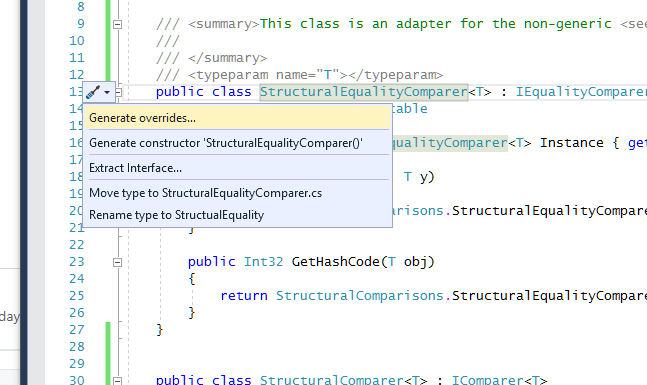
This is how it used to look a few months ago:

 Jehoel
on 3 Nov 2019
Jehoel
on 3 Nov 2019
@roryap -- thank you for your feedback.
@Jehoel, @mikadumont -- please look into a potential documentation update.
 WilliamAntonRohm
on 4 Nov 2019
WilliamAntonRohm
on 4 Nov 2019
VS2017 has multiple different Refactor menus with different options. I appreciate it's confusing.
Put your caret (the blinking I-bar cursor) on the identifier of the class declaration of the class you want to move, then press
[Ctrl] + '.' (dot)on your keyboard to get the Code Fixes menu popup with those options.A subtle icon will also appear in the left-side gutter that you can click to open the menu. Sometime over the past few months an update to VS2017 changed the icon from a bright and visible lightbulb to a blue screwdriver that doesn't stand out as well, unfortunately:
This is how it used to look a few months ago:
I'm not sure how this comment addresses the missing "move to namespace" feature....
roryap
on 5 Nov 2019
@roryap I thought you were referring to the Edit > Refactor menu, not the Editor > Code Fixes menu.
Jehoel
on 5 Nov 2019
I'm referring to the "move type to namespace" feature which the link I provided says should be in the refactor menu.
roryap
on 6 Nov 2019
@TerryGLee This feature doesnt exist in Visual Studio 2017. We added it in 16.1. Can we make sure it doesnt show up under 2017?
 mikadumont
on 26 Mar 2020
mikadumont
on 26 Mar 2020
@mikadumont Yes, there is a way to do this; I'll create a PR for it that we can get published tomorrow morning. (I'll @ mention you on the PR in the private repo.)
 TerryGLee
on 26 Mar 2020
TerryGLee
on 26 Mar 2020
Thanks @TerryGLee! Can we go ahead and close this then?
mikadumont
on 26 Mar 2020
@mikadumont I'll take care of closing it after the update goes live. :)
TerryGLee
on 26 Mar 2020
@roryap Thanks again for bringing this issue to our attention. We've changed the page so that it doesn't appear in the Visual Studio 2017 library of content. And, when anyone tries to visit the page for 2017, they'll receive the following message and are then redirected to the 2019 page:

We are closing this issue now. Thanks for your help in improving our documentation!
TerryGLee
on 30 Mar 2020
Related issues
 yingang
·
3Comments
yingang
·
3Comments
 realbart
·
3Comments
realbart
·
3Comments
 Logerfo
·
3Comments
Logerfo
·
3Comments
 patrikhuber
·
4Comments
patrikhuber
·
4Comments
 CeciAc
·
3Comments
CeciAc
·
3Comments