Visualstudio-docs: Why do I need to pick a storage account?
This page (and the VS UI) say I need to pick an Azure Storage account. What is it for? How much data will be saved there? Will whatever is stored there be auto-deleted? Or will it fill up my storage?
Document Details
⚠ Do not edit this section. It is required for docs.microsoft.com ➟ GitHub issue linking.
- ID: a5f13f80-a3b0-9602-db14-48130d47ef7c
- Version Independent ID: 96ee1b24-bc43-5e46-f645-f4ccfe9f1ba1
- Content: Debug live ASP.NET Azure apps - Visual Studio
- Content Source: docs/debugger/debug-live-azure-applications.md
- Product: visual-studio-windows
- Technology: vs-ide-debug
- GitHub Login: @Mikejo5000
- Microsoft Alias: mikejo
 Eilon
Eilon
All 7 comments
@poppastring Mark, do you have any insight into this?
 Mikejo5000
on 5 Jun 2019
Mikejo5000
on 5 Jun 2019
@Mikejo5000 @Eilon
We create two blob containers in the storage account:
- vsproddiagmetadata
- stores compressed metadata/pdbs
- size is dependent on the modules associated with the web app
- we set a 30 day storage lifetime policy
- vsproddiagsession
- stores an xml file with collection plan details and live session data
- size is in the kb range (~1-100kb)
- we set a 3 day storage lifetime policy
(This assumes that you have lifetime policy enabled for your storage accounts)
 poppastring
on 5 Jun 2019
poppastring
on 5 Jun 2019
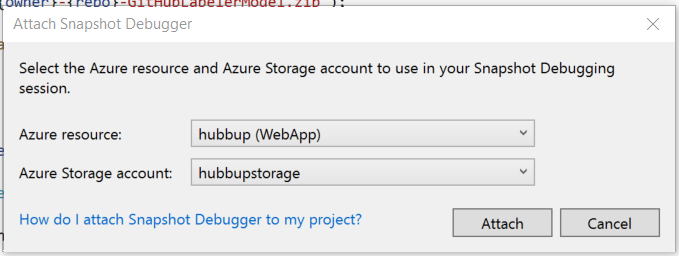
BTW this is the dialog I'm talking about:
Eilon
on 5 Jun 2019
@poppastring great info! I think it might be nice to include such info in the docs (with appropriate caveats). I'm always weary when some tool asks me for account info and then I have no idea what it's planning to put there. This happens with a lot of Azure services, especially when they want to store logs. I get the feeling it's saying "Yeah just gimme your storage info, trust us, we won't make a mess or cost you lots of $$$." But I don't trust it 😄
Eilon
on 5 Jun 2019
@poppastring Mark, do we need any changes here? Or maybe this is too much of an implementation detail.
Mikejo5000
on 28 Sep 2019
@Mikejo5000 We have assumed this detail is a bit too much for users, we do clean this up at the end of a session that is closed properly. The limits are there in the event of an unforeseen failure.
poppastring
on 7 Oct 2019
OK, thanks, Mark
Mikejo5000
on 14 Oct 2019
Related issues
 Ogglas
·
3Comments
Ogglas
·
3Comments
 realbart
·
3Comments
realbart
·
3Comments
 gewarren
·
3Comments
gewarren
·
3Comments
 ChrisMaddock
·
3Comments
ChrisMaddock
·
3Comments
 H35am
·
4Comments
H35am
·
4Comments