Visidata: How does replaying actions on piped data work?
Small description
I was trying to look at some quick directory stats, so I was piping to VisiData. I did some transforms and saved the command log for replay later. However I can't seem to replay when I am reading from a pipe.
Expected result
I expect replay to work and see this:
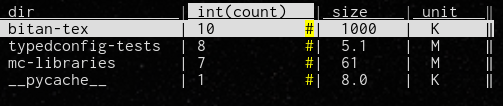
Actual result with screenshot
Instead I see this when I pass -p cmdlog-1.vd:

Steps to reproduce with sample data and a .vd
To reproduce my output, you can use the following script.
#!/bin/bash

{
    echo dir, count, size, unit
    for d in *; do
        [[ ! -d $d ]] && continue
        echo $d, $(files=($d/*) && echo ${#files[@]}), \
             $(du -hs $d | cut -f1 | sed -e 's/[[:alpha:]]/, &/')
    done
} | vd -d, ${@}
The replay command log saved by VisiData is below:
sheet,col,row,longname,input,keystrokes,comment
        override        delimiter       set-option      ,
                        open-file       -       o
-       count           addcol-expr     int(count)      =
-       int(count)              rename-col      fcount  ^
-       fcount          sort-desc               ]
-       count           hide-col                -
Version: saul.pw/VisiData v1.5.2
 suvayu
All 5 comments
Hi @suvayu, I believe this works in the develop branch, which we'll be releasing as v2.0 in the next few weeks (or you can install a prerelease from github if you want it sooner).
BTW, you can use # (type-int) to do what you want, instead of adding int(count) and renaming it. In case you wanted to save a few keystrokes :)
 saulpw
on 19 Sep 2020
saulpw
on 19 Sep 2020
@saulpw thanks! I tried out the develop branch, but something doesn't seem right. The pipe works now, but the CSV is not being read correctly. My script above produces an output like this for the VisiData repo:
dir, count, size, unit
bin, 2, 12, K
deps, 3, 16, K
dev, 26, 280, K
docs, 29, 860, K
plugins, 15, 68, K
sample_data, 24, 616, K
snippets, 7, 32, K
tests, 83, 1.2, M
vgit, 17, 144, K
visidata, 64, 1.7, M
visidata.egg-info, 5, 28, K
vsh, 6, 36, K
However vd or vd --delimiter=, (-d got renamed to --delimiter) only reads the pipe as text. If I write it to a file, and read the file instead, the columns get interpreted correctly. I think there's a bug.
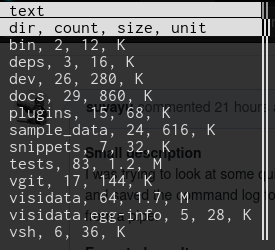
Since the columns are not recognised properly, I couldn't test replay.
PS: thanks for the # tip!
suvayu
on 19 Sep 2020
Try one of these, they should both work:
cmd  | vd -g --delimiter=,
cmd | vd -f csv
 frosencrantz
on 20 Sep 2020
frosencrantz
on 20 Sep 2020
There are a couple of things going on here:
-ddoes work, but it requires the argument to be separated by a space now (perhaps this is why long-args need to use a double hypen).The
delimiteroption is used for thetsvfiletype, but by default files are opened astxt(as you can see on the status line, and column name is 'text'). So @frosencrantz is right, if you pass-f csvit will work.As @frosencrantz suggested, you can use
delimiteras an option, because open_txt tries to be helpful by peeking at the first bit of data, and if it finds the given delimiter, opens the file as tsv instead of txt. But, as withfiletype, since the sheet hasn't been created yet, it has to look only in the global options. Hence the need for-g.
saulpw
on 21 Sep 2020
Hi @frosencrantz thanks, both alternatives worked :)
@saulpw, I tried -d , as well as -d \, - neither worked.
With -f csv, the replay didn't work at first, the pipe was again being interpreted as text. However your explanation about -g prompted me to try: cmd | vd -g -f csv -p cmdlog.vd. This worked well. Although, now the replay file is still opened as the first sheet, and the pipe is the second sheet.
pipe opened as 2nd sheet
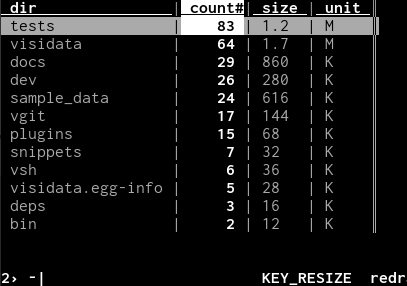
command log opened as 1st sheet
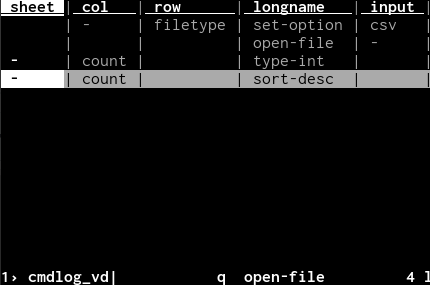
I don't think the command log file should be read in as data. Anyway, thanks for all the help. I can work with this.
Cheers,
suvayu
on 21 Sep 2020
Related issues
 Mikee-3000
·
4Comments
Mikee-3000
·
4Comments
 aborruso
·
3Comments
aborruso
·
3Comments
aborruso
·
3Comments
frosencrantz
·
4Comments
aborruso
·
3Comments
aborruso
·
3Comments
aborruso
·
3Comments
frosencrantz
·
4Comments
Most helpful comment
There are a couple of things going on here:
-ddoes work, but it requires the argument to be separated by a space now (perhaps this is why long-args need to use a double hypen).The
delimiteroption is used for thetsvfiletype, but by default files are opened astxt(as you can see on the status line, and column name is 'text'). So @frosencrantz is right, if you pass-f csvit will work.As @frosencrantz suggested, you can use
delimiteras an option, because open_txt tries to be helpful by peeking at the first bit of data, and if it finds the given delimiter, opens the file as tsv instead of txt. But, as withfiletype, since the sheet hasn't been created yet, it has to look only in the global options. Hence the need for-g.