Visidata: [tsv] Problem reading file that contains a CRLF within a quoted cell
Small description
When I read this TSV file, that has inside cells some CRLF, visidata does not map correctly cells.
Expected result
Using LibreOffice I have no problem
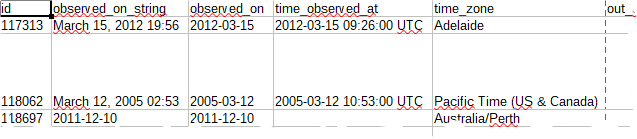
Actual result with screenshot
Using VisiData v1.5.2 I have this
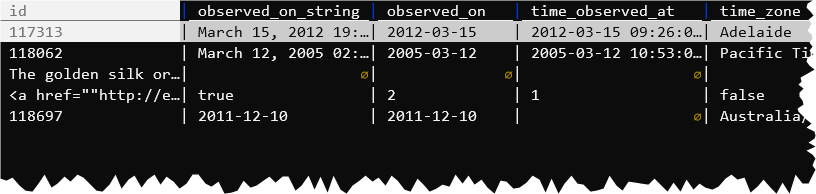
That TSV does not seem to me wrong, because the CRLFs are inside double quotes.
 aborruso
All 5 comments
Thank you so much for the detailed bug report @aborruso!
From a glance, the tsv loader code does not seem to support a quotechar.
The csv loader does!
A current workaround, until we have an opportunity to give this issue more attention, is to load these files with the csv loader, and specify a tab delimiter. You can do that:
vd input.tsv -f csv --csv-delimiter=$'\t'
 anjakefala
on 5 Feb 2020
anjakefala
on 5 Feb 2020
I didn't know about the dollar sign @anjakefala, I always typed ctrl-v
 sfranky
on 6 Feb 2020
sfranky
on 6 Feb 2020
hi @anjakefala $'\t' is the ANSI C way to write the tab char?
aborruso
on 6 Feb 2020
:joy:
Saul taught me this! It blew my mind, too. I asked him how to pass a tab just before commenting on this issue.
From what I understand, the $ tells the shell to interpret \ escapes. Instead of literally taking the "\" as string, it interpets the \t as a backslash'd entity.
anjakefala
on 6 Feb 2020
This is the correct solution, as quoted newlines aren't allowed in 'true' tsv files.
 saulpw
on 9 Feb 2020
saulpw
on 9 Feb 2020
Related issues
 geekscrapy
·
3Comments
geekscrapy
·
3Comments
 frosencrantz
·
3Comments
frosencrantz
·
3Comments
 baogorek
·
3Comments
baogorek
·
3Comments
 paulklemm
·
4Comments
frosencrantz
·
4Comments
paulklemm
·
4Comments
frosencrantz
·
4Comments
Most helpful comment
This is the correct solution, as quoted newlines aren't allowed in 'true' tsv files.