Virtualc64: "Export Disk" has no effect. How to debug?
As far as I know, "Export Disk" from the "Drive 8" menu should create a D64 with all the changes of the currently-inserted disk. Right now, the File Save dialog opens and lets me specify a filename but no file is being created, and if I try to eject the disk it still tells me "there are unexported disks present".
How do I go about beginning to debug this? Is there a log being written somewhere?
 awh-tokyo
All 10 comments
That's bad news. It sounds like a severe bug.
If you start VirtualC64 via the command line (Terminal app), you can see all debug messages:

Could you try to reproduce the bug and see if an error or warning message is printed?
 dirkwhoffmann
on 12 Jul 2019
dirkwhoffmann
on 12 Jul 2019
Thanks! There's not a whole lot of useful info when I try to export:
MyDocument.349::export(drive:to:ofType:): url = file:///Users/awh/Documents/C64/Untitled.D64 typeName = D64
D64File::D64File()
D64Archive: WARNING: D64 has an unknown format
There's not a whole lot of useful info
Actually, there is!
Here is the code that causes the error:
bool
D64File::readFromBuffer(const uint8_t *buffer, size_t length)
{
unsigned numSectors;
bool errorCodes;

switch (length)
{
    case D64_683_SECTORS: // 35 tracks, no errors

        debug(2, "D64 file contains 35 tracks, no EC bytes\n");
        numSectors = 683;
        errorCodes = false;
        break;

    case D64_683_SECTORS_ECC: // 35 tracks, 683 error bytes

        debug(2, "D64 file contains 35 tracks, 683 EC bytes\n");
        numSectors = 683;
        errorCodes = true;
        break;

   ...

    default:
        warn("D64 has an unknown format\n");
        return false;
}
Hence, the following happened:
- The emulator decoded the GCR-encoded disk data and wrote it into a buffer.
After that, it tried to create a D64 object from that buffer.
The second step failed, because the buffer was of unexpected size.
I guess that you loaded in a D64 file, edited some content, and tried to export the disk again.
I further speculate that the original D64 file had an unusual file size and this is why the export failed.
Can you check the file size of the D64 you've loaded in or post the D64 itself?
dirkwhoffmann
on 13 Jul 2019
Hmm, I probably shouldn't post the D64 publicly because of copyright reasons. But you're right; it's only happening on one disk, and it's 175,531 bytes as opposed to all the others, which are 174,848 bytes. The difference is 683 bytes. According to your code, the file size should match D64_683_SECTORS_ECC, so I don't know if something else is wrong with this disk image.
If you would like me to send the D64 to you some other way, let me know, or maybe this is already enough to go on.
awh-tokyo
on 13 Jul 2019
or maybe this is already enough to go on.
I think I got enough information to debug the issue.
the file size should match D64_683_SECTORS_ECC
VirtualC64 is not able to preserve the original ECC bytes at the moment. If you read in a D64_683_SECTORS_ECC file, the emulator does the following:
- perform GCR encoding (i.e., create the disk)
- emulate disk errors (such as checksum violations etc.)
- throw away the ECC info
Hence, if you export the disk, it should come out as a standard D64_683_SECTORS disk. So the question nails down to: Why isn't the internal disk size 174,848 when a 175,531 D64 file was read in. I'll investigate this...
dirkwhoffmann
on 13 Jul 2019
Hi Drew,
I thought about the issue a little bit longer and I think I know what's happening. I expect your D64 file to have some kind of copy protection (because of the ECC appendix). Furthermore, I expect the GCR decoder (which creates the buffer) to stumble across the copy protection that has been applied to the GCR data when the disk was created. I guess the decoder either creates a buffer that is empty or too short.
Therefore, it might be best to debug the issue with the right D64 file in hand.
You'll find my email address here: http://www.dirkwhoffmann.de
Thanks a lot for helping to debug this issue.
dirkwhoffmann
on 13 Jul 2019
Some background infos first: The disk inspector reveals that there are two different copy protection mechanisms on the disk. The first one is on track 34 and based on invalid sector checksums:
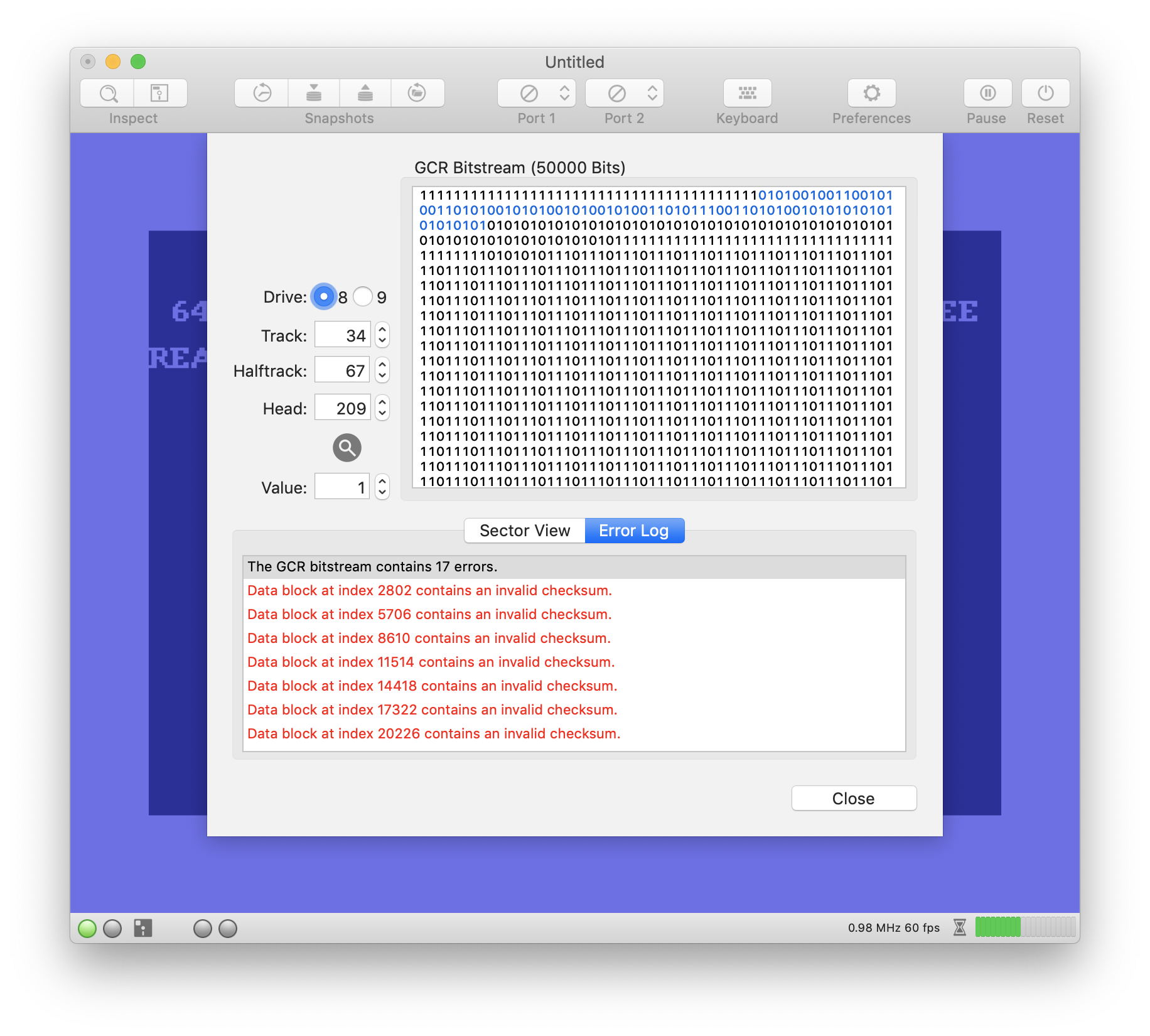
Such mismatches are no problem for the disk exporter, because checksums are not stored in D64 files anyway.
The exporter stumbles across track 35 which contains no recognisable sector header blocks.
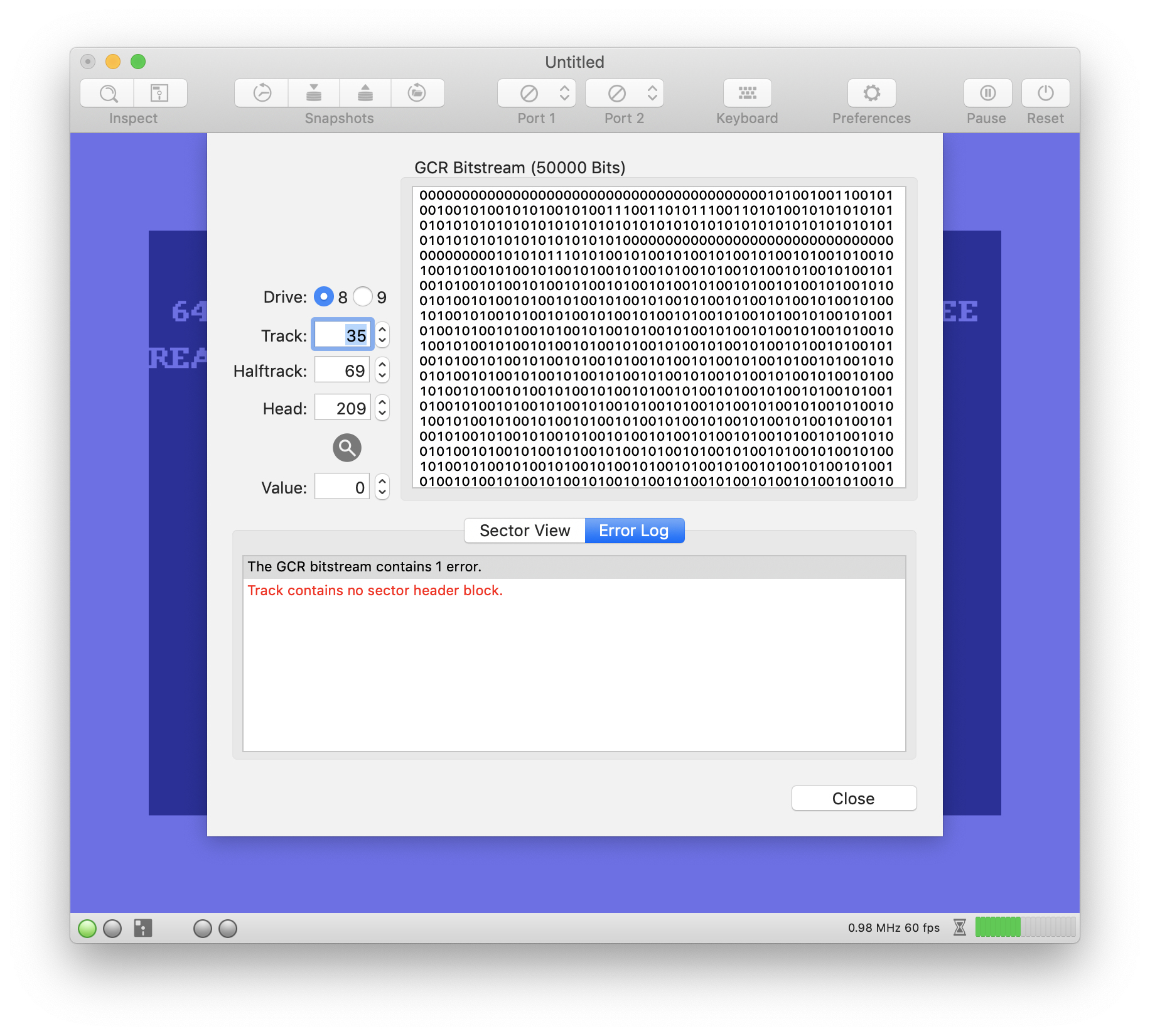
The exporter simply ignored the sectors (because it didn't find any) and therefore produced a too short buffer.
The new implementation is able to export the disk. If sectors are missing, it simply writes zeroes:
http://www.dirkwhoffmann.de/virtualc64/VirtualC64_3.3.3b1.zip
Unfortunately, the game still doesn’t load (although the copy protection has been “removed” by the exporter).
I am a little bit unhappy about the current solution though. If it was like the exporter would really remove the copy protection, it would be a cool feature. However, most games (this one, too) seem to explicitly check for the error conditions. Hence, it might be better if the exporter refused to export the disk. Maybe a user dialog should come up explaining that the disk contains corrupted GCR data due to copy protection and cannot be exported.
dirkwhoffmann
on 14 Jul 2019
...for me the best solution could be, in these situations, a message from the export panel:
"Protected disks cannot be exported !"
Otherwise the new media could be unusable once exported, better to search another version of that .d64 software than use it in that way.
 mortinus
on 15 Jul 2019
mortinus
on 15 Jul 2019
Confirmed that the new one will export the disk. You're right; the game checks for the errors on the disk. As an exercise, I made a copy of the disk using a disk copy program (which exported correctly even with the old version), figured out how to edit the disk sector-by-sector with a monitor cartridge, read the directory, found the sector on the disk where the loader was stored, and edited it to circumvent those checks. It was a fun puzzle to solve.
I'd be happy to have the exporter come up with a dialog that said that it wouldn't export the disk. I was just confused because there was no apparent result when I tried to do so.
As an aside, I just want to say thanks for creating this emulator. When I was a kid with my C64, I was just a little bit too young to fully understand the machine language, the kernel subroutines, the ROM/RAM overlays, etc. I'm having a great time getting into the muck of it now as an adult. Also, it's the only one that I've found that lets me type correctly on my Dvorak keyboard.
awh-tokyo
on 15 Jul 2019
In V3.3.3 beta 2
http://www.dirkwhoffmann.de/virtualc64/VirtualC64_3.3.3b2.zip
it looks like this:

Please feel free to reopen if you can think of a better message text.
dirkwhoffmann
on 29 Jul 2019
Related issues
 bluecursor
·
5Comments
bluecursor
·
5Comments
 ChuckCaplan
·
7Comments
dirkwhoffmann
·
5Comments
dirkwhoffmann
·
7Comments
ChuckCaplan
·
7Comments
dirkwhoffmann
·
5Comments
dirkwhoffmann
·
7Comments
 Shrapnel21
·
6Comments
Shrapnel21
·
6Comments
Most helpful comment
Confirmed that the new one will export the disk. You're right; the game checks for the errors on the disk. As an exercise, I made a copy of the disk using a disk copy program (which exported correctly even with the old version), figured out how to edit the disk sector-by-sector with a monitor cartridge, read the directory, found the sector on the disk where the loader was stored, and edited it to circumvent those checks. It was a fun puzzle to solve.
I'd be happy to have the exporter come up with a dialog that said that it wouldn't export the disk. I was just confused because there was no apparent result when I tried to do so.
As an aside, I just want to say thanks for creating this emulator. When I was a kid with my C64, I was just a little bit too young to fully understand the machine language, the kernel subroutines, the ROM/RAM overlays, etc. I'm having a great time getting into the muck of it now as an adult. Also, it's the only one that I've found that lets me type correctly on my Dvorak keyboard.