Virtual-environments: macOS 10.15 should have the new intermediate certificate from Apple which requires for the enterprise build.
Description
Enterprise build for Apple application (XCode) fails because macOS 10.15 hosted agent image doesn't have the new intermediate certificate from Apple. This issue is reported in the forum below.
https://developercommunity.visualstudio.com/content/problem/1174298/new-apple-distribution-cert-needs-new-intermediate.html
As described below, the renewed certificate is used to sign new iOS Distribution Certificates issued after September 2, 2020 for the Apple Developer Enterprise Program. And it requires the new intermediate certificate.
https://developer.apple.com/support/expiration/
Area for Triage:
Apple
Question, Bug, or Feature?:
Bug
Virtual environments affected
- [x] macOS 10.15
- [ ] Ubuntu 16.04 LTS
- [ ] Ubuntu 18.04 LTS
- [ ] Ubuntu 20.04 LTS
- [ ] Windows Server 2016 R2
- [ ] Windows Server 2019
Expected behavior
macOS 10.15 hosted agent image has the new intermediate certificate which can be obtained from this URL. Then, enterprise builds complete successfully.
https://developer.apple.com/certificationauthority/AppleWWDRCA.cer
Actual behavior
macOS 10.15 hosted agent image doesn't have the new intermediate certificate. So, enterprise builds fail.
 rikat-ms
All 9 comments
Hello, @rikat-ms
Could you please validate temporary workaround?
wget -q https://www.apple.com/certificateauthority/AppleWWDRCAG3.cer
sudo security add-trusted-cert -d -r trustRoot -k /Library/Keychains/System.keychain AppleWWDRCAG3.cer
Fixed: trustAsRoot -> trustRoot
 al-cheb
on 18 Sep 2020
al-cheb
on 18 Sep 2020
Thanks, the workaround was not functioning correctly for me. However I have adjusted it a bit (note the -r unspecified) and this works for my pipelines:
wget https://www.apple.com/certificateauthority/AppleWWDRCAG3.cer
sudo security add-trusted-cert -d -r unspecified -k /Library/Keychains/System.keychain AppleWWDRCAG3.cer
 stefkampen
on 20 Sep 2020
stefkampen
on 20 Sep 2020
Thanks. The install command (-r trustRoot) resolved the build failure. It can be used as a temporary workaround until the hosted image is updated and rolled out.
rikat-ms
on 23 Sep 2020
Fix was merged to main, it should be deployed next week
 maxim-lobanov
on 23 Sep 2020
maxim-lobanov
on 23 Sep 2020
Hello, is it possible that adding the new CA would cause issues with certificates and profiles signed with the old CA? We have builds that started to fail after update to the image version 20200918 which contains the new CA.
 DocX
on 28 Sep 2020
DocX
on 28 Sep 2020
@DocX , what Xcode version do you use and what error do you see after update?
maxim-lobanov
on 28 Sep 2020
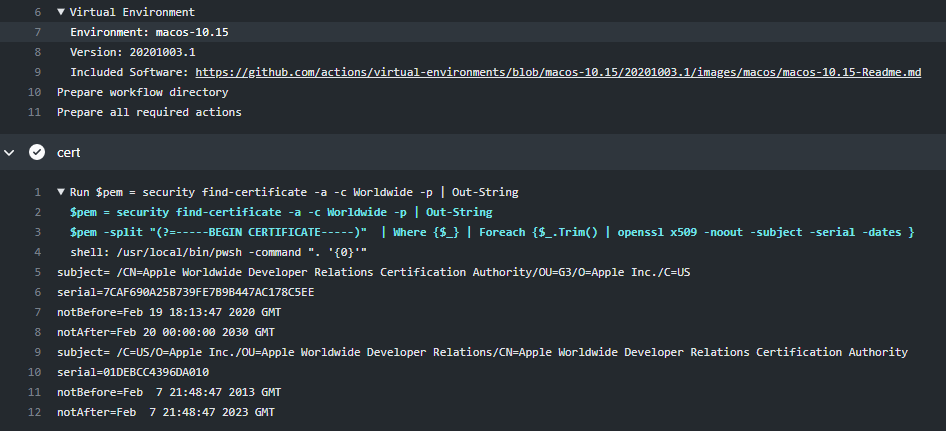
@rikat-ms, @stefkampen, @DocX, The new image with updated Apple certificate has been deployed. Could you please check?
al-cheb
on 8 Oct 2020
I have removed the workaround and it still works correctly. Thanks! 👍
stefkampen
on 8 Oct 2020
Feel free to open the thread if you have any concerns.
al-cheb
on 9 Oct 2020
Related issues
 MSP-Greg
·
3Comments
MSP-Greg
·
3Comments
 Tnze
·
4Comments
Tnze
·
4Comments
 trajano
·
3Comments
trajano
·
3Comments
 ethomson
·
4Comments
ethomson
·
4Comments
 raulpopadineti
·
3Comments
raulpopadineti
·
3Comments
Most helpful comment
Fix was merged to
main, it should be deployed next week