Virtual-environments: Screen Resolution Utility gives error on MS-Hosted agents
Describe the bug
Microsoft hosted agent(Azure Pipelines) started giving this error:
[warning]The current user session is not a console session. It may not be possible to change the screen resolution. Please ensure that agent is running with autologon and disconnect any remote desktop sessions.
[error]Failed to change the resolution.
We are using agent specification vs2017-win2016 but were able to reproduce it on windows-2019 as well. We want to change the specific screen resolution to 1920x1080.
Area for Triage: Servers
Question, Bug, or Feature?: Bug
Virtual environments affected
- [ ] macOS 10.15
- [ ] Ubuntu 16.04 LTS
- [ ] Ubuntu 18.04 LTS
- [x] Windows Server 2016 R2
- [x] Windows Server 2019
 ralucapredacegeka
All 30 comments
Some additional information that might help resolving the issue faster (received from another user of Screen Resolution Utility at the source below):
Tracking it out, based on the source code of the ScreenResolutionUtility.ps1 the utility is just calling the win32 function user32.dll ChangeDisplaySettings
This has been acked by microsoft:
Ack, we are able to repro this. It seems to be an issue with the latest set of hosted images. Can you please file an issue at https://github.com/actions/virtual-environments
 jcageman
on 26 Mar 2020
jcageman
on 26 Mar 2020
we are having the same issue and I suppose anyone that uses hosted agent. did you find any work around for the time being?
 jstoppa
on 26 Mar 2020
jstoppa
on 26 Mar 2020
Hi! When can we expect a solution or a workaround for this one? Our releases/tests have been failing for almost a week know.
ralucapredacegeka
on 31 Mar 2020
Or maybe any workaround to get a different resolution than the default 1028x768 (other than setting up a VM manually ;) )
 nesshoever
on 31 Mar 2020
nesshoever
on 31 Mar 2020
It seems that the issue returned last night (UK) - it was working fine over the weekend
"2020-03-31T08:12:54.7286667Z ##[warning]The current user session is not a console session. It may not be possible to change the screen resolution. Please ensure that agent is running with autologon and disconnect any remote desktop sessions."
 bartchojnacki
on 31 Mar 2020
bartchojnacki
on 31 Mar 2020
@bartchojnacki @nesshoever @ralucapredacegeka @jcageman Apologies for the disruption. We are rolling out a fix, should be everywhere within the next two days.
As @bartchojnacki experienced, it is possible for successes to happen while the fix is completely rolled out.
 alepauly
on 31 Mar 2020
alepauly
on 31 Mar 2020
Hi @alepauly ! Please be aware that we are still facing this issue on both vs2017-win2016 and windows-2019. We understand rolling out the fix might take some time and hopefully this will be solved soon.
ralucapredacegeka
on 3 Apr 2020
We still have the issue - has it been completely rolled out?
 lonevvolf
on 6 Apr 2020
lonevvolf
on 6 Apr 2020
@alepauly As lonevvolf we are still seeing the same issue. Is there any ETA for when this will be fully rolled out?
 GhassanDukes
on 6 Apr 2020
GhassanDukes
on 6 Apr 2020
👋 Unfortunately, we had to revert the fix we made last week as it revealed another more serious issue. At this time we fixed both issues and starting the rollout today and will rollout faster than regular release. It should reach all customers by Tuesday. We apologize for the inconvenience this has caused.
 rsemenov
on 6 Apr 2020
rsemenov
on 6 Apr 2020
@rsemenov thank you for the update. By Tuesday, do you mean 7th April? Or next Tue 14th April?
GhassanDukes
on 6 Apr 2020
We will try our best to rollout by April 7.
rsemenov
on 6 Apr 2020
Is there any update.
when can we expect.
 chiranjeevi5850
on 7 Apr 2020
chiranjeevi5850
on 7 Apr 2020
Still facing same issue for both vs2017-win2016 & windows-2019.
Agent version - 2.165.2
Is the rollout completed or still in progress?
 saurabhchanchawat
on 7 Apr 2020
saurabhchanchawat
on 7 Apr 2020
The rollout supposed the be completed today but we hit at another issue on the last ring and had to rollback. We are verifying the fix to the new issue and will try the rollout tomorrow.
rsemenov
on 8 Apr 2020
The fix is partially available at this point and we finishing rolling it out to the last ring. It should be on everywhere tomorrow.
rsemenov
on 9 Apr 2020
It's still not working on windows-2019 hosted agents. The same warning & errors are displayed.
LE: It works fine since yesterday afternoon.
 raul70
on 10 Apr 2020
raul70
on 10 Apr 2020
Hi Ruslan,
Good day!
Could you confirm on fix is rolled out everywhere?
Thanks,
Vishwa
 post2vishwa
on 13 Apr 2020
post2vishwa
on 13 Apr 2020
The fix is partially available at this point and we finishing rolling it out to the last ring. It should be on everywhere tomorrow.
Hi Ruslan,
Good day!
Could you confirm on fix is rolled out everywhere?
Thanks,
Vishwa
post2vishwa
on 13 Apr 2020
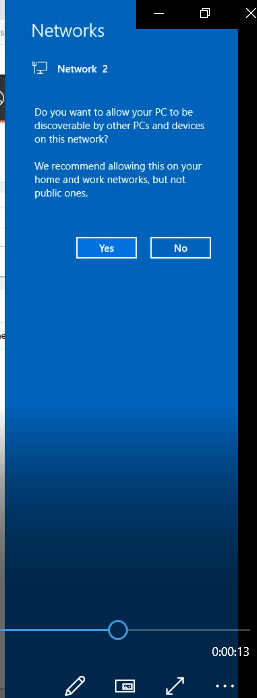
Issue is resolved but I am seeing one odd error as some of the agent has this pop up open which is blocking my selenium test.
 TrickTester
on 14 Apr 2020
TrickTester
on 14 Apr 2020
The fix for this issue has been rolled out everywhere since Friday evening.
rsemenov
on 15 Apr 2020
@ralucapredacegeka I'm going to close the issue, but feel free to reopen if you have any concerns.
Thank you!
 miketimofeev
on 27 Apr 2020
miketimofeev
on 27 Apr 2020
@miketimofeev - can you please let me know the package version for this update,i am facing the same issue and have limited access to the machine,and need to provide IT Team with the above details
 jithinjosejacob
on 19 Jun 2020
jithinjosejacob
on 19 Jun 2020
Sorry, @jithinjosejacob what do you mean by package version?
miketimofeev
on 19 Jun 2020
The agent version which has the above fix
jithinjosejacob
on 19 Jun 2020
@jithinjosejacob I'm afraid it's not connected with agent version, it's some kind of VM provisioner, which version isn't shown anywhere.
Do you have the exact same issue? You can try one of the methods described here to debug it
https://github.com/actions/virtual-environments/issues/924
miketimofeev
on 19 Jun 2020
@rsemenov - Can I ask what the fix was that you rolled out? I am hitting the same error with some self hosted agents I built using the packer scripts from here.
 sean-redmond
on 25 Jun 2020
sean-redmond
on 25 Jun 2020
@sean-redmond , the fix was to run the agent in an interactive session. To do that we had to register a scheduled task for the agent and manually start it. Make sure that after the agent is started as scheduled task it runs with administrator permissions.
rsemenov
on 25 Jun 2020
Thanks, thats really useful, did you publish the changes anywhere?
sean-redmond
on 25 Jun 2020
@sean-redmond, These changes were internal to a non-opensource component of our system.
rsemenov
on 29 Jun 2020
Related issues
 ethomson
·
4Comments
ethomson
·
4Comments
 trajano
·
3Comments
trajano
·
3Comments
 jayaddison
·
3Comments
jayaddison
·
3Comments
 estebanes22
·
3Comments
estebanes22
·
3Comments
 Poolitzer
·
4Comments
Poolitzer
·
4Comments
Most helpful comment
we are having the same issue and I suppose anyone that uses hosted agent. did you find any work around for the time being?