Virtual-environments: System dialogs cause UI tests to fail
Description
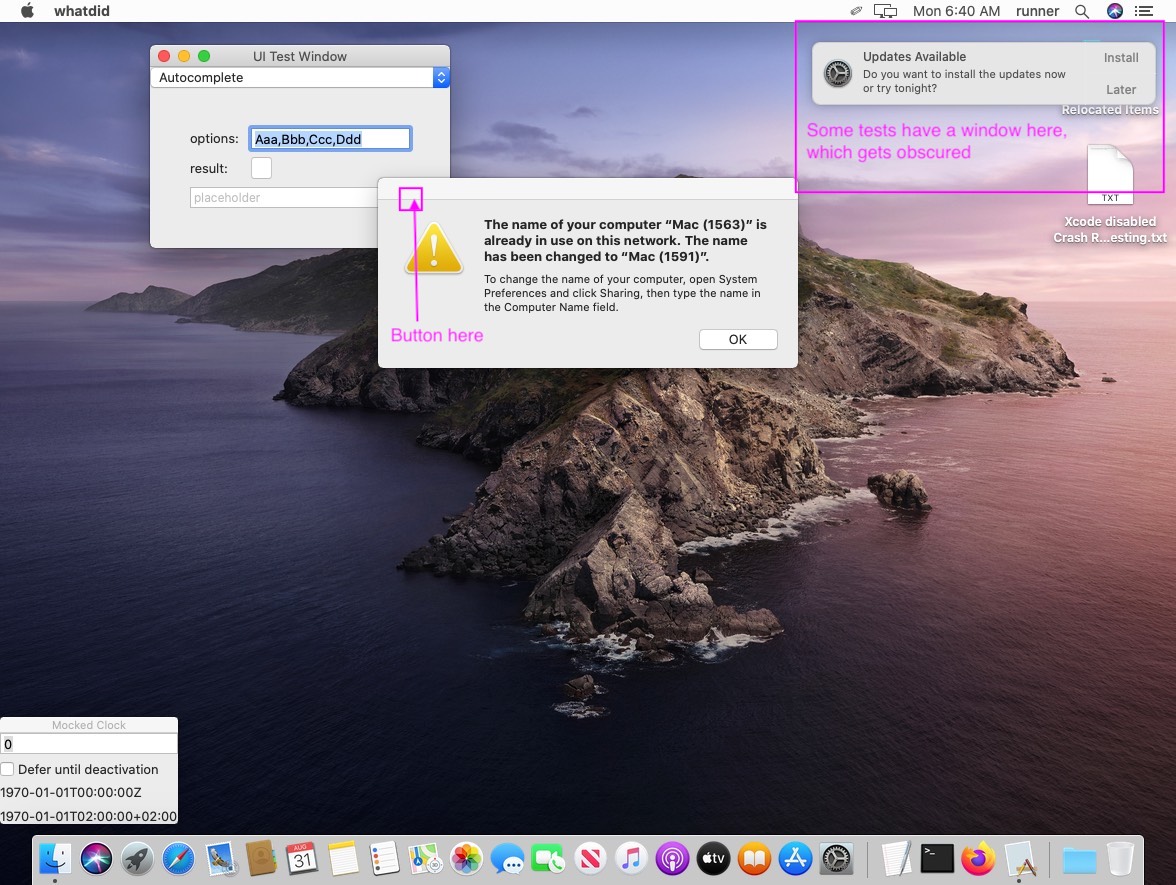
I use the macOS env to run UI tests, which inherently require things like clicking buttons or verifying that I can see certain items. The VM assigned to my workflow currently has two system dialogs: one telling me that the Mac's name has changed, and the other telling me I have system updates ready. These obscure my app's windows, causing tests to fail.
Area for Triage:
Apple, Testing and code coverage
Question, Bug, or Feature?:
Bug
Virtual environments affected
- [x] macOS 10.15
- [ ] Ubuntu 16.04 LTS
- [ ] Ubuntu 18.04 LTS
- [ ] Ubuntu 20.04 LTS
- [ ] Windows Server 2016 R2
- [ ] Windows Server 2019
Expected behavior
I expect a "clean" desktop, with no windows before my application launches; and in particular, no windows that will float over mine.
Actual behavior
There are currently two system dialogs, both of which obscure windows on my screen. This causes tests to fail: either because I can't click on the items, or because I'm asking the system whether the items are visible (to test scrolling, window sizing, etc), but they aren't because they're being hidden by the dialogs.
Repro steps
- See workflow run: https://github.com/yshavit/whatdid/runs/1049848344
- The artifact
failure-logs.xcresultartifact contains logs of the failed runs, including screen shots. Latest copy: failure-logs.xcresult.zip - I've run this workflow a couple times; the first time it only had the system update dialog, and the second time it also had the computer name change.
 yshavit
All 6 comments
Hi @yshavit!
Regarding systems update please take a look at the similar issue we had before
https://github.com/actions/virtual-environments/issues/1436
2 possible workarounds can be used to prevent this window.
As for Mac name has been changed we've found the root cause and implementing a fix at the moment.
Thank you!
 miketimofeev
on 31 Aug 2020
miketimofeev
on 31 Aug 2020
The workaround worked for me! (I used the softwareupdate --ignore option, because eventually I'll probably want to test how my app interacts with DND settings.) The "Mac name has been changed" issue also seems to be fixed, at least on the VM my runner uses; the UI tests succeeded on both my PR and the merge to main (do those use the same VM?).
This is resolved from my perspective, but I'll let you resolve it, in case you're using it to track additional work.
Thank you for the very quick turnaround!
yshavit
on 31 Aug 2020
@yshavit "Mac name has been changed" issue can disturb you again, unfortunately, until we implement a fix so I'd prefer to leave this issue open if you don't mind. I'll let you know when we deploy the fix.
miketimofeev
on 31 Aug 2020
No problem leaving it open!
One thing I wanted to call to your attention, though. The softwareupdate --ignore alternative comes with a warning from Apple:
Run update_name=$(softwareupdate -l | grep "Title: " | awk -F[:,] '{print $2}' | awk '{$1=$1};1')
Ignored updates:
(
    "Command Line Tools beta 5 for Xcode"
)

Software Update can only ignore updates that are eligible for installation.
If the label provided to ignore is not in the above list, it is not eligible
to be ignored.

Ignoring software updates is deprecated.
The ability to ignore individual updates will be removed in a future release of macOS.
@yshavit thanks, we've noticed that warning but at least it still works.
miketimofeev
on 1 Sep 2020
@yshavit Image with the fix was deployed, everything looks fine now. I'm going to close the issue, but feel free to contact us if you have any concerns.
Thank you!
miketimofeev
on 10 Sep 2020
Related issues
 jayaddison
·
3Comments
jayaddison
·
3Comments
 estebanes22
·
3Comments
estebanes22
·
3Comments
 shivammathur
·
3Comments
shivammathur
·
3Comments
 shogo82148
·
3Comments
shogo82148
·
3Comments
 motss
·
3Comments
motss
·
3Comments
Most helpful comment
@yshavit Image with the fix was deployed, everything looks fine now. I'm going to close the issue, but feel free to contact us if you have any concerns.
Thank you!