Virtual-environments: Unable to create reliable pipeline when using windows-2019.json
Describe the bug
I have forked the virtual-environments repo and try to create a Windows-2019 image based on the one in this repo. I changed some variables and added some software.
The problem is that it fails almost every time. And not on the same thing. Just now it was toolcache, the run before a chocolaty install, the run before that it was install-azuremodules (no error...just freezed at Packer: Download target location: 'C:\Users\packer\AppData\Local\Temp\azureps_623173017.zip'
Am I the only one suffering from this? Is there anything I can do to make it more reliable? It becomes frustrating since the build time is at least 5 hours.
Area for Triage:
Question, Bug, or Feature?:
Question
Virtual environments affected
- [ X ] Windows Server 2019
Expected behavior
A reliable build process
Actual behavior
Building fails almost every time for different reasons.
I run it using Azure DevOps. I created a basic (market place) 2019 VM and installed DevOps agent + Az modules + Packer (1.51)
 frankzo
All 26 comments
I have the same problem with install-azuremodules. My last 3 builds are spinning on :
Current build. Spinning...
vhd: Downloading the zip from blob: 'https://vstsagenttools.blob.core.windows.net/tools/azurepowershellmodules/AzureRmPSModules.M157.20190808.27379.zip'
vhd: Download target location: 'C:\Users\packer\AppData\Local\Temp\azureps_2107118905.zip'
Build 2 (ran for 12h before i canceled it):
vhd: Downloading the zip from blob: 'https://vstsagenttools.blob.core.windows.net/tools/azurepowershellmodules/AzurePSModules.M157.20190808.27979.zip'
vhd: Download target location: 'C:\Users\packer\AppData\Local\Temp\azureps_521250086.zip'
Build 3 (ran for 1d 12h before i canceled it):
vhd: Downloading the zip from blob: 'https://vstsagenttools.blob.core.windows.net/tools/azurepowershellmodules/AzPSModules.M163.20191211.17769.zip'
vhd: Download target location: 'C:\Users\packer\AppData\Local\Temp\azureps_1766274346.zip'
 jprioux160
on 10 Feb 2020
jprioux160
on 10 Feb 2020
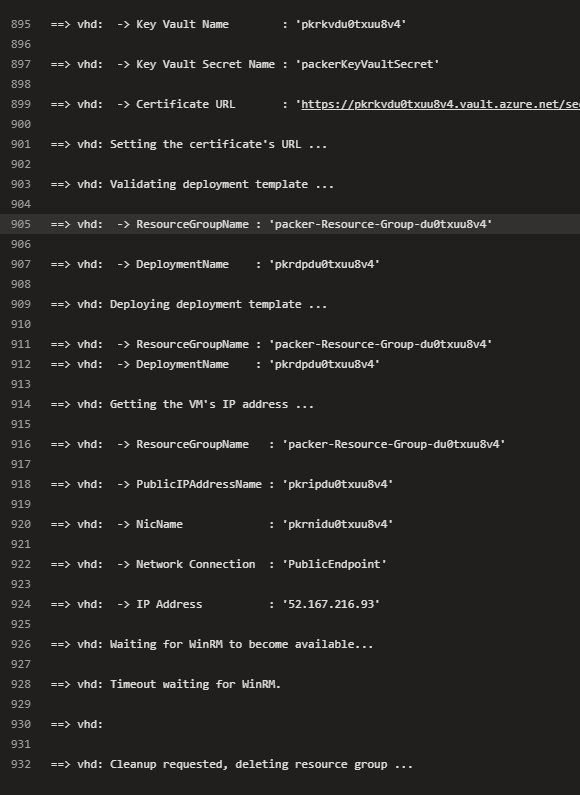
Same for me.. First run tried till tool cache complaining about git token but the subsequent run failed right at VM setup itself timing out enabling winRM.. Anyone noticed this issue before. Thanks..
 nreddipalle
on 10 Feb 2020
nreddipalle
on 10 Feb 2020
Same for me.. First run tried till tool cache complaining about git token but the subsequent run failed right at VM setup itself timing out enabling winRM.. Anyone noticed this issue before. Thanks..
This is must likely due to a firewall / connectivity issue. Make sure that WinRm is working from the computer you are trying to run it.
jprioux160
on 11 Feb 2020
I am the using the repo's json file and running using devops.. so the VM is being created by packer.. It ran fine the first time but subsequent runs started failing..
nreddipalle
on 11 Feb 2020
Got stuck again at : 2020-02-10T19:25:49.7780498Z ==> Packer: Provisioning with powershell script: C:\Agent_work\r1\a_sbp-buildagent/scripts/Installers/Install-AzureModules.ps1
Ran for 14 hours.... had to cancel it. Will do some extra investigation today trying to find the why behind this sort of time-out
Now running 3 new ones. All on Standard_F8
frankzo
on 11 Feb 2020
Are you modifying the JSon file https://github.com/actions/virtual-environments/blob/master/images/win/Windows2019-Azure.json or running as is?
nreddipalle
on 11 Feb 2020
Running almost as is. I add my own requirements and variables.
I can reproduce install-azuremodules by running it manually. Same problem, will try finding the issue.
But this is part of the problem
frankzo
on 11 Feb 2020
Hello, @frankzo
Could you please replace function Download-Zip and try to build image?
function Download-Zip
{
    [CmdletBinding()]
    Param(
        [Parameter( Mandatory = $true)]
        [string]$BlobUri
    )

    Write-Host "Downloading the zip from blob: '$BlobUri'"
    $fileName = "azureps_" + "$(Get-Random)" + ".zip"
    $targetLocation = Join-Path $ENV:Temp -ChildPath $fileName
    Write-Host "Download target location: '$targetLocation'"
    Invoke-WebRequest $BlobUri -OutFile $targetLocation
    $targetLocation
}
 al-cheb
on 11 Feb 2020
al-cheb
on 11 Feb 2020
I am seeing this after running for 30 min..
`
==> vhd: Provisioning with powershell script: C:vstsagent\A1_work\4\s\images\win/scripts/Installers/Install-PowershellCore.ps1
vhd: VERBOSE: About to download package from

vhd: 'https://github.com/PowerShell/PowerShell/releases/download/v6.2.4/PowerShell-6.2.4-win-x64.msi'
==> vhd: Quiet install failed, please rerun install without -Quiet switch or ensure you have administrator rights
nreddipalle
on 11 Feb 2020
My last run ran for 5hr 30 min and succeeded without any errors..
nreddipalle
on 12 Feb 2020
I replaced with suggested code. Do not think it is related but if failed in validate-azuremodules due to this in install-azuremodules
2020-02-11T22:40:06.1124044Z     Packer: The Directory is clean. There are no contents present in it
2020-02-11T22:40:06.1130709Z     Packer: Downloading the zip from blob: 'https://vstsagenttools.blob.core.windows.net/tools/azurepowershellmodules/AzurePSModules.M157.20190808.27979.zip'
2020-02-11T22:40:06.1141348Z     Packer: Download target location: 'C:\Users\packer\AppData\Local\Temp\azureps_1885855862.zip'
2020-02-11T22:44:59.4865000Z     Packer: Downloading the zip from blob: 'https://vstsagenttools.blob.core.windows.net/tools/azurepowershellmodules/AzureRmPSModules.M157.20190808.27379.zip'
2020-02-11T22:44:59.4866577Z ==> Packer: Extract-Zip : Cannot bind argument to parameter 'ZipFilePath' because it is an empty string.
It is runnnig again.
I run my builds on a Windows 2019 market place image on a Standard_F4/F8
frankzo
on 12 Feb 2020
@frankzo I have updated function to return - $targetLocation. Please run once more time.
al-cheb
on 12 Feb 2020
@frankzo I have updated function to return -
$targetLocation. Please run once more time.
are you sure this is correct:
    Invoke-WebRequest $BlobUri -OutFile $fileNamereturn
    $targetLocation
Since fileNamereturn is not set.
frankzo
on 12 Feb 2020
Updated line:
Invoke-WebRequest $BlobUri -OutFile $targetLocation
al-cheb
on 12 Feb 2020
one completed successfully and one failed. Failed one: (successful one on the bottom)
2020-02-12T10:58:50.9728844Z ==> Packer: Provisioning with Powershell...
2020-02-12T10:58:50.9728975Z ==> Packer: Provisioning with powershell script: C:\Agent\_work\r1\a\_ImageBuilder/scripts/Installers/Install-AzureModules.ps1
2020-02-12T10:59:00.5674743Z     Packer: No .msi Installation Present
2020-02-12T10:59:00.5677341Z     Packer: The Azure Modules initially present are:
2020-02-12T10:59:00.5683581Z     Packer: The AzureRM Modules initially present are:
2020-02-12T10:59:00.5688548Z     Packer:
2020-02-12T10:59:00.5697774Z     Packer:
2020-02-12T10:59:00.5706004Z     Packer:     Directory: C:\
2020-02-12T10:59:00.5711519Z     Packer:
2020-02-12T10:59:00.5716883Z     Packer:
2020-02-12T10:59:00.5722462Z     Packer: Mode                LastWriteTime         Length Name
2020-02-12T10:59:00.5730833Z     Packer: ----                -------------         ------ ----
2020-02-12T10:59:00.5732652Z     Packer: d-----        2/12/2020  10:58 AM                Modules
2020-02-12T10:59:00.5738642Z     Packer: The Directory is clean. There are no contents present in it
2020-02-12T10:59:00.5745364Z     Packer: Downloading the zip from blob: 'https://vstsagenttools.blob.core.windows.net/tools/azurepowershellmodules/AzurePSModules.M157.20190808.27979.zip'
2020-02-12T10:59:00.5755617Z     Packer: Download target location: 'C:\Users\packer\AppData\Local\Temp\azureps_1228710678.zip'
2020-02-12T11:08:21.6742908Z     Packer: Expanding the Zip File: 'C:\Users\packer\AppData\Local\Temp\azureps_1228710678.zip'. Target: 'C:\Modules'
2020-02-12T11:08:21.6744876Z ==> Packer: Invoke-WebRequest : The operation has timed out.
2020-02-12T11:08:21.6754086Z ==> Packer: At C:\Windows\Temp\script-5e43d79e-68bc-e2d2-b2f5-14f4f42c1797.ps1:19 char:5
2020-02-12T11:08:21.6760553Z ==> Packer: +     Invoke-WebRequest $BlobUri -OutFile $targetLocation
2020-02-12T11:08:21.6769936Z ==> Packer: +     ~~~~~~~~~~~~~~~~~~~~~~~~~~~~~~~~~~~~~~~~~~~~~~~~~~~
2020-02-12T11:08:21.6778371Z ==> Packer:     + CategoryInfo          : InvalidOperation: (System.Net.HttpWebRequest:HttpWebRequest) [Invoke-WebRequest], WebExc
2020-02-12T11:08:21.6784763Z ==> Packer:    eption
2020-02-12T11:08:21.6799153Z ==> Packer:     + FullyQualifiedErrorId : WebCmdletWebResponseException,Microsoft.PowerShell.Commands.InvokeWebRequestCommand
2020-02-12T11:08:21.6799925Z ==> Packer:
2020-02-12T11:08:33.9712104Z     Packer: Extraction completed successfully.
2020-02-12T11:08:33.9718667Z ==> Packer: Exception calling "ExtractToDirectory" with "2" argument(s): "End of Central Directory record could not be found."
2020-02-12T11:08:33.9729289Z     Packer: Downloading the zip from blob: 'https://vstsagenttools.blob.core.windows.net/tools/azurepowershellmodules/AzureRmPSModules.M157.20190808.27379.zip'
2020-02-12T11:08:33.9738104Z     Packer: Download target location: 'C:\Users\packer\AppData\Local\Temp\azureps_467713687.zip'
2020-02-12T11:08:33.9747078Z ==> Packer: At C:\Windows\Temp\script-5e43d79e-68bc-e2d2-b2f5-14f4f42c1797.ps1:39 char:5
2020-02-12T11:08:33.9756021Z ==> Packer: +     $null = [System.IO.Compression.ZipFile]::ExtractToDirectory($ZipF ...
2020-02-12T11:08:33.9765506Z ==> Packer: +     ~~~~~~~~~~~~~~~~~~~~~~~~~~~~~~~~~~~~~~~~~~~~~~~~~~~~~~~~~~~~~~~~~
2020-02-12T11:08:33.9771546Z ==> Packer:     + CategoryInfo          : NotSpecified: (:) [], MethodInvocationException
2020-02-12T11:08:33.9787682Z ==> Packer:     + FullyQualifiedErrorId : InvalidDataException
2020-02-12T11:08:33.9788666Z ==> Packer:
2020-02-12T11:20:28.5437356Z     Packer: Expanding the Zip File: 'C:\Users\packer\AppData\Local\Temp\azureps_467713687.zip'. Target: 'C:\Modules'
2020-02-12T11:20:28.5442127Z ==> Packer: Invoke-WebRequest : The operation has timed out.
2020-02-12T11:20:28.5450303Z ==> Packer: At C:\Windows\Temp\script-5e43d79e-68bc-e2d2-b2f5-14f4f42c1797.ps1:19 char:5
2020-02-12T11:20:28.5467462Z ==> Packer: +     Invoke-WebRequest $BlobUri -OutFile $targetLocation
2020-02-12T11:20:28.5475409Z ==> Packer: +     ~~~~~~~~~~~~~~~~~~~~~~~~~~~~~~~~~~~~~~~~~~~~~~~~~~~
2020-02-12T11:20:28.5480935Z ==> Packer:     + CategoryInfo          : InvalidOperation: (System.Net.HttpWebRequest:HttpWebRequest) [Invoke-WebRequest], WebExc
2020-02-12T11:20:28.5497370Z ==> Packer:    eption
2020-02-12T11:20:28.5505026Z ==> Packer:     + FullyQualifiedErrorId : WebCmdletWebResponseException,Microsoft.PowerShell.Commands.InvokeWebRequestCommand
2020-02-12T11:20:28.5509495Z ==> Packer:
2020-02-12T11:20:44.6691293Z     Packer: Extraction completed successfully.
2020-02-12T11:20:44.6701351Z     Packer: Downloading the zip from blob: 'https://vstsagenttools.blob.core.windows.net/tools/azurepowershellmodules/AzPSModules.M163.20191211.17769.zip'
2020-02-12T11:20:44.6707242Z ==> Packer: Exception calling "ExtractToDirectory" with "2" argument(s): "End of Central Directory record could not be found."
2020-02-12T11:20:44.6713038Z ==> Packer: At C:\Windows\Temp\script-5e43d79e-68bc-e2d2-b2f5-14f4f42c1797.ps1:39 char:5
2020-02-12T11:20:44.6718776Z     Packer: Download target location: 'C:\Users\packer\AppData\Local\Temp\azureps_1420645670.zip'
2020-02-12T11:20:44.6728244Z ==> Packer: +     $null = [System.IO.Compression.ZipFile]::ExtractToDirectory($ZipF ...
2020-02-12T11:20:44.6733275Z ==> Packer: +     ~~~~~~~~~~~~~~~~~~~~~~~~~~~~~~~~~~~~~~~~~~~~~~~~~~~~~~~~~~~~~~~~~
2020-02-12T11:20:44.6738702Z ==> Packer:     + CategoryInfo          : NotSpecified: (:) [], MethodInvocationException
2020-02-12T11:20:44.6759629Z ==> Packer:     + FullyQualifiedErrorId : InvalidDataException
2020-02-12T11:20:44.6760340Z ==> Packer:
2020-02-12T11:27:08.5040975Z     Packer: Expanding the Zip File: 'C:\Users\packer\AppData\Local\Temp\azureps_1420645670.zip'. Target: 'C:\Modules'
2020-02-12T11:27:16.6543779Z     Packer: Extraction completed successfully.
Successful one:
2020-02-12T10:19:34.5698087Z ==> Packer: Provisioning with Powershell...
2020-02-12T10:19:34.5726784Z ==> Packer: Provisioning with powershell script: C:\Agent\_work\r1\a\_ImageBuilder/scripts/Installers/Install-AzureModules.ps1
2020-02-12T10:19:43.9536496Z     Packer: No .msi Installation Present
2020-02-12T10:19:43.9540175Z     Packer: The Azure Modules initially present are:
2020-02-12T10:19:43.9547385Z     Packer: The AzureRM Modules initially present are:
2020-02-12T10:19:43.9553140Z     Packer:
2020-02-12T10:19:43.9598906Z     Packer:
2020-02-12T10:19:43.9601073Z     Packer:     Directory: C:\
2020-02-12T10:19:43.9601772Z     Packer:
2020-02-12T10:19:43.9602512Z     Packer:
2020-02-12T10:19:43.9609742Z     Packer: Mode                LastWriteTime         Length Name
2020-02-12T10:19:43.9616308Z     Packer: ----                -------------         ------ ----
2020-02-12T10:19:43.9622172Z     Packer: d-----        2/12/2020  10:19 AM                Modules
2020-02-12T10:19:43.9628648Z     Packer: The Directory is clean. There are no contents present in it
2020-02-12T10:19:43.9642082Z     Packer: Downloading the zip from blob: 'https://vstsagenttools.blob.core.windows.net/tools/azurepowershellmodules/AzurePSModules.M157.20190808.27979.zip'
2020-02-12T10:19:43.9662718Z     Packer: Download target location: 'C:\Users\packer\AppData\Local\Temp\azureps_1229343060.zip'
2020-02-12T10:27:51.2747433Z     Packer: Expanding the Zip File: 'C:\Users\packer\AppData\Local\Temp\azureps_1229343060.zip'. Target: 'C:\Modules'
2020-02-12T10:28:09.5382899Z     Packer: Extraction completed successfully.
2020-02-12T10:28:09.5387203Z     Packer: Downloading the zip from blob: 'https://vstsagenttools.blob.core.windows.net/tools/azurepowershellmodules/AzureRmPSModules.M157.20190808.27379.zip'
2020-02-12T10:28:09.5410069Z     Packer: Download target location: 'C:\Users\packer\AppData\Local\Temp\azureps_770250646.zip'
2020-02-12T10:40:19.8111389Z     Packer: Expanding the Zip File: 'C:\Users\packer\AppData\Local\Temp\azureps_770250646.zip'. Target: 'C:\Modules'
2020-02-12T10:40:53.6003667Z     Packer: Extraction completed successfully.
2020-02-12T10:40:53.6007450Z     Packer: Downloading the zip from blob: 'https://vstsagenttools.blob.core.windows.net/tools/azurepowershellmodules/AzPSModules.M163.20191211.17769.zip'
2020-02-12T10:40:53.6014572Z     Packer: Download target location: 'C:\Users\packer\AppData\Local\Temp\azureps_2046271116.zip'
2020-02-12T10:44:49.8548568Z     Packer: Expanding the Zip File: 'C:\Users\packer\AppData\Local\Temp\azureps_2046271116.zip'. Target: 'C:\Modules'
2020-02-12T10:44:56.8797827Z     Packer: Extraction completed successfully.
No differences between runs. Weird that invoke-webrequest does not have time-out specified but still it times-out on the operation. Need to dive into the why behind that. Seems that not the download but the command times-out
edit: Can be blob storage that denies the connection.
frankzo
on 12 Feb 2020
May be azcopy is better tool:
# Install AzCopy 10
[Net.ServicePointManager]::SecurityProtocol = [Net.SecurityProtocolType]::Tls12
Invoke-WebRequest https://aka.ms/downloadazcopy-v10-windows -OutFile azcopy.zip
Expand-Archive azcopy.zip $env:Temp
$azcopy = Resolve-Path -Path $env:Temp\azcopy_windows_amd64_*\azcopy.exe

function Download-Zip
{
    [CmdletBinding()]
    Param(
        [Parameter( Mandatory = $true)]
        [string]$BlobUri
    )

    Write-Host "Downloading the zip from blob: '$BlobUri'"
    $fileName = "azureps_" + "$(Get-Random)" + ".zip"
    $targetLocation = Join-Path $ENV:Temp -ChildPath $fileName
    Write-Host "Download target location: '$targetLocation'"
    & "$azcopy" copy $BlobUri $targetLocation
    $targetLocation
}
Changed it a little bit to make the extract part working.
function Download-Zip {
    [CmdletBinding()]
    Param(
        [Parameter( Mandatory = $true)]
        [string]$BlobUri
    )

    Write-Host "Downloading the zip from blob: '$BlobUri'"
    $fileName = "azureps_" + "$(Get-Random)" + ".zip"
    $targetLocation = Join-Path $ENV:Temp -ChildPath $fileName
    Write-Host "Download target location: '$targetLocation'"
    $null = & "$azcopy" copy $BlobUri $targetLocation
    write-host "targetlocation" $targetlocation
    return $targetLocation
}
Hello, @frankzo
Any updates?
al-cheb
on 19 Feb 2020
We've been running into this too, hangs in Install-AzureModules.ps1 have been the most impactful to us in preventing successful runs. The code as currently written basically busy-waits the active thread polling WebClient.IsBusy, and in the event the connection drops (which seems to happen a lot more often than I'd expect), the script hangs indefinitely.
It appears these fetches don't exceed 50Mb/s (unsure if this is an Azure limitation, or one of the storage account). I observe the three files taking ~50, ~80, and ~20 seconds to download (respectively). azcopy can run multiple connections at once to chunk downloads better, and ends up downloading each file in <10 seconds most of the time.
For now, I'm trying to run some benchmarks of various solutions to this. azcopy is probably the nicest long-term, but is also a fair amount of script to churn. I'll report back with what I find once I've found it. :smile:
 AtOMiCNebula
on 20 Feb 2020
AtOMiCNebula
on 20 Feb 2020
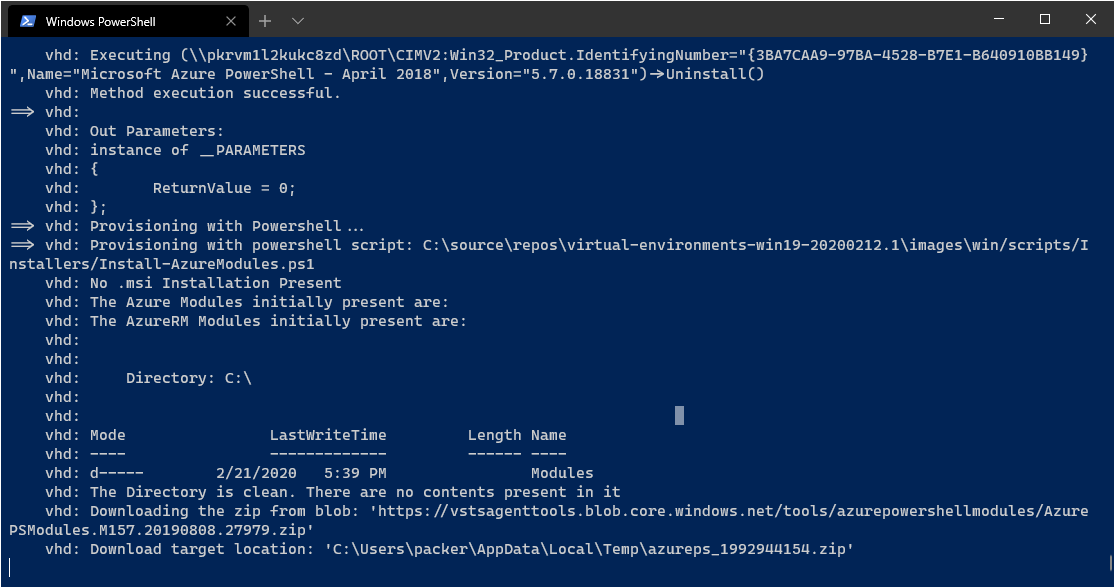
Same here. It ran over the whole weekend.
 timmkrause
on 24 Feb 2020
timmkrause
on 24 Feb 2020
Found some comments in #440 that the team is considering a rework of how Azure PowerShell modules get installed on both Linux and Windows, so this might all be moot. For now, I'm just going to patch a "timeout": "10m" into our .jsons, so that we fail fast if the script itself fails, and then wait for upstream to deliver a fix. :smile:
AtOMiCNebula
on 24 Feb 2020
I am now using azcopy in the function that downloads the zip files. I has not failed anymore on azuremodules. But now it is failing on firefox a lot.
frankzo
on 24 Feb 2020
Any updates on the rework?
timmkrause
on 2 Mar 2020
@timmkrause , we have removed using of Azure blob for modules in #467
 maxim-lobanov
on 3 Mar 2020
maxim-lobanov
on 3 Mar 2020
It worked for me. Ran through with the first run.
Thanks!
timmkrause
on 5 Mar 2020
I am closing this issue because initial issue with Azure Modules downloading reliability should be resolved. We have reworked our logic and now we install modules from PowerShell Gallery so everything should work.
If you still see any issue with reliability of Azure Modules, feel free to reopen this issue.
If you see any other image-generation places where there is a reliability problem, please open the separate issue.
Thanks!
maxim-lobanov
on 5 Mar 2020
Related issues
 Tnze
·
4Comments
Tnze
·
4Comments
 Poolitzer
·
4Comments
Poolitzer
·
4Comments
 ethomson
·
4Comments
ethomson
·
4Comments
 orj
·
4Comments
orj
·
4Comments
 raulpopadineti
·
3Comments
raulpopadineti
·
3Comments
Most helpful comment
@timmkrause , we have removed using of Azure blob for modules in #467