Virtual-environments: macOS instances cannot resolve own hostname through DNS
Describe the bug
From https://github.com/PowerShell/PowerShell/issues/12935.
PowerShell runs tests for the Test-Connection cmdlet in CI, and this requires DNS to function correctly.
After talking through it in https://github.com/dotnet/runtime/issues/37766, we discovered that hostname | nslookup was not resolving anything either, meaning .NET was not at fault.
As far as I'm aware, we do no particular DNS configuration on our machines, and this issue only occurs on macOS instances.
It turns out these issues have been occurring for us intermittently for some time, and we've gradually been forced to turn off more and more of our tests for Test-Connection.
Area for Triage:
Apple
Question, Bug, or Feature?:
Bug
Virtual environments affected
- [x] macOS 10.15
- [ ] Ubuntu 16.04 LTS
- [ ] Ubuntu 18.04 LTS
- [ ] Ubuntu 20.04 LTS
- [ ] Windows Server 2016 R2
- [ ] Windows Server 2019
Expected behavior
hostname | nslookup should return something like:
;; Got recursion not available from 192.168.0.1, trying next server
Server: 205.171.3.25
Address: 205.171.3.25#53

Non-authoritative answer:
Name: hermes.Home
Address: 198.105.254.23
Name: hermes.Home
Address: 198.105.244.23
Actual behavior
Our CI configuration lives here: https://github.com/PowerShell/PowerShell/blob/master/.vsts-ci/mac.yml
I'm working on this in https://github.com/PowerShell/PowerShell/pull/12943, and you can find all build output there. I can easily add to that PR to discover any details needed.
 rjmholt
All 10 comments
If you find out what's causing this on macOS 10.14+, and find a maintainable fix, I'm interested, since it's also happening in dotnet/runtime CI. Note: it works for macOS 10.13.
 antonfirsov
on 15 Jun 2020
antonfirsov
on 15 Jun 2020
Hello @rjmholt, @antonfirsov
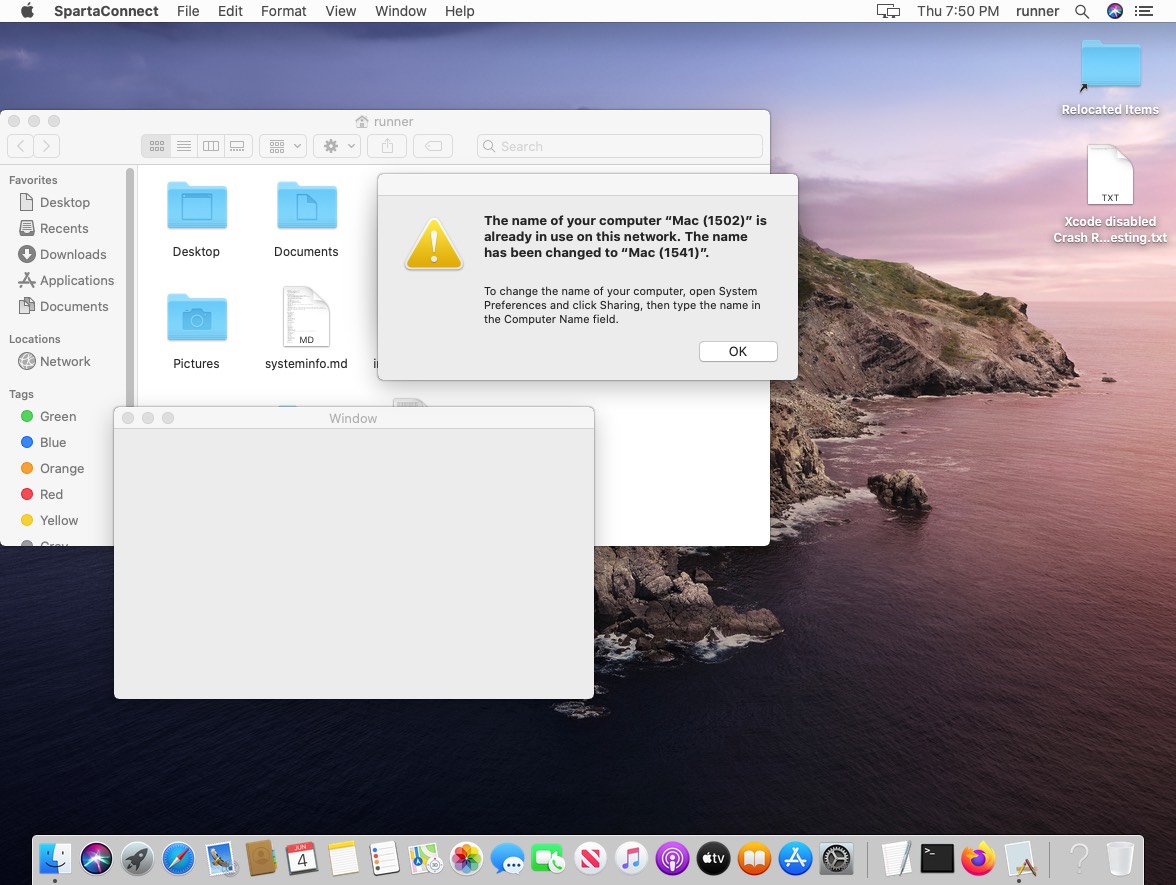
We have disabled /usr/bin/defaults write /Library/Preferences/com.apple.mDNSResponder.plist NoMulticastAdvertisements -bool true multicast advertisement service to prevent window pop-up "the name of your computer is already in use on this network mac", which is the root cause of this issue. We are planning to rollback this parameter in the next week rollout. Sorry for the inconvenience.
PS > [System.Net.Dns]::GetHostEntry($(hostname)).AddressList | Select AddressFamily,IPAddressToString

 AddressFamily IPAddressToString
 ------------- -----------------
InterNetworkV6 ::1
InterNetworkV6 fe80::1%1
  InterNetwork 127.0.0.1
  InterNetwork 1x.xx.x.xx
 al-cheb
on 15 Jun 2020
al-cheb
on 15 Jun 2020
@al-cheb could image start without multicast advertisement then change the computer name to something unique to avoid pop and then re-enable multicast?
Or is there any other way to have a unique computer name booting from an image?
 paulz
on 17 Jun 2020
paulz
on 17 Jun 2020
@paulz, unfortunately, enabling\disabling requires VM reboot so we can't do it in runtime. We're investigating possible infrastructure improvements to avoid such intersections but it'll probably take a lot of time and effort.
 miketimofeev
on 17 Jun 2020
miketimofeev
on 17 Jun 2020
I got bit by this too, but a slightly different manifestation. For me, in Python the following is failing on my mac CI:
import socket
socket.gethostname()
fails with
socket.gaierror: [Errno 8] nodename nor servname provided, or not known
Hopefully this has the same root cause, and will also be fixed by the rollback mentioned above.
@al-cheb Do you have any idea of when that rollback will be coming?
 telamonian
on 22 Jun 2020
telamonian
on 22 Jun 2020
@telamonian, If we don't have any unexpected issues with an image it will be available by Friday.
al-cheb
on 22 Jun 2020
Hello @rjmholt, @telamonian, @antonfirsov
The deployment macOS 10.15 Catalina has been done with the fix. Could you please check if it works for you?
al-cheb
on 25 Jun 2020
Can do. And sorry for spamming the issue with commit-linked notifications. Did not realize Github was going to do that every time I squashed a commit
telamonian
on 25 Jun 2020
@al-cheb Confirmed: my mac CI works now, no more socket.gaierror
So I think this issue has been resolved, at least for me. Sorry it took a couple of days to try this out. I was getting a CI failure due to a completely unrelated issue, thus the delay
telamonian
on 30 Jun 2020
al-cheb
on 2 Jul 2020
Related issues
 ethomson
·
4Comments
ethomson
·
4Comments
 orj
·
4Comments
orj
·
4Comments
 raulpopadineti
·
3Comments
raulpopadineti
·
3Comments
 Tnze
·
4Comments
Tnze
·
4Comments
 mcooley
·
3Comments
mcooley
·
3Comments
Most helpful comment
Hello @rjmholt, @antonfirsov
We have disabled
/usr/bin/defaults write /Library/Preferences/com.apple.mDNSResponder.plist NoMulticastAdvertisements -bool truemulticast advertisement service to prevent window pop-up "the name of your computer is already in use on this network mac", which is the root cause of this issue. We are planning to rollback this parameter in the next week rollout. Sorry for the inconvenience.