Vim: 中文输入模式下,在 integrated terminal 里面,用 Caps Lock 键切换到英文,无法输入小写字母
Describe the bug
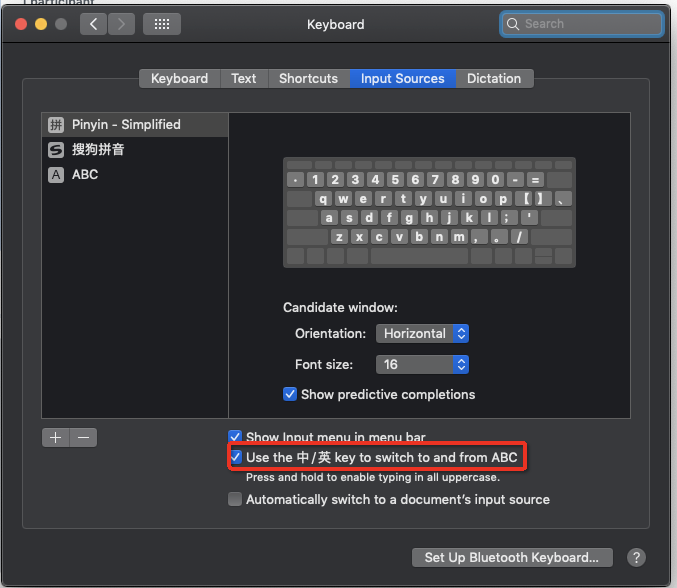
中文输入模式下,在 integrated terminal 里面,用 Caps Lock 键切换到英文,无法输入小写字母。然为,在编辑器里面是表现正常。
To Reproduce
- 打开 vscode
- 打开 integrated terminal
- 输入法模式切换成中文(Mojave 右上角)
- 用 Caps Lock 键切换到英文输入法,此时任何输入字母呈现大写状态。
Expected behavior
- 打开 vscode
- 打开 integrated terminal
- 输入法模式切换成中文(Mojave 右上角)
- 用 Caps Lock 键切换到英文输入法,此时任何输入字母呈现小写状态。
Screenshots
If applicable, add screenshots to help explain your problem.
If remapping-related, please attach log output: https://github.com/VSCodeVim/Vim#debugging-remappings.
Environment (please complete the following information):
- Extension (VsCodeVim) version:
- VSCode version: latest
- OS: Mojave
Additional context
Add any other context about the problem here.
kinquestion
 yifanchen
All 5 comments
yifanchen
on 29 Apr 2019
👍3
感谢解决方案!
 thought7878
on 30 Sep 2019
thought7878
on 30 Sep 2019
如果用 Sougou input 的话,还是存在上述问题。
yifanchen
on 7 Oct 2019
👍7
我也遇到了相同的问题
 imaginezz
on 7 Dec 2019
imaginezz
on 7 Dec 2019
为什么没有解决方案呢
 taozhang-tt
on 13 Nov 2020
taozhang-tt
on 13 Nov 2020
Was this page helpful?
0 / 5 - 0 ratings
Related issues
 gerardmrk
·
3Comments
gerardmrk
·
3Comments
 Jimmy-Z
·
3Comments
Jimmy-Z
·
3Comments
 WangRongda
·
3Comments
WangRongda
·
3Comments
 AndersenJ
·
3Comments
AndersenJ
·
3Comments
 cckowin
·
3Comments
cckowin
·
3Comments
Most helpful comment
如果用 Sougou input 的话,还是存在上述问题。