Hi,
First, thanks for the great work you're doing :+1:
I was wondering if there's a way to define the :W command and map it to :w?
As I often don't lift my finger of the Shift key fast enough more than 50% of the time I write :W which fails silently and I don't notice I haven't saved.
In vim I use the following to set this up:
command! W :w
Is there a way to do it with vscode-vim?
Thanks,
David.
 elentok
All 13 comments
This should be what you are looking for https://github.com/VSCodeVim/Vim#key-remapping
 jpoon
on 9 Aug 2018
jpoon
on 9 Aug 2018
It really isn't clear in this documentation that this is actually there. These mappings are directly in Normal mode, but this issue is when you specifically type :W (note the colon)
 wakeless
on 9 Aug 2018
wakeless
on 9 Aug 2018
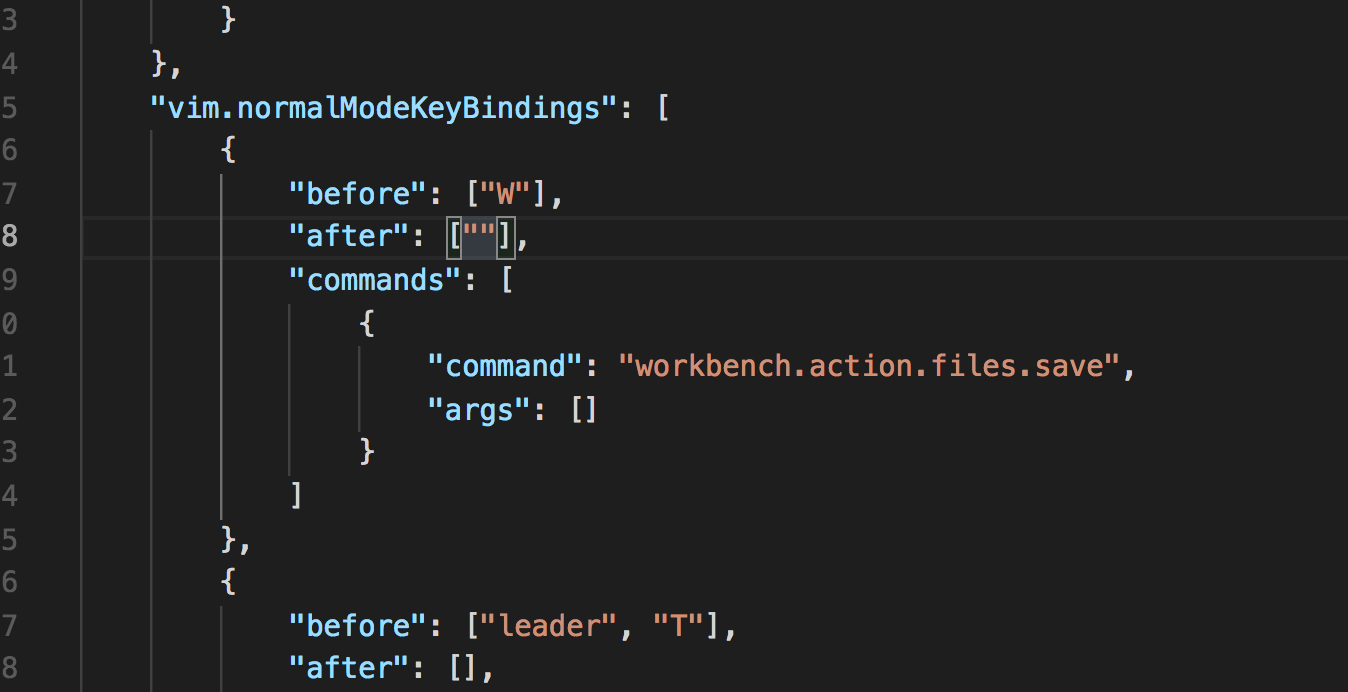
Have you tried creating a new vim.normalModeKeyBindings mapping before W to after :w?
jpoon
on 9 Aug 2018
Yes:

wakeless
on 9 Aug 2018
@jpoon I agree with @wakeless. There isn't a clear way to remap : W to :w.
My first thought, doesn't work:
"vim.normalModeKeyBindingsNonRecursive": [
{
"before": [":", "W"],
"commands": [":w"]
},
]
A really common occurrence is to fat finger :W rather than :w. Coming from native vim it's super annoying, so I'd be happy to jump into the code if there isn't currently a supported way to do command mode remapping
 evans
on 21 Aug 2018
evans
on 21 Aug 2018
Not a direct solution, but I prefer remapping : to ; in Vim – this means I am never pressing shift during save so never accidentally type :W.
"vim.normalModeKeyBindings": [
  {
     "before": [";"],
     "after": [":"]
   }
]
 bsaf
on 19 Sep 2018
bsaf
on 19 Sep 2018
@bsaf This is not working at all
 xahon
on 29 Sep 2018
xahon
on 29 Sep 2018
Same here. Anyone found a solution yet?
 mxlian
on 26 Oct 2018
mxlian
on 26 Oct 2018
Another solution would be to create another mapping pointing to the same command, e.g.:
"vim.normalModeKeyBindingsNonRecursive": [
  {
    "before": [":","W"],
    "commands": [
      "workbench.action.files.save"
    ]
  }
]
Unfortunately this doesn't work.
 marcinbiegun
on 22 Nov 2018
marcinbiegun
on 22 Nov 2018
Anyone has a solution? It's very annoying :)
 hristodd
on 30 Jan 2019
hristodd
on 30 Jan 2019
@hristodd I've started using <leader> w to save files.
    "vim.leader": "<space>",
    "vim.normalModeKeyBindingsNonRecursive": [
        {
            "before": ["<leader>","w"],
            "commands": [
              "workbench.action.files.save"
            ]
        },
        {
            "before": ["<leader>","q"],
            "commands": [
              "workbench.action.closeActiveEditor"
            ]
        }
    ]
Maybe this isn't a bug per se but I'm trying to add the command :e to vim.normalModeKeyBindingsNonRecursive and change its behavior from exiting to saving just like :w does.
Exiting in vs code just doesn't work and I often mistype "w" with "e"
I've tried numerous ways to handle this but haven't found a solution yet. Has anyone else tried mapping these keys like this to affect a "save action"?
 tommulkins
on 2 Sep 2019
tommulkins
on 2 Sep 2019
I was struggling with this too and was able to resolve by adding the following
 "vim.commandLineModeKeyBindings": [
        {
            "before": ["W"],
            "after": ["w"]
        },
    ]
One drawback to note is that it seems like any W typed in vim's command line will be changed to a w e.g. /WORD -> /wORD but since I use "vim.incsearch": true this doesn't seem to present a problem for me.
I'm using Version: 1.45.1
 grahamsinger
on 15 May 2020
grahamsinger
on 15 May 2020
Related issues
 orn688
·
3Comments
orn688
·
3Comments
 liamdawson
·
3Comments
liamdawson
·
3Comments
 cckowin
·
3Comments
cckowin
·
3Comments
 ghost
·
3Comments
ghost
·
3Comments
 typeoneerror
·
3Comments
typeoneerror
·
3Comments
Most helpful comment
Not a direct solution, but I prefer remapping
:to;in Vim – this means I am never pressing shift during save so never accidentally type:W.